1
Hard Drive Position Tips
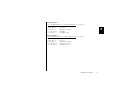
Most systems are capable of holding four ATA/IDE devices, two devices on the primary cable
and two devices on the secondary cable or port. Typical configurations are as follows:
New System
2
(See “Installing Hard Drive as a Boot Drive” on page 16.)
Cable Position
Device
Primary Master, 0:
Primary Slave, 1:
Secondary Master, 0:
Secondary Slave, 1:
Boot Drive
No Device
CD-ROM
No Device
Existing System 1
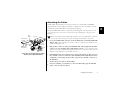
(See Figure 10 and “Installing Hard Drive as an Additional Hard Drive” on page 21.)
Cable Position
Device
Primary Master, 0:
Primary Slave, 1:
Secondary Master, 0:
Secondary Slave, 1:
Boot Drive
Additional Storage Drive
CD-ROM
No Device
10
Installing the Hard Drive
Primary Master, 0
(Boot Drive)
Primary Slave, 1
(Additional
Storage)
Primary
Motherboard
Connection
Secondary Master, 0
(CD-ROM)
Secondary Slave, 1
(Open)
Secondary
Motherboard
Connection
Figure 11. Typical Device Configuration