1
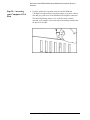
12. Replace the GPIB back-panel cover plate screw to hold the interface in
place. (Save the blank cover plate for use if the interface is removed
later.
Installing the PCI-MIX-2 Digitizer Interface Card
13. Insert the PCI-MIX-2 Digitizer interface edge connector into the
expansion slot connector of the computer. Make sure the interface is
fully seated by pushing firmly on the edge of the card with the palm of
your hand.
14. Replace the PCI-MIX-2 Digitizer back-panel cover plate screw to hold
the interface in place. (Save the blank cover plate for use if the interface
is removed later.
Agilent Technologies E5500A Installation Guide 1-11