1
Programming Manual
Appendix C: Error Messages
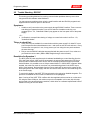
Any errors that occur during operation from either the front panel or the remote control interface
will result in error messages. Error messages are displayed on the LCD display. They are also
stored in the error message queue from which they can be queried using the SYST:ERR?
Query. The error queue has a finite depth. If more error messages are generated than can be
held in the queue, a queue overflow message will be put in the last queue location. To empty the
queue, use the error query until the No Error result is received.
Errors appearing on the LCD will generally remain visible until the user moves to another
screen. If multiple error messages are generated in succession, only the last message will be
visible as there is only space for one error message on the LCD display.
The same area of the display is also used to display status messages. While error messages
always have a negative error number, status messages have a positive number.
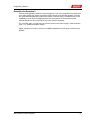
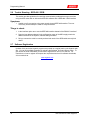
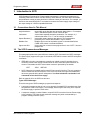
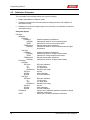
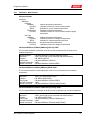
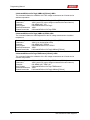
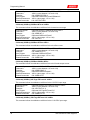
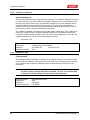
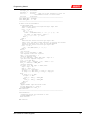
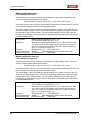
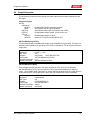
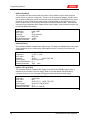
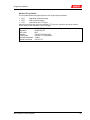
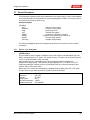
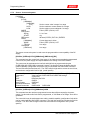
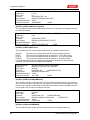
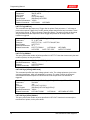
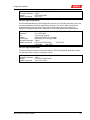
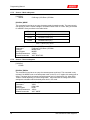
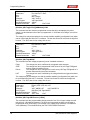
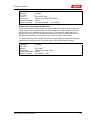
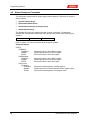
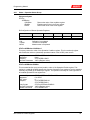
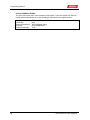
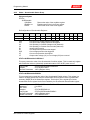
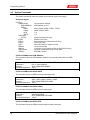
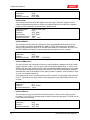
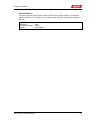
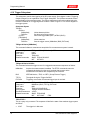
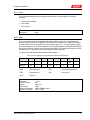
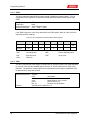
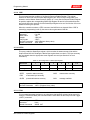
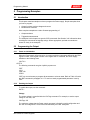
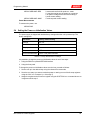
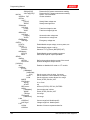
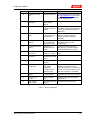
The table below displays a list of possible error and status messages along with their possible
cause and remedy.
Number
0
110
Message String
Cause
Remedy
"No error"
No errors in queue
-100
"Command error"
Unable to complete
requested operation
Unit may be in a mode inconsistent
with request.
-102
"Syntax error"
Command syntax
incorrect.
Misspelled or unsupported command
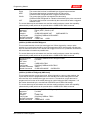
-103
"Invalid separator"
SCPI separator not
recognized
See SCPI section of programming
manual.
-104
"Data type error"
Data type invaled.
Check command for supported data
types
-108
"Parameter not
allowed"
One or more
additional parameters
were received.
Check programming manual for
correct number of parameters
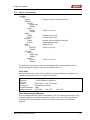
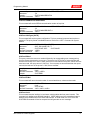
-109
"Missing parameter"
Too few parameters
received for
requested operation
Check programming manual for
correct number of parameters
-110
"Command header
error"
Command header
incorrect
Check syntax of command.
-111
"header separator
error"
Invalid command
separator used.
Use semi-colon to separate command
headers
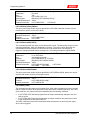
-112
"Program mnemonic
too long"
Syntax error
Check programming manual for
correct command syntax
-113
"Undefined header"
Command not
recognized error
Check programming manual for
correct command syntax
-120
"Numeric data error"
Data received is not a
number
Check programming manual for
correct command syntax
-121
"Invalid character in
number"
Number received
contains non-numeric
character(s)
Check programming manual for
correct command syntax
-123
"Exponent too large"
Exponent in number
exceeds limits
Check programming manual for
correct parameter range
-128
"Numeric data not
allowed"
Number received
when number is not
allowed.
Check programming manual for
correct command syntax
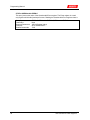
-168
"Block data not
Block data was sent.
Check programming manual for
KDC Series DC Power Supplies