1
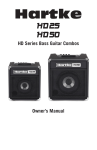
Setting Up and UsingYour Hartke G10 Guitar Amplifier
1. Remove all packing materials (save them in case of
need for future service) and decide where the amplifier
is to be physically placed. To avoid potential overheating
problems, make sure that the rear panel is unobstructed
and that there is good ventilation around the entire unit.
2. Before you plug-in the power cable, be sure the
POWER switch is in the off (down) position. Then, plug-in
the 3-pin AC plug into any grounded AC socket. Don’t
turn the G Series on just yet, though.
3. Use a standard shielded musical instrument cable to
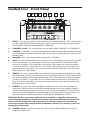
connect your guitar to the INPUT jack on the front panel.
4. On the front panel of the G10, turn the CRUNCH and
VOLUME controls to their minimum (fully counterclockwise) position. Set the BASS andTREBLE controls to their
“0” position.
5. Let's start with a clean sound, so press the front panel
CRUNCH SWITCH to the out position
6. Press the front panel Power switch in order to turn on
your G Series amp; the switch will light up and you will
see the power LED illuminate.
7. Set the output of your guitar to maximum and then,
while playing, slowly turn the VOLUME control up until
the desired level is achieved. You will get a nice clean
tone when using just VOLUME (no CRUNCH) for level,
so set it to the level you like. Eventually, the amp will
clip on its own and you will hear distorion even with the
CRUNCH off. Try using a little amplifier clipping with a
little distortion for a gtreat blues tone.