1
Operation Manual
9.
VOICE MENU PROGRAMMING EQ-LINK.
9.1.
EQ-LINK
START
PRESS BUTTON
3 TIMES TO ENTER MENU
PRESS TO SELECT
then WAIT
Microphone Noise
cancelling ON
MENU MODE
Microphone Noise
cancelling OFF
ECHO Reduction
ON
ECHO Reduction
OFF
Intercom Mode
ON
Intercom Mode
OFF
Phone Mode
ON
Phone Mode
OFF
Wait for 3 seconds !
Then Function activates
Wait for 3 seconds !
Then Function activates
Wait for 3 seconds !
Then Function activates
Wait for 3 seconds !
Then Function activates
Wait for 3 seconds !
Then Function activates
Wait for 3 seconds !
Then Function activates
Wait for 3 seconds !
Then Function activates
Wait for 3 seconds !
Then Function activates
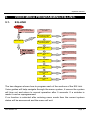
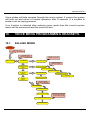
The tree diagram shows how to program each of the sections of the EQ Link.
Voice guides will help navigate through the menu system, if unsure the system
will time out and return to normal operation after 5 seconds. If a mistake is
made it can be reprogrammed.
If no function is selected after entering menu mode then the current system
status will be announced and the menu will exit.
ATO Aviation Inc
Page 17