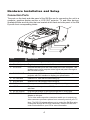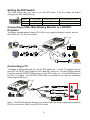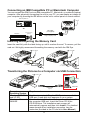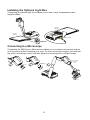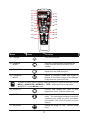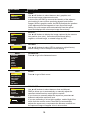
1
(2)
(3)
(4)
(1)
(20)
(5)
(6)
(19)
REVERSE
(18)
(7)
(17)
(8)
(9)
ENTER
(11)
(16)
(15)
(14)
(12)
(13)
(10)
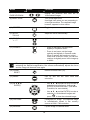
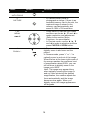
Name
Button
Function
(1) POWER
Turn the unit on/off.
(2) CAMERA
MODE
Switch to Camera mode and display the
image from the RM Eye’s built-in CCD
camera.
(3) PC MODE
Switch to PC mode and display the video
signal from the RGB input port.
(4) PLAYBACK
MODE
Switch to Playback mode and toggle to
display 16-thumbnail images or the selected
image from the memory source.
To switch to other memory source, RM Eye must be in camera mode then press
MENU > ADVANCED > MEMORY > TYPE > select the source and press
(►ENTER) > press MENU to exit.
(5) EFFECTS
Convert and display the video in BW,
Negative or Color. (camera mode only)
(6) TIMER
Display, start and hide the on-screen display
timer. You can toggle to display or hide the
remaining time when the timer countdown
has started. (See Timer Function for more
details)
(7) REVERSE
REVERSE
Rotate the image by 180°. (camera mode
only)
11