1
Combined Function Operations
-Function compatibility
DeskTopBinder V2
Professional/Lite
Web Document Server
Printing from Document Server
Printing from Document Server
Sending a Fax from Document Server
Printing
*2
*4
*4
Scanning using the Network TWAIN Scanner
Scanning
Using the control panel
Print
Document Server
Scanner
Stapling
Data Reception
Printing
Printing Received Data
Memory Reception
Immediate Transmission
Reception
Transmission
Memory Transmission
Using the control panel
Sort
*1
Copying
Stapling
*1
Using the control panel
Using the control panel
*1
Printer
*2
*2
Using the control panel
Facsimile
Interrupt Copying
Function you want to select Copier
Scanning an Original for Memory Transmission
2
Scanning a Document to Store in Document Server
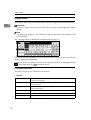
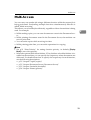
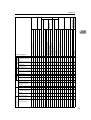
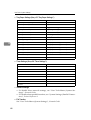
The chart shows function compatibility when print priority is set to "Interleave".
See p.51 “Print Priority”.
|: Simultaneous operations are possible.
$: Operation is enabled when the relevant function key is pressed and remote
switching (of the scanner) is done.
m: Operation is enabled when the {Interrupt} key is pressed to interrupt the preceding operation.
→: Operation is performed automatically once the preceding operation ends.
×: The operation must be started once the preceding operation ends. (Simultaneous operations are not possible.)
Interrupt
Copying
Copier
Function in progress
Using the control panel × × × m m $ $ | $ | | | | | $ $ $ $ $ $ | | m
Stapling
| → → m m $ $ | $ | | | | → $ $ $ $ $ | | | m
30
Sort
*5
*2
*2
*4
| → → m m $ $ | $ | | | | | $ $ $ $ $ | | | m
*1
*1
*1
Using the control panel m m m ×
Copying
m m m ×
*2
×
×
×
×
*2
× | × | | | | | ×
× | × | → | → → ×
*2
*2
×
×
×
×
*2
×
×
×
×
× | | m
× → | →