1
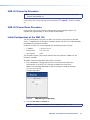
7. In the browser address bar, enter the IP address of
the recorder followed by a colon and the port number
(127.0.0.1:8080). The login page opens (see the
figure to the right).
8. Enter the Username and Password.
NOTE: By default, the Username and Password
are both config.
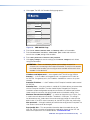
9. Click Login. The VNR 100 Recorder Settings
page opens (see the figure to the right).
10. Set the Network Settings and Recorder Settings
as required (default values are shown).
Logout
VNMatrix recorder settings
11. Click Apply Changes.
Network settings [eth0]
12. Logout of the config screen.
IP Address
Subnet Mask
255.255.0.0
13. Power down the unit.
Gateway
192.168.254.253
14. Remove the mouse, keyboard, and monitor.
Serial
1111999
192.168.254.254
Recorder settings
Controller IP
192.168.254.254
Controller port
5432
MTU
1500
User settings
New password
Confirm New password
Data disk
Umount
status:
Disk free space:
Format
mounted to /home/matrix_rec/Recording_Files
19GB->98% used
formated to ext3
Apply Changes
Cancel Changes
VNR 100 • Replacing the VNR 100 Drives
17