1
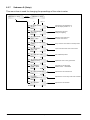
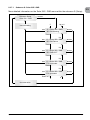
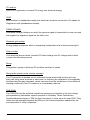
LED STATUS
green: <off>
red: <off>
yellow: <off>
green: <on>
red: <on>
yellow: <on>
green: <flashes>
red: <off>
yellow: <off>
green: <on>
red: <off>
yellow: <off>
green: <off>
red: <on/off>
yellow: <on/off>
green: <off>
red: <on/off>
yellow: <on>
green: <on/off>
red: <on/off>
yellow: <flashes>
OPERATIONAL STATE
EXPLANATION
The input voltage (UPV) is lower than
100 V. The solar inverter is not feeding
power to the grid.
Night disconnection.
Initialization
Input voltages: UPV: 100 V to 150 V (self
test ongoing).
Input- and grid monitoring.
Starting conditions are tested.
Feed-in operation.
Normal operational state: UPV: 150 V to
450 V.
Internal or external fault (interrupted
feed). See also „9.2 Display messages“,
page 34.
Solar inverter is not connected to the grid.
No power is delivered. See also „9.2 Display
messages“, page 34.
You can carry on using the solar inverter.
See also „9.2 Display messages“,
page 34.
Equipment fault.
General error condition.
Warning message.
8.
Operating concept
8.1
The display
EN
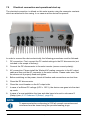
The display on the device indicates varied information. The enter keys are used for the
adjustment of the device and for the retrieval of information. The indicated data can
deviate with a tolerance of up to 5 %.
(A)
ESC
(B)
(C)
●●
Key (A), ESC: To switch from the menu
items to the main menu and to exit each
sub-menu.
●●
Key (B) and (C): For scrolling in the individual menu items and/or carrying out adjustments in the setup menu.
●●
Key (D), ENTER: ENTER key for changing
into the menu levels and for input acknowledgement in the setup menu.
(D)
Operation and installation manual SOLIVIA 3.3 AP G3 TR
23