1
Table of Contents
Unpacking Instructions……..…………………………………………… Page 1
Jukebox Description……………………………………………………… Page 3
Getting Ready to Use Your New Jukebox
Carton contents, install batteries in remote, attach FM antenna…………… Page 4
Quick Start Guide to Control Functions
Shows layout of main control panel and describes each button function…. Page 5
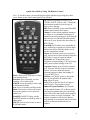
Quick Start Guide to Using The Remote Control
Describes button functions on the remote control…………………………. Page 8
Step-by-Step Instructions – Operating the CD Player
View this page if you want to play an audio CD that you
purchased at a store………………………………………………………... Page 9
Step-by-Step Instructions – Playing MP3 CDs
View this page if you want to play a CD that is
in MP3 format. Also known as a jukebox CD…………………………….. Page 10
Step-by-Step Instructions – Using the AM/FM Radio
Explains how to use the AM/FM radio……………………………………. Page 11
Step-by-Step Instructions – Using the Auxiliary Input Feature
Describes how to connect your MP3 player to the jukebox
auxiliary input……………………………………………………………… Page 12
Troubleshooting Tips…………………………………………………….. Page 14
Product Specifications……………………………………………………. Page 14
Warranty& Returns Information………………………………………...Page 15
Important Safety Instructions…………………………………………… Page 16
2