1
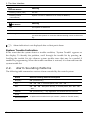
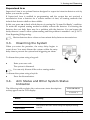
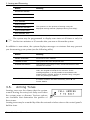
2. The User Interface OK LED Status Meaning Flashing Yellow (fast) AC loss. Flashing Yellow (intermittent) System Trouble in addition to AC loss/Low Battery. LED Status Meaning Off The system is disarmed. On Green The system is armed. Flashing Red An alarm has occurred. Alarm indication is cleared the next time you arm the system or view the relevant arming event in the event log. Alarm indication is not displayed after a silent panic alarm. System Trouble Indication In the event that the system detects a trouble condition, “System Trouble” appears on the display. To identify the problem, scroll through the trouble list by pressing . Scrolling the trouble list also silences system trouble tones that may be sounded if enabled in programming. When the trouble condition is restored, it is removed from the system trouble list. 2.2. Alarm Sounding Patterns The following table summarizes various alarms sounded by the control system. Alarm Alarm Sounding Pattern Description Burglary ON (continuously) Fire ON - ON - ON, 1.5-second pause, ON - ON – ON...... Gas ON - ON - ON - ON (short bursts), 5 second pause, ON - ON - ON - ON...... Medical ON (continuously) – only applicable for Medical alarm from zone Flood Environmental CommPact User Manual 4 rapid tones sounded once per minute (same as Trouble tones) 7