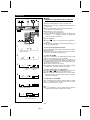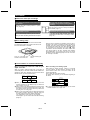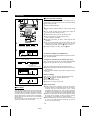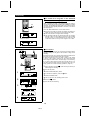
1
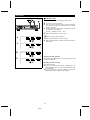
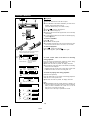
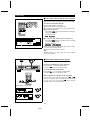
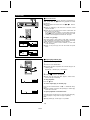
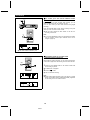
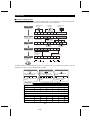
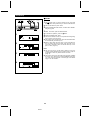
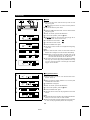
MINIDISC DECK
MODEL
MD-R2
OPERATION MANUAL
Thank you for purchasing this SHARP product.
For the best performance, read this manual carefully.
It will guide you in operating your SHARP product.
FOR YOUR RECORDS
For your assistance in reporting this unit in case of loss
or theft, please record below the model number and
serial number which are located on the rear of the unit.
Please retain this information.
Model number ___________________________
Serial number ___________________________
Date of purchase ________________________
Place of purchase ________________________
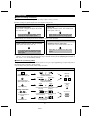
CAUTION
RISK OF ELECTRIC SHOCK
DO NOT OPEN
The lightning flash with arrowhead
symbol, within an equilateral triangle, is intended to alert the user
to the presence of uninsulated
“dangerous voltage” within the
product’s enclosure that may be of
sufficient magnitude to constitute a
risk of electric shock to persons.
CAUTI ON: TO REDUCE THE
RISK OF ELECTRIC SHOCK, DO
NO T REM O VE CO VER (OR
BACK).
NO USER-SERVICEABLE PARTS
INSIDE. REFER SERVICING TO
QUALIFIED SERVICE PERSONNEL.
Caution - use of controls or adjustments or performance of procedures other than those
specified herein may result in hazardous radiation exposure.
The exclamation point within an
equilateral triangle is intended to
alert the user to the presence of important operating and maintenance
(servicing) instructions in the literature accompanying the appliance.
WARNING: TO REDUCE THE
RISK OF FIRE OR ELECTRIC
SHOCK, DO NOT EXPOSE THIS
APPLIANCE TO RAIN OR MOISTURE.
Note:
WARNING
This equipment has been tested and found to comply with the limits
for a Class B digital device, pursuant to Part 15 of the FCC Rules.
These limits are designed to provide reasonable protection against
harmful interference in a residential installation.
This equipment generates, uses, and can radiate radio frequency energy and, if not installed and used in accordance with the instructions,
may cause harmful interference to radio communications.
However, there is no guarantee that interference will not occur in a
particular installation. If this equipment does cause harmful interference
to radio or television reception, which can be determined by turning the
equipment off and on, the user is encouraged to try to correct the
interference by one or more of the following measures:
● Reorient or relocate the receiving antenna.
● Increase the separation between the equipment and receiver.
● Connect the equipment into an outlet on a circuit different from
that to which the receiver is connected.
● Consult the dealer or an experienced radio/TV technician for
help.
FCC Regulations state that any unauthorized changes or modifications
to this equipment not expressly approved by the manufacturer could
void the user’s authority to operate this equipment.
MD-R2
● It is the intent of Sharp that this product be used in full
compliance with the copyright laws of the United States
and that prior permission be obtained from copyright
owners whenever necessary.
● US and foreign patents licensed from Dolby Laboratories
Licensing Corporation.
IMPORTANT SAFEGUARDS
CAUTION
All the safety and operating instructions should be read
before the appliance is operated, and should be retained for
future reference.
Electrical energy can perform many useful functions. This
unit has been engineered and manufactured to assure your
personal safety. Improper use can result in potential electrical
shock or fire hazards. In order not to defeat the safeguards,
observe the following basic rules for its installation, use and
servicing.
1
2
3
4
12
Outdoor Antenna Grounding - If an outside antenna is connected
to the receiver, be sure the antenna system is grounded so as
to provide some protection against voltage surges and built-up
static charges. Article 810 of the National Electrical Code,
ANSI/NFPA 70, provides information with regard to proper
grounding of the mast and supporting structure, grounding of the
lead-in wire to an antenna-discharge unit, size of grounding conductors, location of antenna-discharge unit, connection to grounding electrodes, and requirements for the grounding electrode.
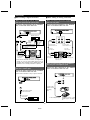
EXAMPLE OF ANTENNA GROUNDING AS PER
NATIONAL ELECTRICAL CODE
Heed Warnings - All warnings on the appliance and in the operating instructions should be adhered to.
Follow Instructions - All operating and use instructions should be
followed.
Water and Moisture - The appliance should not be used near
water - for example, near a bathtub, washbowl, kitchen sink,
laundry tub, in a wet basement, or near a swimming pool, etc.
Carts and Stands - The appliance should be used only with a
cart or stand that is recommended by the manufacturer.
ANTENNA LEAD
IN WIRE
GROUND
CLAMP
ANTENNA DISCHARGE
UNIT
(NEC SECTION 810-20)
• An appliance and cart combination should be
ELECTRIC
SERVICE
EQUIPMENT
moved with care.
Quick stops, excessive force, and uneven surfaces may cause the appliance and cart combination to overturn.
GROUNDING CONDUCTORS
(NEC SECTION 810-21)
GROUND CLAMPS
NEC - NATIONAL ELECTRICAL CODE
S2898A
5
6
7
8
9
10
11
Wall or Ceiling Mounting - The appliance should be mounted to
a wall or ceiling only as recommended by the manufacturer.
Ventilation - The appliance should be situated so that its location
or position does not interfere with its proper ventilation. For example, the appliance should not be situated on a bed, sofa, rug,
or similar surface that may block the ventilation openings; or,
placed in a built-in installation, such as a bookcase or cabinet
that may impede the flow of air through the ventilation openings.
Heat - The appliance should be situated away from heat sources
such as radiators, heat registers, stoves, or other appliances (including amplifiers) that produce heat.
Power Sources - The appliance should be connected to a power
supply only of the type described in the operating instructions or
as marked on the appliance.
Power-Cord Protection - Power-supply cords should be routed
so that they are not likely to be walked on or pinched by items
placed upon or against them, paying particular attention to cords
at plugs, convenience receptacles, and the point where they exit
from the appliance.
Do not use liquid cleaners or aerosol cleaners. Use a damp cloth
for cleaning.
Power Lines - An outdoor antenna should be located away from
power lines.
13
14
15
A
B
C
D
E
16
17
POWER SERVICE GROUNDING
ELECTRODE SYSTEM
(NEC ART 250, PART H)
Nonuse Periods - The power cord of the appliance should be
unplugged from the outlet when left unused for a long period of
time.
Object and Liquid Entry - Care should be taken so that objects
do not fall and liquids are not spilled into the enclosure through
openings.
Damage Requiring Service - The appliance should be serviced
by qualified service personnel when:
The power-supply cord or the plug has been damaged; or
Objects have fallen, or liquid has been spilled into the appliance;
or
The appliance has been exposed to rain; or
The appliance does not appear to operate normally or exhibits a
marked change in performance; or
The appliance has been dropped, or the enclosure damaged.
Servicing - The user should not attempt to service the appliance
beyond that described in the operating instructions. All other servicing should be referred to qualified service personnel.
Grounding or Polarization - Precautions should be taken so that
the grounding or polarization means of an appliance is not
defeated.
CONTENTS
Page
ACCESSORIES . . . . . . . . . . . . . . . . . . . . . . . . . . . . . . . . 1
FEATURES . . . . . . . . . . . . . . . . . . . . . . . . . . . . . . . . . . . 2
PRECAUTIONS . . . . . . . . . . . . . . . . . . . . . . . . . . . . . . . . 2
NAMES OF CONTROLS AND INDICATORS . . . . . . . . 3
REMOTE CONTROL . . . . . . . . . . . . . . . . . . . . . . . . . . . . 4
CONNECTIONS . . . . . . . . . . . . . . . . . . . . . . . . . . . . . 5 - 7
SETTING THE CLOCK . . . . . . . . . . . . . . . . . . . . . . . 8 - 9
PLAYING A MINIDISC . . . . . . . . . . . . . . . . . . . . . 10 - 14
RECORDING . . . . . . . . . . . . . . . . . . . . . . . . . . . . . 15 - 19
Page
EDITING . . . . . . . . . . . . . . . . . . . . . . . . . . . . . . . . 20 - 30
HOW TO USE THE BUILT-IN TIMER . . . . . . . . 31 - 33
MINIDISC SYSTEM LIMITATIONS . . . . . . . . . . . . . . . . 33
WHAT IS A MINIDISC? . . . . . . . . . . . . . . . . . . . 34 - 35
TROUBLESHOOTING . . . . . . . . . . . . . . . . . . . . . 35 - 37
MAINTENANCE . . . . . . . . . . . . . . . . . . . . . . . . . . . . . . . 38
SPECIFICATIONS . . . . . . . . . . . . . . . . . . . . . . . . . . . . . 38
LIMITED WARRANTY . . . . . . . . . . . . . . . . . . Back cover
ACCESSORIES
Note:
Parts and accessories mentioned in this operation manual other than those shown to the left
are not included.
Remote control x 1
(RRMCG0123AWSA)
“AA” size battery
(UM/SUM-3, R6, HP-7
or similar) x 2
Analog connecting
(for remote control)
cable x 2
(UBATU0001AWZZ)
(QCNWG0003AWZZ)
1
MD-R2
FEATURES
Recordings start automatically when the external
sound source starts to produce sound.
Supports various types of digital/analog equipment
Two digital input jacks and two analog input jacks are built
in. They allow the unit to be connected to stereos or headphone stereos.
Comes with a sound synchro recording function, which allows
the unit to automatically begin recording when the external
equipment starts playing back. Lets you make MiniDisc
recordings easily.
DAT tapes can be digitally recorded directly onto
a MiniDisc.
Track selection with a jog dial
A jog dial makes it much easier to control the MD unit. It is
easy to select track numbers or enter characters.
The MiniDisc unit has a built-in sampling rate convertor
which allows the unit to be connected to various types of
digital equipment. You can record from a large variety of
digital formats.
Timer function/date stamp function
If the unit is used with other equipment that also has a timer
function, timer recording and timer playback are possible.
Also, the year, month, day, and time are automatically
recorded on the MiniDisc.
The recording time is doubled if you record in the
monaural mode.
Comes with a monaural long-recording mode which doubles
the recording time. Best suited for recording monaural broadcasts or talk programmes.
PRECAUTIONS
■ General
■ Installation location
● Do not use oil, solvents, petrol, paint thinners or
insecticides on the unit.
● Do not expose the unit to moisture, to temperatures
higher than 60oC (140oF) or to extreme low temperatures.
● Keep the unit away from direct sunlight, strong magnetic
fields, excessive dust, humidity and electronic/electrical
equipment (home computers, facsimiles, etc.) which
generates electrical noise.
● Hold the AC power plug by the head when removing it
from the AC outlet, since pulling the jack can damage
internal wires.
● Never open the cabinet. If a foreign object drops into the
set, contact your dealer.
● Use the unit on a firm, level surface free from vibration,
and do not place anything on the top of the unit.
● If the unit does not work properly while in use, press the
POWER button to turn the power off, then disconnect
the AC power cord from the AC outlet. Plug the AC power
cord back in, and then press the POWER button to turn
the power on.
● If a lightning storm is taking place near you, it is
suggested that you disconnect the AC power cord from
the AC outlet for safety.
Do not install the unit in the following places.
Otherwise, it may cause trouble or accidents.
Places exposed to vibration
Places exposed to direct sunlight for many hours
●
●
●
●
●
Warning:
The voltage used must be the same as that specified on
this unit. Using this product with a higher voltage than that
which is specified is dangerous and may result in a fire or
other type of accident causing damage. SHARP will not be
held responsible for any damage resulting from use of this
unit with a voltage other than that which is specified.
Hot places
Extremely cold places
Places exposed to high humidity.
Places exposed to excessive dust.
Poorly ventilated places.
Places exposed to water, for example, a bathroom.
Places near objects which generate magnetism or
electric noise.
■ Condensation
In the following cases, condensation (water droplets) may
form inside of the unit (optical section).
● Just after lighting a gas stove.
● When the unit is put in a room where steam or moisture
is present.
● When the unit is carried from a cool place (room) to a
warm room.
2
MD-R2
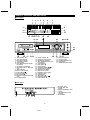
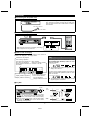
NAMES OF CONTROLS AND INDICATORS
■ Front panel
1
11
2
3
4
5
TOC DISC TRACK DATE
12
13
TOTAL
REMAIN
RANDOM
MONO LP PRGM
14 1516 17 18
6
7
12
TIMER REC
19
4
0dB
OVER
AM 1 2 3 4 5 6 7
PM 8 9 10 11 12 13 14
CLOCK 15 16 17 18 19 20
8
9
10
20
21 22
23
24 25 26
27
28
29
1.
2.
3.
4.
5.
6.
7.
8.
9.
10.
11.
12.
13.
14.
15.
30
31 32 33
TOC Indicator: TOC
Total Time Indicator
Disc Name Indicator
Track Name Indicator
Date Indicator
Level Meter/Character Information Display
Recording Level Indicator
Recording Level Too High Indicator
Music Calendar
More Tracks Indicator
Pause Indicator:
Record Indicator: ●
Play Indicator:
Monaural Long-Play Mode Indicator
Program Indicator
16.
17.
18.
19.
20.
21.
22.
23.
24.
25.
26.
27.
28.
29.
30.
31.
32.
6
0
34
R
Repeat Indicator:
Remaining Time Indicator
Random Play Indicator
Timer Playback/Timer Recording Indicator
Clock Indicator
Eject Button:
Remote Sensor
Cue/Review Button:
/
Display/Character Button
Name/TOC Edit Button
Record Level Control
Headphone Level Control
Headphone Jack
Power Button
Stop Button: ■
Play/Pause Button:
Record Button: ●
7
35
33.
34.
35.
36.
37.
36 37
Input Select Button
Program Button
Jog Dial (Next/Previous)
Enter Button
Delete/Clear/Timer Button
32
06
■ Rear panel
1. AC Power Cord
2. Coaxial Input Jack
(Digital)
3. Optical Input/Output Jacks
(Digital)
4. Line Input/Output Jacks
(Analog)
5. Reset Button
1
2
3
4
5
3
MD-R2
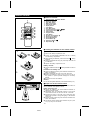
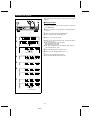
REMOTE CONTROL
■ Names of controls
1
2
3
4
5
6
7
8
9
10
11
1.
2.
3.
4.
5.
6.
7.
8.
9.
10.
11.
12.
13.
14.
15.
16.
17.
18.
19.
12
13
14
15
16
17
18
19
Remote Control Transmitter Window
Direct Key Buttons
Play Mode Button
Music Scan Button
Input Select Button
Display Button
Time Button
Auto Mark Button
Track Down/Review Button: 5 / 3
Track Up/Cue Button: 4 / 2
Power Button
Program Button
Clear Button
Synchro Record Button: ●
Record Cancel Button
Record Mode Button
Record Button: ●
Play/Pause Button: 06
Stop Button: ■
■ Loading the batteries for the remote control
1
1
2
Remove the battery compartment cover.
Insert 2 “AA” size batteries (UM/SUM-3, R6, HP-7 or similar)
into the battery compartment.
● When inserting the batteries, push them toward the ë battery
terminals.
● Placing the batteries the wrong way round may cause the unit
to malfunction.
2
3
Replace the battery compartment cover.
Battery removal:
● Push the batteries toward the
them.
ë
battery terminals and remove
Precautions for battery use:
● Insert the batteries according to the direction indicated in the
battery compartment.
● Replace all batteries with new ones at the same time.
● Remove the batteries if weak or if the unit is not in use for
long periods to prevent potential damage due to battery
leakage.
● Do not mix old and new batteries.
3
Caution:
Do not use rechargeable batteries (nickel-cadmium battery, etc.).
■ Proper use of the remote control
Aim the remote control at the remote control sensor within 30o
with no obstacles, and operate as shown.
Notes concerning use:
8" - 20’ (0.2 - 6 m)
15
● Replace the batteries if the control distance decreases or
operation becomes erratic.
● Periodically clean the transmitter window on the remote
control and the sensor on the main unit with a soft cloth.
● Exposing the sensor on the main unit to strong light may
interfere with operation. Change the lighting or the direction
of the unit.
● Keep the remote control away from moisture, excessive heat,
shock, and vibrations.
● The remote control’s usable range is between 8" (0.2 m) and
20’ (6 m) away from the sensor.
15
4
MD-R2
CONNECTIONS
■ Digital and analog connections
This unit can be connected to your equipment by making a digital or analog connection.
● When recording the playback signals from other equipment using this unit
Digital connection
Analog connection
Digital equipment with an optical output jack
or a coaxial output jack
Equipment with line output jacks or a headphone jack
Stereo system, CD player, MD player, MD recorder,
DAT, DSS tuner, etc.
CD player, headphone stereo, radio cassette player,
stereo system, video, etc.
Can be recorded with high fidelity, without
converting the original digital signals.
Digital signals, such as those from a CD
player, can be recorded as analog signals.
● When listening to a recording on this unit or recording its output on other equipment
Digital connection
Analog connection
Digital equipment with an optical input jack
Equipment with line input jacks
Stereo system, MD recorder, DAT, etc.
Stereo system, radio cassette recorder, video, etc.
Played back or recorded from with analog
signals.
Can be played back or recorded from with
high fidelity, without converting the original
digital signals.
● Depending on the digital equipment, the sampling frequency may be different (DAT etc.) from this unit’s sampling
frequency. This unit supports these digital devices using an automatic switching function (Sampling rate converter: 32
kHz, 48 kHz → 44.1 kHz automatically switched).
■ About the connecting cables
The type of cables required to make connections depends on the type of signal (digital/analog) and input/output jacks on
the equipment being connected to the MD recorder.
Check the shape of the jacks carefully before making connections.
Jacks to be connected
Digital connection
Optical input/output,
digital input/output, etc.
Cables used
Square plug
Square plug
Model: AD-M3DC
(available separately)
OPTICAL
OPTICAL
OUT
Round plug
Optical input/output,
digital input/output, etc.
Jacks on this unit
IN 1
Square plug
Model: AD-M1DC
(available separately)
Yellow
COAXIAL
Yellow
COAXIAL
Digital output etc.
Analog connection
L
Pin plug
Pin plug
Commercially available video coaxial cable
Pin plug
Pin plug
R
Line input/output,
AUX input/output, etc.
Connecting cable included with this unit
Stereo mini-plug
Pin plug
PHONES
Headphones etc.
Commercially available audio
connecting cable
5
MD-R2
IN 2
LINE OUT LINE IN
L
L
R
R
(Continued)
■ When making a digital connection
■ When making an analog connection
When connecting the unit to equipment
that has square/round optical jacks:
When connecting the unit to equipment
that has line jacks:
Connect the other equipment to the “OPTICAL
jacks” on the back of this main unit.
MD/CD player, etc.
OPTICAL
OUT
Connect the other equipment to the “ANALOG
jacks” on the back of this main unit.
ANALOG
LINE OUT LINE IN
IN 1
To the optical
output jack
AD-M3DC
When it’s
a round
optical
jack
L
L
R
R
Connecting cable
included with this unit
When connecting this unit to AD-M1DC
other equipment for playback
To the optical
output jack
Connecting cable
included with this unit
To the line
input (left) jack
To the line
output (left) jack
When connecting
this unit to a
recorder/player
To the optical
input jack
To the line
input (right) jack
Stereo, DAT, MD recorder, etc.
with an optical input/output jack
● If this unit is connected to a stereo, the digital audio
section of a CD (or other digital source) can be
recorded. When recording from a cassette tape, radio
broadcast, etc. an analog connection is required.
To the line
output (right) jack
Stereo, radio cassette
player, etc. with line
input/output jacks
When connecting this unit to equipment
that only has a headphone jack:
When connecting this unit to equipment
that has a coaxial jack:
Connect the other equipment to the "LINE IN
jacks" on the back of this main unit.
Connect the other equipment to the “COAXIAL
jack” on the back of this main unit.
● The coaxial connection is only an input to this unit.
LINE IN
L
COAXIAL
R
IN 2
C o mme rc ially
available audio
connecting
cable
Commercially available
video coaxial cable
To the digital
output jack
To the headphone jack
6
MD-R2
Headphone stereo, radio
cassette player, CD player,
etc.
(Continued)
■ Connecting the AC power cord
If you will not be using this unit for a prolonged period of
time, unplug the AC power cord from the AC outlet. Even
when the power is turned off, a small amount of current is
still consumed.
AC 120 V, 60 Hz
To an AC outet
■ How to turn the power on or off
Press the
POWER
POWER
or
button.
POWER
POWER
CLOCK
● When the power is turned on, the display will change.
● Press it again to turn the power off.
■ How to read the display
Various messages, describing the operations and contents of
MiniDiscs are displayed in the display section.
Indicators of the playback
and recording operations
To change the brightness of the display
Turn the power on and hold down the DISPLAY/CHARACTER (DISPLAY) button for more
than two seconds.
Area where track names and Music calendar
disc names are displayed.
Shows the number of tracks
During playback it becomes a recorded on an MD.
level meter.
DISPLAY/CHARACTER
DISPLAY
● The "DIMMER ON" display will appear, and the
display will be dimmer.
TOC
MONO LP PRGM
DISC TRACK DATE
TOTAL
REMAIN
RANDOM
12
TIMER REC
Display related to playback
Display related to recording
4
0dB
OVER
To return to the original brightness, hold down the
DISPLAY/CHARACTER (DISPLAY) button for more
than two seconds.
AM 1 2 3 4 5 6 7
PM 8 9 10 11 12 13 14
CLOCK 15 16 17 18 19 20
Area where playing time,
track numbers and the
time are displayed
Display related to the timer
DISPLAY/CHARACTER
DISPLAY
● The "DIMMER OFF" display will appear, and the
original brightness is retrieved.
■ Jog Dial
The jog dial on the main unit can be used to select track numbers (page 11) or to select characters (page 26).
Jog dial
Track
number
REMAIN
1 2 3 4 5 6 7
8 9 10 11 12 13 14
15 16 17 18 19 20
The track
number decreases.
54
● When the dial is turned gently, it will stop at an angle
of about 15o. This has the same effect as pressing the
/
button on the remote control. (Track up/down)
● When the dial is twisted harder, it has the same effect
as pushing the
/
button on the remote control
repeatedly. (Track up/down)
The track
number increases.
54
Track
number
7
MD-R2
REMAIN
1 2 3 4 5 6 7
8 9 10 11 12 13 14
15 16 17 18 19 20
SETTING THE CLOCK
When recording, the date and time are recorded on the Minidisc
(page 15).
ENTER
DELETE/CLEAR
POWER
TIMER
■ Setting the date
1
2
3
Press the POWER button to turn the power on and press
the TIMER button.
Within 10 seconds, turn the jog dial until “TIME ADJUST”
appears.
Within 10 seconds, press the ENTER button.
● The unit will enter the date setting mode.
1
4
Set the “year” using the jog dial.
● When you turn the jog dial and let go, the year will change
up or down by one.
● The year 2000 or later is set as follows:
[00] indicates the year 2000
[01] indicates the year 2001
● The range of dates that can be entered is from January 1,
1997 to December 31, 2099.
2
CLOCK
3
5
6
7
DATE
AM
CLOCK
Date setting mode
4
Press the ENTER button to set the “year”.
Set the “month” repeating steps 4 and 5.
Set the “day” repeating steps 4 and 5.
● The unit will enter the time setting mode.
Each time the button is pressed,
the display will change.
5
6
7
DATE
AM
CLOCK
Time setting mode
8
MD-R2
(Continued)
■ Setting the time
ENTER
DELETE/CLEAR
TIMER
After step 7, described in the “Setting the date” section
8
●
●
Set the “hour” using the jog dial.
When you turn the jog dial and let go, the hour will change
up or down by one. When you turn and hold it, the hour will
change continuously.
The clock uses the 12-hour system. Pay attention to the AM
or PM indicator in the display.
AM 0:00 → midnight, PM 0:00 → noon
9 Press the ENTER button to set the “hour”.
10 Adjust the “minute” using the jog dial.
11 Press the ENTER button to set the “minute”.
8
DATE
●
PM
CLOCK
When the ENTER button is pressed, the clock will show the
correct time.
9
DATE
PM
CLOCK
10
DATE
PM
CLOCK
Checking the date and time
11
After pressing the TIMER button, turn the jog dial until the date
and time are displayed.
DATE
PM
CLOCK
Resetting the date and time
See “Setting the clock”.
● Once you have set the date and time, “TIME ADJUST” will
not be displayed in step 2. Turn the jog dial to make the date
and time appear.
● If you do not need to change the settings, just press the
ENTER button without turning the jog dial again.
9
MD-R2
PLAYING A MINIDISC
■ Playback
EJECT
DISPLAY/CHARACTER
1 Switch the external unit to the MD unit input.
2 Load a MiniDisc in the direction indicated by the arrow on the
MiniDisc, with the label side facing up.
(Insert the MiniDisc firmly, until a click is heard.)
3 Press the 06 button to start playback.
0
● The “ ” indicator will light up.
● When the last track has been played back, this unit will stop
automatically.
● To stop playback before the last track has finished playing,
press the ■ button.
DISPLAY
TIME
To remove a MiniDisc:
7
Press the
button.
● The MiniDisc will be ejected.
● If a MiniDisc has been left in the unit for several hours, when
it is removed it will be warm to the touch. This is normal.
To interrupt playback:
06
06
Press the
button during playback.
● To resume playback, press the
button again.
When a long track name has been assigned,
it will be scrolled across the display.
12
4
Playback
display
0dB
OVER
1 2 3 4 5 6 7
8 9 10 11 12 13 14
15 16 17 18 19 20
Press the DISPLAY/CHARACTER (DISPLAY) button during
playback or while the unit is in the pause mode.
● Each time this button is pressed, the display will switch.
● In the following cases, disc names, track names and recording
dates will not be displayed.
The elapsed playing
time for the track is
displayed.
PAUSE indicator
Track
name
To check a track name or the date of a recording
during playback:
when a track name has
not been programmed,
“NO NAME” will appear.
Number of
recorded tracks
• A MiniDisc that has not been given a disc name or track name
• A MiniDisc that does not have a recording date on it
To check the playing time during playback:
Remaining
recording time
(Remote control operation)
Press the TIME button on the remote control during playback or
while the unit is in the pause mode.
TRACK DATE
● Each time this button is pressed, the display will switch.
PM
Date and time recorded
Note:
● Although MiniDiscs will not normally skip due to vibration, you
may hear a skip in the sound if there is a continuous vibration.
When you listen to MiniDiscs near a radio or a TV set, the
radio or the TV set may pick up noise.
Keep the unit as far away as possible from tuners.
Level meter
1 2 3 4 5 6 7
8 9 10 11 12 13 14
15 16 17 18 19 20
Elapsed playing time
REMAIN
1 2 3 4 5 6 7
8 9 10 11 12 13 14
15 16 17 18 19 20
Remaining playing time
TOTAL
REMAIN
1 2 3 4 5 6 7
8 9 10 11 12 13 14
15 16 17 18 19 20
Total remaining playing time
10
MD-R2
(Continued)
■ Track number selection (Remote control operation)
1
2
3
4
Specify a track number, and playback will start from that track.
5
6
7
8
To select a track number directly:
9
10/0
10
Press the desired DIRECT KEY button.
● Playback will start from the specified track.
● To select any track number from the 11th to the 99th track
■ 11th track to 99th track
After pressing
, enter the track number by pressing the
numbers on the keypad.
Example: 28th track
→
■ To select any track number from the 100th track on
12
4
0dB
OVER
4 5 6 7
8 9 10 11 12 13 14
15 16 17 18 19 20
Selected track number
After pressing
twice, enter the track number by pressing
the numbers on the keypad.
Example: 105th track
→
● You cannot select any track number larger than the number
of tracks on a particular MiniDisc.
● Press the next button within 5 seconds.
Note:
● During APMS play or random play, track number selection
play is not possible.
■ APSS (Auto Program Search System)
APSS automatically locates the beginning of each track.
To move to the beginning of the next track:
4
During playback ... Turn the jog dial clockwise.
Or press the
button on the remote control.
To restart the track being played:
5
During playback ... Turn the jog dial counterclockwise.
Or press the
button on the remote control.
When using the jog dial while in the stop mode:
5 4
Every time the jog dial is turned (or each time the
or
button on the remote control is pressed), the track number will
go up or down by one. If you press the
button, playback
will begin from the track being displayed.
06
While listening to the 5th track
TRACK
6 7
8 9 10 11 12 13 14
15 16 17 18 19 20
TRACK
5 6 7
8 9 10 11 12 13 14
15 16 17 18 19 20
11
MD-R2
(Continued)
■ Cue and review
2
3
Hold down the
button during playback for audible fast forward, or hold down the
button during playback for audible
fast reverse.
● Normal playback will resume when the
or
button is
released.
● When the beginning of the first track is reached, normal
playback will start.
● When the end of the last track is reached, “DISC END” will
light, and the unit will pause.
If you want to listen to a portion of a track again, press and
hold the
button to return to the point in the track you want
to listen to. Normal playback will start from that point.
3 2
3
To search very quickly:
12
4
0dB
When fast forward or fast reverse is used while in the pause
mode, the playback point will move more quickly than when using
audible fast forward or audible fast reverse playback.
● In this mode, no sound is heard. Therefore, you must refer
to the time display.
● When you lift your finger, the unit will re-enter the pause
mode.
OVER
3 4 5 6 7
8 9 10 11 12 13 14
15 16 17 18 19 20
The elapsed playing time is reduced.
12
4
0dB
OVER
6 7
8 9 10 11 12 13 14
15 16 17 18 19 20
The elapsed playing time is increased.
■ Repeat play/random play
(Remote control operation)
1
PLAY
MODE
Press the PLAY MODE button.
● Each time this button is pressed, the mode will change in the
following order:
Repeat play → Random play → Normal play
2 Press the 06 button to start playback.
● When all of the tracks have been played in random order,
the unit will stop automatically.
To stop playback:
1 2 3 4 5 6 7
8 9 10 11 12 13
Press the ■ button.
“REPEAT” indicator
To cancel repeat play or random play:
R
Press the PLAY MODE button until “ ” or “RANDOM” disappears.
● When a MiniDisc is removed, the repeat play or random play
mode will be canceled.
1 2 3 4 5 6 7
8 9 10 11 12 13
RANDOM
To repeat playback of selected tracks:
“RANDOM” indicator
Enter the program for the tracks you want and start repeat play.
You can program a single track and play it repeatedly.
Note:
● During APMS play, random play is not possible.
12
MD-R2
(Continued)
PROGRAM
DELETE/CLEAR
■ APMS
(Automatic Programmable Music Selector)
TIMER
1
Press the PROGRAM button while in the stop mode.
● Programs cannot be set or canceled while in the playback or
pause mode.
2
1
2
3
4
5
6
7
8
9
10/0
10
PROGRAM
● Repeat steps 1 and 2 for any track.
Up to 20 tracks can be programmed.
● If the total program playing time exceeds 199 minutes and
59 seconds, “— : —” will appear. However, the programmed
selections will still be memorized.
3
4
CLEAR
Select a desired track number by pressing the DIRECT
KEY button on the remote control.
Press the ■ button.
Press the
selections.
06 button to start playback of the programmed
● After all of the programmed tracks have finished playing, the
unit will automatically stop.
1
To clear the programmed selections:
Press the DELETE/CLEAR (CLEAR) button while the “PRGM”
indicator is flashing.
● Each time the button is pressed, one track will be cleared,
beginning with the last track programmed.
PRGM
“PRGM” indicator
2
To cancel the APMS:
TOTAL
2
TOTAL
2 3
8 9
While the unit is stopped in the APMS mode, press the CLEAR
button on the remote control to turn off “PRGM”.
When you use the DELETE/CLEAR button on the main unit, all
of the programmed contents will be erased by holding it down
for at least 2 seconds. (If you simply press this button briefly, the
unit will enter the timer mode.)
● The program contents will be erased.
● If a MiniDisc is removed or when the unit enters the recording
standby mode, the APMS mode will be canceled.
PRGM
3
6
PRGM
Total playing Selected track
number
time
To check which tracks are programmed:
5 4
4
2 3
8 9
While the unit is stopped in the APMS mode, turn the jog dial.
Or press the
or
button on the remote control.
● When the jog dial is turned clockwise, the next track number
will appear. When it is turned counterclockwise, the previous
track number will appear.
6
PRGM
To add tracks to the APMS:
When a program has been entered ("PRGM" will be lit), perform
steps 1 - 4. Additional tracks can be selected and they will be
stored after the last track you entered.
1 2 3 4 5 6 7
8 9 10 11 12 13 14
15 16 17 18 19 20
Note:
● It is not possible to insert an additional track between
programmed tracks that have already been entered.
“PRGM” will disappear.
2 3
8 9
6
PRGM
The playing time will appear
about 2 seconds later.
13
MD-R2
(Continued)
■ Music scan play
MUSIC
SCAN
When the MUSIC SCAN button on the remote control is pressed
while in the stop mode, music scan play will start, previewing
the tracks from the first to last in order.
PROGRAM
● “M.SCAN PLAY” will appear.
To stop music scan play:
Press the ■ button.
1 2 3 4 5 6 7
8 9 10 11 12 13 14
15 16 17 18 19 20
12
4
0dB
OVER
1 2 3 4 5 6 7
8 9 10 11 12 13 14
15 16 17 18 19 20
To program selected tracks during music scan play:
(Music scan program selection)
1
During music scan play, the current track being previewed can
be stored in memory.
1 2 3 4 5 6 7
8 9 10 11 12 13 14
15 16 17 18 19 20
TOTAL
PRGM
1
Press the PROGRAM button.
2
● “PRGM” will flash.
3
● “M.SCAN PRGM” will appear.
2
TRACK
12
4
0dB
3
OVER
2 3
Press the MUSIC SCAN button.
Press the PROGRAM button while playing the beginning
of a track to be stored in memory.
PRGM
■ Connecting headphones
This unit can be used with commercially available headphones.
Plug them into the PHONES jack on the front of the unit.
About headphones
PHONES
Use headphones that have an impedance between 8 ohms and
50 ohms (recommended: 32 ohms).
■ Listening to music through headphones
When headphones are connected to the unit and a MiniDisc is
played, you can hear the recording.
● It is not necessary to supply power to any other equipment,
such as a stereo, which is connected to the unit.
To adjust the headphone volume:
Rotate the PHONE LEVEL control toward MAX to increase the
volume, and toward MIN to decrease the volume.
14
MD-R2
RECORDING
■ Differences from tape recordings
You cannot record music on the reverse side
of a MiniDisc.
You can check the total or remaining
recordable time (possible recording) before
recording.
This lets you plan a recording session so that the
last song will not come to an abrupt end before it
has finished. (Page 17)
MiniDiscs cannot be incorrectly inserted, i.e. upside
down. (Page 35)
You don’t need to search for the starting
point at which to record.
The date and time of a recording are
automatically saved with the recording.
The unit automatically finds the point at which recording can start. Recording will start from that point.
The date and time of a recording are
If you have set the date and time, they will be
automatically recorded when a recording is made.
(Page 10)
■ Disc writing (TOC)
MiniDiscs have one area in which the sound is recorded
and another area where track number, track name, and
disc name information is recorded.
First the sound is recorded on a MiniDisc, and then the information (TOC: Table of Contents) for finding the tracks is
recorded. This TOC is vitally necessary for playback. Tracks
can be edited by rewriting the TOC. When the POWER button is pressed to turn the power off or when the
button
is pressed to remove the Minidisc, the current version of the
TOC will be written on the disc. Therefore, after pressing
the POWER button, do not jar the main unit. It may not be
possible to perform playback properly if the TOC is not written correctly on the disc.
7
Area for recording track
numbers, track names, etc.
Area for recording the
sound
■ Track numbers are created automatically
When recording from another CD or MD using the
digital connectors
When recording from analog inputs
When making an analog recording, if there is 1.5 seconds
or more of silence, the blank space is assumed to be the
space between tracks, and a new track number will be
created automatically.
This is called the auto marker function.
By creating track numbers, you can locate the beginning of
the tracks.
When you make a digital recording from a CD player or
another MD player, new track numbers will be created automatically for each track, regardless of the amount of silence
between tracks. (Synchro marker function)
First track
Track A
First track
Track A
Second track
Track B
Second
track
Track B
Third track
Track C
About 1.5
seconds
Third track
Silence
Track C
First track
● When you record from a CD to a Minidisc, the track
numbers recorded on the MiniDisc may not match the
track numbers on the CD.
● When recording from digital equipment such as DAT tape
recorders, the synchro marker function will not work. The
auto marker function will work the same way it does when
recording from an analog input.
● When a DAT is recorded using the digital inputs and the
DAT mode (sampling frequency) changes during the
recording session, the track numbers will change.
Very occasionally, some noise may be recorded.
If this happens, you can edit out the noise after recording.
(Page 22)
● If you do not use the auto marker function, you can record
musical selections as a single track.
15
MD-R2
Second track
(Continued)
■ Note about making digital copies
Recording
Playback
MiniDiscs are designed so that further copies cannot be made
from digitally recorded MiniDisc tracks. This is a specification
of the SCMS (Serial Copy Management System).
Digital cable
CD player, MD
player, etc.
Digitally recorded MiniDisc
Digital cable
Recording
Playback
Analog recording is possible.
■ How to select the inputs
Press the INPUT SELECT button to select the input from
which you want to record.
INPUT
SELECT
Each time the INPUT SELECT button is pressed, the input mode will
appear for 1.5 seconds in the Character Information Display. Then, the
display will return to the normal
mode.
About the recording level
■ When making a digital recording:
The recording level is automatically set the same as the
level of the original.
It is not necessary to adjust the recording level.
■ When recording from analog inputs:
Before recording, adjust this unit’s recording level. (Page
17)
● When this unit is connected to the headphone jack
of some other equipment, the playback level of the
other equipment should also be adjusted.
● When this unit is connected to line jacks on the other
equipment, it is not necessary to adjust the playback
level of the other equipment. (The playback volume
of the other equipment will not have any effect on
the recording.)
Digital input 1
(OPTICAL jack)
Digital input 2
(COAXIAL jack)
Analog input
(LINE IN jacks)
● Each time the button is pressed, the active input will
be changed.
Recordings cannot be made in the following
situations.
● If you try recording on a playback-only MiniDisc
(commercially available music)
● If a MiniDisc is protected against accidental erasure
(Page 34)
● If there is no more recording time left on the disc
(Page 17)
● When the “TOC FULL” message appears (Page 37)
● If a disc’s TOC has been damaged
● If you are trying to copy a digital signal that has
been encoded with the SCMS signal (Serial Copy
Management System)
Note:
● When recording important selections, be sure to make a
preliminary test to ensure that the desired material is being
properly recorded.
16
MD-R2
(Continued)
RECORD
INPUT
SELECT
REC LEVEL
DISPLAY/CHARACTER
MIN
■ Sound synchro recording
When music is played on another piece of equipment, such as
a stereo, that is connected to this unit, this unit will automatically
start recording on the MD.
MAX
1 Insert a recordable MiniDisc.
2 Press the INPUT SELECT button to select the input. (Page
INPUT
SELECT
16)
● If you will be recording from the analog input, adjust the
recording level after selecting the input.
SYNC REC
DISPLAY
REC
CANCEL
3 Press the SYNC REC button on the remote control.
REC
● The unit will enter the recording standby mode.
“SYNC STANDBY” will appear.
4 Start playing the music you want to record using the other
equipment.
● This unit will automatically start recording. When the other
equipment has finished playback, this unit will enter the
recording standby mode. Press the ■ button to cancel it.
● To stop recording at any time, press the ■ button.
2
When the digital optical input is selected
3
TOC
To check the remaining recordable time:
1
Press the DISPLAY/CHARACTER (DISPLAY) button after inserting a recordable MiniDisc.
“PAUSE” indicator
Number of tracks
already recorded
DISC TRACK DATE
12
To adjust the recording level: (Analog input only)
4
0dB
After you select analog input in step 2, press the RECORD (REC)
button, and then play the music on the other equipment.
OVER
Recordable time
(39 minites and 14 seconds)
12
4
0dB
↓
Adjust the recording level using the REC LEVEL control.
● Adjust the recording level so that the maximum level does not
exceed “0 dB”.
● After the level is adjusted, stop the other equipment, and go
to step 3.
OVER
1
Manual recording:
0dB
12
4
0dB
Select the input, and then press the RECORD (REC) button.
● The unit will enter the recording standby mode.
Press the
button.
● This unit will start recording.
● The space cut function will not work.
06
OVER
1
Space cut function:
■ Rec cancel
When the REC CANCEL button on the remote control
is pressed during sound synchro recording or while the
auto marker function is turned on and normal recording
has been started, the recorded contents of the track
will be erased and the unit will revert to the recording
pause mode. (The unit will enter the normal recording
standby mode.)
To start a sound synchro recording again, press the
SYNC REC button on the remote control.
● During sound synchro recording, if there are more than 3
seconds of silence in the playback sound, this unit will automatically enter the recording standby mode. ("SYNC
STANDBY" will appear.) Then, when further playback is
started on the other equipment, this unit will resume recording.
(A silence of up to 3 seconds can be created between tracks.)
● If there is noise between the tracks on the original recording,
the sound synchro recording or space cut function may not
work properly. If this happens, use manual recording.
● When recording tracks or sounds in which there are 3 seconds
or more of very small continuous sounds that you want to
record, use manual recording.
17
MD-R2
(Continued)
■ To record for a long time in the monaural
mode (monaural long-play mode)
When a recording is made in the monaural long-play mode, it
can be twice as long as the recording time available for a stereo
recording. The monaural long-play mode is very useful for recording songs that were originally recorded in monaural, or for recording talk programs.
REC
MODE
Press the REC MODE button on the remote control.
● Each time the button is pressed, the display will switch between the stereo mode and the monaural long-play mode.
● This mode cannot be changed while recording.
● The recording mode will not change back until you change it
manually. After you have made a recording in the monaural
long-play mode, it is recommended that you return the unit
to the stereo mode so that you won’t forget to do so later.
TOTAL
MONO LP
“MONO LP” indicator
TOTAL
“MONO LP” will disappear.
■ To re-record
RECORD
ENTER
When you want to re-record, you can erase a track that is already
recorded, starting from any point in the old track, to begin a new
recording.
Be aware that when you do this, all of the tracks and track names
that follow the newly recorded track will be erased.
If there are tracks that you do not want to erase, in the middle
or end of a disc, erase a track that you don’t want before that
track, using the erase function, and then begin a new recording.
If you want to erase all of the tracks and re-record the disc, you
can erase all of the tracks using the all erase function. Then you
simply perform the normal recording operations. (Page 25)
REC
1 During playback, press the 06 button at the point where you
want to begin re-recording.
● The unit will pause.
2 Press the RECORD (REC) button.
1
12
4
0dB
● To cancel the operation, press the ■ button.
OVER
4 5 6 7
8 9 10 11 12 13 14
15 16 17 18
3 Press the ENTER button.
(When recording starting from 3 minutes
and 32 seconds into the fourth track)
● The unit will be in the recording pause mode.
4 Press the 06 button.
2
● The unit will start recording.
4 5 6 7
8 9 10 11 12 13 14
15 16 17 18
3
TOC
12
4
0dB
OVER
0dB
OVER
1 2 3 4
4
TOC
12
4
1 2 3 4
18
MD-R2
(Continued)
■ To create your own track numbers while
RECORD
recording
By creating your own track numbers while recording, you can
mark and later search for any passage you wish.
(You can also create your own track numbers during digital
recording.)
Press the RECORD (REC) button during recording at the point
where you want to create a track number.
● After the track number has been written on the disc, the
recording will continue.
Note:
● If you use the MD editing function, the recorded track numbers
can be changed, and the space between tracks can be
changed. (Page 20)
REC
12
4
0dB
OVER
1 2 3 4 5
● The track number increases by one.
■ Recording tracks as a single track
(Remote control operation)
When making an analog recording, you can record several pieces
of music as a single track, without using the auto marker function.
AUTO
MARK
1 Press the AUTO MARK button on the remote control while
the recording is paused.
● “A.MARK OFF” will appear.
2 Press the 06 button.
● This unit will start recording.
Note:
● When making digital recordings using a CD player or an MD
player, track numbers will be created automatically regardless
of the setting of the auto marker function.
1
“A.MARK OFF” will appear.
12
4
0dB
OVER
1
19
MD-R2
EDITING
We will explain the 5 editing features you can use to create your own original MiniDiscs.
Playback-only MiniDiscs cannot be edited.
MOVE
DIVIDE
A track can be divided into two tracks. If two selections
were recorded as a single track because there was
not enough silent space between the pieces, you can
use the DIVIDE function to separate the selections.
This feature is also convenient for identifying specific
points with one selection so that you can locate those
points easily whenever you like.
(Page 22)
1
2
A
3
2
C
D
3
B
1
4
C
B
2
A
D
C
2
A
1
3
B
1
The order of the recorded tracks can be changed. This
feature is different from program play. A new track
order can be recorded directly on the disc. When the
power is turned off, the revised order will not be
changed.
(Page 24)
4
C
D
3
A
4
D
B
Program move function
COMBINE
This function allows the track numbers to be automatically rearranged in the order specified for programmed
playback. The track numbers will be adjusted as
needed, automatically.
(The tracks that are not included in the programmed
selections will be put at the end of the new track numbers.)
(Page 24)
Two adjacent tracks (for example, the third and fourth
tracks) can be combined.
If there is a prolonged silent section in the middle of
a selection that is recorded, a single piece of music
may be recorded as two tracks. If this happens, these
two tracks can be combined into a single track.
(Page 23)
1
2
A
3
B
1
2
A
4
1
C
D
C
D
3
B
2
A
B
1
2
C
ERASE
3
4
C
D
3
A
4
D
B
TRACK/DISC NAME
Tracks you want to erase can be erased one at a time
or all at once.
Once a track has been erased, it cannot be recovered.
Double-check the track number before erasing it.
You can assign titles to recorded tracks and to discs.
The characters must be capital and lowercase letters,
or symbols. Track and disc names can use up to 100
characters per name.
(Page 25)
(Page 26)
1
2
A
3
B
4
C
D
5
E
TOC DISC
TOTAL
1
2
A
3
B
4
D
E
20
MD-R2
4
1 2 3 4 5 6 7
8 9 10 11 12 13 14
15 16 17 18
(Continued)
■ Using the editing function
We will show you some examples of how to use the editing functions. You can create a disc of your favorite selections by
recording tracks from a variety of input sources such as CDs, tapes, and radio broadcasts.
Digital recording
from a CD
STEP 1
Recording a
broadcast
Analog recording
from tape
Recording tracks to
be edited on an MD
STEP 2
Putting the space
between tracks in order
STEP 3
A
B
C
D
D
Talk
E
Live performance
A
B
C
D
D
Talk
E
Live performance
The tracks are
combined using the
combine function.
A
B
The tracks are
divided using the
divide function.
C
D
Talk
E
F
G
CM
H
Cutting unnecessary
sections
Cut using the
erase function.
STEP4
A
Rearranging tracks in
your preferred order
STEP 5
B
C
D
E
F
The tracks are
rearranged
using the program
move function.
D
Cut using the
erase function.
G
H
The track is moved
using the move function.
E
A
C
B
H
F
G
Finish by putting
names on the disc
and tracks
(Disc name)
(Track name)
The editing functions are selected from the edit menu. The functions which can be selected from the edit menu will vary,
depending on the state in which an editing operation is started.
STEP 1 Edit menu display
STEP 2 Edit menu selection
NAME/TOC EDIT
Previous
menu
Each time the button is pressed,
the edit menu will appear.
Next menu
Each time the dial is turned,
the menus will appear in order.
(Move function)
STEP 3 Editing start
ENTER
You can edit the selected
menus.
(Track name function)
A different menu may be displayed.
Within 10 seconds, perform
step 3.
This function
To stop editing anytime,
press the button.
Can be selected in the following conditions.
When stopped
The total number
of tracks appears
(
When stopped
Selection of
track numbers
)(
)
During
playback
Disc name
Track name
Divide
Combine
Move
Program move
Erase
All erase
21
MD-R2
Playback
in the pause
mode
During recording/
in the recording
standby mode
When entering
a program
(Continued)
■ DIVIDE
ENTER
NAME/TOC EDIT
1 Play the track which you want to divide into two, and press
the
06 button at the point where you want to divide the track.
● The unit will enter the pause mode.
2 Press the NAME/TOC EDIT button, and then select “DIVIDE”
using the jog dial.
3 Within 10 seconds, press the ENTER button.
● To cancel the operation, press the ■ button.
1
12
4
0dB
4 Press the ENTER button again.
OVER
● The track is divided, and the unit is paused at the beginning
of the second of the two tracks.
● The numbers of the tracks which come after the divided track
are automatically increased by one.
● When a track which has been given a name is divided, the
two new tracks will have the same name and date. If the
“TOC FULL” message is seen, the second track may not be
given a name. (Page 37)
4 5 6 7
8 9 10 11 12 13 14
15 16 17 18
(To divide the fourth track into two)
2
4 5 6 7
8 9 10 11 12 13 14
15 16 17 18
Notes:
● This unit can hold up to 255 tracks. However, even if the
number of tracks assigned has not reached 255, it might not
be possible to make any further divisions of tracks.
(Page 33)
● This function cannot be used while in the program ("PRGM"
is lit: Page 13) or random play modes ("RANDOM" is lit: Page
12). First, cancel the program or random play mode before
trying to use this function.
3
4
TOC
TRACK
REMAIN
1 2 3 4 5 6 7
8 9 10 11 12 13 14
15 16 17 18 19
22
MD-R2
(Continued)
■ COMBINE
ENTER
NAME/TOC EDIT
1 While in the stop mode, select the second of the two tracks
you want to combine using the jog dial.
06
Or start playing the second of the two tracks you want to
combine, and then press the
button.
● The unit will enter the pause mode.
2 Press the NAME/TOC EDIT button, and then select “COMBINE” using the jog dial.
3 Within 10 seconds, press the ENTER button.
1
● To cancel the operation, press the ■ button.
TRACK
REMAIN
1 2 3 4 5 6 7
8 9 10 11 12 13 14
15 16 17 18
4 Press the ENTER button again.
● The two tracks are combined, and the unit is paused at the
beginning of the combined track.
● The numbers assigned to the tracks following the combined
track are automatically decreased by one.
(To combine the fourth track and the
fifth track)
2
REMAIN
1 2 3 4 5 6 7
8 9 10 11 12 13 14
15 16 17 18
When both tracks have a name:
● When only the first track has a name → That name will be
used.
● When only the second of the two tracks has a name → That
name will be used.
● When both tracks have a name → The name of the first track
will be used.
3
To combine two non-continuous tracks:
4
TOC
(Example: the first and third tracks)
Move the third track to the second track using the MOVE function.
(Page 24)
Then, combine the first and second tracks using the COMBINE
function.
TRACK
REMAIN
1 2 3 4 5 6 7
8 9 10 11 12 13 14
15 16 17
Notes:
● Tracks recorded from analog inputs cannot be combined with
tracks recorded from CDs or MDs using the digital inputs.
● Tracks recorded in the stereo mode cannot be combined with
tracks recorded in the monaural long-play mode.
● Tracks where either track’s recording time is less than 15
seconds may not be combined.
23
MD-R2
(Continued)
■ MOVE
ENTER
NAME/TOC EDIT
1 While in the stop mode, select the track you want to move
using the jog dial.
06
Or start playing the track to be moved, and then press the
button.
● The unit will enter the pause mode.
2 Press the NAME/TOC EDIT button, and then select “MOVE”
using the jog dial.
3 Within 10 seconds, press the ENTER button.
1
● To cancel the operation, press the ■ button.
TRACK
REMAIN
4 Select the direction to move the track using the jog dial or
1 2 3 4 5 6 7
8 9 10 11 12 13 14
15 16 17 18
the
(To move the eighth track)
2
REMAIN
5/4 button on the remote control.
4
5
● To increase the track number ....
● To decrease the track number ....
5 Press the ENTER button again.
1 2 3 4 5 6 7
8 9 10 11 12 13 14
15 16 17 18
● The track is moved, and the unit is stopped at the beginning
of the track.
Notes:
● When a track has been moved, the other tracks which are
affected will be assigned new track numbers automatically.
3
Example: When moving the fifth track to the third track, the old
third track will become the new fourth track, and the
old fourth track will become the new fifth track.
(To move to the fifth track)
● This function cannot be used while in the program ("PRGM"
is lit: Page 13) or random play modes ("RANDOM" is lit: Page
12). First, cancel the program or random play mode before
trying to use this function.
4
TOC
TRACK
REMAIN
1 2 3 4 5 6 7
8 9 10 11 12 13 14
15 16 17 18
■ Programmed move
1
TOTAL
1
3
9
5
11
18
PRGM
7
14
1 Select the tracks you want to move and enter them into a
program. (Page 13)
2 Make sure that the “PRGM” indicator is lit, and then press
2
the NAME/TOC EDIT button.
TOTAL
1
3
9
PRGM
5
11
18
● “PRGM MOVE” will appear.
7
14
3 Within 10 seconds, press the ENTER button.
● To cancel the operation, press the ■ button.
3
4 Press the ENTER button again.
● The tracks will be moved, and the programmed move mode
will end.
4
TOC
TRACK
REMAIN
Notes:
● The tracks that are not included in the programmed selections
will be put at the end of the new track numbers.
● When the same track has been entered into the program twice
or more, the last programmed position will have priority.
1 2 3 4 5 6 7
8 9 10 11 12 13 14
15 16 17 18
24
MD-R2
(Continued)
■ ERASE
ENTER
NAME/TOC EDIT
To erase tracks one at a time:
1 While in the stop mode, select the track to be erased using
the jog dial.
06
Or start playing the track which you want to erase, and press
the
button.
● The unit will enter the pause mode.
2 Press the NAME/TOC EDIT button, and then select “ERASE”
using the jog dial.
1
3
TRACK
REMAIN
1 2 3 4 5 6 7
8 9 10 11 12 13 14
15 16 17 18
4 Press the ENTER button again.
(To erase the sixth track)
● The track is erased, and the unit is paused at the beginning
of the previous track.
2
TRACK
REMAIN
1 2 3 4 5 6 7
8 9 10 11 12 13 14
15 16 17 18
Notes:
● Once a track has been erased, it cannot be recovered.
Double-check the track number before erasing it.
● When a track is erased, the numbers assigned to the tracks
following the erased track will be automatically decreased by
one.
● When a track is erased, the track name will be erased at the
same time.
3
4
TOC
Within 10 seconds, press the ENTER button.
● To cancel the operation, press the ■ button.
TRACK
REMAIN
1 2 3 4 5 6 7
8 9 10 11 12 13 14
15 16 17
To erase all of the tracks at once:
1 Press the ■ button.
1
● The total number of tracks and the total playing time for the
MD will be displayed.
TRACK
TOTAL
1 2 3 4 5 6 7
8 9 10 11 12 13 14
15 16 17 18
2 Press
the NAME/TOC EDIT button, and then select “ALL
ERASE” using the jog dial.
2
3 Within 10 seconds, press the ENTER button.
TOTAL
1 2 3 4 5 6 7
8 9 10 11 12 13 14
15 16 17 18
● To cancel the operation, press the ■ button.
4 Press the ENTER button again.
3
● All of the track numbers and track names will be erased.
4
Note:
● This function cannot be used while in the program ("PRGM"
is lit: Page 13) or random play modes ("RANDOM" is lit: Page
12). First, cancel the program or random play mode before
trying to use this function.
TOC DISC
TOTAL
25
MD-R2
(Continued)
■ Track/disc name
ENTER
DISPLAY/CHARACTER
● Up to 255 tracks can be named on each disc, and each disc
can be given a disc name.
When naming discs and tracks, the characters should
be entered as follows:
To select the type of characters: (STEP 1)
STEP 1
Press the DISPLAY/CHARACTER button.
DISPLAY/CHARACTER
Each time the button is pressed, the available
characters will switch as follows:
To select characters: (STEP 2)
Select characters using the jog dial.
Alphabet
(capital letters)
To enter characters: (STEP 3)
Alphabet
(lower-case letters)
Press the ENTER button.
Repeat STEP 1 to STEP 3 as necessary to enter the characters
in the name.
Numbers or symbols
STEP 2
Previous character
Next character
Each time the dial is turned, the cursor (■) over
the character will move.
Type of characters used:
Type of
characters
Cursor
Lower-case
letters
Symbols
When the DISPLAY/
CHARACTER button is pressed
with the cursor at the edge
of the display, another 5
characters will be displayed.
●
Move the cursor to the
character you want.
STEP 3
ENTER
The selected character will be entered in the
character input column.
B C D E
F G H
Z . ,
I
U V W X
Y
a
b
c
d
e
f
g
h
i
u
v
w
x
y
z
.
,
/
1
+
2
,
3
-
4
.
5
6
:
7
;
8
<
9
=
/
J
/
j
0
>
K
,
k
,
!
L M N O P Q R S
!
"
#
l
m n
o
p
q
r
s
!
"
#
$
"
#
$ % &
'
(
)
? @ _
T
$
t
`
means a space.
Notes:
Number of characters you can enter
■ Disc names and track names
Up to 100 characters (including spaces) can be entered for
each name. If more than 100 characters are entered, “NAME
FULL” will appear.
■ Total number of characters per MiniDisc
A total of approximately 1700 characters can be used for all
of the disc and track names. If more than 1700 characters
are entered, “TOC FULL 1” will appear.
26
MD-R2
Characters <symbols>
A
Capital
letters
(Continued)
■ To create a disc name
ENTER
DISPLAY/CHARACTER
NAME/TOC EDIT
A title for the entire disc. Disc names are displayed when an MD
is inserted.
1 Press the ■ button.
● The total number of tracks and the total playing time for an
MD will appear.
2 Press the NAME/TOC EDIT button, and then select “DISC
NAME” using the jog dial.
3
1
1 2 3 4 5 6 7
8 9 10 11 12 13 14
15 16 17 18
TOTAL
Total number
of tracks
Within 10 seconds, press the ENTER button.
● The unit will enter the character input mode.
DISC
4
Total playing
time
5
Press the DISPLAY/CHARACTER button to select the type
of characters you want to use. (Page 26)
Select the character you want using the jog dial.
6 Press the ENTER button to enter the character.
2
TOTAL
● Repeat steps 4 to 6 above to enter the characters in the
name. When the next character’s type is the same as the
previous character, step 4 can be skipped.
1 2 3 4 5 6 7
8 9 10 11 12 13 14
15 16 17 18
7
3
● The disc name will be recorded.
DISC
TOTAL
After entering all of the characters in the name, press the
NAME/TOC EDIT button.
1 2 3 4 5 6 7
8 9 10 11 12 13 14
15 16 17 18
Note:
● This function cannot be used while in the program ("PRGM"
is lit: Page 13) or random play modes ("RANDOM" is lit: Page
12). First, cancel the program or random play mode before
trying to use this function.
4
● If you have selected capital letters
5
(If you have selected "B")
6
Disc name recorded
7
TOC DISC
TOTAL
1 2 3 4 5 6 7
8 9 10 11 12 13 14
15 16 17 18
27
MD-R2
(Continued)
■ To create a track name
ENTER
DISPLAY/CHARACTER
NAME/TOC EDIT
Name each track.
A track’s name will be displayed whenever you select it and
during playback.
1 During playback, press the NAME/TOC EDIT button.
● “TRACK NAME” will appear.
2 Within 10 seconds, press the ENTER button.
● The unit will enter the character input mode.
● The track you are listening to will be played repeatedly.
1
3 Press the DISPLAY/CHARACTER button to select the type of
characters. (Page 26)
1 2 3 4 5 6 7
8 9 10 11 12 13 14
15 16 17 18
4 Select the character you want using the jog dial.
(To name the first track)
5 Press the ENTER button to enter the character.
● Repeat steps 3 to 5 above to enter characters in the name.
When the next character’s type is the same as the previous
character, step 3 can be skipped.
2
TRACK
1 2 3 4 5 6 7
8 9 10 11 12 13 14
15 16 17 18
6 After entering all of the characters in the name, press the
NAME/TOC EDIT button.
● The track name will be recorded.
● The unit will return to normal playback.
3
(If you have selected capital letters)
Notes:
● This function cannot be used while in the program ("PRGM"
is lit: Page 13) or random play modes ("RANDOM" is lit: Page
12). First, cancel the program or random play mode before
trying to use this function.
● The track name function can be used while in the stop mode
(when selecting a track), in the pause mode, or in the recording mode. (Select “TRACK NAME” from the edit menu.)
● If you create a track name while recording the track, make
sure you finish entering the name before you finish recording
the track.
If the end of the recording is reached before you have entered
the complete name, only the characters entered before the
recording ended will be recorded.
4
(If you select “L”)
5
Track name recorded
6
TOC
TRACK
TOTAL
1 2 3 4 5 6 7
8 9 10 11 12 13 14
15 16 17 18
28
MD-R2
(Continued)
■ To change disc names and track names
ENTER
NAME/TOC EDIT
To change disc names:
1 During playback, press the ■ button.
2 Press the NAME/TOC EDIT button.
3 Within 5 seconds, press the ENTER button.
● The unit will enter the character input mode.
● To cancel this operation, press the ■ button.
4 Now you can erase or add characters. (Page 30)
1
DISC
TOTAL
1 2 3 4 5 6 7
8 9 10 11 12 13 14
15 16 17 18
2
3
To change track names:
1 While in the stop mode, select the track name you want to
1
change, using the jog dial.
TRACK
4 5 6 7
8 9 10 11 12 13 14
15 16 17 18
2 Press the NAME/TOC EDIT button.
3 Within 5 seconds, press the ENTER button.
● The unit will enter the character input mode.
● To cancel this operation, press the ■ button.
2
4 Now you can erase or add characters. (Page 30)
3
29
MD-R2
(Continued)
■ To erase a character
DISPLAY/CHARACTER NAME/TOC EDIT DELETE/CLEAR
After performing steps 1 to 3 on page 29, do the following:
TIMER
ENTER
Example: To change “BESUT” to “BEST”
4 Press the
32
/
button to make the character you want to
erase begin flashing.
5 Press the DELETE/CLEAR button.
6 Press the NAME/TOC EDIT button.
4
(To erase the letter "U")
5
● The character will disappear.
6
TOC
DISC
■ To add a character
4
After performing steps 1 to 3 on page 29, do the following:
(To add a character to left of the "S")
Example: To change “BST” to “BEST”
5
4 Press the
32
/
button to make the character at the place
you want to add a letter begin flashing.
(To add the letter "E")
● The original characters will move
to the right by one.
5 Select the character you want to add, using the jog dial. Then,
press the ENTER button.
6
TOC
6 Press the NAME/TOC EDIT button.
DISC
■ To correct a spelling
After putting the unit in the character input mode, erase the wrong
character. Then, enter the correct character.
■ To erase disc names or track names
After performing steps 1 to 3 on page 29, do the following:
Press the DELETE/CLEAR button for at least 2 seconds, and
then press the ENTER button.
● The disc or track name will be erased.
30
MD-R2
HOW TO USE THE BUILT-IN TIMER
● Before setting the timer, make sure that the clock setting is correct.
● The start time and stop time, which are set with this operation, will be kept in memory until the AC power cord is
unplugged or the setting is changed.
The timer is set as follows.
STEP 1 Selecting the timer mode
STEP 2 Setting the timer
STEP 3 Using the timer
Select timer playback or timer
recording.
Set the start time and stop time for
the timer.
Activate the timer so that timer playback or timer recording will begin at
the time you want.
In our example, we set the timer mode, the start time, and the stop time, as described in STEP 1 and STEP 2.
■ To select the timer mode (playback/recording)
DISPLAY/CHARACTER NAME/TOC EDIT DELETE/CLEAR
TIMER
(STEP 1)
ENTER
1 While in the stop mode, press the TIMER button, and then
select "TIMER SET" using the jog dial.
2 Press the ENTER button, and then select "TIMER PLAY" or
"TIMER REC" using the jog dial.
3
1
Press the ENTER button.
● The start time setting display will appear.
(Timer setting mode)
2
(Timer playback mode)
Go on to the next step.
(Timer recording mode)
■ To set the start time and the stop time (STEP 2)
3
4 Enter the “hour”, using the jog dial. Then, press the ENTER
AM
button.
4
5 Enter the “minute”, using the jog dial. Then, press the ENTER
AM
button.
● The stop time setting display will appear.
AM
5
6 Enter the “hour”, using the jog dial. Then, press the ENTER
button.
AM
7 Enter the “minute”, using the jog dial. Then, press the ENTER
button.
● The start and stop times are now set.
AM
● The stop time setting display will appear.
● The “hours” display will be automatically increased one hour.
6
AM
AM
7
AM
31
MD-R2
(Continued)
Set the timer so that timer playback or timer recording will begin at the time you want. See the previous page.
To use timer playback, perform STEP3-A. To use timer recording, perform STEP3-B.
■ To use timer playback (STEP3-A)
INPUT
SELECT
ENTER
DELETE/CLEAR
1 Insert the MD you want to play, and press the TIMER button.
Then select "T-STANDBY" using the jog dial.
TIMER
2 Press the ENTER button.
● The settings will appear in order, and the unit will enter the
timer playback standby mode. (The power will be turned off.)
1
Preparations for any equipment connected to this unit
Any equipment, such as a stereo, that is connected to this
unit should be set up in advance as follows:
(Timer standby mode)
● Adjust the sound level of the equipment.
● If it has a timer function, set it so that the power will be
turned on at the same time as the timer’s start time.
● Adjust the playback volume.
2
TIMER
Timer playback indicator
■ To use timer recording (STEP3-B)
1
1 Insert a recordable MiniDisc, and press the INPUT SELECT
1 2 3
TOTAL
button to select the input from which you want to record.
When the digital optical input was selected
● If you select the analog input, adjust the recording level. (Page
17)
2 Press the TIMER button, and then select "T-STANDBY" using
the jog dial.
3 Press the ENTER button.
2
● The settings will appear in order, and the unit will enter the
timer recording standby mode. (The power will be turned off.)
(Timer standby mode)
Preparations for any equipment connected to this unit
3
Any equipment, such as a stereo, that is connected to this
unit should be set up in advance as follows:
TIMER REC
● Set it up so that music to be recorded will be played at
the same time as the timer’s start time.
Timer recording indicator
Notes:
● This timer in this unit cannot be used to control equipment
connected to this unit. You must use the timer in the other
equipment, if it has one.
● The timer playback and timer recording functions cannot be
used at the same time.
In
●
●
●
the following cases, the timer recording function will not work.
When a MiniDisc has not been inserted
When a playback-only MiniDisc is inserted
When the MiniDisc you inserted is protected against accidental
erasure
● When there is no recording space left on the MiniDisc you
inserted (when the “TOC FULL” or “DISC FULL” messages
appear)
32
MD-R2
(Continued)
■ To check the timer setting
INPUT
SELECT
ENTER
DELETE/CLEAR
TIMER
1 While in the timer standby mode, press the TIMER button.
● If the display shows the wrong mode, correct it using the jog
dial.
2 Turn the jog dial until “TIMER CALL” appears.
3 Press the ENTER button within 10 seconds.
● The timer settings will appear in order, and then the original
display will reappear.
■ To cancel the timer operation
(Timer confirmation mode)
When the power is turned on, the timer will be canceled.
The timer operation can also be canceled as follows.
1 While in the timer standby mode, press the TIMER button.
● If the display shows the wrong mode, correct it using the jog
dial.
(Timer cancel mode)
2 Turn the jog dial until “TIMER CANCEL” appears.
3 Press the ENTER button.
● The timer operation will be canceled. ("TIMER" or “TIMER
REC” will go out.) The start and stop times will still be stored.
MINIDISC SYSTEM LIMITATIONS
Even if the maximum recording time of a MiniDisc has not
been reached, “DISC FULL” or “TOC FULL” may be displayed.
When the number of tracks used reaches the limit, regardless
of the remaining recording time, further recording will be impossible. (Maximum number of tracks: 255)
Even if the number of tracks and the recording time have not
reached the limit, “DISC FULL” may be displayed.
When emphasis information (equalizer treatment in the treble
section) in a track switches on/off several times, each change
is assumed to be the beginning of a new track, which will
quickly use up all available track numbers and further recording will be impossible, regardless of the remaining recording
time or the number of tracks on the original.
Even if several short tracks are erased, the remaining recording time may not show an increase.
When the remaining recording time of a disc is displayed,
short tracks less than 8 seconds long may not be included in
the total.
Two tracks may not be combined in editing.
For MiniDiscs on which repeated recording and editing operations were performed, the COMBINE function may not work.
The total of the recorded time and time remaining on a disc
may not add up to the maximum possible recording time.
A cluster (about 2 seconds) is normally the minimum unit of
recording. So, even if a track is less than 2 seconds long, it
will use about 2 seconds of space on the disc. Therefore, the
time actually available for recording may be less than the
remaining time displayed.
If there are scratches on discs, those sections will be automatically avoided (no recording will be placed in those sections). Therefore, the recording time will be reduced.
33
MD-R2
WHAT IS A MINIDISC?
The disc is stored in a cartridge. You can handle it easily without worrying about dust, fingerprints, etc.
However, dust entering the opening of the cartridge, dirt on the cartridge, warping, etc. may cause malfunctions. Please
note the following.
■ To prevent recorded discs from being
■ Handling the MiniDisc
erased accidentally
Do not touch the disc directly!
(accidental erasure prevention)
Do not open the shutter or touch the disc directly.
If the shutter is opened forcibly, it may break.
Slide the accidental erase prevention tab, located on the
side of the disc, in the direction indicated by the arrow.
● The disc will then be protected against accidental
erasure.
● To add a recording to such a disc, slide the accidental
erase prevention tab back to its original position.
Disc
Cartridge
Shutter
Tab
Protected against
accidental erasure
Where not to store discs:
Do not store discs in places with high temperatures or
humidity. Specifically, do not leave discs in places exposed
to direct sunlight or in cars with doors and windows closed.
Do not leave discs in places where sand can get into the
cartridge easily (e.g., beaches).
■ What is a MiniDisc?
● A MiniDisc is a 2-1/2" (64 mm) diameter disc which is
stored in a cartridge. MiniDiscs are easy to handle, compared to compact discs, because they are protected
against dust and scratches.
● Recording and playback use a digital system with a
sound quality that is similar to that found on compact
discs.
MiniDiscs cannot twist or stretch like tapes. The quality
of sound will not deteriorate. MiniDiscs are extremely
durable.
● Never disassemble MiniDiscs.
Regular cleaning:
■ Adaptive TRansform Acoustic Coding
If the surface of the cartridge becomes dusty or dirty, clean
it with a dry cloth.
[ATRAC]
The ATRAC (Adaptive TRansform Acoustic Coding) is a
new technology that is designed to eliminate the information
in sounds which you can not hear and to compress the
remaining sound data so that the recording uses about 1/5
of the original sound information.
Sound data is analyzed and filtered to take advantage of
psycho acoustic masking. The acoustic quality of the sound
is not impaired.
34
MD-R2
(Continued)
■ Types of discs
■ High-speed access
There are two types of discs: playback-only and recordable
type.
A unique feature of the MiniDisc is the ability to locate the
beginning of a desired track at high speed.
This is because the track number and track name data is
stored in a TOC (Table of Contents).
● Playback-only MiniDisc:
This type of MiniDisc is used for commercially available
pre-recorded music. This is the same kind of optical disc
as CDs. Playback is performed using an optical pickup.
(Recording and editing are not possible.)
Disc
A shutter will be used
on only one side (back).
TOC
● Recordable MiniDisc:
This is a “raw disc” on which recording can be performed.
A magneto optical disc is used.
Recordings are made using a laser and magnetic field.
Repeated recording is possible.
Sound data
■ Shock Resistant Memory
During playback, approximately 10 seconds of information
is stored in the semiconductor memory. Therefore, even
when the pickup cannot read information for a second or
two due to an external shock, the sound continues without
interruption because the information stored in memory is
output.
Shutters will be used on
both sides.
TROUBLESHOOTING
■ Moisture condensation
■ If a problem occurs
In the following cases, condensation may form inside
the unit.
● Shortly after turning on a heater.
● When the unit is placed in a room where there is excessive steam or moisture.
● When the unit is moved from a cool place to a warm
place.
If this product is subjected to strong external interference (mechanical shock, excessive static electricity,
abnormal supply voltage due to lightning, etc.) or if it
is operated incorrectly, it may malfunction or the display
may not function correctly. If such a problem occurs,
do the following:
➀ Unplug the AC power cord from the AC outlet.
➁ Wait about 20 - 30 seconds and then plug the AC power
lead back into the AC outlet.
➂ Press the reset button on the back of the unit.
When the unit has condensation inside, the disc signals
cannot be read, and the product may not function
properly.
RESET
● If this happens, remove the disc, and open the disc
holder. The condensation should evaporate in approximately 1 hour. The unit will then function properly.
Pen, pencil, etc.
■ If a power failure occurs during recording
If the AC power plug is disconnected from the AC outlet
or a power failure occurs during recording (before the
TOC information has been recorded on the disc), the
audio portion being recorded at that time will be erased.
When a recording is being added to a MiniDisc which
already has a recording on it, if the TOC is not updated
before the power failure, the added recording will be
erased.
● When the reset button is pressed, all of the settings in
memory will be erased.
● If strange sounds, smells or smoke come out of the unit
or if a foreign object falls into the unit, turn off the power,
unplug the AC power cord from the AC outlet, immediately. Contact your nearest authorized Sharp servicer.
● If a power failure occurs or the AC power cord is disconnected for about 10 minutes, when power is restored,
TOC will be written on the disc.
35
MD-R2
(Continued)
■ If a problem occurs
If this unit functions abnormally during operation, first check the following items. If the unit continues to function abnormally,
or if an abnormality appears other than listed below, turn off the player’s power and disconnect the AC power plug, then
consult your SHARP dealer or service personnel.
General
SYMPTOM
The clock is wrong.
POSSIBLE CAUSE
Did a power failure occur?
When a button is pressed, the unit
does not respond.
Radios make unusual noise or the picture on the TV screen is distorted.
REMEDY
Try setting it again.
Turn the power off and on again, and
then retry the operation.
When a radio or TV which uses an
indoor antenna is placed near the
unit, the picture on the TV screen may
be distorted or the radio may not function properly.
It is recommended that you use an
outdoor antenna.
Audio
SYMPTOM
A recording cannot be made.
POSSIBLE CAUSE
REMEDY
Is the MiniDisc protected against accidental erasure?
Slide the accidental erase prevention
tab back to its original position.
Did you try to make recording on a
playback-only MiniDisc?
Replace it with a recordable disc.
Can you see the “TOC FULL” message in the display?
Put in another recordable disc with
recording space on it.
Even though a disc has been loaded,
“no disc” or “Error” is displayed.
Is the disc scratched?
Is the unit located near excessive
vibrations?
Replace the disc.
Place the unit on a firm, level surface
free from vibration.
Playback stops in the middle of a
track, or playback is not performed
properly.
Is the unit located near excessive
vibrations?
Place the unit on a firm, level surface
free from vibration.
Playback sounds are skipped.
Has condensation formed inside the
unit?
Remove the disc and leave the power
turned on. The unit should function
properly in about 1 hour.
Remote control
SYMPTOM
POSSIBLE CAUSE
The remote control does not function
or does not operate properly.
The batteries (polarity) are not inserted
properly.
Insert properly.
The batteries inside the remote control
are dead.
Replace the batteries.
The remote control is operated from
an incorrect distance or angle.
Operate it within a range of 8" (0.2 m)
to 20’ (6 m) and within an angle of 15 o
to either side of center.
No disc has been loaded.
Load a disc.
Is the AC power cord plugged in?
Connect the AC power cord.
The power cannot be turned on from
the remote control.
36
MD-R2
REMEDY
(Continued)
When an error message is displayed, proceed as follows:
Error messages
Meaning
Remedy
BLANK MD
● Nothing is recorded.
(Neither music nor a disc name have been
recorded on this MD.)
● Replace the disc with a recorded disc.
Can’t COPY
● You tried to record from a disc which you are
not allowed to copy.
● Replace it with another disc which you can
copy from (regular CD).
Can’t EDIT
● A track cannot be edited.
● Change the stop position of the track and then
try editing it.
Can’t REC
● Recording cannot be performed correctly due to
vibration.
● Move the unit away from the source of vibration.
DEFECT
● Since this disc has scratches on it, the
recording operation was skipped.
● Replace the disc with another recordable disc.
Din UNLOCK
● Incorrect digital signals are input.
● Connect correct digital signals.
● Use the analog input jack.
DISC ERR
● The disc is damaged or there is no TOC on the
disc.
● Reload the disc or replace it.
DISC FULL
● The disc is out of recording space.
● Replace the disc with another recordable disc.
FOCUS ERROR
● The proper focus cannot be obtained.
● Reload the MiniDisc.
MD ERROR
● The unit has determined that it is out of order
by performing a self-diagnosis.
● Ask the store where you purchased this unit,
about repairs.
MECHA ERR*
● There is a mechanical problem and the disc is
not working properly.
● Turn off the power, and press the
NAME FULL
● The number of characters for the disc name or
track name exceeds 100.
● Shorten the disc or track name.
NO DISC
● A MiniDisc has not been loaded.
● The MiniDisc data cannot be read.
● Load a MiniDisc.
● Reload the MiniDisc.
NOT AUDIO
● The data recorded on this disc is not audio data.
● Select another track.
● Replace the MiniDisc.
PLAYBACK MD
● You tried to record on a playback-only disc.
● The data of disc names and track names are
not able to move from playback-only discs.
● Replace it with a recordable MiniDisc.
● Edit only the sound.
PROTECTED
● The MiniDisc is write protected.
● Move the write protection tab back to its original
position.
TEMP OVER
● The temperature is too high.
● Turn off the power, and wait for a while.
TOC ERR*
● The disc has a large amount of damage.
● TOC information cannot be read.
● The MD does not meet the specifications for
MDs.
● Replace the disc with another disc.
TOC FULL*
● There is no space left for recording character
information (track names, disc names, etc.)
● Replace it with another recordable disc.
TOC W ERROR
● The unit has determined that it is abnormal by
performing a self-diagnosis.
● Ask the store where you purchased this unit,
about repairs.
U TOC ERR*
● The TOC information on this disc does not
meet the MD specifications or it cannot be read.
● Replace it with another disc.
● Erase all the data, and try recording.
U TOC W ERR
● The TOC information could not be created
properly due to a mechanical shock or to
scratches on the disc.
● Turn off the power, and try to write the TOC
again. (Remove any source of shock or vibration
while writing.)
? DISC
● The data contains an error.
● Replace the disc with another disc.
0 0:00
● Music is not being recorded.
● Replace the disc with a recorded disc.
*: Number or symbol
37
MD-R2
7 button.
MAINTENANCE
■ External care
● Periodically wipe the cabinet with a soft cloth and dilute soap
solution, then wipe with a dry cloth.
● Do not use chemically treated cleaning cloths or other chemicals.
SPECIFICATIONS
As a part of our policy of continuous improvement, SHARP reserves the right to make design and specification changes
for product improvement without prior notice. The performance specification figures indicated are nominal values of
production units. There may be some deviations from these values in individual units.
● General
Type:
Signal readout:
Audio channels:
Frequency response:
Rotation speed:
Error correction:
Coding:
Recording method:
MiniDisc deck
Non-contact, 3-beam semi-conductor laser pick-up
Stereo 2 channels/monaural
(long-play mode) 1 channel
4 – 20,000 Hz (+0/-1 dB)
Approximately 400 to 900 rpm
ACIRC (Advanced Cross Interleave Reed-Solomon Code)
ATRAC (Adaptive TRansform
Acoustic Coding)
Magnetic modulation overwrite
method
A/D, D/A converter:
Sampling frequency:
Wow and flutter:
Signal/noise ratio:
Power source:
Power consumption:
Dimensions:
Weight:
Output jacks
Input jacks
Jack
name
LINE IN
Jack
shape
Pin jack
Input
impedance
Reference
input level
Minimum
input level
Over
22 kohms
680 mVrms
170 mVrms
Pin jack
LINE OUT
Jack shape
Pin jack
Output
Load
level
impedance
15 mW
32 ohms
2 Vrms
50 kohms
OPTICAL
Square optical connector
OUT (Optical)
75 ohms
500 mVp-p
● Timer/clock
Type:
Timer:
Jack name
PHONES
1/4" (6.3 mm) stereo
(Headphones) jack
OPTICAL Square
IN (Optical) optical
connector
COAXIAL
(Coaxial)
1-bit
44.1 kHz
Unmeasurable (less than
±0.001% W. peak)
100 dB or better during playback
(line output)
AC 120 V, 60 Hz
17 W
Width: 16-15/16" (430 mm)
Height: 3-11/16" (93 mm)
Depth: 11-15/16" (302 mm)
8.0 lbs (3.6 kg)
● Remote control
Digital clock with date function
ON/OFF, once a day
Power:
38
MD-R2
DC 3V ("AA" (UM/SUM-3, R6,
HP-7 or similar) battery included x 2)
LIMITED WARRANTY
SHARP ELECTRONICS CORPORATION warrants to the first consumer purchaser that this Sharp brand product (the
“Product”), when shipped in its original container, will be free from defective workmanship and materials, and agrees
that it will at its option, either repair the defect or replace the defective Product or part thereof with a new or remanufactured equivalent at no charge to the purchaser for parts or labor for the period(s) set forth below.
This warranty does not apply to any appearance items of the Product nor to the additional excluded item(s) set forth
below nor to any Product the exterior of which has been damaged or defaced, which has been subjected to misuse,
abnormal service or handling, or which has been altered or modified in design or construction.
In order to enforce the rights under this limited warranty, the purchaser should follow the steps set forth below and
provide proof of purchase to the servicer.
The limited warranty described above is in addition to whatever implied warranties may be granted to purchasers by
law. ALL IMPLIED WARRANTIES INCLUDING THE WARRANTIES OF MERCHANTABILITY AND FITNESS FOR USE
ARE LIMITED TO THE PERIOD(S) FROM THE DATE OF PURCHASE SET FORTH BELOW. Some states do not
allow limitations on how long an implied warranty lasts, so the above limitation may not apply to you.
Neither the sales personnel of the seller nor any other person is authorized to make any warranties other than those
described above, or extend the duration of any warranties beyond the time period described below on behalf of Sharp.
The warranties described above shall be the sole and exclusive warranties granted by Sharp and shall be the sole and
exclusive remedy available to the purchaser. Correction of defects, in the manner and for the period of time described
herein, shall constitute complete fulfillment of all liabilities and responsibilities of Sharp to the purchaser with respect
to the Product, and shall constitute full satisfaction of all claims, whether based on contract, negligence, strict liability
or otherwise. In no event shall Sharp be liable, or in any way responsible, for any damages or defects in the Product
which were caused by repairs or attempted repairs performed by anyone other than an authorized servicer. Nor shall
Sharp be liable or in any way responsible for any incidental or consequential economic or property damage. Some
states do not allow the exclusion of incidental or consequential damages, so the above exclusion may not apply to
you.
THIS WARRANTY GIVES YOU SPECIFIC LEGAL RIGHTS. YOU MAY ALSO HAVE OTHER RIGHTS WHICH VARY
FROM STATE TO STATE.
Product Model Number: MD-R2 MiniDisc Deck (Be sure to have this information available when requesting service for
your Product.)
Warranty Period for this Product: 1 Year parts and labor from the date of purchase.
Exclusions from Warranty Coverage: accessories.
Where to Obtain Service: At a Sharp Authorized Servicer located in the United States. To find a location of the nearest
Sharp Authorized Servicer, call Sharp toll free at 1-800-BE SHARP.
What to do to Obtain Service: Ship prepaid or carry in your Product to a Sharp Authorized Servicer. Be sure to have
Proof of Purchase available. If you ship the Product, be sure it is insured and packaged securely.
SHARP ELECTRONICS CORPORATION
Sharp Plaza, Mahwah, New Jersey 07430-2135
TO OBTAIN SUPPLY, ACCESSORY OR PRODUCT INFORMATION, CALL 1-800-BE-SHARP.
SHARP ELECTRONICS CORPORATION
Sharp Plaza, Mahwah, New Jersey 07430-2135
SHARP CORPORATION
Printed in Malaysia
A9709.HK
TINSE0191AWZZ
MD-R2