1
(Continued)
8
8
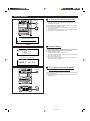
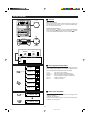
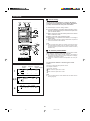
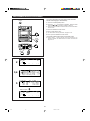
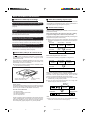
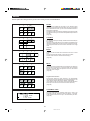
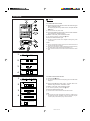
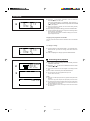
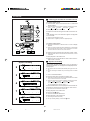
WW T I M E RWWW P L A Y WWWWWWW
WWO NWWWWWW a mW 6 : 3 0 WWWW
WWO F F WWWWW a mW 7 : 4 0 WWWW
WW S O U R C E WWM D N E RW P - 0 1 W
WW V O L U M E WWW 3 WWWWWWWWW
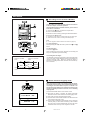
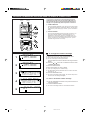
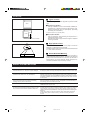
Press the
on the MULTI CONTROL button to select the
VOLUME position on the LCD.
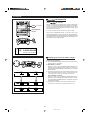
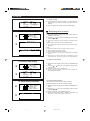
The current volume level (0 - 10) will flash. Then, press the
or on the MULTI CONTROL button to adjust the volume level
(0 - 10) as required.
I When the preset time is reached, the volume will increase gradually
to the preset volume level.
9
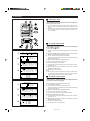
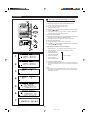
After making all required settings, press the ENTER button.
I The timer playback settings are now complete. These settings will be
stored in memory until changed.
Then, set all items as required. For details on settings, see "Performing timer playback" below.
Stopping timer playback in the middle:
Press any button other than the MULTI CONTROL button or the ENTER
button.
To change a setting:
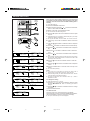
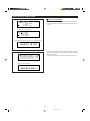
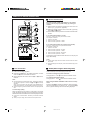
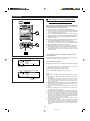
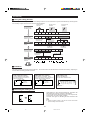
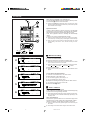
WW T I M E RWWW P L A Y WWWWWWW
WWO NWWWWWW a mW 6 : 3 0 WWWW
WWO F F WWWWW a mW 7 : 4 0 WWWW
WW S O U R C E WWM D N E RW P - 0 1 W
WW V O L U M E WWW 2 WWWWWWWWW
1
Turn the power on, and perform steps 1 - 2 on page 38. Then,
select the item you want to change, and set its value as
required.
2
After completing the changes, press the ENTER button.
H Performing timer playback
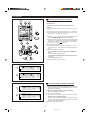
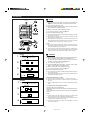
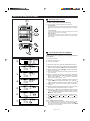
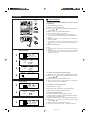
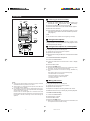
WWWWWWWW
WWWWWW
T I ME R S T ANDB Y
WWWWWW
T I M E R S E T WWWW
WWWWW
W
S L E E P W S E T WWWW
WWWWWA
T I M EW
T
R D J U S T WW
2
3
1
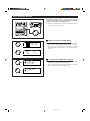
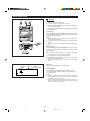
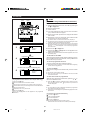
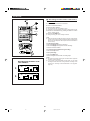
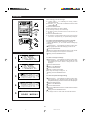
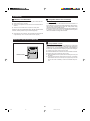
After all timer playback settings have been stored, press the
TIMER/DELETE button.
2
Press the or
on the MULTI CONTROL button to select
"TIMER STANDBY".
I If a time has not been set, this will not appear on the display. Set the
time.
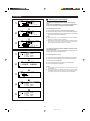
3
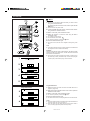
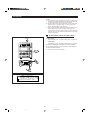
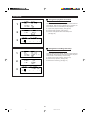
WWG O O DWB Y E ! WWWWWW
WWWWWWWWWWWWWWWWW
WWWWWWWWWWWWWWWWW
WWWWWWWWWWWWWWWWW
WWWWWWWWWWWWWWWWW
Then, within 10 seconds, press the ENTER button.
I The unit will enter the timer playback stand-by mode.
(Power will be turned off.)
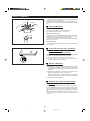
Notes
I When the CD or MD is played to the end, playback will stop before the
stop time.
If you wish to play to the stop time, set repeat play for the CD or MD.
I The timer playbck and timer recording with this unit cannot be used to
control equipment connected to this unit. You must use the timer of
the other equipment, if it has one.
I The timer playback and timer recording functions cannot be used at
the same time.
WWW 0 9 . 2 7 . ' 9 8 WW 1 0 : 3 0 p m
WWWWWWWWWWW T I M E RW P L A Y
WWWWWWWWWWWWWWWWWWWWW
WWWWWWWWWWWWWWWWWWWWW
WWWWWWWWWWWWWWWWWWWWW
39
38-58
39
98.6.23, 10:33 AM