1
GB
Programming the system when using additional
radio link transmitters or remote control transmitters
The original radio link transmitter and receiver have the same factory preset code. When additional
radio link transmitters or remote control transmitters are to be used, the whole system (incl. all
transmitters) must be programmed again.
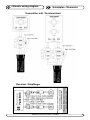
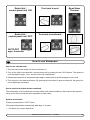
1. Deactivate all transmitters and the receiver (press “OFF” on the control panels(s) / transmitter(s)
and turn off the main power switch for the thruster system.
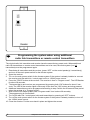
2. Open the receiver.
3. Turn on the main power switch for the thruster system if the system is already installed or connect
the receiver and the radio link / control panel unit to a 12/24V power source.
4. Press the “PROG” button at the receiver. The receiver is then in “Program mode”. The LED flashes
for about 30 seconds.
5. The transmitter(s) and receiver are programmed by pressing both “ON” buttons for about 2 seconds. The LED at the receiver lights continously for the time the “ON” buttons are being pressed.
6. Additional transmitters must be programmed according to step 5 within the 30 seconds time period
when the receiver is in “Program mode”.
7. Wait until the LED stops to flash (total “Program mode” time is about 30 seconds).
The programming is now finished.
8. Turn off all radio link / control panel units and transmitters by pressing all “OFF” buttons.
9. Turn off the main power switch for the thruster system if the system is already installed, or turn off
the 12/24V power source.
10. Close the receiver. Put the cover back in place and tighten the screws.
6
Sidepower radio remote control
V1.0 2004