1
output—but with the Coach functions turned off.
• Voice Coach Level G: Beeps Only
Board light G indicates a level where the computer uses beeps to
signify moves, keypresses, and other game activity. The voice will
not speak at all on this level, and there are no coaching functions.
Note that beeps do not sound when verifying pieces.
• Voice Coach Level H: Silent Mode
Choosing Level H gives you completely silent game operation—
no voice and no beeps. Coaching features are also off. When
playing without sound, be sure to watch the board lights carefully!
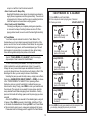
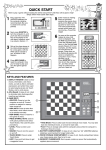
TEACH MODES AT A GLANCE!
1. Press LEVEL to enter Teach Mode.
2. Press a square to select a playing level, if desired.
3. Choose your mode:
BOARD LIGHTS ON
To study QUEENS…
7
Press
(Only Kings, Queens, and
pawns on the board)
4.2 Teach Modes
Your chess computer contains five built-in Teach Modes. This
feature allows you to learn basic moves and master the tactics of the
pieces, one at a time. For each individual Teach Mode, the only pieces
on the board are Kings, pawns, and the selected piece type. This will
help beginners to concentrate on one piece at a time, without losing
focus and being distracted by other pieces on the board!
To study ROOKS…
6
6
Press
(Only Kings, Rooks, and
pawns on the board)
See the “TEACH MODES AT A GLANCE!” chart for a step-bystep example of how to select the Teach Modes!
To study BISHOPS…
5
5
Press
To enter Teach Mode, press LEVEL. The computer uses board
lights to indicate the currently selected level of play. If you want to
change the level, press a board square as described in Section 3. If
you do not change the level, the current level will remain in effect. After
deciding on the level, you are ready to choose a Teach Mode.
Selecting the piece you want to study is easy—simply press a Piece
Symbol key (QUEEN, ROOK, BISHOP, KNIGHT, or PAWN). As shown
in the “TEACH MODES AT A GLANCE” Chart, pressing a Piece
Symbol key turns on a pair of board lights to indicate the piece you
have chosen to study. Finally, press LEVEL to enter your selection into
the computer. The computer is now ready for a new game, using the
newly selected Teach Mode and playing level. Remember—the only
pieces on the board will be Kings, pawns, and the piece type you have
selected!
Note that the KING key is reserved for the standard game, using all
32 pieces. When KING is pressed in Teach Mode, lights 2 and 7 turn
on to indicate the standard board. Pressing LEVEL to exit Teach Mode
at this point simply returns you to a new game, playing with all pieces.
Please also note the following points in regard to the Teach Modes:
(Only Kings, Bishops, and
pawns on the board)
To study KNIGHTS…
4
4
Press
(Only Kings, Knights, and
pawns on the board)
To study PAWNS…
3
3
Press
(Only Kings and pawns on
2
the board)
4. Press LEVEL to enter your selection into the computer. Now
you can play, studying the piece of your choice!
12