1
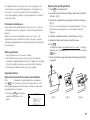
TABLE OF CONTENTS
INTRODUCTION .................................................................................... 2
BEFORE USE ......................................................................................... 3
GETTING STARTED ............................................................................... 4
BASIC ENTRY PROCEDURES ............................................................... 5
USING THE HOME AND WORLD CLOCKS .......................................... 6
USING THE CALENDAR FUNCTION ..................................................... 9
BEFORE USE
Using the Organizer for the first time
Be sure to perform the following procedures before using the Organizer
for the first time.
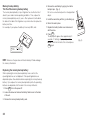
1. Open the Organizer.
2. Initialize the Organizer.
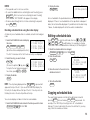
While holding ON , press the RESET switch. Release the RESET
switch and then release ON . The following display will appear:
USING THE SCHEDULE FUNCTION ................................................... 10
CLEAR ALL DATA
USING THE ANNIVERSARY FUNCTION ............................................. 15
USING THE TELEPHONE DIRECTORY ............................................... 17
ON
USING THE MEMO FUNCTION ........................................................... 20
USING THE TO DO FUNCTION ........................................................... 22
USING THE EXPENSE FUNCTION ...................................................... 24
OK (Y/N) ?
ON
OFF
T
RESE
USING THE CALCULATOR FUNCTION .............................................. 26
USING THE CONVERSION FUNCTION .............................................. 27
USING THE SECRET FUNCTION ........................................................ 27
NOTE: Under certain conditions the message may appear as “Data
USING THE MISCELLANEOUS FUNCTION ........................................ 30
has been impaired! Press [Y] to CLEAR ALL memory”. Proceed to the
next step in either case.
USING THE OPTION FUNCTION ........................................................ 32
APPENDIX ............................................................................................ 35
3. Press Y .
The Organizer is initialized and the TEL1 directory is displayed.
3