1
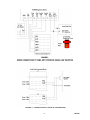
There are also contact closures associated with zones
26 to 29. The contact closures can be operated by
pressing the "*" key on the telephone key pad after
the zone has been called. These contacts can be used
to operate electric strikeplates on doors.
OPERATION
General
Originating a Page
When the attendant accesses the intercom and dials
the access code, dial tone is returned. The attendant
can then select an area to be paged by dialing a two
digit number (10 to 29). A tone is heard in the
handset and at the speaker location. The attendant
can then page the area and anyone hearing the page
can reply back handsfree to the speaker.
All Call with Meet Me
When the attendant accesses the All Call feature to
locate a specific individual, the desired person can
then respond from any speaker by pressing the
push-button at the speaker four (4) times. When this
is done, all other speakers are cut off and this
individual speaker becomes talkback to allow
two-way conversation.
Receiving a Call From a Door Box
When the button is pressed on the speaker, the
dedicated line or trunk port will begin to ring. A tone
is also heard at the speaker location. Hearing the
incoming ring, the attendant accesses the trunk or
C.O. line. The person at the speaker location can
then talk handsfree to the attendant.
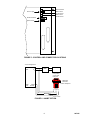
Inhibit Option
If a single line telephone is desired for "meet me
answer," a single line "A" lead control telephone and
a 5.1K ohm resistor will be required. The T & R of
the telephone connects to the W/BL pair, the "A1"
lead connects to GND (BL/R), the "A" lead has the
5.1K ohm resistor placed in series, and the resistor
terminates on inhibit (W/BR).
Auxiliary Contacts
The control unit provides a contact closure that
follows the ringing cycle. Contact closures are
provided for electric strike plate operation for zones
26 to 29. A lamp contact closure is provided.
TECHNICAL ASSISTANCE
Troubleshooting Chart
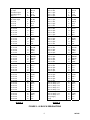
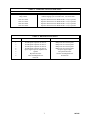
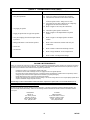
For additional information on the various contact
closures refer to Table 1.
Table 3 identifies some possible problems with
solutions.
Queue Operation
When the system is in use and another call is placed
from a speaker location, the person on the telephone
will hear 3 short tones and the call will be placed in
queue. If the # key is pressed, the telephone user will
be connected to the new calling location. The system
will remember the order that calls come in and will
switch to the next call in queue when the # key is
pressed.
Factory Assistance
When trouble is reported, verify the unit is turned on
and there are no broken connections leading to this
system.
Assistance in troubleshooting is available from the
factory. When calling, you should have a VOM and
a telephone test set available and be calling from the
job site. Call (540) 427-3900 and ask for Technical
Support, or call (540) 427-6000 for Valcom 24-hour
Automated Support or visit our website at
http://www.valcom.com.
Queue Override
A person can override a call in progress by pressing
the call button four (4) times within a four (4) second
time period. The person at the telephone will be
connected to the zone that originated the override and
the call in progress will be placed in queue.
Valcom equipment is not field repairable. Valcom
maintains service facilities in Roanoke, VA. Should
repairs be necessary, attach a tag to the unit clearly
stating your company name, address, phone number,
contact person, and the nature of the problem. Send
the unit to:
Valcom, Inc.
Repair and Return Dept.
5614 Hollins Road
Roanoke, VA 24019-5056
Special Programming Zones 26 to 29
Zones 26 to 29 can be in the normal queue or be
programmed to have a lower priority than the rest of
the zones. In the lower priority mode the zones can
be used for door locations or other areas not requiring
immediate response from the attendant. These zones
will be bumped from their place in queue and put at
the end of the line if another zone calls in.
6
947305