1
DESIGN
INSTALLATION
General
Precautionary Designations
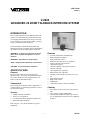
The V-2920, Advanced 20 Zone Talkback Intercom
System used with the Valcom talkback speakers,
provides voice paging with handsfree reply for up to
20 zones.
RIS K O F E LE CTRIC S HO CK
The system can be accessed through a C. O. line
position of a key system, loop start trunk port or
single line telephone. Zones are selected by dialing a
two digit number. The user can then page the area
and anyone hearing the page can reply back
handsfree. (By using one-way amplified speakers, a
zone can be one-way).
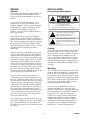
CA UTIO N: To reduc e the ris k of elec tric s hoc k ,
Do not rem ove c over.
No us er s ervic eable parts ins ide.
Refer s ervic ing to qualified s ervic e pers onnel.
This s y m bol indic ates that dangerous
voltage c ons tituting a ris k of elec tric
s hoc k is pres ent within this unit.
The system can also be accessed from a talkback
speaker location. When a call button at the speaker is
pressed, the dedicated line or trunk port will begin to
ring. A person hearing the incoming ring accesses the
line or trunk. The person at the telephone can then
talk with the person at the speaker location. (Valcom
doorplate speakers are normally used in these
applications).
This s y m bol indic ates that there are
im portant operating and m aintenanc e
ins truc tions in the literature ac c om pany ing
this unit.
Cabling
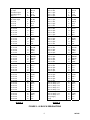
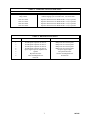
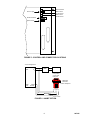
Two 25 pair cables with female connectors should be
run from the Control Unit (V-2920) to each of the
connecting blocks. The cables should be terminated
on the connecting blocks in standard color code
color. An opening is provided at the bottom of the
Control Unit to allow exit of the cables. A "punch
out" slot is designated at the top of this opening to be
"punched out" to allow additional cabling exit space,
if required.
When the system is in use and another call is placed
from a speaker location, the person on the telephone
will hear 3 short tones and the call will be placed in
queue. If the # key is pressed, the telephone user will
be connected to the new calling location. The system
will remember the order that calls come in and will
switch to the next call in queue when the # is pressed.
A person can override a call in progress by pressing
the call button four (4) times within a four (4) second
time period. The person at the telephone will be
connected to the zone that originated the override and
the call in progress will be placed in queue.
Mounting
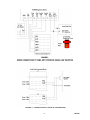
The V-2920 System was designed to be wall or table
mounted. When wall mounting the V-2920 System,
secure the units to wall studs or a suitable brace. (A
plywood backboard 2' square and at least 1/2" thick
attached to wall studs would be considered a suitable
brace). Make certain the units are not mounted near
heat sources or strong magnetic fields. Ascertain
control and terminal strip accessibility.
Zones 26 to 29 can be in the normal queue or be
programmed to have a lower priority than the rest of
the zones. In the lower priority mode, the zones can
be used for door locations or other areas not requiring
immediate response from the attendant. These zones
will be bumped from their place in queue and put at
the end of the line if another zone calls in. There are
also contact closures associated with zone 26-29.
The contact closures can be operated by pressing the
"*" key on the telephone key pad after the zone has
been called. These contacts can be used to operate
electric strike plates on doors.
Six 3/4" cross-tip round head wood screws are
included for mounting the V-2920 and V-2990.
Fasten two of these screws at the appropriate location
on the mounting surface, allowing the screwheads to
protrude 1/8" to 1/4". Place the chassis of the
Control Unit (V-2920) onto the screwheads at the
mounting slots. Position two screws through the
remaining mounting slots and fasten. Complete
mounting the Control Unit by tightening all screws.
Using the two screws remaining, mount the Ring
Down Device (V-2990) in a similar manner.
The V-2920 provides a background music input, and
is designed to automatically cut off the music during a
page. If background music is to be installed, a low
level music source such as the V-2952 FM Tuner will
be required.
3
947305