1
Table of Contents
Parts and Their Functions ........................................................................................... 4
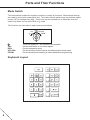
Mode Switch ........................................................................................................................... 4
Keyboard Layout ..................................................................................................................... 4
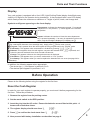
Display .................................................................................................................................... 5
Before Operation .......................................................................................................... 5
Reset the Cash Register ......................................................................................................... 5
Install Batteries ....................................................................................................................... 6
Install the Paper Roll ............................................................................................................... 6
Set the Time and Date ............................................................................................................ 7
Check the Time and Date ....................................................................................................... 8
Program VAT/tax ..................................................................................................................... 8
Program Departments ............................................................................................................. 9
Program Other Items as Necessary ........................................................................................ 9
When an Error Occurs ................................................................................................. 9
Error Escape Function ............................................................................................................ 9
Typical Operation Examples ..................................................................................... 10
When Paid by Cash .............................................................................................................. 10
When Paid by Credit ............................................................................................................. 10
When Paid by Cheque .......................................................................................................... 10
Mixed Tender Sale ................................................................................................................ 11
Corrections ................................................................................................................. 11
Correction of Entered Numbers ............................................................................................ 11
Correction of the Last Entry (Direct Void) ............................................................................. 11
Correction of Earlier Entries (Indirect Void) ........................................................................... 12
Correction After Issuance of Receipt .................................................................................... 12
Repetitive Entries ....................................................................................................... 12
Repetitive Department Entries .............................................................................................. 12
Multiplication Entries ............................................................................................................. 13
Department ................................................................................................................. 13
Programming a Preset Unit Price ......................................................................................... 13
Programming the Department Status ................................................................................... 13
Operation Using a Preset Unit Price ..................................................................................... 14
Single Item Cash Sale (SICS) Entry ..................................................................................... 15
VAT/tax Calculation .................................................................................................... 15
Opening the Drawer with No Sale............................................................................. 15
Percent Key ................................................................................................................ 16
Programming Percent Key Function ..................................................................................... 16
Programming Percent Rate .................................................................................................. 16
Discounts and Premiums Using the Percent Key ................................................................. 16
Minus Key ................................................................................................................... 17
Programming a Preset Reduction Amount ............................................................................ 17
Programming an Entry Digit Limit ......................................................................................... 17
Discounts Using the Minus Key ............................................................................................ 18
Non-add Code Number ..............................................................................................
Received-on-Account and Paid-Out Entries ............................................................
Entering a Refund ......................................................................................................
Receipt Number ..........................................................................................................
Printing Format ..........................................................................................................
Miscellaneous Settings .............................................................................................
2
18
19
19
19
20
21