1
351579-YTS-C-0111
THE MILLENNIUM® SIMPLICITY® CONTROL
INTRODUCTION AND OVERVIEW
Welcome to the new Millennium® Simplicity® control, a digital
control system designed specifically for the Millennium® 25 to 40
Ton single package rooftop unit. The Simplicity® is composed of
72 monitored and controlled input and output points. The control
logic of the Simplicity® extends on the rules built in to the
Synthesys control, and provides character displays in addition to
LED flashes to display information to the technician.
The Simplicity® digital control performs all of the control and
monitoring functions that were originally done by separate
discrete relays, controls, and interlocking hardware. This
reduces manufacturing, service, and maintenance costs. The
Simplicity® digital controller includes sophisticated control of
the individual components of the HVAC cooling/heating unit,
and has built-in rules that protect those components and
optimize the control to its environment. The cooling and heating
modes are protected against frequent cycling, slugging,
multiple restarts, etc.
The Millennium® Simplicity® control is resistor-configured for
Constant Volume (CV) units or Variable Air Volume (VAV) units.
The option settings for a specific option configuration will be
made as part of unit test at the factory; however, if there is
doubt about how a unit is responding in the field, check the
option setting for the unexplained action.
If connected to a network, the control requests an address by a
press of the Address/Down button.
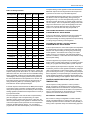
DIAGNOSTICS VIA LED
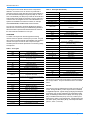
There is an LED on the board that shows the status of the
control and alarms (see Status LED Table). There are two
character displays, one 2-digit and one 4-digit, to indicate
details of run conditions and alarms (see Alarms Table in the
Trouble Shooting section of this manual).
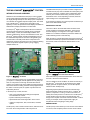
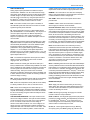
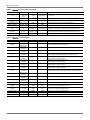
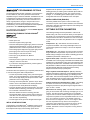
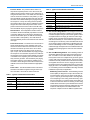
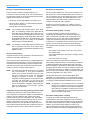
When the Alarm / Change Data button (See Figure 2 Simplicity®
Controller Push Buttons) is pushed and released one time within
five seconds, it will re-enunciate the last five alarms on the
Display.
Program
Alarms / Change Data
Test / Reset / Up
Address / Down
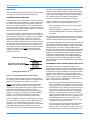
Figure 2: Simplicity® Controls Push Buttons
Figure 1: Simplicity® Controller
One result is that the system may not immediately respond as
you expect. For example, internal digital timers may delay the
start of a compressor even though the thermostat calls for
cooling. The control may be in the middle of a timing sequence;
without the observer knowing what has already happened and
the status of current inputs, the system may take action not
expected by the tech.
®
In the Simplicity control, there are:
• a list of user-selected option settings and setpoints
recorded within the control;
• inputs monitored by the Simplicity®;
• specific fixed rules and timings built in to the control
• outputs to compressors, heat, economizers, and other
options.
Simplicity®
The
has a real-time clock function, with minimum of
ten hours “Time-of-day retention” with unit power off.
Johnson Controls Unitary Products
When this button is pushed and released two times within five
seconds, it will clear all stored alarms.
The error details for most conditions are stored in summary in
the Simplicity® Control and can be accessed by the digital
display, personal computer interface, or Palm Pilot (Some
interfaces still in development).
Diagnosing requires patience because of internal timings.
Normal observable conditions are the same - contactor 1M
pulled in, compressor 1 running - but the control does not
identify what it has just done or is about to do. The Simplicity®
control will take action according to its internal rules even
though action requests come from smart thermostats. A call for
cooling, for example, will be compared with supply air
temperature before energizing a cooling stage.
ERROR HISTORY
The Simplicity® control stores up to 5 of the most recent alarms
in a First In, First Out (FIFO) manner. As the control collects
3