1
Chapter 3 Installing the Driver and
Utility Software
®
Windows 98 Driver Installation
After you have properly installed your AVerMedia ® TVPhone98 or
AVerMedia ® TVCapture98 card, turn on your computer.
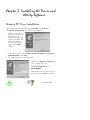
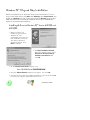
1. When you reboot your
machine for the first time,
Windows 98 ® will
automatically detect that
you have installed a new
device. The Add New
Hardware Wizard will
appear. Click Next to
continue.
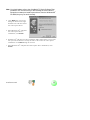
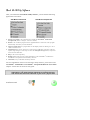
2. In the next dialog box, choose Search for the best driver for your device
(Recommended). Click Next.
3. The following dialog box will then appear :
Make sure the Specify a Location check
box is selected. Then, type:
Your CD-ROM Drive :\
Driver\Win9X
Place the Installation CD into your CDROM drive then click N ext to continue.
10
Installation Guide