1
D9412G/D7412G/D7212G
Troubleshooting
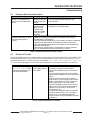
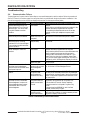
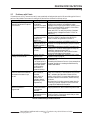
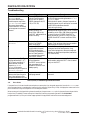
• With the overload removed, the panel returns power to Terminals 3, 6, 7, 8, 24, and 32, and the Programming
Connector. The panel sends PT BUS RESTORAL and SDI RESTORAL reports.
• If a D928 Module is connected, it stops sounding.
• If the battery voltage is below 8.4 V, the panel does not reconnect it. The battery must be replaced.
• When the battery reaches 13.7 V, the panel sends a BATTERY RESTORE report and turns off the red Low
Battery LED.
• When the battery reaches 13.9 V, the panel turns off the yellow Charging Status LED.
3.15
Service Walk Test
The Service Walk Test differs from the standard Walk Test in that POPITs whose switches are set for a point number not
programmed in the panel appear in the test.
The Service Walk Test allows a user to walk test all 246 points from a panel-wide command center, regardless of the point
index type. 246 PTS TO TEST will appear in the D7412G and D7212G Control Panels even though there is a maximum
of only 75 and 40 points available, respectively. Service Walk Tests may also be initiated by account-wide or area-wide
command centers but will only test those points that fall within the scope of the command center that initiated the function.
The Service Walk Test will not test points in areas that are currently armed.
Fire and other 24-hour points do not transmit reports during Service Walk Test!
WARNING
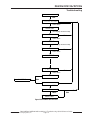
The steps below outline a simple Service Walk Test procedure. The flow chart (Figure 1 on page 19) shows all the Service Walk
Test options.
Note:
1.
Choose a command center to conduct the test. Be certain the display shows the idle disarmed text.
2.
Press the [MENU] key to enter the Function List. Press[NEXT] repeatedly until reaching the
SERVICE WALK ? prompt. Press [ENT]. Or press [9][9] followed by [ENT] to reach the Service Menu to
access the Service Walk Test.
The D7412G and D7212G do NOT include the Service Walk Test in the Service Menu. Therefore, the D7412G and
D7212G must have the Service Walk Test function enabled in the Function List in order for the Service Walk Test to
be accessed.
3.
The display shows ### PTS TO TEST . Test the first detection device.
4.
As the detection devices are faulted, the command center emits a brief tone and displays the point text of the
point tested for 60 seconds. After 60 seconds, the display returns to the points to test message.
Extra Points display default text: If the switches on a POPIT are set incorrectly to a point number that is not in
the program for the panel, the default text for that point number (PT ###) displays when the point is
faulted. The panel’s Program Record Sheet shows the default text for all points.
Faulting the point a second time produces the tone and displays the point text, but does not reduce the PTS TO
TEST count.
Note:
5.
During the Service Walk Test, to see the points that remain untested, press [ESC] when point text is displayed.
The display shows ## PTS TO TEST. Press the [ESC] key. VIEW UNTESTED ? is displayed. Press
[ENT]. ## PTS UNTESTED is displayed. Press [NEXT] to see a list of the points that have not yet been
tested. Move through this list by pressing the [NEXT] key. To resume the Service Walk Test, press [ESC]. ##
PTS UNTESTED is displayed. Press [ESC]. ## PTS TO TEST is displayed. Resume testing points. To end
the Service Walk Test, press [ESC] twice.
6.
After testing the last point, 0 PTS TO TEST displays. Press [ESC]. The display momentarily shows ALL
PTS TESTED before returning to idle text.
The Service Walk Test, when performed on a D7412G and D7212G, cannot display “0 points to test” as it is physically
unable to connect to the second POPEX Module (used for Points 129-247).
Automatic time-out returns the system to idle text: If there is no point or command center activity for 20 min., the
walk test ends automatically. The command center returns to idle text.
D9412G/D7412G/D7212G Installation & Troubleshooting Quick Reference Guide
43700F
Page 18
© 2004 Bosch Security Systems, Inc.