1
Drive Fitness Test
Usage Instructions
To support World Wide Web
16 October 2007
©Hitachi Global Storage Technologies 2004
Page 1 of 32
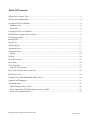
Table Of Contents
What is Drive Fitness Test? .................................................................................................................3
DFT System Fundamentals ..................................................................................................................4
Creating a DFT Test Diskette...............................................................................................................4
Windows OS’s ..................................................................................................................................4
Linux OS’s ........................................................................................................................................5
Creating a DFT Test CD Media ...........................................................................................................5
DFT hardware support and restrictions ................................................................................................6
SCSI Requirements: .............................................................................................................................7
Running DFT........................................................................................................................................7
Quick Test ..........................................................................................................................................12
Advanced Test....................................................................................................................................17
Advanced Topics................................................................................................................................17
Advanced Topics................................................................................................................................18
Menus..............................................................................................................................................18
Utilities ...............................................................................................................................................20
Erase Boot Sector ...............................................................................................................................22
Erase Disk...........................................................................................................................................24
ATA Functions ...................................................................................................................................27
S.M.A.R.T Operations. ...................................................................................................................27
Error Code and first aid for your drive ...............................................................................................28
DFT Error Codes ................................................................................................................................29
Testing of Non-Hitachi/IBM Hard Disk Drives .................................................................................30
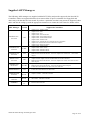
Supplied ASPI Managers ...................................................................................................................31
Troubleshooting..................................................................................................................................32
ASPI Manager Fails to Load...........................................................................................................32
Drives Attached to PCI IDE Adapter not seen by DFT ..................................................................32
Serial ATA Attached Drives ...........................................................................................................32
©Hitachi Global Storage Technologies 2004
Page 2 of 32
What is Drive Fitness Test?
Hitachi offers a full line of 2.5 and 3.5-inch products with both high capacity and a diversity of
interface options for high throughput operating environments, such as network and internet servers,
multimedia production and digital video processing
The prime purpose of DFT is to test hard disk drives while they remains inside a personal computer,
even when the primary operating system may no longer be bootable. This is suggested when it is
suspected that there is a malfunction that could be related to the hard disk drive. This is helpful, as
often problems occur with data content and management that are unrelated to the function of the
disk drive itself. In these cases, a reload of the operating system, or similar recovery action, is all
that would be required to recover the computer. The use of DFT avoids unnecessary disturbance of
the disk drive and usually will preserve other existing data belonging to the user, which may not
have been backed up. This latest version of DFT has been enhanced to provide support for the latest
Hitachi drives and also the Serial-ATA interface.
DFT is a DOS based utility and as such testing of the hard disk drive has no dependency on the
original Partition Format or Operating System that is installed on the disk drive.
The basic Drive Fitness Test (i.e. Quick, Advance and Exerciser) is non-destructive, which means
that it will not perform any write operations in the user data area. This option was chosen to ensure
the maximum integrity of user data.
When run, the Drive Fitness Test will provide a result, from which the condition of the drive electronics and storage mechanism - can be determined. This can then be used to either choose to
change a drive that is defective, or take other actions to restore the functionality of the PC. A further
diagnosis may determine that the drive has been subjected to handling damage.
In the event that you have a Hitachi/IBM drive which is reported by DFT as defective, then you will
be provided with a Technical Return Code (TRC) which will allow you to check and if appropriate
generate a Returns Material Authorisation (RMA) via our web based warranty support process.
NOTE: DFT currently will NOT generate a TRC for failed drives that were not manufactured by
Hitachi/IBM.
In addition to hard drive testing, DFT contains utilities, which allows the following: S.M.A.R.T (Self-Monitoring, Analysis and Reporting Technology) to be enabled or disabled.
Erasure of the disk Master Boot Sector
Total Erasure of the data in the user area of the disk
Initialise corrupted sectors
View useful information about the drive, e.g. Microcode level, Specification Compliance.
More information and background about DFT is available from
http://www.hgst.com/hdd/support/download.htm
©Hitachi Global Storage Technologies 2004
Page 3 of 32
DFT System Fundamentals
The Drive Fitness Test currently provides for in-depth testing of Hitachi Global Storage
Technologies and legacy IBM disk drives and basic testing of Other Manufacturers drives. This new
version will support standard disk drives with the ATA/IDE, Serial-ATA and SCSI interfaces. The
basic tests will not overwrite customer data.
The Drive Fitness Test (DFT) application is designed to run under native DOS (i.e. not a DOS
window of any OS) and is distributed as an executable file DFT32-Vxxx.exe (where xxx may vary),
over the Internet, or as a prepared floppy diskette. If the file has been received via a Internet
download you will need to follow one of the procedures below to prepare a test diskette.
If you have received a prepared floppy, proceed to the section below entitled DFT Hardware
Support and Restrictions.
Creating a DFT Test Diskette
Windows OS’s
The Drive Fitness Test set-up program ( DFT32-Vxxx.exe ) includes IBM PC DOS2000 and the
Drive Fitness Test Utility. In order to run the set-up program you will need to have a formatted
1.44-MB diskette and access to a system that is running one of the following operating systems,
Windows’95, Windows’98, Windows Millennium, Windows NT, Windows 2000 or Windows XP.
Running the set-up program creates an IBM PC DOS2000 bootable diskette that contains the Drive
Fitness Test and all required supporting programs.
It is recommended that before starting the set-up program, all open Windows applications should be
closed.
The following represents two examples of how the DFT diskette can be created.
Method A.
1. Insert a formatted diskette into the Floppy drive, (A: or B:).
2. Using Windows Explorer, locate the program DFT32-Vxxx.exe downloaded from the
Internet.
3. To start diskette creation, double-click on the program icon and follow the on screen
instructions. Note: you have the option to select your country location and keyboard
layout, the default for these options is United States.
Method B.
1.
2.
3.
4.
5.
Click Start, then select Run.
Click the Browse button to locate the DFT32-Vxxx.exe set-up program.
Click on the filename, then click Open.
Click OK to run the DFT32-Vxxx.exe set-up program.
Insert a formatted 1.44-MB diskette into the required floppy drive ( A or B if your
system has 2 floppy drives ), select the target floppy on the set-up screen then click next
to continue.
6. Follow the on screen instructions.
©Hitachi Global Storage Technologies 2004
Page 4 of 32
Linux OS’s
The Drive Fitness Test image file (e.g. DFT-v300img.bin) includes IBM PC DOS2000 and the
Drive Fitness Test. The name of the image file will change according to the release version of DFT.
Running the Linux Disk Dump (DD) utility creates an IBM PC DOS 2000 bootable diskette that
contains the Drive Fitness Test Utility.
A formatted 1.44-MB diskette is required to create the DFT diskette.
To create the bootable DFT diskette under Linux:
1. Download the DFT image file (DFT-v3xximg.bin) into a known directory on your PC.
2. Insert a formatted 1.44-MB diskette into your floppy disk drive.
3. Make sure that the floppy disk is un-mounted.
4. Change directory to where you saved the DFT image.
5. Run the Disk Dump (DD) utility with the following parameters:
DD if=dft-v3xximg.bin of=/dev/fd0 bs=8k
6. The bootable DFT diskette will now be created, Note this could take a couple of minutes.
Creating a DFT Test CD Media
1. Download the ISO image file (dft32_vxxx_bxx.iso) into a known directory on your PC.
2. Insert a blank CD-R(or the other writable media) into the writable optical drive.
3. Burning the downloaded ISO image using writing soft.
Please refer to the user manual of writing soft about the details.
©Hitachi Global Storage Technologies 2004
Page 5 of 32
DFT hardware support and restrictions
DFT is designed to run on ATA, Serial-ATA and SCSI attached disk drives. From version 2.1
onwards DFT also supports testing of disk drives that have been manufactured by OEM
manufactures (i.e. not Hitachi or IBM) in addition to Hitachi/IBM. However the depth of testing that
is carried out on the non-IBM/Hitachi drives will be less than that performed on the Hitachi/IBM
drives. Sector Repair, Disk Erasure and Erase Master Boot Sector functions are not supported on
non-Hitachi/IBM drives.
DFT will run on SCSI drives if these drives are attached to SCSI controllers that have a DOS ASPI
layer, which supports hard disk drives. Some SCSI controllers have ASPI layers that offer support
only for removable media devices e.g. CD-ROM’s, Tape etc. if you have this type of controller a
ASPI Manager that allows hard disk support will be required in order to test your SCSI hard disk
drives using DFT. DFT is supplied with a small number of DOS ASPI Managers supporting the
most popular SCSI controllers.
DFT supports UDMA/33, UDMA/66, UDMA/100 and UDMA/133 plug-in PCI-to-ATA adapters
from
♦ Promise Technologies, CMD, I’Will, Silicon Image and Highpoint.
♦ ATA motherboard controllers based on the Highpoint HPT366, HPT370 and
HPT372 chipset, the Promise Ultra 100 and Ultra100TX2 chipsets.
Windows sees these adapters as SCSI controllers through a non-standard architecture and drives
attached to these adapters will be reported as being attached via PCI adapters.
From release 3.50, DFT supports Hitachi Serial-ATA drives when these drives are attached to
♦
Motherboards and Plug-in PCI controllers, which utilises the Highpoint HPT374
and 372A (with Marvel bridge chip) chipsets, Silicon Image SIL3112A and 0680
chipset and Intel ICH5 chipset.
Configurations NOT supported:
♦ Drives attached using ATA RAID controllers where direct access to the attached
devices is blocked by the controller also not supported are Multi-Channel SCSI
RAID controllers.
♦ Serial-ATA controllers based on the Silicon Image Promise and Intel chipsets are
not currently supported
The references made in this document to Hitachi drives, refers to drives that were manufactured by
the newly formed Hitachi Global Storage Technologies Company. Drives, which were designed by
the Hitachi Drive Company and in manufacture prior to January 2003, will be treaded as OEM
drives by DFT, however the utility has been enhanced to allow the Erase MBR & Erase Disk
functions to be performed on these drives.
©Hitachi Global Storage Technologies 2004
Page 6 of 32
SCSI Requirements:
To test SCSI drives DFT requires a DOS loadable ASPI manager for the SCSI Controller that the
drives are attached to. Note: Some ASPI managers offer support only for removable media devices
e.g. CD-ROM’s, Tape etc. check the documentation that was supplied with your SCSI controllers or
contact your SCSI controller supplier to see if this is the type of ASPI managers you have.
DFT is supplied with ASPI managers that support several different types of SCSI controllers, see
the section ‘Supplied ASPI Managers’ at the end of this document. If your SCSI controller is not
listed you will need to obtain a DOS ASPI manager that supports your controller. Check the
software supplied with your controller or visit the web page of your controller manufacturer.
Having obtained a DOS loadable ASPI manager you will need to update the DFT diskette as follows,
1. Copy the ASPI manager program(s) to the ASPI sub-directory on the diskette.
2. Using a text editor (e.g. Notepad, Wordpad etc.) edit the file Config.sys on the diskette
to include the ASPI manager under the SCSI heading.
e.g. DEVICE=A:\ASPI\abcdef.sys where adcdef.sys is the name of your ASPI manager.
(Your controller documentation should detail how to add a ASPI manager to a
configuration file).
Running DFT
Place the prepared floppy disk in the system to be tested and boot the system either by powering off
then on or pressing the reset button or by pressing the <Ctrl><Alt><Delete> keys.
When the system restarts you will be offered a menu with two options
1. SCSI and ATA support
2. ATA support only
By default option 1 is selected, this will take you to a second menu screen where you can select
from a range of SCSI Controller manufacturers.
Note: the default on the second menu is to load ASPI’s to support Adaptec,
Buslogic, DPT and INITIO Controllers, if the relevant SCSI controller is not
installed in the system an error message may be displayed on the screen. This is
normal and isn’t a problem.
Select option 2 if you have only or wish to test only ATA and/or Serial-ATA drives.
©Hitachi Global Storage Technologies 2004
Page 7 of 32
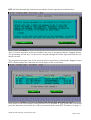
DFT will load automatically and present you with the License Agreement as shown below.
This is a license agreement, which you should review prior to accepting using the “I Agree” button.
The positioning and tab keys can be used to navigate through the license agreement and also the
button selection.
The program will progress only if you accept the license agreement by selecting the ‘I agree’ button.
DFT will then analyse the connected drives and display to the screen below
If the drives in the list represents what you know to be installed in your system then you should
press the Yes button, after which you will be presented with the main DFT Test Menu, see page 11.
©Hitachi Global Storage Technologies 2004
Page 8 of 32
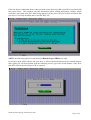
If the list doesn’t contain the drive(s) that you wish to test then select No, you will be presented with
the screen below. This window provides information about cabling and jumper settings, which
could have prevented your drive from being detected, please power-off your system and check that
your drive is correctly installed and re-start the DFT test.
NOTE: the following applies for non-detected Hitachi/Legacy IBM drives only
If you have made all the checks and your drive is still not detected then press the continue button,
after which you will be presented with the following screen, type in the serial number of the drive
that DFT failed to detect and press OK to continue.
©Hitachi Global Storage Technologies 2004
Page 9 of 32
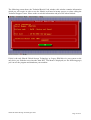
The following screen shows the Technical Result Code window, this window contains information
which you will require in order to use the Hitachi web based warranty process or when calling the
Technical Support Centre. Please make record this information and press OK when finished.
If this is the only Hitachi Global Storage Technology or Legacy IBM drive in your system or the
only drive you wished to test when the main DFT Test Menu is displayed (see the following page)
you can exit the program and shutdown your machine.
©Hitachi Global Storage Technologies 2004
Page 10 of 32
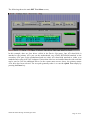
The following shows the main DFT Test Menu screen,
In this example, there are four drives visible in the Device List menu. One ATA hard disk is
attached to the primary ATA port on the motherboard, one ATAPI DVD-ROM attached to the
secondary ATA port on the motherboard and two other ATA hard disk attached to either a on
motherboard or plug-in PCI ATA adapter. If more that 4 devices are installed then the side scroll bar
can be used to view the additional drives. In the current menu screen, above, the primary master
ATA drive has been selected. The test path generally taken is to run the Quick Test simply by
pressing the Enter key.
©Hitachi Global Storage Technologies 2004
Page 11 of 32
Quick Test
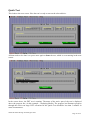
This leads to the next screen. Here the test is ready to start on the selected drive.
All that needs to be done is to press enter again to Start the test, which is seen running in the next
screen.
In the screen above, the DFT test is running. The name of the active part of the test is displayed
above the progress bar, (in this example - Analysing Media). The progress bar illustrates progress
through the active test stage. DFT execution for the Quick Test should be less than 3 minutes in
most circumstances.
©Hitachi Global Storage Technologies 2004
Page 12 of 32
During testing DFT only performs read operations in the user data area, so your data files will not be
overwritten. Write operations will ONLY be performed if you select the options to erase disk, erase
MBR or perform sector repair operation from the Utility Menu or by selecting these options when
offered after a media error has been detected.
The screen above shows the conclusion of a test. In this case, the drive passed the DFT testing.
What does passing Quick Test mean if my system is not starting up correctly?
If the system is failing to boot (start up), then your next steps may be to
- proceed to check all of the data on the drive using Advanced Test (described below)
- analyse the PC in other ways, in particular with respect to rebuilding the operating
system (usually one of the Windows OS’s). Please review the PC and operating
system manuals and use PC manufacturers support lines if appropriate.
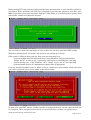
If the test should fail and the cause of failure is due to a media error (for example a bad write) then
you will be presented with a screen similar to that shown below.
In most cases when DFT reports a media error this is because the data in a sector cannot be read due
to corruption. These corrupted sectors can be recovered by being re-written, see options below.
©Hitachi Global Storage Technologies 2004
Page 13 of 32
1. Attempt to repair the corrupted sector(s)
2. Run Erase Disk, or
3. Return
Run Sector Repair
This option is used primarily to allow the recovery of sector(s) of the disk that have become corrupt,
without the need to completely delete all the data already stored on the disk and re-installing the
operating system. The sector repair utility is only supported for Hitachi disk drives and will
launched as a result of DFT finding corrupted sectors on the drive during testing.
By selecting the repair sector option you are instructing DFT to initialise all sectors it identifies as
corrupt. The initialisation process involves over writing the corrupt sector(s) with zeroes.
WARNING: The sector repair operation is not doing data recovery; any data that was stored
in the repaired sector(s) will be lost. Sector Repair WILL result in data being deleted from
your disk drive, only perform these activity if your data has been backed-up or you can afford
to lose the data on your drive.
Run Erase Disk
For more information on Erase Disk see the relevant sections of this document.
NOTE –Erase Disk WILL result in data being deleted from your disk drive, only perform
these activity if your data has been backed-up or you can afford to lose the data on your drive.
For more details of what erase disk does see the relevant sections in this user guide.
If you choose not to repair the drive by selecting the Return option above, or if the cause of failure
wasn’t due to a media defect you will be presented with a screen as shown below. In this example
the screen shows a non-media test failure.
The failing return code 0x72 represents a S.M.A.R.T. error. The S.M.A.R.T. system is a disk drive’s
way of notifying of possible failure in the future (see Utilities Section of this document for more
information on S.M.A.R.T).
©Hitachi Global Storage Technologies 2004
Page 14 of 32
In all cases of test failure a screen displaying a Technical Result Code (TRC) similar to that shown
above will be displayed.
The test result should be noted. It may be required in discussion with your supplier or support centre
in order to take steps to replace the hard drive or to obtain a RMA (Return Materials Authorisation)
through the Hitachi web based warranty process.
If a test is stopped, for example by pressing the cancel button, the following screen will appear.
Selecting Yes will cause the test to be stopped as shown in the following screen.
©Hitachi Global Storage Technologies 2004
Page 15 of 32
This says that testing has not been completed, and is not a statement of either pass or fail. Testing
must be restarted and run to completion in order to assess if there is a problem with the drive. The
return code 0x10 is not an error.
©Hitachi Global Storage Technologies 2004
Page 16 of 32
Advanced Test
If the Advanced Test option is selected, testing is similar to Quick Test, but all of the data area of
the selected disk drive will be tested.
DFT only performs a read test in the user data area, so your data will not be overwritten. Execution
time will normally be in the order of 40 minutes, but this can be longer for very large capacity drives.
Test progress will be illustrated as shown below.
©Hitachi Global Storage Technologies 2004
Page 17 of 32
Advanced Topics
Menus
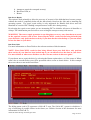
Use the F10 key or the mouse to access menu items at the top of the main test screen, as illustrated
below. These are generally a repeat of functions already displayed but also allow access to
additional tests and utilities.
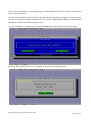
The Exerciser test, as shown in the next screen, can be accessed from the menu or by using the hot
key combination Alt+E.
©Hitachi Global Storage Technologies 2004
Page 18 of 32
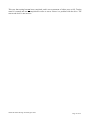
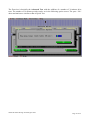
The Exerciser is basically the Advanced Test with the addition of a number of 30-minute drive
tests. The number of 30-minute periods can be set in the following option screen. The pass / fail /
abort mechanism are similar to that of Quick Test.
©Hitachi Global Storage Technologies 2004
Page 19 of 32
Utilities
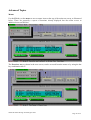
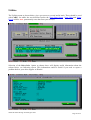
The Utilities menu as shown below, gives you access to several useful tools. These should be used
with CARE, for unlike the test described earlier the Erase Boot Sector, Erase Disk and Sector
Repair utilities WILL permanently erase data from your drive(s).
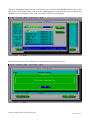
Selection of the Drive Info. Option as shown above will display useful information about the
selected drive, see following screen. This information could be useful if you need to report a
problem back to your drive supplier or Hitachi.
©Hitachi Global Storage Technologies 2004
Page 20 of 32
The drive information displayed above can be saved to a text file in the DATA sub-directory on the
floppy drive. The default name of the text file is DRVINFO.TXT as shown below, you can change the
filename by over typing this name with, for example, the drive serial number.
The following screen will be displayed to confirm that the file has been saved.
©Hitachi Global Storage Technologies 2004
Page 21 of 32
Erase Boot Sector
The boot sector of a disk contains the start-up programs for your operating system, it also contains
information about how your disk is partitioned. If this sector becomes corrupted in any way and this
is your boot drive you may not be able to start your system or access data on the drive. Reinstallation of your operating system in a small number of cases may not fix the problem, for these
cases you will need to erase the boot sector, partition the drive and re-install your operating system.
This utility will erase the boot sector by over writing the original information in this sector with
zeros. It can be used with both IDE and SCSI drives.
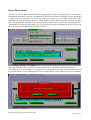
Selecting Erase Boot Sector from the Utilities menu above will display the following screen
This utility will overwrite data on your hard drive, to ensure that you really wish to do this you will
be presented with several confirmation screens as shown below, select YES in each case to continue.
©Hitachi Global Storage Technologies 2004
Page 22 of 32
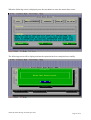
When the following screen is displayed press the start button to erase the master boot sector.
The following screen will be displayed when the operation has been completed successfully.
©Hitachi Global Storage Technologies 2004
Page 23 of 32
Erase Disk
This utility will write zeroes to every sector of your hard drive including the boot sector, and can be
used with both IDE and SCSI drives. This utility is meant to be used to clean-up disk which have
errors written to the media (e.g. where a system has been powered off whilst writing data out to the
drive). This utility can take a long time to run (more than an hour) depending on the capacity of the
drive and the system configuration.
Selecting Erase Disk from the Utilities menu above will display the following screen
As with the Erase Boot Sector utility, Erase Disk will overwrite data on your hard drive, to ensure
that you really wish to do this you will be presented with several confirmation screens as shown
below, select yes in each case to continue.
©Hitachi Global Storage Technologies 2004
Page 24 of 32
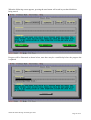
When the following screen appears, pressing the start button will result in your hard disk drive
being erased.
Progress will be illustrated as shown below, note there may be a small delay before the progress bar
is updated.
©Hitachi Global Storage Technologies 2004
Page 25 of 32
After completing the erasure of the disk a sequential read of the disk is carried out to verify that all
sectors have been initialised.
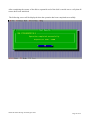
The following screen will be displayed when the operation has been completed successfully.
©Hitachi Global Storage Technologies 2004
Page 26 of 32
ATA Functions
S.M.A.R.T Operations.
S.M.A.R.T. - Self-Monitoring, Analysis and Reporting Technology is intended to protect user data
and prevent unscheduled system downtime that may be caused by predictable degradation and/or
fault of the disk device. By monitoring and storing critical performance and calibration parameters,
S.M.A.R.T. devices employ sophisticated data analysis algorithms to predict the likelihood of nearterm degradation or fault conditions.
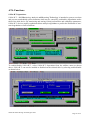
To enable/disable S.M.A.R.T., select S.M.A.R.T. Operations from the utilities menu as shown
above, S.M.A.R.T. can now be enabled or disabled on the selected drive by selecting enable/disable
as shown below.
©Hitachi Global Storage Technologies 2004
Page 27 of 32
Error Code and first aid for your drive
The following table defines all the currently supported DFT error codes. For example if during
testing of your hard drive DFT reports a error code of 0x70 as shown on page 14, this indicates that
your hard disk drive has problems reading one or more of its sectors. In most of these cases the
drive can heal itself of these errors. To do this first back-up all your data from the problem drive ( if
possible ) then run DFT again and select either the Erase Disk or Sector Repair option which is
under the Utility heading. If you already have a backup of the data on the hard disk or the data isn’t
important you can opt to run Erase Disk/Sector Repair from the Test Result screen. Once the
selected operation has completed you can then run one of the test options Quick or Advance to
confirm that the drive has been healed. The result code, which should be displayed, is 0x00 if the
test returns another code then you should check with your drive/system vendor if the drive can be
return for warranty replacement.
©Hitachi Global Storage Technologies 2004
Page 28 of 32
DFT Error Codes
Codes
0x00
0x10
Description
No Error
Command complete successfully.
Test aborted by user.
The current test was cancelled by user and cannot be completed. Rerun the test to conclusion
Selected device not present.
0x20
The selected device could not be found on the selected port. Check cabling and HDD connectors. If the
drive is not seen by the BIOS or is not spinning
ATA Master device not present.
0x21
0x22
0x23
0x30
0x31
An attempt was made to test an ATA Slave device, but an ATA Master cannot be detected. A Master must
be present to test a Slave. Check cabling and HDD connectors.
Device Protected,
Selected device is protected by a password. The drive is write and read protected and cannot be tested
Format Degraded.
A SCSI low-level format was interrupted.
Out of memory.
There’s not enough memory to execute this program.
Wrong parameter.
There is a wrong or unknown parameter.
0x33
Function cannot be executed on this device.
System interrupts the current operation.
0x40
The System has interrupted the current operation, and the function was aborted. Please exit the program
and check if any Power Saving Modes or Cache Programs (like SMARTDRV.EXE) are active. Disable
those features and start this program again.
0x41
0x42
Bad cable.
A data miss compare was detected during the cable test.
Drive temperature problem.
The drive has exceeded the drive temperature limit
Pending SCSI request.
0x43
The ASPI Device driver could not complete the SCSI request block. Check the SCSI configuration
(cabling, termination, Ids etc.).
0x44
The level of vibration that the drive is experiencing is excessive, check the mounting of the drive in the
system and ensure it is rigidly mounted. If possible try mounting the drive in a different position.
0x45
Low System Performance
Corrupted Sector.
0x70
A general hard disk drive problem was detected. You can run the "Erase Disk" utility. If a subsequent test
fails again, the drive is defective and should be replaced.
System Vibration
0x71
Device not ready.
The selected drive is not ready for operation. Check cabling and HDD connectors.
Device S.M.A.R.T. Error.
0x72
0x73
The Self-Monitoring, Analysis and Reporting Technology (S.M.A.R.T.) has detected a drive problem. The
drive may fail soon and should be replaced as soon as possible.
Device damaged by shock.
This device was damaged by an excessive shock
S.M.A.R.T Self-test failed
0x74
0x75
An error was detected during S.M.A.R.T. self-test. You can run the "Erase Disk" utility of DFT. If a
subsequent test fails again, the drive is defective and should be replaced
Defective Hard Disk Drive Component
©Hitachi Global Storage Technologies 2004
Page 29 of 32
Testing of Non-Hitachi/IBM Hard Disk Drives
DFT supports testing of hard disk drives, which were not manufactured by either Hitachi or IBM.
Due to vendor specific design parameters the depth of testing, which will be carried out on these
non-Hitachi/IBM, drives will be less than that performed on the Hitachi and IBM drives.
Should DFT detect a problem with the drive, you will be presented with a result screen similar to
that below. The recommendation is that you obtain a test utility specific to your drive from your
drive manufacturer or your system supplier. Use this utility (if one is available) to re-test your drive,
these utilities may also provide information, which you will require should you need to replace the
drive under warranty.
Running the Erase Disk, Erase MBR or Sector Repair functions on non-Hitachi/IBM disk drives is
not supported by DFT. The screen below will be displayed if you attempt to run any of these
functions on a non-IBM hard disk drive.
©Hitachi Global Storage Technologies 2004
Page 30 of 32
Supplied ASPI Managers
The following ASPI managers are supplied with the DFT Utility and provide support for the listed SCSI
Controllers. Others are supported but have been removed due to space constraints of a floppy disk and
others may work that haven’t been tested. If you have a particular one that is not present or supported, either
add it and edit the config.sys with the appropriate instruction or contact the Call Centre for further advice.
ASPI Manager
ASPI2DOS.SYS
02-12-98
ASPI4DOS.SYS
26-04-99
ASPI8DOS.SYS
02-12-98
ASPI8U2.SYS
06-12-99
ASPI8XX.SYS
08-02-2001
ASPIUWF.SYS
ASPI320.SYS
05-09-02
EXPRESS2.SYS
18-07-02
ASPIMPT
Version
Supported Controllers
4.11.00
•
•
•
Adaptec AVA-1502P,1502AP
Adaptec AVA-1505
Adaptec AVA-1515
Adaptec AHA-1510/1520/1522
Adaptec AHA-1510A/1520A/1522A
Adaptec AHA-1510B/1520B/1522B
Adaptec AHA-1530P/1532P
Adaptec AVA-1502AE/AI,AVA-1505AE/AI,AVA-1505AES
Adaptec AIC-6260/6360/6370 based SCSI host adapters
Adaptec AVA-2825 host adapter
Adaptec AHA-1540B/1542B
Adaptec AHA-1540C/1542C
Adaptec AHA-1540CF/1542CF
Adaptec AHA-1540CP/1542CP
Adaptec 2940 family of PCI to SCSI
Motherboards with SCSI onboard – that uses Adaptec AIC-78XX and AIC-75XX
chipset
Adaptec Dual & Single Channel Ultra2 family of PCI to SCSI Controllers
Adaptec Dual & Single Channel ULTRA160 PCI to SCSI Controllers
Motherboards with SCSI onboard – that uses Adaptec AIC-7890, AIC-7891 and AIC7902 chipsets
Symbios SYM8751SP Single ended Controller
Motherboards with SCSI onboard – that uses Symbios 53C875J chipset.
Tekram DC-390U/W/F/U2 and DC-310/U, DC-390U3W
3.21
•
Tekram DC-390U/W/F/U2 and DC-310/U
d1.10
•
Adaptec 39320D – Ultra320 Controller
01.01
•
Atto UL4D – Ultra320 Controller
5.00.00.
11
•
LSI Ultra320 Controller
1.35
•
•
•
•
•
•
•
•
•
•
•
•
•
•
•
•
1.07
•
•
•
3.68
3.36S
©Hitachi Global Storage Technologies 2004
Page 31 of 32
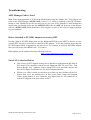
Troubleshooting
ASPI Manager Fails to Load
Note: Some implementation of SCSI on the Motherboard using the Adaptec AIC-7890 chipset will
result in the ASPI Manager ASPI8U2.SYS (version 1.07), which is supplied on this DFT diskette,
failing to load. Should this be the case and you are sure your SCSI controller is built around this
chipset then you should replace the file ASPI8U2.SYS in the A:\ASPI sub-directory of the diskette
with the ASPI8U2.SYS which should have been supplied as part of the software support package
for your hardware.
Drives Attached to PCI IDE Adapter not seen by DFT
If using a Plug-in PCI IDE adapter that uses the Highpoint HPT366 or the HPT370 chipset, in some
systems DFT will fail to detect drives attached to this adapter. To fix this problem ensure that the
PCI IDE adapter BIOS is upgraded to the latest level. For example, if using the EPUSB66 adapter
then you will need to have BIOS level 1.25 or above.
BIOS updates can be obtained from the following web site: http://www.highpoint-tech.com/drivers.htm
Serial ATA Attached Drives
♦
This release of DFT supports testing drives attached to motherboards and Plug-in
PCI Serial-ATA controllers, which uses the Highpoint HPT374 and 372A ( with
Marvel Bridge chip ) chipsets, Silicon Image SIL3112A and 0680 chipset and
Intel ICH5 chipset and Promise SATA chipset implementations.
♦
Whilst every effort is made to keep these up to date you may find that you have a
chipset that we’ve not included yet. In this event, please contact the Support
Centre giving details of your controller and chipset and we will endeavour to
include it’s support in the next release of DFT.
.
©Hitachi Global Storage Technologies 2004
Page 32 of 32