1
Add/Edit Search Satellite
If you cannot find the search satellite you want, you must add it to the positioner
memory. To add/change the search satellite proceed as follows:
1. Perform steps 1 through 4 page 18 if you are not in the Edit Menu.
2.
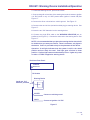
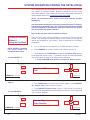
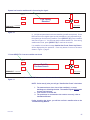
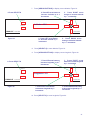
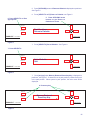
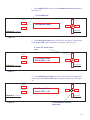
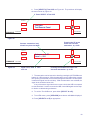
1. Press SELECT A
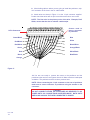
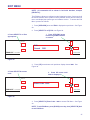
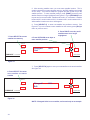
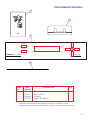
Press [SELECT A] Select Search Sat, see Figure 34.
SELECT A
Select Search Sat
Set Motor Positions
SELECT B
PINNACLE
Model RD-9900
POSITIONER
by WINEGARD
Figure 34
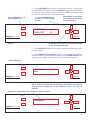
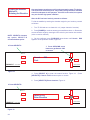
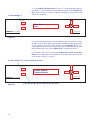
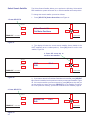
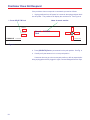
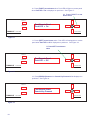
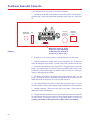
2. The display will show the current search satellite (factory default is the DSS
satellite(s) at 101.0 orbital position). Press [UP] arrow to scroll to Inactive,
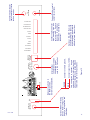
Figure 35.
3. Press SELECT B Edit
2. Press UP arrow key to
scroll to Inactive
SELECT A
Inactive
Edit
SELECT B
PINNACLE
Model RD-9900
POSITIONER
by WINEGARD
Figure 35
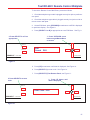
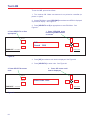
3. Press [SELECT B] to access edit menu. See Figure 35.
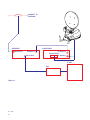
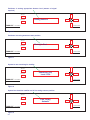
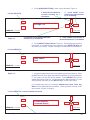
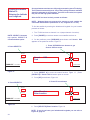
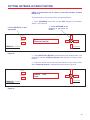
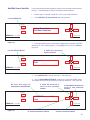
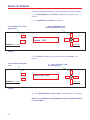
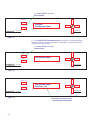
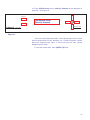
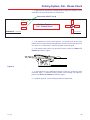
4. Use the UP/DOWN/LEFT/RIGHT arrow keys to enter the satellite name.
The satellite name cannot be longer than eight (8) characters. See Figure 36.
No more than eight (8)
characters for satellite name
4. Press UP arrow key to
scroll to next character/
number
4. Press RIGHT arrow key to
scroll to next character
position
SELECT A
SELECT B
PINNACLE
XXXXXXXX
Quit
0.0
Model RD-9900
POSITIONER
by WINEGARD
Figure 36
4. Press LEFT arrow key to scroll
to previous character position
4. Press DOWN arrow key to scroll to
previous character/number
39