1
TM
BlueDragon 7.1
Deploying CFML on ASP.NET
and the Microsoft .NET Framework
NEW ATLANTA COMMUNICATIONS, LLC
BlueDragon™ 7.1
Deploying CFML on ASP.NET
and the Microsoft .NET Framework
May 12, 2009
Version 7.1
Copyright 1997-2009 New Atlanta Communications, LLC. All rights reserved.
100 Prospect Place • Alpharetta, Georgia 30005-5445
Phone 678.256.3011 • Fax 678.256.3012
http://www.newatlanta.com
BlueDragon is a trademark of New Atlanta Communications, LLC (“New Atlanta”). ServletExec and JTurbo are
registered trademarks of New Atlanta in the United States. Java and Java-based marks are trademarks of Sun Microsystems, Inc. in the United States and other countries. ColdFusion is a registered trademark of Adobe Systems Incorporated (“Adobe”) in the United States and/or other countries, and its use in this document does not imply the
sponsorship, affiliation, or endorsement of Adobe. All other trademarks and registered trademarks herein are the
property of their respective owners.
This product includes software developed by the Apache Software Foundation (http://www.apache.org).
No part of this document may be reproduced, transmitted, transcribed, stored in a retrieval system, or translated
into any language or computer language, in any form or by any means, electronic, mechanical, magnetic, optical,
chemical, manual, or otherwise without the prior written consent of New Atlanta.
New Atlanta makes no representations or warranties with respect to the contents of this document and specifically
disclaims any implied warranties of merchantability or fitness for any particular purpose. Further, New Atlanta reserves the right to revise this document and to make changes from time to time in its content without being obligated to notify any person of such revisions or changes.
The Software described in this document is furnished under a Software License Agreement (“SLA”). The Software
may be used or copied only in accordance with the terms of the SLA. It is against the law to copy the Software on
tape, disk, or any other medium for any purpose other than that described in the SLA.
Contents
1
INTRODUCTION........................................................................................... 1
1.1 About This Document............................................................................................................................. 1
1.2 About CFML ........................................................................................................................................... 1
1.3 About BlueDragon .................................................................................................................................. 2
1.4 System Requirements ............................................................................................................................. 2
1.5 Technical Support................................................................................................................................... 2
1.6 Other Documentation ............................................................................................................................. 2
2
GETTING STARTED WITH BLUEDRAGON.NET ....................................... 4
2.1 Prior to Installing BlueDragon .............................................................................................................. 4
2.1.1
Ensure ASP.NET Pages Can Run ................................................................................................ 4
2.1.2
Windows Server 2008 and Windows Vista ................................................................................. 4
2.1.3
Windows 2003 Security Settings ................................................................................................. 6
2.1.4
Windows “Data Execution Protection” Mechanism .................................................................... 7
2.1.5
Disable Any IIS 6 “WildCard Mapping” Enabled by CFMX ..................................................... 7
2.2 Installing BlueDragon for the Microsoft .NET Framework ............................................................... 7
2.2.1
Installation Alternatives ............................................................................................................... 8
2.2.2
Upgrading or Uninstalling BlueDragon....................................................................................... 8
2.3 Placing Your CFML within IIS Web Site(s) ........................................................................................ 9
2.4 BlueDragon CFML Compatibility and Enhancements ....................................................................... 9
2.5 Editors for Creating/Editing CFML and ASP.NET Pages ................................................................. 9
2.6 Understanding and Troubleshooting BlueDragon.NET Issues .......................................................... 9
3
BENEFITS OF DEPLOYING CFML ON .NET ............................................ 11
3.1 Audiences for Deploying CFML on .NET .......................................................................................... 11
3.2 Benefits of Deploying CFML on BlueDragon.NET ........................................................................... 11
3.2.1
Benefits from Running CFML on .NET Without Code Changes .............................................. 11
3.2.2
Benefits from CFML/ASP.NET Integration .............................................................................. 12
3.2.3
Benefits from Learning and Using ASP.NET Additional Features ........................................... 13
3.2.4
Benefits Enabled in .NET 2.0 .................................................................................................... 13
3.2.5
Benefits In Learning ASP.NET and .NET At Your Own Pace ................................................. 14
3.2.6
Other BlueDragon and New Atlanta Advantages ...................................................................... 14
4
.NET FEATURES REQUIRING NO CHANGE IN CFML CODE ................. 15
4.1 .NET Framework Features That CFML Pages Inherit..................................................................... 15
4.2 CFML-based Database Processing is ADO.NET under the Covers ................................................. 18
4.2.1
CFQUERY Results Are ADO.NET DataTables, and Vice-versa.............................................. 18
4.2.2
ADO.NET Connection Pooling ................................................................................................. 18
4.2.3
DSN-Less Connections.............................................................................................................. 19
4.2.4
ASP.NET Connection Strings ................................................................................................... 19
4.3 CFML Web Services Served as .NET Web Services ......................................................................... 19
5
ACCESSING THE BLUEDRAGON ADMINISTRATION CONSOLE ......... 20
5.1 BlueDragon.NET on IIS 7.0 ................................................................................................................. 20
5.1.1
Server Settings and Configuration Inheritance .......................................................................... 22
5.2 BlueDragon.NET on IIS 6.0 and 5.1.................................................................................................... 24
5.2.1
Admin Console Defined Per Web App ..................................................................................... 24
5.2.2
Applying BlueDragon Admin Configuration Settings Globally................................................ 25
5.2.3
Setting a (Virtual) Directory to Not Have Its Own Admin Console .......................................... 26
5.3 BlueDragon Admin Configuration Files ............................................................................................. 27
5.3.1
Work File Locations .................................................................................................................. 27
5.3.2
BlueDragon.xml Configuration File Location ........................................................................... 27
5.3.3
Central CustomTags Directory Location ................................................................................... 28
5.3.4
No BlueDragon\Admin Directory Exists in Admin Console Path ............................................ 28
5.3.5
BlueDragon Datasources ........................................................................................................... 28
5.4 Securing the BlueDragon Admin Console .......................................................................................... 29
5.4.1
No Admin Console Password Defined Upon Installation ......................................................... 29
5.4.2
Changing the Admin Console URL Path................................................................................... 29
5.4.3
Restricting Admin Access by IP Address .................................................................................. 29
5.4.4
Remove the Admin UI Completely ........................................................................................... 30
6
UNDERSTANDING THE MICROSOFT .NET FRAMEWORK .................... 31
6.1 BlueDragon as a .NET HTTP Handler ............................................................................................... 31
6.2 Global Assembly Cache (GAC) ........................................................................................................... 31
6.3 Web.config file ...................................................................................................................................... 32
6.4 IIS Configuration of CFML File Extensions ...................................................................................... 32
6.5 .NET Web Applications........................................................................................................................ 33
7
OTHER CONFIGURATION ISSUES .......................................................... 35
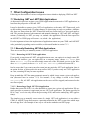
7.1 Restarting .NET and .NET Web Applications ................................................................................... 35
7.1.1
Manually Restarting .NET Web Applications ........................................................................... 35
7.1.2
Automatic Stopping/Restarting of .NET Web Applications ...................................................... 37
7.1.3
Implications on Sessions of Restarting .NET Web Applications .............................................. 38
7.1.4
First Request Delay on Restart of .NET Web Applications ...................................................... 38
BlueDragon 7.1: Deploying CFML on ASP.NET and the Microsoft .NET Framework
ii
7.2 Manually Configuring CFML Extension Mappings.......................................................................... 38
7.2.1
“Manual Configuration” Installation Option ............................................................................. 38
7.2.2
XCopy Deployment ................................................................................................................... 40
7.2.3
Hiding CFM Extensions ............................................................................................................ 41
7.3 Sourceless Deployment ......................................................................................................................... 41
7.3.1
Setting an Expiration Date on Your Templates, Such as for Trial Code ................................... 41
7.4 No Default Document Defined by BlueDragon.NET ......................................................................... 42
7.5 Invoking CFX Custom Tags in .NET .................................................................................................. 42
7.5.1
Compiling CFXs in Native .NET Languages ............................................................................ 42
7.5.2
Reusing Existing Java CFXs ..................................................................................................... 42
8
TROUBLESHOOTING CFML PROCESSING ON .NET ............................ 43
8.1 CFML Pages Do Not Run at All .......................................................................................................... 43
8.1.1
File Not Found Errors ................................................................................................................ 43
8.1.2
Page Returns Source Code or Does Not Run at All................................................................... 43
8.1.3
CFML Pages Were Running But Have Stopped........................................................................ 44
8.2 Admin Console Changes Are Not Taking Effect................................................................................ 44
8.3 Pages Are Not Performing As Expected ............................................................................................. 45
8.3.1
Beware of Unexpected Application Restarts ............................................................................. 45
8.3.2
.NET Framework Workload Processing Defaults ..................................................................... 45
8.3.3
Using Microsoft Performance Monitor...................................................................................... 46
8.3.4
Contacting New Atlanta for Any Other Performance Challenges ............................................. 47
8.4 .NET Security Issues that May Affect CFML Processing ................................................................. 48
8.4.1
Problems Processing CFDIRECTORY, CFFILE Actions ......................................................... 48
8.4.2
Problems Processing Access Databases .................................................................................... 49
8.4.3
.NET Request Identity ............................................................................................................... 49
8.5 Other Challenges and Concerns .......................................................................................................... 50
8.5.1
Work Directories Don’t Exist As Expected ............................................................................... 50
8.5.2
Debugging Errors When Including Between CFML and ASP.NET ......................................... 50
8.5.3
Frequently Asked Questions ...................................................................................................... 50
9
ADDITIONAL USEFUL RESOURCES ....................................................... 51
BlueDragon 7.1: Deploying CFML on ASP.NET and the Microsoft .NET Framework
iii
1 Introduction
BlueDragon 7.1 for the Microsoft .NET Framework (commonly referred to as BlueDragon.NET)
allows CFML applications to be deployed on Windows servers running the Microsoft .NET
Framework, the Microsoft IIS web server, and ASP.NET. The Microsoft .NET Framework is
built-in to Windows 2008 Server, Windows Vista, and Windows 2003 Server; and, can be installed onto Windows 2000 and Windows XP.
While most web applications on .NET are built with ASP.NET and other components of the
.NET framework, BlueDragon makes it possible for the .NET Framework to also process CFML
applications. BlueDragon.NET is the only way to run CFML on the .NET Framework.
BlueDragon.NET is about empowering CFML to integrate with your organization’s .NET development and take full advantage of the enterprise features of this strategic platform.
1.1 About This Document
This document describes how to install BlueDragon.NET and run CFML applications via the
Microsoft IIS web server and the .NET framework, without requiring the installation of proprietary Adobe ColdFusion server software. See section 6 for details on the technical underpinnings of how BlueDragon.NET is implemented.
This document also offers a brief overview of the .NET Framework. More importantly, it explains the many benefits of .NET deployment for CFML developers. It discusses the many forms
of integration that are possible between CFML pages and native .NET components, including
ASP.NET pages. Section 3 discusses these many benefits, and the details and code examples of
integrating CFML and ASP.NET are detailed in a separate document, Integrating CFML with
ASP.NET and the Microsoft .NET Framework.
1.2 About CFML
ColdFusion® Markup Language (CFML) is a popular server-side markup language for building
dynamic database-driven web sites. Unlike scripting-based alternatives such as ASP or PHP,
CFML is based primarily on HTML-like markup tags (though CFML also contains a scripting
language component). CFML is characterized by its low learning curve and ease-of-use, particularly for web developers who do not have a technical background in programming languages
such as C/C++ or Java. CFML was originally developed by Allaire Corporation in the late
1990’s; Allaire was acquired by Macromedia, Inc. in early 2001, which in turn was acquired by
Adobe Systems Inc. in late 2005.
Over the past several years, many organizations have begun adopting standards-based application servers for their Internet and intranet web site deployments. In particular, there has been a
significant migration to application servers based on the Microsoft .NET Framework. This standardization on .NET (and ASP.NET) creates a problem for organizations that have legacy applications implemented in CFML; prior to the introduction of BlueDragon these applications could
only be deployed on proprietary Allaire/Macromedia ColdFusion application servers.
BlueDragon 7.1: Deploying CFML on ASP.NET and the Microsoft .NET Framework
1
1.3 About BlueDragon
The core technology of BlueDragon is a CFML runtime and execution module that, in BlueDragon.NET, is implemented as a standard ASP.NET HTTPHandler. This allows the deployment of
CFML pages onto the .NET framework and IIS without installing proprietary
Allaire/Macromedia ColdFusion server software.
BlueDragon is highly compatible with Macromedia’s ColdFusion MX 7.0 Server, with some limitations but also many enhancements. Beside those mentioned in this guide, see the BlueDragon 7.1 CFML Compatibility Guide and BlueDragon 7.1 CFML Enhancements Guide for details:
http://www.newatlanta.com/products/bluedragon/self_help/docs/index.cfm
BlueDragon is a highly optimized, high-performance CFML runtime engine. CFML pages are
compiled into an internal representation that is cached in memory and executed by the BlueDragon runtime when CFML pages are requested by client browsers.
1.4 System Requirements
BlueDragon 7.1 for the Microsoft .NET Framework is supported on Windows Server 2008, Windows Vista, Windows Server 2003, and Windows XP.
BlueDragon.NET 7.1 requires the Microsoft .NET Framework version 2.0 or higher which can
be installed using the Windows Update service, or may be downloaded and installed manually.
BlueDragon.NET 7.1 requires the Visual J# 2.0 Redistributable Package – Second Edition; however, if this is not present the BlueDragon installer will install it for you. If you have already installed the original Visual J# 2.0 Redistributable Package (not the Second Edition), it must be
uninstalled before you install the Second Edition redistributable.
BlueDragon.NET 7.1 requires the Visual C++ 2005 SP1 Redistributable Package; however, if
this is not present the BlueDragon installer will install it for you.
1.5 Technical Support
If you’re having difficulty installing or using BlueDragon, visit the self-help section of the New
Atlanta web site for assistance:
http://www.newatlanta.com/products/bluedragon/self_help/index.cfm
Details regarding paid support options, including online-, telephone-, and pager-based support
are available from the New Atlanta web site:
http://www.newatlanta.com/biz/support/index.jsp
1.6 Other Documentation
The other relevant manuals available in the BlueDragon documentation library are:
•
Integrating CFML with ASP.NET and the Microsoft .NET Framework
BlueDragon 7.1: Deploying CFML on ASP.NET and the Microsoft .NET Framework
2
•
BlueDragon 7.1 CFML Compatibility Guide
•
BlueDragon 7.1 CFML Enhancements Guide
•
BlueDragon 7.1 User Guide
Each of these documents offers useful information that may be relevant to developers, installers,
and administrators using BlueDragon.NET. These are offered in PDF format in the docs directory where BlueDragon is installed (as discussed in section 2.1.4).
All BlueDragon documents are available from New Atlanta’s web site:
http://www.newatlanta.com/products/bluedragon/self_help/docs/index.cfm
BlueDragon 7.1: Deploying CFML on ASP.NET and the Microsoft .NET Framework
3
2 Getting Started with BlueDragon.NET
This quick start chapter covers the minimum information needed to get started with deployment
of CFML on Microsoft .NET, including Windows 2000, Windows XP, Windows Server 2003,
Windows Vista, and Windows Server 2008.
While the simplest approach will have you running your CFML on .NET in just minutes, with
Microsoft IIS serving your CFML in a familiar way, there are some new concepts and capabilities that will differ from your experience with traditional standalone CFML servers (like BlueDragon Server JX and ColdFusion Server). The remainder of this document explains those matters in further detail.
2.1 Prior to Installing BlueDragon
Some installations of BlueDragon for the Microsoft .NET Framework may experience challenges
due to configuration issues in the Windows environment. The following sections offer guidance
to anticipate and/or resolve such issues.
2.1.1 Ensure ASP.NET Pages Can Run
Before installing BlueDragon for the Microsoft .NET Framework, you should make sure that the
server has been set up to run ASP.NET pages. This means that both the .NET Framework must
be installed and IIS must have been properly configured by the .NET Framework installation to
process ASPX pages.
If the server can’t run ASP.NET pages, it will not be able to run CFML pages once BlueDragon
is installed, since they are executed using the same page processing “pipeline”. This is discussed
further in the troubleshooting section, 8.1, where a simple sample ASP.NET page is offered for
testing purposes.
On Windows 2000, it is imperative that IIS be installed prior to installation of the .NET Framework (conversely, if IIS has been installed or re-installed after .NET, there is additional configuration required as discussed in section 8.1.2.1.)
2.1.2 Windows Server 2008 and Windows Vista
Before installing BlueDragon.NET on Windows Server 2008 or Windows Vista, you must first
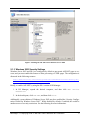
install IIS and ASP.NET. From the “Programs and Features” control panel, select the “Turn
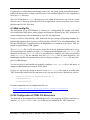
Windows features on or off” option. For Windows Vista, select the ASP.NET option as illustrated in Figure 1, below; required options to support ASP.NET will be selected automatically.
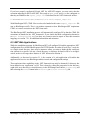
For Windows Server 2008, add the “Web Server (IIS)” role, and select the ASP.NET role service
as illustrated in Figure 2, below; required services to support ASP.NET will be selected automatically.
BlueDragon 7.1: Deploying CFML on ASP.NET and the Microsoft .NET Framework
4
Figure 1. Installing IIS and ASP.NET on Windows Vista
BlueDragon 7.1: Deploying CFML on ASP.NET and the Microsoft .NET Framework
5
Figure 2. Installing IIS and ASP.NET on Windows Server 2008
2.1.3 Windows 2003 Security Settings
Windows Server 2003 and IIS 6 are configured by default to not permit ASP.NET pages to execute, and you must enable this feature to allow processing of CFML pages. The configuration is
discussed in the following resource:
http://www.microsoft.com/technet/prodtechnol/WindowsServer2003/Library/IIS
/44f16c37-f727-4244-9813-2289e13dadba.mspx
Briefly, to enable ASP.NET by using the IIS 6 version of IIS Manager:
1. In IIS Manager, expand the desired computer, and then click Web
Extensions.
Service
2. In the details pane, click ASP.NET, and then click Allow.
Additionally, recent editions of Windows Server 2003 may have enabled the “Security Configuration Wizard for Windows Server 2003”. While disabled by default, if enabled, this could be
another source of security restrictions. See the following for more information:
BlueDragon 7.1: Deploying CFML on ASP.NET and the Microsoft .NET Framework
6
http://www.microsoft.com/windowsserver2003/technologies/security/configwiz
/default.mspx
2.1.4 Windows “Data Execution Protection” Mechanism
Editions of Windows XP SP 2 and Windows Server 2003 may enable a security feature called
Data Execution Protection (or DEP). If enabled, this may prevent the BlueDragon installer from
running. See the following for more information:
http://support.microsoft.com/kb/875352
2.1.5 Disable Any IIS 6 “WildCard Mapping” Enabled by CFMX
If the ColdFusion MX installer has been run to integrate with IIS 6, prior to installing BlueDragon, it will have enabled an IIS-specific feature called “wildcard mappings”, which is set on the
Application Configuration page where file extensions (like CFM and CFC) are defined. Depending on your CFMX installation choice, this may be configured for a single web site, all web
sites, or the master properties for IIS.
You must remove this wildcard mapping if set for any web site which will be processing CFML
with BlueDragon.NET, as will be discussed in section 2.2.
If the wildcard mappings setting is set in the master properties for IIS, note that it will be implemented in any future web sites you might create and you will need to remove it from them, unless you remove it from the master properties.
2.2 Installing BlueDragon for the Microsoft .NET Framework
BlueDragon for the Microsoft .NET Framework can be downloaded from the New Atlanta web
site:
http://www.newatlanta.com/bluedragon/index.cfm
Offered as a free trial edition, it will work in an unrestricted fashion for 30 days, after which it
will revert to a single IP developer edition that never expires (development with BlueDragon is
free). When you purchase a license for BlueDragon, you can enter the license key into the BlueDragon admin console (see section 5) or manually enter it into the central bluedragon.xml
configuration file (see section 5.2.3).
The BlueDragon installer will first confirm that you already have installed the .NET Framework
2.0. If not, you should use the Windows Update service to install it. Alternately, the .NET
Framework can be obtained from:
http://msdn.microsoft.com/netframework/downloads/updates/
The BlueDragon installer next determines if you have installed the Visual J# .NET 2.0 Redistributable Package—Second Edition; if this is not present the BlueDragon installer will install it for
you. The BlueDragon installer also determines if you have installed the Visual C++ 2005 SP1
Redistributable Package; if this is not present the BlueDragon installer will install it for you.
BlueDragon 7.1: Deploying CFML on ASP.NET and the Microsoft .NET Framework
7
2.2.1 Installation Alternatives
You will next be offered a choice of four options for installing BlueDragon.NET, which will
configure the Microsoft IIS web server and .NET framework to process files with the .cfm,
.cfml, .cfc or .cfchart extension. You can implement BlueDragon to configure:
•
All Web Sites
•
Selected Web Site(s)
•
Manual Configuration
•
Single Virtual Directory
The first three options will implement BlueDragon in a global way so that all CFML pages in all
directories and virtual directories on the selected web site(s) will be processed by BlueDragon.
BlueDragon will be installed as a managed assembly that resides in the Global Assembly Cache
(GAC). The BlueDragon installer also makes the XML modifications needed in the system-wide
web.config file to extend the .NET framework to process CFML using BlueDragon. These are
discussed further in Section 6. Additional support files will be placed, by default, in:
C:\Program Files\New Atlanta\BlueDragon.NET
The fourth option differs from the first three in that it will let you indicate a single virtual directory in a selected web site where BlueDragon will place all needed support files, including the
web.config, bin directory, and changes in IIS will be made only for that virtual directory (no
global changes will be made). You will be prompted for the directory to use or create within the
selected web site. (If a web.config file already exists, the installer will simply update it for the
needed BlueDragon entries, and if a bin directory already exists, the BlueDragon DLLs will
simply be added to that.)
For all but the third option, BlueDragon will configure IIS so that CFML files are processed by
BlueDragon by way of the .NET framework (as discussed in section 6.4). It will also prompt to
indicate if these changes would overwrite any existing extension mappings for CFML-related
files (.cfm, .cfml, .cfc, and .cfchart).
The third option leaves you to make the extension mapping changes manually, when desired. See
section 7.2 for more information.
Depending on the installation option you choose, BlueDragon may prompt you to stop the IIS
Admin service. After installation has completed, IIS will be restarted by the BlueDragon installer.
2.2.2 Upgrading or Uninstalling BlueDragon
If you wish to upgrade from BlueDragon.NET 6.2 or 7.0 to 7.1, simply run the 7.1 installer
which will detect and upgrade your current 6.2 or 7.0 installation. Note, however, that it is not
possible to upgrade to BlueDragon.NET 7.1 on Windows Server 2008 or Windows Vista; on
these operating systems you must first uninstall the older version of BlueDragon.NET before installing 7.1.
BlueDragon 7.1: Deploying CFML on ASP.NET and the Microsoft .NET Framework
8
When you uninstall BlueDragon.NET, it will preserve your previous settings, including admin
console configuration and more. If you are upgrading and are concerned about protecting your
files, simply make a copy of the relevant configuration and work directories (as discussed in section 5.2) before upgrading.
To uninstall BlueDragon.NET, use the Windows Control Panel feature, Add or Remove
Programs.
2.3 Placing Your CFML within IIS Web Site(s)
Once installed, BlueDragon is configured so that IIS and the .NET Framework natively process
CFML templates alongside other ASP.NET and static web resources (such as .aspx pages,
HTML files, GIF/JPEG images, etc.). Simply place your CFML pages into the document root
directory (for example, C:\Inetpub\wwwroot) or its sub-directories or a virtual directory (or
the virtual directory chosen in the fourth option discussed in the previous section).
Note that the BlueDragon installer does not configure index.cfm as a “default document” in
IIS. See section 7.4 for more information, if your application relies on URLs without filenames.
2.4 BlueDragon CFML Compatibility and Enhancements
While all BlueDragon users should become aware of the various enhancements and compatibility
discussions in the manuals, BlueDragon 7.1 CFML Compatibility Guide and BlueDragon 7.1
CFML Enhancements Guide, users of the .NET edition should look there particularly for differences specific to the .NET edition, including the following new or enhanced functions:
createObject(), getHTTPContext(), and render(), and the following tags: CFDIRECTORY,
CFINVOKE, CFOBJECT, CFQUERY, CFPROCPARAM, CFREGISTRY, and CFSETTING. Also, see
the BlueDragon 7.1 User Guide for general information about the BlueDragon Admin console as
well as information about other features familiar to CFML developers (Flash integration, CFML
IDEs, etc.)
In addition, BlueDragon.NET introduces many new enhancements itself over the Java-based versions of BlueDragon and ColdFusion, including powerful options for integrating your CFML
with ASP.NET and .NET objects, as well as exposing your CFML application to built-in features
of the .NET framework that require no coding changes to enable. See the discussions in sections
3 and 4 of this document for important information.
2.5 Editors for Creating/Editing CFML and ASP.NET Pages
CFML developers can continue to use their favorite editors for creating/editing CFML pages,
including CF Studio, HomeSite+, Dreamweaver MX, CFEclipse, and so on. Note, however, that
there are tools that each of these has some support for editing ASP.NET pages (Dreamweaver
MX, in particular), and there are also other traditional ASP.NET editors with some support for
CFML pages. For more information, see the manual, Integrating CFML with ASP.NET and the
Microsoft .NET Framework, and the section of this same name.
2.6 Understanding and Troubleshooting BlueDragon.NET Issues
Finally, as you begin exploring BlueDragon.NET, be aware of several resources provided here to
help you in understanding details of the .NET Framework as well as troubleshooting techniques
BlueDragon 7.1: Deploying CFML on ASP.NET and the Microsoft .NET Framework
9
that may be new to both CFML and ASP.NET developers. These are discussed in sections 6 and
7. Additional resources for understanding .NET are provided in section 9.
If you have difficulty with anything related to BlueDragon, please note that we have several
sources of free and paid support. See the discussion of technical support in section 1.5.
BlueDragon 7.1: Deploying CFML on ASP.NET and the Microsoft .NET Framework
10
3 Benefits of Deploying CFML on .NET
BlueDragon for the Microsoft .NET Framework allows existing CFML applications to be redeployed onto any server that’s running the Microsoft .NET Framework 2.0 or higher, eliminating the need for proprietary Adobe ColdFusion servers. It’s also important to note that BlueDragon.NET is not a server or service but instead extends the .NET Framework in a standard way
(via an HttpHandler) so that it can process CFML. See Section 6 for more information on the
technical underpinnings of BlueDragon.NET.
Further, there are several advantages when CFML is deployed on .NET, as discussed below.
3.1 Audiences for Deploying CFML on .NET
Deploying CFML on .NET will be of interest to two categories of CFML developers. The first
includes those working in an organization (or who have clients) moving to the .NET framework.
Such CFML developers will be faced with the prospect of rewriting all of their CFML applications in ASP.NET. Now they don't have to; they can keep their CFML and simply redeploy it on
.NET.
The second category includes those who don't have a pressing need to move to .NET, but who
could find advantages in moving to .NET, or in moving to BlueDragon. There are advantages
that BlueDragon gives you over CFMX, and there are additional advantages to running CFML
on .NET that you can't get with ColdFusion.
3.2 Benefits of Deploying CFML on BlueDragon.NET
For many, the most important aspect of being able to deploy CFML on .NET is that they can
avoid a lengthy and expensive rewrite of the CFML into ASP.NET. BlueDragon.NET extends
the .NET framework to enable it to process CFML pages.
There are many other specific benefits, however, which can be classified as follows and will be
expanded upon in the following sections:
•
Benefits from Running CFML on .NET Without Code Changes
•
Benefits from CFML/ASP.NET Integration
•
Benefits from Learning and Using ASP.NET Additional Features
•
Benefits Enabled in .NET 2.0
•
Benefits In Learning ASP.NET and .NET At Your Own Pace
•
Other BlueDragon and New Atlanta Advantages
3.2.1 Benefits from Running CFML on .NET Without Code Changes
CFML pages deployed on .NET can benefit from several features enabled by either the .NET
framework or IIS, many without any required changes in CFML:
•
CFML queries are ADO.NET under the covers
•
CFML web services are native .NET web services
BlueDragon 7.1: Deploying CFML on ASP.NET and the Microsoft .NET Framework
11
•
.NET includes support for clustering, failover, and load-balancing
•
Session replication across clusters
•
Session persistence over restarts
•
Resource throttling and auto restart/recovery
•
Multiple independent instances (application isolation)
•
Multiple BlueDragon Admin Consoles
•
Optional Application Pooling in IIS 6 (greater isolation)
•
Application sandboxing (protecting shared resources)
•
Declarative login security features (including Active Directory)
•
Performance monitoring
•
Application tracing and reporting mechanisms
•
Enhanced error handling
•
And more
These features are discussed further in section 4.
3.2.2 Benefits from CFML/ASP.NET Integration
There are benefits for CFML developers integrating their CFML with the .NET framework, including (but not limited to):
•
CFML and ASP.NET applications can share session, application, request and other
scopes (including complex datatypes like structures, arrays, and queries)
•
CFML applications can include output from and forward control to ASP.NET templates,
and vice-versa
•
CFML applications can use CFOBJECT and createObject() to call upon .NET components (including the .NET Framework classes, business objects you might write in-house,
third-party objects you may acquire, and COM objects)
Further, BlueDragon.NET offers powerful features for integration of CFML objects (templates,
components, and custom tags) from ASP.NET pages:
•
ASP.NET pages can invoke CFML components (CFCs) , call CFML custom tags (including CFXs), and include CFML pages
•
ASP.NET pages can execute CFML code inline (within the ASP.NET page) and share
data in any CFML scope
•
ASP.NET pages can be directed to execute an application’s Application.cfm and
OnRequestEnd.cfm files
BlueDragon 7.1: Deploying CFML on ASP.NET and the Microsoft .NET Framework
12
Each of these integration features is discussed in further detail in the manual, Integrating CFML
with ASP.NET and the Microsoft .NET Framework.
3.2.3 Benefits from Learning and Using ASP.NET Additional Features
Still other benefits of ASP.NET are worth exploring, some of which can be leveraged by integrating CFML and ASP.NET, include:
•
the many rich user interface controls such as the calendar, datagrid, adrotator, datalist, repeater, and more (and 3rd party controls beyond those), some of which are discussed in
the manual, Integrating CFML with ASP.NET and the Microsoft .NET Framework
•
built-in support for mobile devices
•
built-in support for internationalization
•
built-in Active Directory support
•
built-in support for caching page and partial page output as well as data, with refresh triggers based on query string values, file updates, and more
•
built-in application and session event handling via global.asax
•
built-in integration with Performance Monitor (as discussed in section 8.3.3)
•
built-in form validation
•
built-in support for configuration files (as an alternative to application variables), as discussed in the manual, Integrating CFML with ASP.NET and the Microsoft .NET Framework
Look for additional technotes to be developed in the future discussing integration of these features from BlueDragon.NET.
3.2.4 Benefits Enabled in .NET 2.0
In addition, the .NET 2.0 Framework offers still more possibilities:
•
over 45 new controls for rich user interfaces including menus, trees, wizards, datasource
controls & more
•
built-in portal support through web parts
•
enhanced caching, including query dependencies
•
support for master pages, from which other content pages can inherit
•
support for themes and skins
•
enhanced configuration support and application health monitoring
•
and much more
BlueDragon 7.1: Deploying CFML on ASP.NET and the Microsoft .NET Framework
13
3.2.5 Benefits In Learning ASP.NET and .NET At Your Own Pace
Most important to some, web developers can continue to enjoy the productivity and ease-of-use
of CFML, but in a standard .NET environment.
We make it easy for CFML developers to learn about and integrate with ASP.NET and the .NET
Framework, at their own pace and without need to learn many of the details usually associated
with such programming. They can continue to use their preferred tools (Dreamweaver MX,
CFEclipse, CF Studio, HomeSite+, PrimalCode, etc.) to edit their CFML, and some of those
tools support creation of both CFML and ASP.NET pages.
When developers are interested in learning more about .NET and building native .NET pages or
components, they will also find that Microsoft’s new Visual Web Developer 2005 Express Edition should be even more accessible and familiar to their experience working with more traditional CFML tools than previous editions of Visual Studio.
We like to say that BlueDragon.NET offers training wheels for CFML developers in their move
to .NET. They can move some or all of their applications (and developers) to the new platform at
whatever pace they deem appropriate, or they can just leverage the better platform that .NET
provides for their existing CFML applications. The next section expands on that idea of why
CFML code, unchanged, simply runs better on .NET.
3.2.6 Other BlueDragon and New Atlanta Advantages
There are many additional benefits to running CFML on BlueDragon, as are outlined in the other
manuals in the BlueDragon documentation set. See section 2.4 for links to those resources.
BlueDragon 7.1: Deploying CFML on ASP.NET and the Microsoft .NET Framework
14
4 .NET Features Requiring No Change in CFML Code
There are some features of the .NET Framework which provide benefit to CFML developers
even if they don’t change any of their CFML code. New Atlanta believes that .NET simply provides a better platform for CFML execution. This section discusses some of the features.
4.1 .NET Framework Features That CFML Pages Inherit
There are several features that the .NET framework enables which normally are discussed only
with respect to processing ASP.NET pages. Since BlueDragon.NET enables CFML pages to be
processed similarly to ASP.NET pages, these features and benefits are available (or can be configured to apply) to CFML pages as well.
These features require no changes to the CFML pages and instead are configured in IIS or the
.NET framework by way of XML entries defined in the standard .NET configuration file,
web.config. See section 6.3 and following for more on the location and purpose of this file and
how to edit it.
Following are some of the features that can be enabled in the .NET framework to benefit all
pages, including CFML pages:
•
Queries in CFML are processed using ADO.NET, which offers both enhanced performance and added features over JDBC-based processing
o As described in section 4.2, database processing in BlueDragon leverages Microsoft’s ADO.NET drivers for all database processing. Besides the benefits of Microsoft’s native support and performance, among the features that can be leveraged is use of ADO.NET connection pooling, as discussed in that section 4.2. No
CFML code changes are required to leverage this benefit.
•
Web services in CFML are served as native .NET web services, offering enhanced
functionality over java-based web services
o See section 4.3 for more information
•
Leveraging .NET Clustering, Load-Balancing, and Fail-over
o Because CFML runs in the same pipeline as ASP.NET, any available mechanisms
(from Microsoft or third parties) to enable clustering, load-balancing, and failover will accrue to the benefit of CFML developers
o Further, because CFML session variables are integrated with ASP.NET session
variables (next bullet), mechanisms available to persist sessions to database or
other shared datastores enable clustering without requiring “sticky sessions”
•
Leveraging .NET Session Variable Persistence for Clustering
o It is possible to configure web applications in the .NET framework so that session
variables are stored not just in memory but also in a database or a state server (a
BlueDragon 7.1: Deploying CFML on ASP.NET and the Microsoft .NET Framework
15
service running on the same or another server). If BlueDragon is configured to use
.NET sessions (in the BlueDragon Admin console), then CFML session variables
also benefit from this feature. This gives session variables many of the benefits of
client variables while also enabling clustering of sessions. For more information,
see any discussion of the .NET sessionState directive, such as in:
http://msdn2.microsoft.com/en-us/library/ms178586
o Additionally, third party software exists to provide still more scalable, robust
management of .NET sessions, particularly for clustering. ScaleOutSoftware, for
example, has been demonstrated to work with BlueDragon.NET.
http://www.scaleoutsoftware.com/
•
Leveraging .NET Session Variable Persistence Over Restarts
o Related to persistent session variables, another significant benefit of using session
persistence is that they are persisted over server restarts. In traditional ColdFusion
servers, a restart would cause loss of all sessions. With BlueDragon.NET, if persistent sessions are enabled in .NET and ASP.NET sessions are enabled in the
BlueDragon Admin, then sessions are not lost on restart. Existing CFML code
that sets or gets session variables will benefit from this feature, without change.
•
Leveraging .NET Application Restart Mechanisms
o When an error occurs in a .NET application domain which causes undesirable
excessive use of resources (too much memory, too many requests, requests taking
too long, etc.), the Framework has built-in limiters set that detect the problem and
try to protect the application. It will create a new instance of the application,
sending new requests to that new instance, and it will quiesce and eventually shutdown the errant application instance. Since CFML pages run in a .NET application domain, the benefit accrues to CFML code. This is discussed further at:
http://samples.gotdotnet.com/quickstart/aspplus/doc/procmodel.aspx
•
Multiple Independent Instances
o .NET defines each application (web site, virtual directory, or directory declared in
IIS as an application) to be independent from others—even on the same machine—with its own administrative settings, website configuration, shared variable scopes, and more. See section 5.1.1 for more information.
•
Multiple BlueDragon Admin Consoles per Web Site, Virtual Directory, and More
o As discussed in section 5.1.1, BlueDragon.NET leverages a feature of .NET
where each web site, virtual directory, and directory declared as an application in
IIS will be an independent isolated application. Besides isolating shared variable
spaces (like session, application, and server scopes), each application also
BlueDragon 7.1: Deploying CFML on ASP.NET and the Microsoft .NET Framework
16
has its own BlueDragon admin console and can be configured independently. Of
course, each may also have its own .NET configuration settings (as enabled in the
web.config file, discussed in 6.3). These multiple admin consoles all also inherit from a single, central bluedragon.xml file, as discussed in section 5.2.2.
•
Leveraging IIS Application Protection (Pooling)
o In Windows 2003 using IIS 6, it’s possible to designate multiple .NET web
applications (and by association a CFML web applications) to be isolated from
each other using “Application Pooling”.
•
Leveraging .NET Sandboxing
o Additionally, it’s possible to configure a web application so that it cannot access
files and directories outside the web application directory space. Information
about this and other .NET security practices is presented at:
http://msdn.microsoft.com/en-us/library/ms998372.aspx
•
Leveraging .NET Login Security
o It is possible to configure web applications in the .NET framework so that when
an ASP.NET page is requested, authentication security can be performed automatically, using either a form, or database, or Windows authentication. Because
CFML pages process through the same pipeline as ASP.NET pages, CFML page
requests are secured this way as well. An example of enabling ASP.NET page request security is offered here:
http://www.dotnetjunkies.com/quickstart/aspplus/doc/formsauth.aspx
•
Leveraging built-in integration with Performance Monitor
o The Windows Operating System offers a Performance Monitor tool that permits
observing, logging, and tracing (detecting events) regarding performance of both
.NET and IIS, as well as ADO.NET, and many other important features. You can
leverage this reporting and tracing, without change to your CFML code, as discussed in section 8.3.3.
•
Custom error handling
o It is possible to configure web applications in the .NET framework so that custom
error pages are presented to the user for such http error codes as 404 (file not
found) or 500 (server error). Such errors can also be configured to only be handled this way for remote requests, while local requests (such as from the developers machine) are processed normally. For more information, see:
http://www.dotnetjunkies.com/quickstart/aspplus/doc/handlingerrs.aspx
BlueDragon 7.1: Deploying CFML on ASP.NET and the Microsoft .NET Framework
17
•
Leveraging .NET Tracing/Debugging Output
o It is possible to configure web applications in the .NET framework so that you
can enable tracing/debugging output to be created either on a given page or in an
available trace monitoring page (trace.axd) that can track output from any page
request from any user. For more information, see:
http://www.dotnetjunkies.com/quickstart/aspplus/doc/tracelogapp.aspx
Where the mechanisms to enable these features are not documented here, and to learn about
many more, see the Microsoft documentation or various books, articles, blogs, and web sites.
Additionally, see the resources listed in section 9.
4.2 CFML-based Database Processing is ADO.NET under the Covers
Another benefit of the .NET Framework which generally requires no changes in CFML code is
the fact that when performing CFQUERY and other database tags, the .NET edition of BlueDragon leverages ADO.NET under the covers. (The Java editions of BlueDragon and CFMX leverage JDBC for database processing, instead.)
Some of the advantages of ADO.NET are described in this section. Note that your CFML tags,
and even the admin console datasource configuration process, remain substantially unchanged.
Under the covers, the query objects created are ADO.NET, and as such they benefit from the improved performance and reliability of having database processing mechanisms that are created by
Microsoft rather than a third party (as with the CFMX database drivers from DataDirect).
Following are some advantages from BlueDragon leveraging ADO.NET.
4.2.1 CFQUERY Results Are ADO.NET DataTables, and Vice-versa
BlueDragon automatically causes CFQUERY results to be treated in ASP.NET as .NET datatables, and vice-versa. Various features regarding sharing of data between CFML and ASP.NET,
as discussed in section 3.2.2, demonstrate leveraging this feature.
4.2.2 ADO.NET Connection Pooling
One advantage of the underlying ADO.NET implementation is its support for enhanced connection pooling. By default, datasources defined in the BlueDragon Admin console use a connection
pooling mechanism that is built into BlueDragon. You can cause BlueDragon to give up control
of connection pooling for a given datasource, so that ADO.NET connection pooling takes its
place.
In the BlueDragon Admin console, where a datasource is defined, there is an available Maximum
Connections field, which defaults to 24. If this value is set to 0, BlueDragon will not perform
connection pooling. Further, you can specify details about how to configure ADO.NET connection pooling by passing appropriate values into the Connection String field on the same
page.
For more information on setting these values in the Admin console, see the online help link on
the page where a datasource is defined.
BlueDragon 7.1: Deploying CFML on ASP.NET and the Microsoft .NET Framework
18
4.2.3 DSN-Less Connections
ColdFusion 5 had added support for a new DBTYPE=”dynamic” option on CFQUERY and related
database processing tags. CFMX removed support for that feature, as did the Java editions of
BlueDragon. But the .NET edition of BlueDragon now supports this feature. For more information, see the discussion of CFQUERY in the BlueDragon 7.1 CFML Enhancements Guide.
4.2.4 ASP.NET Connection Strings
BlueDragon.NET also supports the use of ASP.NET connection strings in place of BlueDragon
datasources. When rendering a CFQUERY tag—or any other tag that specifies a DATASOURCE
attribute—BlueDragon 7.1 will first look for a configured datasource of the specified name. If a
BlueDragon datasource of the specified name is not found, BlueDragon will then look for an
ASP.NET connection string of that name.
This feature allows ASP.NET connections strings and associated ADO.NET connection pools to
be shared across ASP.NET and CFML pages.
4.3 CFML Web Services Served as .NET Web Services
When a CFML web services are exposed on BlueDragon for the Microsoft .NET Framework, it
may be important to know that they are created as pure .NET web services. BlueDragon has been
certified as .NET Connected because of this feature.
Besides affording the strength and reliability of Microsoft’s implementation of web services
(compared to the open source Axis-based web services implementation in CFMX and the Java
editions of BlueDragon), another benefit is that when CFML web services are browsed in the
.NET edition of BlueDragon, their metadata display is provided by the normal .NET interface
typically shown for ASP.NET web services (pages served using the .asmx extension).
In other words, if a CFC method is enabled to permit access to it via web services (using the
Access=”remote” attribute of CFFUNCTION), you can request display of that CFC’s methods
as a web service in the browser, such as:
http://localhost/somedir/somecfc.cfc
This will display an HTML-based interface showing its available method(s) along with links to
enable invocation of the method, just as would be made available to those who attempt to browse
an ASP.NET web service (a file with an asmx extension).
BlueDragon 7.1: Deploying CFML on ASP.NET and the Microsoft .NET Framework
19
5 Accessing the BlueDragon Administration Console
A unique feature of BlueDragon.NET is that every IIS web site and web application has its own
separate configuration data and administration console. For BlueDragon.NET on IIS 7.0—on
Windows Vista and Windows Server 2008—BlueDragon administration is integrated with the
IIS Manager. For BlueDragon.NET on IIS 6.0 (Windows Server 2003) and IIS 5.1 (Windows
XP), BlueDragon administration and configuration is done via a browser-based administration
console.
5.1 BlueDragon.NET on IIS 7.0
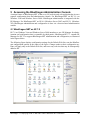
IIS 7.0 on Windows Vista and Windows Server 2008 introduces a new IIS Manager for administration and configuration that is extensible by third parties. BlueDragon.NET 7.1 extends IIS
Manager for IIS 7.0 to support BlueDragon.NET administration and configuration, as illustrated
in the figures below.
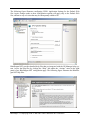
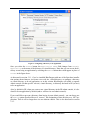
The following figure displays configuration settings for the Default Web Site; note the BlueDragon configuration options in the center of the figure. Changes made to these configuration options will apply only to the Default Web Site, and not to any web sites that may be subsequently
added to IIS.
BlueDragon 7.1: Deploying CFML on ASP.NET and the Microsoft .NET Framework
20
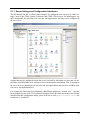
The following figure illustrates configuring CFML Application Settings for the Default Web
Site. Again, changes made to these configuration options will apply only to the Default Web
Site, and not to any web sites that may be subsequently added to IIS.
BlueDragon.NET provides detailed help files that are integrated with the IIS Manager help system. Access the help files by clicking the “Help” link under the “Actions” menu in the right
panel of any BlueDragon.NET configuration page. The following figure illustrates the BlueDragon.NET help files.
BlueDragon 7.1: Deploying CFML on ASP.NET and the Microsoft .NET Framework
21
5.1.1 Server Settings and Configuration Inheritance
The IIS Manager for IIS 7.0 allows some settings to be configured at the server level. Other settings—such as the CFML Search Collections and CFML Web Services for BlueDragon—are
only configurable for individual web sites and web applications, and may not be configured at
the server level.
Settings that may be configured at both the server level and for individual web sites and web applications (which includes most settings) exist in an inheritance relationship. That is, settings at
the server level are inherited by all web sites and web applications, and may be overridden at the
web site or web application level.
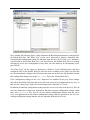
For example, the following figure illustrates a BlueDragon datasource—named “ows”—that has
been configured at the server level within IIS Manager (notice the status text at the lower left that
indicates that this configuration setting exists in the server-wide applicationHost.config file
for the server “localhost”).
BlueDragon 7.1: Deploying CFML on ASP.NET and the Microsoft .NET Framework
22
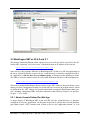
Now consider the following figure, which illustrates the BlueDragon datasources configured for
the Default Web Site. The “Entry Type” for the “ows” datasource is listed as “Inherited” indicating that this configuration setting was inherited from the server level. If the “ows” datasource
is not needed by the Default Web Site, it can be deleted at the Default Web Site level without
affecting the server-level configuration or any other web sites that may be subsequently configured for IIS.
The “Entry Type” for the “sqlserver” datasource is listed as “Local” indicating that it has been
configured only for the Default Web Site and will not be available for any other web sites that
may be subsequently configured for IIS (notice the status text at the lower left that indicates that
this configuration setting exists in the web.config file for the “Default Web Site”).
If the configuration settings for the “ows” datasource are modified in any way, those changes
only affect the Default Web Site and do not affect the server-level configuration in any way. In
this case, the “Entry Type” field value would change from “Inherited” to “Local.”
In addition to inheriting configuration setting from the server level to the web site level, IIS web
sites may themselves contain web applications that have separate configuration settings within
their own web.config files. Just as web sites inherit configuration settings from the server
level, web applications in turn inherit configuration settings from the parent web site level (including configuration settings that the web site inherited from the server level).
BlueDragon 7.1: Deploying CFML on ASP.NET and the Microsoft .NET Framework
23
5.2 BlueDragon.NET on IIS 6.0 and 5.1
The browser-based BlueDragon admin console for a given web site can be accessed via the following URL, replacing "www.server.com" with the host name or IP address of the web site:
http://www.server.com/bluedragon/admin.cfm
Note, however, that a unique difference in BlueDragon.NET is that every IIS web application on
the server (which IIS defines as each web site, virtual directory, or directory configured in IIS as
an “application”) will also have its own admin console, as discussed in the following sections.
The URL to access the admin console for each would differ from the above, and could appear as:
http://www.server.com/myapp/bluedragon/admin.cfm
This issue of multiple BlueDragon admin consoles in the .NET edition is discussed below, as are
matters of where configuration settings are stored and how to secure the Admin console, which
are different in the .NET edition. For general information on using the BlueDragon admin console, including configuring ODBC and other datasources and still more features, see the BlueDragon 7.1 User Guide.
5.2.1 Admin Console Defined Per Web App
A unique feature of BlueDragon.NET is that each IIS web site, virtual directory, or directory
configured in IIS as an “application” (as discussed in Section 6) will also have its own BlueDragon admin console. .NET considers each of these to be its own “application domain” or “web
BlueDragon 7.1: Deploying CFML on ASP.NET and the Microsoft .NET Framework
24
application”. If you prefer to have setting apply globally to all web apps, see section 5.1.2. (Also,
to reset a virtual directory so that it does not have its own admin console, see section 5.1.3.)
To open the BlueDragon admin console for a given web site, virtual directory, or directory configured in IIS as an application (any of these three will be referred from here on as simply a “web
app”), append /bluedragon/admin.cfm to the URL for browsing the root of that web app.
For example, if you configure a virtual directory (or directory declared in IIS as an application)
that’s browsed using context path of “myapp”, then the admin console for that will be accessed
via the following URL:
http://www.server.com/myapp/bluedragon/admin.cfm
If you’re having trouble determining the correct URL to use to request the admin console for a
given directory, see the code snippet offered in section 8.2.
If you’re interested in configuring a directory so that it has its own admin console and settings,
you would use the mechanism in IIS to declare it to be an application. See section 6.5 for more
information.
Similarly, if you configure a web site to have BlueDragon process its CFML pages, then you’d
append the /bluedragon/admin.cfm to the different hostname, ip address, or port used to
distinguish it from other web sites.
Changes made in a particular web app’s Admin console apply only to templates executed within
that web app. If one web app is nested within another (as a virtual directory—or directory configured in IIS as an application—is naturally nested within a web site), the nested web app does
NOT inherit the BlueDragon admin settings of the parent web app.
See the next section for an option to cause inheritance of global configuration settings by all webapps on a server.
As discussed in section 5.2, changes to the Admin console are written to the bluedragon.xml
file, whose location is discussed in that section.
5.2.2 Applying BlueDragon Admin Configuration Settings Globally
Assuming you’ve used one of the first three installation options for BlueDragon.NET (an option
other than Single Virtual Directory), each webapp (web site, virtual directory, or directory configured in IIS as an application) will have its own, separate BlueDragon admin console
and configuration settings, as discussed in the previous section.
There are, however, some settings which should be shared by all webapps on the server (the
BlueDragon license key, for instance.)
Also, what if you wanted to define some setting (like adding a certain datasource) so that it’s
available to all web apps? Must you manually add that setting to every web app? What if you
have many web sites? Or many virtual directories (or directories configured in IIS as an application) within one or more web sites? That would be both tedious and error-prone.
BlueDragon 7.1: Deploying CFML on ASP.NET and the Microsoft .NET Framework
25
BlueDragon.NET offers a unique solution to this challenge. There is a single, global
bluedragon.xml configuration file, but it’s stored in the config directory under the central
BlueDragon installation location, which by default is C:\Program Files\New
Atlanta\BlueDragon.NET\. So, to effect a change that would apply to all webapp’s on a
server, apply the needed XML to:
C:\Program Files\New Atlanta\BlueDragon.NET\config\bluedragon.xml.
The XML schema for the bluedragon.xml file is not documented, so the most effective way
to make such a global change would be to first implement the change using the BlueDragon
Admin console of a given webapp, then edit the bluedragon.xml file for that webapp, and
copy/paste the needed changes into the global xml file. The location of a given webapp’s
bluedragon.xml file is discussed in section 5.2. You must exercise caution when manually
editing the central (or any) bluedragon.xml file.
Finally, if you change any bluedragon.xml file, you must restart the affected web app for the
changes to take effect. See section 7.1 for information on restarting web apps.
5.2.3 Setting a (Virtual) Directory to Not Have Its Own Admin Console
As discussed in section 5.1.1, assuming you’ve used one of the first three installation options for
BlueDragon.NET, any virtual directory you define in IIS will by default be declared as a .NET
application, and therefore it (and any directory declared manually to be an application) will have
its own BlueDragon Admin console.
A challenge arises when changes are made in the Admin console of a web site root (because
from ColdFusion experience developers expected to only have one admin console) and those
changes do not apply to code in a subdirectory (or virtual directory) of that web site.
If the declaration of a given (virtual) directory to be a web application isn’t really needed for any
other reasons, it is possible to change the (virtual) directory in IIS so that it is no longer a separate .NET application. This simply reverses the scenario and steps described in section 5.1.1. In
such a case the code will instead operate within the scope of the web site (or higher-level virtual
directory) in which it’s located and will use that higher-level BlueDragon admin console. (This
subject is different from disabling the ability to open the BlueDragon Admin console, as discussed in section 5.3.4.)
To reset a virtual directory so it’s no longer its own .NET application (and no longer has its own
BlueDragon Admin console), right-click on the Virtual Directory’s name in IIS and choose
Properties. In the Virtual Directory tab which is opened by default, notice in the
Application Settings section of that window, with its available Remove button.
Clicking that Remove button will remove the designation of this virtual directory as its own web
application. Instantly, any requests for CFML pages within that directory will no longer operate
under any virtual directory-specific admin console but will instead operate under the BlueDragon
admin console of the web site (or other higher-level virtual directory) in which this virtual directory was defined within IIS.
BlueDragon 7.1: Deploying CFML on ASP.NET and the Microsoft .NET Framework
26
Note that if any requests were made against CFML templates in that virtual directory after BlueDragon.NET was installed, BlueDragon will have created a new subdirectory within the c:\
Program Files\New Atlanta\BlueDragon.NET\WebSiten\ directory (as discussed next
in section 5.2.1). The work files created for that virtual directory will be ignored once you reset it
to not be a .NET application. The files are not removed by BlueDragon upon resetting it this
way. Further, if you reset the virtual directory properties in IIS and revert it back to being an application (clicking the create button where you previously chose remove), any previously configured BlueDragon admin settings for that virtual directory will take affect again.
5.3 BlueDragon Admin Configuration Files
There are various configuration and working files used by BlueDragon. Their location and purpose differs in BlueDragon.NET than may be expected from your prior BlueDragon (or ColdFusion) experience.
5.3.1 Work File Locations
For the first three installation options (All Web Sites, Selected Web Sites, or Manual
Configuration), a directory called:
c:\ Program Files\New Atlanta\BlueDragon.NET\
is created and various work and support files are placed there. For the fourth, Single Virtual
Directory, option, all work and support files are placed with the directory named during the
installation. Some of the work files and directories are not created until a first request is made for
a CFML page.
In the case of the first three installation options, a directory called
c:\ Program Files\New Atlanta\BlueDragon.NET\WebSiten\
is created, where the number n represents an internal identification number for the web site reported by IIS. Work files and directories for that web site are stored here. If you manually create
a virtual directory (or declare a directory in IIS to be an application) within a web site (as discussed in section 6.5), then a subdirectory with the same name as the (virtual) directory will also
be created under:
c:\Program Files\New Atlanta\BlueDragon.NET\WebSiten directory.
A \work directory is created within the web application directory (directories) discussed above,
and in that directory are a bluedragon.log file and such subdirectories as cfmail and
cfschedule (supporting the tags of the same names).
5.3.2 BlueDragon.xml Configuration File Location
When BlueDragon.NET is deployed on IIS 7.0 on Windows Server 2008 or Windows Vista,
most of the BlueDragon configuration data is stored in the IIS 7.0 web.config file. In this case,
only data for scheduled tasks and search collections is stored in bluedragon.xml; all other
BlueDragon configuration data is stored in web.config.
BlueDragon 7.1: Deploying CFML on ASP.NET and the Microsoft .NET Framework
27
When BlueDragon.NET is deployed on IIS 5.1 on Windows XP, or on IIS 6.0 on Windows
Server 2003, all BlueDragon configuration changes made in the BlueDragon Admin console are
stored in a bluedragon.xml file.
The location of that file in BlueDragon.NET depends on which of the four installation options
was chosen, and it will be stored in a \config directory which will be a sibling to the \work
directory, as discussed in the previous section.
Note that for the first three installation options, there may be multiple admin configuration files,
one for each web site, virtual directory, and directory declared in IIS to be an application.
Wherever a CFML page has been requested for them, these will have its own \config directory
with its own bluedragon.xml file. Additionally, there will be a central bluedragon.xml file
from which all the others inherit, as discussed in section 5.1.2.
If you chose the fourth (Single Virtual Directory) installation option, then the
bluedragon.xml file is stored in the bluedragon\config directory within the virtual directory chosen during installation. With the Single Virtual Directory installation option,
there is no inheritance from a central bluedragon.xml file.
Finally, if you change any bluedragon.xml file, you must restart the affected web app for the
changes to take effect. See section 7.1 for information on restarting web apps.
5.3.3 Central CustomTags Directory Location
For the first three installation options, a central customtags directory is created in the:
c:\Program Files\New Atlanta\BlueDragon.NET directory.
For the fourth option, Single Virtual Directory, a customtags directory will be created
under the \bluedragon directory created within that virtual directory.
5.3.4 No BlueDragon\Admin Directory Exists in Admin Console Path
You may notice that there's no \bluedragon\admin directory installed in your web application’s docroot. How, then, do things work when you request a file such as
\bluedragon\admin\index.cfm? Loading of the Admin console is handled through directives implemented in the BlueDragon and .NET Framework configuration files.
If you desire to change the path used to load the admin console (for security purposes), that is
possible as discussed in section 5.4.2.
If you use the fourth installation option, however, for a Single Virtual Directory, that
does create a \bluedragon directory within the designated virtual directory location, though
again there is no \bluedragon\admin directory there.
5.3.5 BlueDragon Datasources
As discussed in the BlueDragon 7.1 User Guide, the BlueDragon admin console provides an interface for defining datasources for SQL Server, Oracle, MySQL, Sybase, DB2, and ODBC data-
BlueDragon 7.1: Deploying CFML on ASP.NET and the Microsoft .NET Framework
28
sources. These datasource connections use native ADO.NET drivers for optimal performance.
See the User Guide for more details on configuring and managing datasources. For other information on advantageous differences regarding datasources in the .NET edition, see section 4.2.
5.4 Securing the BlueDragon Admin Console
This section applies to BlueDragon.NET when deployed on IIS 5.1 on Windows XP or IIS 6.0
on Windows Server 2003; it does not apply to BlueDragon.NET when deployed on IIS 7.0 on
Windows Server 2008 or Windows Vista.
There are several ways in which you may want to secure the BlueDragon admin console, as discussed in this section.
5.4.1 No Admin Console Password Defined Upon Installation
Note that upon installation there is no default password defined for the BlueDragon Admin console(s). It’s critical that before deploying on a public-facing server you set a password for your
web site and any virtual directory or directory declared in IIS to be an application. Use the admin
console’s available General>License & Security link which has a field for entering the
Administration Console Password.
5.4.2 Changing the Admin Console URL Path
As explained at the start of this chapter, the BlueDragon Admin UI is accessed with
/bluedragon/admin.cfm, appended to the URL for the web site, virtual directory, or directory declared in IIS to be an application.
What if you would like to hide or change the default URL path for the Admin console, for security purposes? As discussed in section 5.2.4, there is no directory you can rename as you may
have from your prior ColdFusion experience. You can rename the path to be used, however, by
manually editing the appropriate bluedragon.xml file, whose location for a given web application is discussed in section 5.2.2.
In this file, under the <file><application name="admin"> node, simply change the value
of the <context> element from bluedragon to something else. If it was changed to
/bdadmin, then the path to append to the site/application URL would be
/bdadmin/admin.cfm.
5.4.3 Restricting Admin Access by IP Address
As a further security precaution, you can control who may access the Admin Console by way of
IP address filtering, either by changing values in the admin console itself (under
General>License & Security, in the field Allow IPs) or by editing the
bluedragon.xml file itself (as discussed in 5.2.2), modifying the entry for
<server><file><application
</allowedips>.
name="admin"><name>admin</name><allowedips>
The value list provided may be either an address or a range (including support for asterisks, as in
192.*.*.*). If you want to provide a list of addresses or ranges, separate them with commas.
BlueDragon 7.1: Deploying CFML on ASP.NET and the Microsoft .NET Framework
29
See the online help for this screen in the Admin UI for more information. Support for IP address
exclusion filtering (restricted IPs) is being considered for a future release.
5.4.4 Remove the Admin UI Completely
Rather than rename or restrict the admin URL, some may prefer instead to entirely remove it.
There are two ways to remove the Admin UI. First, you can edit the bluedragon.xml (for the
web site or application, as discussed in section 5.2.2) to either change or remove the
<file><application name="admin"> entry.
If you change the name to something other than admin, the admin console will no longer function. You could also remove the entire <application name="admin"> entry and its children
xml entries. Doing so will cause BlueDragon to remove the surrounding <file> entry if there
are no entries left.
Second, you could also remove the Admin UI by removing or renaming the file admin.bda,
which is located in the \config sub-directory of the BlueDragon installation directory:
c:\ Program Files\New Atlanta\bluedragon.net\config
for the first three installation options, or the \config of a given virtual directory if the fourth,
Single Virtual Directory, installation option was taken.
BlueDragon 7.1: Deploying CFML on ASP.NET and the Microsoft .NET Framework
30
6 Understanding the Microsoft .NET Framework
This section is an introduction to the Microsoft .NET framework for developers who are new to
this subject. Experienced .NET developers may still want to follow along. Configuring the .NET
framework to support CFML involves steps that ASP.NET developers wouldn’t normally need
to perform. Fortunately, the installer for BlueDragon.NET will perform this configuration automatically. The following information is provided for those wanting to understand the underlying
process.
Additionally, if you want to leverage some features of the .NET framework, as discussed in section 4, these will require editing of the .NET configuration files, which will also be discussed in
this chapter.
6.1 BlueDragon as a .NET HTTP Handler
BlueDragon.NET extends the .NET framework so that it can process CFML files. IIS and .NET
already know how to run ASP.NET files, assuming they are properly configured (see section
2.1.1). BlueDragon.NET has nothing to do with execution of ASP.NET pages and instead runs
only CFML pages (though it offers some extension that can be placed within ASP.NET pages).
The .NET framework offers a standardized mechanism for enabling support for another file extension and language, as with CFML files, by way of what it calls HTTP Handlers.
BlueDragon.NET is implemented as such an HTTPHandler, which is implemented within the
BlueDragon.dll assembly. The location where this file is stored will depend on the installation option chosen when installing BlueDragon (see Section 2.2.1).
If either of the first three installation options were chosen (All Web Sites, Selected Web
Sites, or Manual Configuration), this file and a couple of related BlueDragon DLLs
(summing less than four megabytes total in size) are placed by the installer in the Global Assembly Cache (discussed in the next section).
If the fourth installation option is chosen (Single Virtual Directory), these files are instead placed in the \bin directory under that virtual directory.
The configuration of this HTTPHandler is implemented in a standard .NET configuration file,
web.config. This is discussed in section 6.3.
6.2 Global Assembly Cache (GAC)
The Global Assembly Cache, or GAC, is a system-wide repository of .NET components (called
assemblies) that enable functionality in the .NET framework for all .NET applications.
If you choose either of the first three installation choices of BlueDragon.NET, the pertinent
BlueDragon DLL files (assemblies) will be implemented in the GAC. The location of this directory is typically C:\WINDOWS\assembly\.
BlueDragon 7.1: Deploying CFML on ASP.NET and the Microsoft .NET Framework
31
If you prefer to avoid making such changes to the GAC, the fourth option in the BlueDragon installer will instead create a single virtual directory with all BlueDragon DLL files implemented
in its own /bin directory.
Note as well that there is a /bin directory may exist within the docroot for any web site, virtual
directory root, or directory declared in IIS to be an application, and you may place your own application-specific DLL files there.
6.3 Web.config file
The declaration of an HTTPHandler is defined in a configuration file named web.config.
web.config holds XML entries whose purpose and format are defined by the .NET framework to
control configuration of the environment or a specific web application.
It may be useful to learn that the .NET framework has pre-existing configuration handlers implemented designating how to process ASPX and other ASP.NET files using HttpHandlers. The
fact that BlueDragon is implemented as an HttpHandler is a testament to its native .NET approach to implementing CFML support.
The web.config file, is a file that can be created for each web application defined on a server.
(Web applications are defined in section 6.5.) Configuration information in the web.config file
inherits overrides any web.config file in a parent directory. Similarly, any values not specified
in the web.config file are inherited from any web.config files in parent directories. The
BlueDragon installer will automatically create (or edit any existing) web.config file and configure it for BlueDragon.
You do not need to (and should not) manually configure a web.config file to add entries to
support for BlueDragon processing of CFML pages.
If, however, you have any reason to desire to create a web.config file (such as to enable other
.NET features that require this file) and none exists, you can easily create a skeletal one, such as:
<?xml version="1.0" encoding="utf-8" ?>
<configuration>
</configuration>
For more information on .net configuration files, see:
http://msdn.microsoft.com/library/default.asp?url=/library/enus/cpguide/html/cpconaspnetconfiguration.asp
6.4 IIS Configuration of CFML File Extensions
The final link in the configuration of BlueDragon.NET is the mapping of CFML-related file extensions (CFM, CFML, CFCHART, and CFC) so that they are handled by the .NET framework.
BlueDragon 7.1: Deploying CFML on ASP.NET and the Microsoft .NET Framework
32
If you have properly configured IIS and .NET for ASP.NET support, you may notice that the
extension mappings in IIS for ASP.NET files (such as ASPX, ASMX, and ASCX) are configured so
that they are handed to the aspnet_isapi.dll file defined for the .NET framework such as:
C:\WINDOWS\Microsoft.NET\Framework\v2.0.50727\aspnet_isapi.dll.
With BlueDragon.NET, CFML files are also to be handed to this same aspnet_isapi.dll file
(not to BlueDragon itself). This is yet another testament to how BlueDragon.NET implements
CFML as a native extension to the .NET framework.
The BlueDragon.NET installation process will automatically configure IIS so that the CFML file
extensions are handed to the .NET framework. If you choose the third configuration alternative
(Manual Configuration), or if you have any reason to need to repair or alter this extension
mapping, see section 7.2.1 for additional information and assistance.
6.5 .NET Web Applications
While the installation program for BlueDragon.NET will configure IIS and the appropriate .NET
configuration file to define BlueDragon as an HTTP Handler for either all web sites, a web site,
or a single virtual directory, there may be instances where you want to further define configuration options for a specific web site, virtual directory, or directory declared in IIS to be an application, such as to leverage those features of .NET discussed in Section 4.
Additionally, as discussed in section 5.1.1, the creation of a web application will enable that
application to have its own BlueDragon admin console and configuration settings.
These and some other capabilities in the .NET framework can only be obtained if a directory has
been defined as an “application” to IIS. This is done by editing the properties for the directory
(right-click on a directory or virtual directory in the IIS Manager and choose properties), and
then selecting the Create button in the Directory (or Virtual Directory) tab.
BlueDragon 7.1: Deploying CFML on ASP.NET and the Microsoft .NET Framework
33
Figure 3. Configuring a Directory as an Application
Once you select the Create button, the Application Name field changes from Default
Application to the name of the directory or virtual directory. Note that you can revert the directory to not being an application by selecting the Remove button that would appear in place of
Create in the figure above.
As discussed in section 5.1.1, if you’ve installed BlueDragon with one of the first three installation options, then whenever you create a new web site, virtual directory, or configure a directory
or virtual directory to be an application, as in this section, BlueDragon will enable a separate
Admin console for that specific web site, virtual directory, or directory declared in IIS (as here)
to be an application.
Also, by default in IIS, when you create a new virtual directory in the IIS admin console, it is declared to be an application by default (and so will have its own admin console).
If you would like to prevent a directory from having its own Admin console, you can always use
the Remove option described above to “remove” the designation of that directory as a .NET application. Then it will no longer have its own Admin console. This is also discussed in section
5.1.3.
BlueDragon 7.1: Deploying CFML on ASP.NET and the Microsoft .NET Framework
34
7 Other Configuration Issues
Following are discussions of various configuration issues related to deploying CFML on .NET.
7.1 Restarting .NET and .NET Web Applications
As discussed in previous sections, your CFML applications become native .NET applications, at
least from the perspective of IIS and .NET.
It may be desirable to restart a given .NET web application, or the entire .NET Framework, such
as after making certain kinds of coding changes or when trying to resolve a problem. Additionally, there are times when the .NET Framework itself may restart itself or a given web application. This section discusses both automatic and manual restarting of .NET and .NET web applications. (Technically, in .NET you stop—or, unload—the application. Then the first request for
an ASP.NET or CFML page will restart—or, reload—the application.)
It’s also important to know the implications of application restarts on your CFML and ASP.NET
code, particularly regarding session variables, as discussed further in section 7.1.3.
7.1.1 Manually Restarting .NET Web Applications
There are several ways to manually restart a .NET web application.
7.1.1.1 Restarting All .NET Web Applications
If you prefer to stop/restart all .NET web applications at once, one option is to simply restart IIS.
From the IIS interface, you can right-click on a computer name, choose All Tasks, then
choose Restart IIS. (You can also simply restart one of the IIS-related services in the Windows Services panel, such as World Wide Web Publishing, which will restart IIS.)
Just be aware that if you want or need to restart just one particular .NET web application, there is
an option for that, as discussed in the next section. Still, if you have only one .NET application
on a site, restarting IIS may be more expedient.
Keep in mind that .NET has many automatic means by which it may restart a given web application (discussed later in section 7.1.2). For instance, if any change is made to the central
web.config file, all .NET web applications on the server will be stopped (and restarted on the
next first request).
7.1.1.2 Restarting a Single .NET Web Application
Rather than restart all of IIS, it is often desirable to restart just a given web application. IIS currently provides no means to stop/restart just one .NET web application. The option provided in
IIS to “stop” a web site only affects the processing of IIS, and not the underlying .NET application(s).
The simplest way to manually cause restart of a single .NET web application is to run either a
CFML or ASP.NET page that executes a particular method in the .NET system class which stops
the web app. Here’s an example of one way to call such a method as an ASPX page:
BlueDragon 7.1: Deploying CFML on ASP.NET and the Microsoft .NET Framework
35
<%@ Page Language="c#"
%>
<% System.Web.HttpRuntime.UnloadAppDomain(); %>
Restarted web app <%=
System.Web.HttpRuntime.AppDomainAppVirtualPath %>
at <%= System.DateTime.Now.ToShortTimeString() %>
Save this code into a file, perhaps called restart-webapp.aspx, and call it whenever you
want or need to restart the .NET web application. Note that in addition to unloading the .NET
web application, the code also displays the path of the application being restarted (discussed in a
moment) as well as the time of execution of this page.
Watch to make sure that the time shown indeed reflects the current time, to help you ensure that
you’re not seeing the cached output of a previous execution of the page from your browser.
Simply refresh the page to see the current time.
The next request for a .NET page (CFML or ASPX, for instance) will restart the application
(with the expected delay that occurs on the first request of any new .NET page, as explained in
section 7.1.3).
Remember also that each web site, virtual directory, or directory declared in IIS to be an application is its own web application, as discussed in section 6.5, so it’s important that you run this
code in the docroot (or one of its subdirectories) of the intended web application. That’s why
the code also displays the path to the web application, to help you ensure you’re restarting your
intended application.
You could also execute the same .NET method using CFML:
<cfobject action="create" type=".NET"
class="System.Web.HttpRuntime" name="rt">
<cfset rt.UnloadAppDomain()>
<cfoutput>
Restarted web app #rt.get_AppDomainAppVirtualPath()# at
#timeformat(now())#
</cfoutput>
One problem with this approach of running the request as a CFML page, however, is that if the
CFML runtime engine (BlueDragon) is not responding for any reason, such a CFM page may not
run, where an ASPX page should always run.
BlueDragon 7.1: Deploying CFML on ASP.NET and the Microsoft .NET Framework
36
Still another approach would be to leverage one of the many automatic means built into .NET for
restarting a web application (discussed in section 7.1.2). For instance, if an application’s
web.config file is edited, that will restart the application.
7.1.2 Automatic Stopping/Restarting of .NET Web Applications
It’s important to be aware that the .NET Framework itself will stop (unload) web applications
automatically under various conditions. These can be very useful in preventing ongoing error situations, but their impact can be unexpected (such as the impact on sessions in section 7.1.3 or the
speed to restart applications as in section 7.1.4), so it’s important to know what these conditions
are.
The first set of conditions are generally quite beneficial. The .NET framework has various builtin limiters, where if conditions are detected that may create instability in the .NET application,
the framework will restart the application.
•
If any of several .NET-specific resource limiter settings are exceeded, as set in the
<processModel> element in the machine.config, a given application will be unloaded. These settings (including the percentage of memory used, the number of requests
served, etc.) are inherited by all .NET applications. For more information, see section
8.3.2.
•
On Windows 2003, when not using IIS5 isolation mode (which is not used by default),
these <processModel> elements are ignored and instead the settings in Application
Pools in IIS manager are used and set the limiters
The second set of conditions which can cause application restarts are generally more unexpected
and not completely documented by Microsoft. You should be aware of these, as your actions
may cause the application restart unexpectedly. Our experience so far has found that .NET will
stop web applications (leaving them ready to restart on the next request) under the following
conditions.
•
If a directory within a given web application is renamed or deleted, or a new one is
created, that application will be unloaded
•
If changes are made to files in the bin directory of a given web app, or a subdirectory
of that directory, that application will be unloaded
•
If a single ASP.NET file (aspx, asmx, etc.) is edited and therefore recompiled more than
20 times since an application has been loaded, that application will be unloaded. The
number is set in the xml element within machine.config named
numRecompilesBeforeApprestart. This setting does not apply to CFML pages.
•
If the machine.config file for the server is edited and saved (even if no change is
made), all .NET applications for that server will be unloaded.
•
If the web.config, or global.asax file in a given web application root directory is
edited and saved (even if no change is made), that application will be unloaded
BlueDragon 7.1: Deploying CFML on ASP.NET and the Microsoft .NET Framework
37
7.1.3 Implications on Sessions of Restarting .NET Web Applications
One of the most important implications of restarting web applications is that, assuming session
variables are stored in memory (which is the default in .NET) and you are using .NET sessions
for your CFML, when the web application restarts, all session variables will be lost.
As discussed in Section 4, it’s possible to declare that a .NET web application should use an
alternative form of persistence, including a database or state server. One benefit of those options
is that when a .NET web application is restarted, the session variables are recovered, thereby minimizing the impact to end users of such application restarts.
If your CFML applications use session variables and your application is suffering frequent restarts for any of the manual or automated reasons explained previously in this section, you should
consider using session variable persistence.
7.1.4 First Request Delay on Restart of .NET Web Applications
Another facet of the impact of restarting a .NET web application (whether manually or automatically) is a slight delay upon the first request for a page in a .NET web app. The delay occurs only
for the first user making a request for any dynamic page (.aspx or .cfm files, for instance, not
.htm or .gif files) after the restart. The delay may be up to a few seconds. This is not a BlueDragon issue, but a generic .NET one.
One solution, if your web applications are stopped on a recurring basis, would be to set up a
scheduled task (using the Windows scheduler) that makes a request for any dynamic page. Perhaps it could be set to run first thing in the morning every day (if the server is restarted nightly,
perhaps due to changes as described in section 7.1.2).
Another option may be to take advantage of .NET’s ability (via the special global.asax file)
to set up an application end event, so that whenever the web application is stopped, a request is
made to start it again. Just be aware that you may have a reason some times for the web application to stop and not be immediately restarted.
7.2 Manually Configuring CFML Extension Mappings
You may want or have to manually configure the CMFL extension mappings in IIS, as discussed
in the following sections.
7.2.1 “Manual Configuration” Installation Option
If you choose the Manual Configuration option in the BlueDragon.NET installer, you must
then manually implement the extension mappings for CFML-based file extensions, including
CFM, CFC, CFCHART, and CFML. You may also desire to manually configure these extension
mappings even if you’ve used one of the other installation options (such as when resolving the
problem discussed in Section 8.1.2.1).
In BlueDragon.NET, the mapping for all CFML extensions should point to the same executable
as ASP.NET pages (like ASPX and ASMX), the aspnet_isapi.dll. In a .NET 2.0 installation,
this will generally be:
BlueDragon 7.1: Deploying CFML on ASP.NET and the Microsoft .NET Framework
38
C:\WINDOWS\Microsoft.NET\Framework\v2.0.50727\aspnet_isapi.dll
The exact path may vary on your installation. See the mapping for ASPX pages to find the precise executable path for your installation.
The extension mappings can be configured for the default web site, any given web site, a virtual
directory, or a directory configured in IIS to be an application.
By right-clicking on any of them and selecting Properties, in the dialogue that opens select
the option Home Directory (or Home Directory ) tab and then choose the Configuration
button on that tab. Finally, add extension mappings for the cfc, cfm, and cfml extensions (or
edit them if already there) and configure them as follows:
Figure 4: Extension Mappings for CFM filetypes
Place the full path to the aspnet_isapi.dll as discussed above. Please note that it’s critical
that you do NOT enable the option on that dialogue labeled, Check that file exists. Because the BlueDragon admin console pages do not really exist (see section 5.2.4), request for the
admin console will fail if this option is checked.
Additionally, on the prior Virtual Directory (or Home Directory) page, also ensure that
the Application Settings value, Execute Permissions, is set to either Scripts Only
or Scripts and Executables.
7.2.1.1 New ASP.NET 2.0 Configuration Features
Note that after installing .NET 2.0, you will find a newly available tab labeled ASP.NET, in the
properties dialogue for a given web site, virtual directory, or directory declared to be an application.
From that tab, you can more easily select which version of the aspnet_isapi.dll file to apply to all extensions currently configured to reference that file, using the available ASP.NET
Version drop-down option. This is helpful also in preventing the mistake of having different
BlueDragon 7.1: Deploying CFML on ASP.NET and the Microsoft .NET Framework
39
extensions in a given application pointing to different editions of the .NET framework, which
can cause problems.
Additionally, if you select the 2.0 option (to configure files to be processed by .NET 2.0),
another new option, the Edit Configuration button, is enabled on the ASP.NET tab. This
option opens a useful visual editor for making web.config file changes. Even more powerful, it
reflects any entries that are inherited from high-level web.config files or the global
machine.config, by highlighting the entries in italics. This configuration editor option is disabled if you select .NET 1.1 for the ASP.NET Version drop-down on this tab.
7.2.2 XCopy Deployment
If you would like install and configure BlueDragon.NET and your CFML application on one
machine, and then copy the code (and the BlueDragon engine) to another machine, you can do
that with just a little effort. This is often called “xcopy-style” deployment.
Of course, in order to redeploy BlueDragon and your application on another machine, you must
obtain a license for that additional deployment. Fortunately, New Atlanta has very compelling
licensing terms for developers interested in redeploying BlueDragon and their CFML applications. Please contact us for details.
The manual configuration steps in the previous section are the key to this process. If you use the
fourth (Single Virtual Directory) option of the installer, to install and configure an instance of BlueDragon into a single virtual directory, that directory will contain all the components needed to run your CFML application on any box that has the same edition of the .NET
Framework and the Visual J# runtime which were implemented on the original box.
You can then copy that single virtual directory to another server (before or after making changes
in the BlueDragon admin console).
The only manual step you will need to perform on the destination box is the configuration in IIS
of the extension mappings for CFML files. The BlueDragon installer will have done that on the
box where BlueDragon was installed, but you will need to make those changes on the destination
box.
It’s possible to automate the process of implementing those extension mappings, using any of
several mechanisms for scripting the configuration of IIS. Examples of tools and documentation
include the following:
Automating Administration for IIS 5.0
http://technet.microsoft.com/en-us/library/bb727082.aspx
IIS Programmatic Administration Reference
http://msdn.microsoft.com/en-us/library/ms524713.aspx
A Free Tool for Configuring .NET Web Applications
BlueDragon 7.1: Deploying CFML on ASP.NET and the Microsoft .NET Framework
40
http://www.west-wind.com/Tools/WebSiteConfiguration.asp
As you contemplate the steps in this section, be aware that you cannot install BlueDragon more
than once on a given machine. If you already have implemented any of the other installation options, you cannot run the installer again to use the fourth option to create a single virtual directory deployment. Instead, you must either uninstall BlueDragon or run the installer on a machine
(or virtual machine) that does not yet have BlueDragon installed.
7.2.3 Hiding CFM Extensions
You may also choose to manually configure a different file extension to process CFML pages.
You could, for instance, declare that .xyz files should be processed by BlueDragon as CFML.
You would need to change both IIS extension mappings as described in section 7.2.1 and the
HttpHandler settings described in 6.3.
The steps to do this (including for BlueDragon editions other than the .NET version) are discussed in a BlueDragon technote, “"Hiding" CFML behind an extension other than .cfm or
.cfml”:
http://www.newatlanta.com/products/bluedragon/self_help/tech_notes/hiding_
cfml.cfm
7.3 Sourceless Deployment
BlueDragon supports sourceless deployment (deploying your CFML applications without exposing your source code) through an option we call precompiling and optionally encrypting your
CFML templates. This protects your code from being read. (The files are not converted into
.NET classes or DLLs but instead remain CFM files, which when opened are unreadable, and no
mechanism exists to revert them to source.) This feature is discussed in the BlueDragon 7.1 User
Guide
While the BlueDragon admin console provides an option for precompiling templates, there is
also an available command line utility. In BlueDragon.NET, the precompile.exe utility is located in the precompiler directory where BlueDragon is installed. There are important additional details offered in a readme.txt file located there.
7.3.1 Setting an Expiration Date on Your Templates, Such as for Trial Code
An extension of the precompiled code feature (from the last section), BlueDragon permits you to
set an expiration date for your code, whether for a single template, directory, or an entire CFML
application. With this feature, such code will stop working after a given date (reporting to the
user an appropriate message).
Note that BlueDragon will continue to run, as this is an expiration date for just your code, so you
can have some part of your application continue to run while some other portion stops on that
date. If and when the user obtains the permission from you to use the code beyond that date, you
simply provide new copies of the CFML code to be dropped into the appropriate directory of
your application.
BlueDragon 7.1: Deploying CFML on ASP.NET and the Microsoft .NET Framework
41
7.4 No Default Document Defined by BlueDragon.NET
The BlueDragon installer does not declare index.cfm or any other filenames in the IIS list of “default documents” (to serve up such a file if the URL from a browser request has no file name). If
your code relies on that feature, please add that yourself using the Documents tab in the
Properties dialogue for the web site, virtual directory, or directory configured in IIS to be an
application.
7.5 Invoking CFX Custom Tags in .NET
BlueDragon.NET, like the other editions of BlueDragon, supports the use of CFX custom tags.
Indeed, it’s possible to create CFX tags using any .NET programming language, including J#, C#
and Visual Basic.NET. It is not possible, however, to simply drop existing Java or C++ CFXs
into the .NET Framework. This section discusses both compiling CFXs in native .NET languages
and the challenges of supporting existing Java and C++ CFXs.
7.5.1 Compiling CFXs in Native .NET Languages
Where the source for a java CFX tag, for instance, would normally reference a CFX.jar file containing interfaces to be implemented, BlueDragon.NET implementations include a
bluedragon/CFX directory (wherever the installation was made, as discussed in Deploying
CFML on ASP.NET and the Microsoft .NET Framework), which includes a CFX.NET.dll file
offering a .NET assembly serving the same purpose.
Whether coding in J#, C#, or VB.NET, simply add a reference to the CFX.NET.dll assembly to
your Visual Studio .NET project and then compile the CFX tag. Note that you may compile
multiple Java CFX tags into a single .NET assembly to deploy on BlueDragon.NET.
Assemblies that contain CFX tags must be placed in the /bin directory of the web site or virtual
directory (or directory declared in IIS as an application) in which they're to be deployed, or in the
Global Assembly Cache (see section 6.2). You must then configure the CFX tag(s) using the
BlueDragon admin console.
7.5.2 Reusing Existing Java CFXs
It is not possible, however, to simply drop Java custom tags into a BlueDragon.NET deployment
and expect to call them. They must be recompiled using J#.
Existing CFX tags implemented in Java can be easily implemented simply by recompiling them
from source using the Visual J# compiler. (Visual J# is included with Visual Studio.NET.) The
steps involved would be the same for newly written tags created in C# or VB.NET.
The bluedragon/CFX directory also includes two files, BlueDragon.java and
BlueDragon.dll, as a sample Java CFX tag that has been recompiled using Visual J# for
deployment on BlueDragon.NET.
BlueDragon 7.1: Deploying CFML on ASP.NET and the Microsoft .NET Framework
42
8 Troubleshooting CFML Processing on .NET
When having trouble with execution of CFML pages in BlueDragon.NET, the following tips regarding the processing of CFML on the .NET framework may help. Additionally, see a further
discussion of general CFML troubleshooting tips in the BlueDragon 7.1 CFML Compatibility
Guide.
8.1 CFML Pages Do Not Run at All
When CFML pages do not run at all, the following may identify possible solutions.
8.1.1 File Not Found Errors
If you’re trying to browse a CFML page or the BlueDragon Admin, and you get a BlueDragon
File Not Found error (or an ASP.NET resource cannot be found or similar errors),
you should confirm that you’re using the correct URL for IIS to serve the page.
Perhaps the easiest way to avoid mistakes in making requests to CFML (or ASP.NET) pages is
to use the “browse” feature of the IIS Admin interface. First, find your desired website, then the
directory and filename to be browsed. Right-click on the filename and choose Browse. IIS will
launch your browser using the appropriate URL needed to open that file in that given
website/path.
If the path is something very different from what you expected, consider the information in sections 5.1.1 and9 8.2.
8.1.2 Page Returns Source Code or Does Not Run at All
If the URL is correct but CFML pages simply don’t run, or return the source of the page, one of
the first things to consider is making sure that the .NET Framework is properly configured for
IIS and ASP.NET pages. Since CFML pages are processed in the same pipeline as ASP.NET
pages (see section 2.1.1), if the latter don’t work, the former won’t either.
The simplest way to ensure that the .NET web application is properly configured and running is
to run an a simple ASP.NET page, such as the following (name it test.aspx or similar and
place it in the same directory as your intended CFML):
<%@ Page language="c#" %>
<% Response.Write("test"); %>
If this page fails to runs as expected, this is an indication that the problem is not with BlueDragon but instead with the .NET Framework or the configuration of IIS with the .NET Framework.
See section 2.1 for some common problems in Windows 2003 that may prevent ASP.NET (and
therefore CFML) pages from running. Similarly, the following section explains a common problem that can make ASP.NET (and CFML) pages not run on IIS.
8.1.2.1 Problems Caused by IIS Being Installed After .NET
If neither ASPX nor CFML pages run, a common problem is when IIS itself is installed (or
reinstalled) after .NET is installed (or reinstalled). The .NET installer normally configures IIS in
BlueDragon 7.1: Deploying CFML on ASP.NET and the Microsoft .NET Framework
43
several ways to make it know how to process ASP.NET pages. If IIS is not installed when .NET
is installed, these required changes are not made.
A simple way to determine if this is the problem is if you observe the extension mappings for
your web site or directory. If you find that CFM file extensions are mapped to the aspnet_isap.dll
(see sections 6.4 and 7.2.1) but there are no file extension mappings for ASP.NET pages (such as
aspx, asmx, and ascx files), .NET was installed after IIS and these and other needed settings
were not properly configured by the .NET installer.
The problem (and suggested solution, which involves running a .NET command line utility
called, aspnet_regiis.exe) is discussed in the following Microsoft Tech Notes:
http://msdn.microsoft.com/en-us/library/k6h9cz8h(vs.71).aspx
After resolving this, and ensuring that an ASPX page runs (see Section 2.1.1), try running your
CFML pages. Depending on your resolution to the problem, you may need to manually implement the mappings required for CFML pages (as discussed in section 7.2) or uninstall and reinstall BlueDragon and let its installer apply the needed changes.
8.1.3 CFML Pages Were Running But Have Stopped
If you have CFML pages that were running but they suddenly stop (fail to respond), the .NET
Framework or the web application in particular may have become unstable and an unexpected
error has arisen.
The most expedient solution may be to simply restart the .NET web application, as discussed in
section 7.17.1. If this problem persists, please contact us for further assistance.
8.2 Admin Console Changes Are Not Taking Effect
If you’ve made a change in the BlueDragon admin console and it doesn’t appear to be taking effect, the problem may be in your using the incorrect admin console. A common example of this
is a “datasource could not be found” error.
Recall that BlueDragon.NET offers a separate BlueDragon admin console per web site or virtual
directory or directory declared in IIS to be an application, as discussed in section 5.1.1. So if you
define a datasource in one admin console (such as that for the web site), but you execute code in
a virtual directory or a directory declared in IIS to be a web application, the datasource will not
be found. You must ensure that you configure the appropriate Admin console for your CFML
code.
The following CFML code will report the .NET web application context path and physical document root for pages processed in the directory where the code is executed:
<cfobject action="create" type=".net"
class="System.Web.HttpRuntime" name="rt">
<cfdump var="#rt.get_AppDomainAppVirtualPath()#"><br>
<cfdump var="#rt.get_AppDomainAppPath()#"><br>
BlueDragon 7.1: Deploying CFML on ASP.NET and the Microsoft .NET Framework
44
You could use this information to find the appropriate admin console (by using the first value
reported to help create the proper URL to request the admin console, as also discussed in 5.1.1).
If it seems burdensome to have to declare some setting in multiple admin consoles, recall that all
web applications do inherit from a single, central, bluedragon.xml file, discussed in section
5.1.2.)
Finally, as explained in section 5.1.3, it’s also possible to remove the indication in IIS of a given
virtual directory being an application (and having its own Admin Console). The same applies to
a directory declared to be an application.
8.3 Pages Are Not Performing As Expected
Our experience is that BlueDragon.NET will process CFML pages faster and more efficiently
than ever before possible. Still, there are factors that can affect performance. The following sections should be considered when facing this challenge.
8.3.1 Beware of Unexpected Application Restarts
If your CFML applications on .NET seem to be performing poorly, it’s worth considering that
one explanation may be the (often unexpected) behavior that .NET offers to restart web applications automatically under certain conditions. As explained in section 7.1.2, there are several circumstances (some surprising) where a .NET web application may unload. For example, simply
creating or renaming directories in a .NET application directory can cause the application to unload.
As explained further in section 7.1.4, after .NET unloads a web application, the first request for
the first CFML (or ASPX) page after the application unloads will experience a delay of up to a
few seconds. We have seen instances where unexpected circumstances were causing a web application to be unloaded very often, thus making all or intermittent CFML page processing to be
slow. To help identify if this is happening, see the following BlueDragon FAQ:
How can I determine if my .NET web application is restarting too often?
http://www.newatlanta.com/c/products/bluedragon/self_help/faq/detail?faqId
=285
8.3.2 .NET Framework Workload Processing Defaults
When application pages fail or the application performs poorly, it may be that the .NET Framework’s built-in processing model and default settings may be throttling or protecting the environment in unexpected ways.
There are built-in settings that control how many pages can be requested before being queued,
how much memory can be used by the application, how long pages can run before being timed
out, and more. These settings are controlled by XML entries in the machine.config file or
may be set in your web application’s web.config file (see section 6.3).
BlueDragon 7.1: Deploying CFML on ASP.NET and the Microsoft .NET Framework
45
In particular, the default value for the httpRuntime section’s executionTimeout and
appRequestQueueLimit values may not be set appropriately for your application or environment.
Similarly, the <processModel> element in the machine.config (also discussed briefly in
section 7.1.2) controls various settings that can impact your performance if not configured suitably for your environment.
For more information on these settings, see the Microsoft Framework documentation, as well as
the following:
Developing High-Performance ASP.NET Applications
http://msdn.microsoft.com/en-us/library/5dws599a(vs.71).aspx
Improving .NET Application Performance and Scalability
http://www.microsoft.com/downloads/details.aspx?familyid=8A2E454D-F30E4E72-B531-75384A0F1C47&displaylang=en
10 Tips for Writing High-Performance Web Applications
http://msdn.microsoft.com/en-us/magazine/cc163854.aspx
HOW TO: Tune and Scale Performance of Applications That Are Built on the .NET Framework
http://support.microsoft.com/kb/818015
8.3.3 Using Microsoft Performance Monitor
Since BlueDragon.NET processes your CFML pages just like any other ASP.NET page, you can
also take advantage of the built-in performance monitoring and reporting services offered by Microsoft.
Many developers may be familiar with the Microsoft Performance Monitor tool (available using
Start>Control Panel>Administrative Tools>Performance). A useful introduction
to the tool, often referred to as Perfmon, as well as some general information on tuning IIS is at:
http://technet.microsoft.com/en-us/library/bb727100.aspx
8.3.3.1 .NET-Specific Perfmon Counters (for CFML, Also)
Besides the typical performance counters and categories (or “performance objects”) with which
many may be familiar, there are several special counters and categories for ASP.NET, and these
apply to CFML pages running under BlueDragon as well.
In particular, look into the ASP.NET there is a category ("performance object") named ASP.NET
Apps v2.0.50727 with a root instance and, if you have other web site, virtual directories, or
directories declared in IIS to be an application, an instance for each of those having templates
BlueDragon 7.1: Deploying CFML on ASP.NET and the Microsoft .NET Framework
46
that have been run since startup of the current instance of the .NET framework. There are nearly
50 counters produced that can give very compelling information.
There is another category called ASP.NET v2.0.50727 and it tracks still other details about
running applications. In.NET 2.0, the number and value of these Perfmon counters has increased
considerably.
8.3.3.2 Using Perfmon to View, Log, Trace, and Alert About Performance
Perfmon is very flexible. It can be used to viewing these counters graphically on screen in real
time (at an interval of collection you can set). There's also an option to show them in a text-based
"Report" form as well as in a histogram format.
Beyond that, it can also write log files (writing either all or some counters associated with a
given object), and it can do that on a scheduled basis. The log files can be binary, csv, or even
SQL Server-compatible files.
It also offers a "trace log" feature, to track when events fire, and "asp.net" is offered as one of the
"non-system providers" when using the interface to set these up.
Finally, and perhaps most powerfully, it offers an "alert" mechanism that can track when any of
these counters above (for any given instance, where applicable) exceeds (or falls below) some
limit (again, monitored at an interval you set). If the alert is triggered, it can take an action including logging an entry in the windows application log, sending a network message to someone
or some process, start creating a perfmon data log, or run some programs.) And, again, these
alerts can be scheduled to only be tracked at certain times.
8.3.3.3 Other .NET Performance Monitoring Resources
The following additional resources address use of Perfmon and other tools with .NET to monitor
and manage performance and server uptime:
ASP.NET Performance Monitoring, and When to Alert Administrators
http://msdn.microsoft.com/en-us/library/ms972959.aspx
A Shareware Tool to Monitor/Detect Web App Uptime Status
http://www.west-wind.com/webmonitor/
Watching Your Server Processes
http://msdn.microsoft.com/en-us/library/aa479014.aspx
8.3.4 Contacting New Atlanta for Any Other Performance Challenges
New Atlanta expects your execution of CFML applications on BlueDragon to always be faster
than any previous experience you may have had with other CFML servers. As such, if you experience any serious degradation in performance, we want to know about it. See the technical sup-
BlueDragon 7.1: Deploying CFML on ASP.NET and the Microsoft .NET Framework
47
port discussion in section 1.5 for contact information. We want to hear from you in order to evaluate and attempt to resolve your challenge.
8.4 .NET Security Issues that May Affect CFML Processing
The .NET Framework has implemented tighter security mechanisms to avoid common problems
in web application development. Some more global settings were discussed in section 2.1.2.
There are also several more localized security mechanisms that are specific to .NET. As is often
the case, the tighter security can also be a hindrance if you do not expect and understand it. The
following sections describe some pertinent .NET security features.
8.4.1 Problems Processing CFDIRECTORY, CFFILE Actions
There can be challenges using certain CFML tags such as CFDIRECTORY and CFFILE, which
can be used to create or modify directories and files on the server. By default, the user under
which ASP.NET runs has quite limited permissions. This is a security precaution. It isn’t even
authorized to create or modify directories within the web docroot.
If a directory is not modified to specifically permit read access to the user under which ASP.NET
runs, an attempt to use CFFILE action="read" will give the CFML Runtime error, File
Specified No Longer Exists, not a .NET error; and if it’s not modified to permit the List
Folder Contents access, then an attempt to use CFDIRECTORY ACTION="list" will get
Error Getting Directory List
In order to enable tags that do perform such actions, you must grant authority to the account under which ASP.NET is running. The default on Windows 2000 and Windows XP is a user called
ASPNET. On Windows 2003, the account is NETWORK SERVICE.
The process of granting authority for a given file or directory may vary depending on the specific
version of Windows that you’re running. In Windows XP, for instance, you may need to perform
a preliminary step in order to even control the security for a given directory. By default there is
no visible means to modify the security settings for a file or directory. You must use Windows
Explorer, to choose its Tools>Folder Options>View>Advanced Settings in order to
uncheck the option Use Simple File Sharing.
Having enabled that option, you will then see a Security tab when you select the properties for
a file or directory (right-click it and choose Properties). To add new permissions, click the
available Add button, then Advanced, then Find Now. Find and select the appropriate user
(ASPNET or NETWORK SERVICE, as discussed above), then select OK, then OK again. Finally,
with that user selected, choose the appropriate options (Modify, Read, Full Control) as
you deem appropriate for the action desired.
8.4.1.1 Creation of Fusebox Parsed Files May Fail
Those executing a Fusebox 4 application may experience an error for this same reason, where the
attempt to write a “parsed” file for a given request (as generated by the Fusebox framework) may
fail. The error may say:
An Error during write of Parsed File or Parsing Directory not
found.
BlueDragon 7.1: Deploying CFML on ASP.NET and the Microsoft .NET Framework
48
Again, the solution is to grant permissions, as discussed in section 8.4.1, to allow .NET to write
to the parsed directory for the Fusebox application.
8.4.2 Problems Processing Access Databases
For similar security reasons, when trying to update an Access database using BlueDragon.NET,
you may receive the error: Operation must use an updateable query. This is not
caused by BlueDragon but instead the .NET framework. Indeed, the problem is discussed in the
Microsoft Knowledge Base article:
http://support.microsoft.com/default.aspx?scid=kb;en-us;316675
The issue has to do with security and the limited controls of the ASP.NET default user. The simplest solution may be to edit the security properties for the MDB file (using Windows Explorer,
right-click on the MDB file, choose properties, then the security tab). Add everyone as a
user (choose Add, then Advanced, then Find Now, and select Everyone), and give that user
Modify and Write permissions.
If you have opened the file in a currently running instance of BlueDragon or ColdFusion (or
Access) before making that change, you'll see that the directory where the MDB is stored will
now have an LDB file of the same name. In this case, the change you've made won't take effect
until you restart whatever app(s) had opened the file (which will release this LDB lock file and
make it disappear). In the case of BlueDragon.NET, see section 7.1 for information on restarting
.NET web applications.
Once the file is gone, the change to security will take effect and the next refresh of the page
doing the database update should work as expected.
8.4.3 .NET Request Identity
In any web application, knowing the account under which processing take place is often vital in
order to understand permissions and some feature capabilities related to that.
The following ASP.NET code can be used to determine which user ASP.NET requests are running under:
<%@ Page Language="c#" %>
<%
Response.Write("User: " +
System.Security.Principal.WindowsIdentity.GetCurrent().Name);
%>
There is also a notion of setting or impersonating request identity during page processing, which
can be important to understand in resolving permissions problems. The account is determined by
the following algorithm:
1. If web.config contains an <identity> element with the impersonate attribute set to
true then BlueDragon.NET will run under the username specified in the <identity>
element. If an empty string is specified for the username then BlueDragon.NET will run
BlueDragon 7.1: Deploying CFML on ASP.NET and the Microsoft .NET Framework
49
under the authenticated user for authenticated requests and under the anonymous user for
unauthenticated requests.
2. If web.config doesn't contain an <identity> element with the attribute impersonate
set to true but the machine.config file does, then BlueDragon.NET will run under the
username specified in the <identity> element. If an empty string is specified for the
username then BlueDragon.NET will run under the authenticated user for authenticated
requests and under the anonymous user for unauthenticated requests.
3. If impersonation is disabled then:
•
with IIS 5 and earlier, BlueDragon.NET will run under the user specified in the
<processModel> element of machine.config. The <processModel> element
cannot appear in web.config.
•
with IIS 6, BlueDragon.NET will run under the application pool identity of the
application pool it is configured to run under.
8.5 Other Challenges and Concerns
Following are some other challenges you may face when working with BlueDragon.NET.
8.5.1
Work Directories Don’t Exist As Expected
If you use one of the first three installation options, BlueDragon will create work directories for
each web site, virtual directory, or directory declared in IIS to be an application, as discussed in
section 5.2.1. However, as explained there, many of these directories are not created until a first
request is made for a CFML page in the given web application.
8.5.2 Debugging Errors When Including Between CFML and ASP.NET
When including CFML pages from .NET (and vice-versa), if there's an error, it may be helpful to
try running the included page directly (rather than by way of the calling program). Errors may
not be propagated effectively across the page boundaries.
8.5.3 Frequently Asked Questions
You may have other problems or questions that may not be documented here. The BlueDragon
section of the New Atlanta web site has a FAQ (frequently asked questions) area, which is searchable. Try searching that just for the phrase .net to find other issues related to .NET (you can
also try to search for something specific, but if you don’t find it, consider just using the simpler
phrase.
BlueDragon 7.1: Deploying CFML on ASP.NET and the Microsoft .NET Framework
50
9 Additional Useful Resources
Following are some additional resources that may prove helpful while working with the .NET
Framework using ASP.NET, IIS, and BlueDragon.
ASP.NET Configuration
http://msdn.microsoft.com/library/default.asp?url=/library/enus/cpguide/html/cpconaspnetconfiguration.asp
ASP.NET Performance Monitoring, and When to Alert Administrators
http://msdn.microsoft.com/library/default.asp?url=/library/enus/dnaspp/html/monitor_perf.asp
Developing High-Performance ASP.NET Applications
http://msdn.microsoft.com/library/default.asp?url=/library/enus/cpguide/html/cpcondevelopinghigh-performanceaspnetapplications.asp
Improving .NET Application Performance and Scalability
http://www.microsoft.com/downloads/details.aspx?familyid=8A2E454D-F30E4E72-B531-75384A0F1C47&displaylang=en
10 Tips for Writing High-Performance Web Applications
http://msdn.microsoft.com/msdnmag/issues/05/01/ASPNETPerformance/default.a
spx
HOW TO: Tune and Scale Performance of Applications That Are Built on the .NET Framework
http://support.microsoft.com/kb/818015
IIS Programmatic Administration Reference
http://msdn.microsoft.com/library/default.asp?url=/library/enus/iissdk/html/333bb7c7-379b-4173-ac6b-1dad75e37271.asp
A Free Tool for Configuring .NET Web Applications
http://www.west-wind.com/Tools/WebSiteConfiguration.asp
A Shareware Tool to Monitor/Detect Web App Uptime Status
http://www.west-wind.com/webmonitor/
Watching Your Server Processes
http://msdn.microsoft.com/asp.net/archive/default.aspx?pull=/library/enus/dnaspp/html/aspnet-watchserverprocesses.asp
BlueDragon 7.1: Deploying CFML on ASP.NET and the Microsoft .NET Framework
51