1
MAINTENANCE
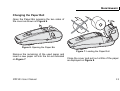
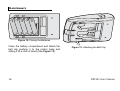
Figure 8. Pulling Out the Paper
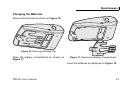
Figure 9. Cleaning the Print Head
Cleaning the Print Head
Disconnect the printer from the power supply
adapter.
Clean the heating element of the head with a
cotton swab moistened with an alcohol solvent
(ethanol, methanol, or IPA).
Open the paper bin cover. If a paper roll is
loaded, remove it.
Never touch the head; oils on your
skin can damage the head.
Do not clean the head immediately
after printing; the head may be hot.
14
Reload paper roll and close the printer cover.
MPP101 User Manual