1
AXIS 7000 User’s Guide
Physical Description
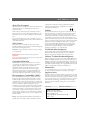
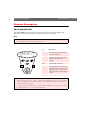
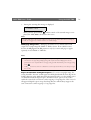
Connectors and Indicators
Push
Button
SCSI
Connector
Keyboard
Connector
Network
Connector
Power
Supply
Status
Indicator
Busy
Indicator
Network Power
Indicator Indicator
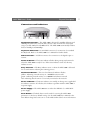
Network Connector - The AXIS 7000 is designed for 10 Mbps Ethernet and
100 Mbps Fast Ethernet networks and connects to the network via a twisted pair
category 5 cable (10baseT and 100baseTX). The AXIS 7000 automatically switches
between 10 Mbps and 100 Mbps.
Keyboard Connector - A mini-DIN connector for connection of a standard
PC-Keyboard. Refer to the AXIS 7000 User’s Manual for further details.
SCSI Connector - A SCSI-2 connector for connection to the digital copier or
scanner.
Status Indicator - The Status indicator flashes during startup and remains lit
when the AXIS 7000 is ready for use. If the Status indicator turns off, this may
indicate an error.
Busy Indicator - The Busy indicator turns on when the AXIS 7000 is allocated
for use and remains on during the scanning process.
Network Indicator - The tri-colored Network indicator flashes:
yellow - indicating network activity on a 10MB Ethernet network.
green - indicating network activity on a 100MB Fast Ethernet network.
red - indicating that the unit is not correctly connected to the network.
Power Indicator - The Power indicator is normally on when power is applied. If
the indicator remains off or flashes, this indicates a problem with the AXIS 7000 or
its power supply.
Power Supply - The AXIS 7000 can use either the AXIS PS-C or AXIS PS-E
power supply.
Push Button - The Push button can be used for restoring the AXIS 7000
parameters to the factory default settings. See the AXIS 7000 User’s Manual at the
Axis Website http://www.axis.com or on the AXIS Online CD for more information.
7