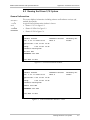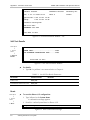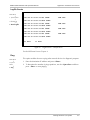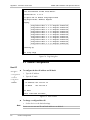
1
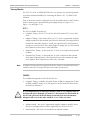
IPmux-1, IPmux-1E
TDMoIP Gateways
Installation and Operation Manual
Notice
This manual contains information that is proprietary to RAD Data Communications. No part of this
publication may be reproduced in any form whatsoever without prior written approval by RAD Data
Communications.
No representation or warranties for fitness for any purpose other than what is specifically mentioned in
this manual is made either by RAD Data Communications or its agents.
For further information contact RAD Data Communications at the address below or contact your local
distributor.
International Headquarters
RAD Data Communications Ltd.
U.S. Headquarters
RAD Data Communications Inc.
24 Raoul Wallenberg St.
Tel Aviv 69719 Israel
Tel: 972-3-6458181
Fax: 972-3-6498250
E-mail: [email protected]
900 Corporate Drive
Mahwah, NJ 07430 USA
Tel: (201) 529-1100
Toll free: 1-800-444-7234
Fax: (201) 529-5777
E-mail: [email protected]
© 2001 RAD Data Communications
Publication No. 114-200-09/01
Warranty
This RAD product is warranted against defects in material and workmanship for a period of one year
from date of shipment. During the warranty period, RAD will, at its option, either repair or replace
products which prove to be defective. For warranty service or repair, this product must be returned to
a service facility designated by RAD. Buyer shall prepay shipping charges to RAD and RAD shall pay
shipping charges to return the product to Buyer. However, Buyer shall pay all shipping charges, duties
and taxes for products returned to RAD from another country.
Limitation of Warranty
The foregoing warranty shall not apply to defects resulting from improper or inadequate maintenance
by Buyer, Buyer-supplied firmware or interfacing, unauthorized modification or misuse, operation
outside of the environmental specifications for the product, or improper site preparation or
maintenance.
Exclusive Remedies
The remedies provided herein are the Buyer’s sole and exclusive remedies. RAD shall not be liable for
any direct, indirect special, incidental, or consequential damages, whether based on contract, tort, or
any legal theory.
Regulatory Information
FCC-15 User Information
This equipment has been tested and found to comply with the limits of the Class B digital device,
pursuant to Part 15 of the FCC rules. These limits are designed to provide reasonable protection
against harmful interference when the equipment is operated in a commercial environment. This
equipment generates, uses and can radiate radio frequency energy and, if not installed and used in
accordance with the instruction manual, may cause harmful interference to the radio communications.
Operation of this equipment in a residential area is likely to cause harmful interference in which case
the user will be required to correct the interference at his own expense.
Safety Warnings
The exclamation point within a triangle is intended to warn the operator
or service personnel of operation and maintenance factors relating to the
product and its operating environment which could pose a safety hazard.
Always observe standard safety precautions during installation, operation and maintenance of this
product. Only a qualified and authorized service personnel should carry out adjustment, maintenance
or repairs to this instrument. No adjustment, maintenance or repairs should be performed by either the
operator or the user.
Telecommunication Safety
The safety status of each of the ports on IPmux-1/1E is declared according to EN 41003 and is detailed
in the table below:
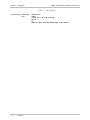
Safety Status
Ports
SELV
LAN, Unbalanced E1, E&M, ISDN-S
TNV-1
Balanced E1, T1
TNV-2
FXS
TNV-3
FXO
SELV = Safety Extra-Low Voltage
TNV-1 = Telecommunications Network Voltage within the limits of SELV and subject to overvoltages
TNV-2 = Telecommunications Network Voltage not subject to overvoltages
TNV-3 = Telecommunications Network Voltage subject to overvoltages
Declaration of Conformity
Manufacturer’s Name:
RAD Data Communications Ltd.
Manufacturer’s Address:
24 Raoul Wallenberg St.
Tel Aviv 69719
Israel
declares that the product:
Product Name:
IPmux-1
conforms to the following standard(s) or other normative document(s):
EMC:
EN 55022 (1998)
Information technology equipment – Radio disturbance
characteristics – Limits and methods of measurement.
EN 50024 (1998)
Information technology equipment –Immunity
characteristics – Limits and methods of measurement.
Safety:
EN 60950/A4 (1996)Safety of information technology equipment, including electrical
business equipment.
Supplementary Information:
The product herewith complies with the requirements of the EMC Directive 89/336/EEC and the
Low Voltage Directive 73/23/EEC. The product was tested in a typical configuration.
Tel Aviv, March 18th, 2001
Haim Karshen
VP Quality
European Contact: RAD Data Communications GmbH, Berner Strasse 77, 60437 Frankfurt am Main, Germany
Contents
Chapter 1. Introduction
1.1 Overview .......................................................................................................... 1-1
Versions...................................................................................................................1-1
Applications.............................................................................................................1-2
Features...................................................................................................................1-6
1.2 Physical Description ........................................................................................ 1-10
Front Panel ............................................................................................................1-11
Rear Panel .............................................................................................................1-11
1.3 Functional Description .................................................................................... 1-11
Operation Modes ..................................................................................................1-12
BRI/FXS TS Assignment in a Bundle ........................................................................1-14
Testing...................................................................................................................1-14
Timing Modes........................................................................................................1-15
Network Timing Schemes ......................................................................................1-16
Frame Format ........................................................................................................1-17
Packet Delay Variation...........................................................................................1-19
PDVT (Jitter) Buffer ................................................................................................1-20
Ethernet Throughput..............................................................................................1-20
Round Trip Delay ..................................................................................................1-22
Ethernet User Port .................................................................................................1-23
1.4 Technical Specifications .................................................................................. 1-24
Chapter 2. Installation
2.1 Introduction ...................................................................................................... 2-1
2.2 Site Requirements and Prerequisites.................................................................. 2-1
2.3 Package Contents.............................................................................................. 2-2
Power Cable ............................................................................................................2-2
2.4 Equipment Needed........................................................................................... 2-2
2.5 Installation and Setup........................................................................................ 2-2
Setting Jumpers........................................................................................................2-2
Connecting Interfaces and Cables.............................................................................2-4
Connecting the Power .............................................................................................2-9
Chapter 3. Operation
3.1 Front Panel Controls, Connectors, and Indicators .............................................. 3-1
3.2 Operating Instructions....................................................................................... 3-4
Turning IPmux-1/1E On ...........................................................................................3-4
Login .......................................................................................................................3-5
Turning IPmux-1/1E Off ...........................................................................................3-5
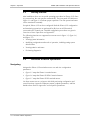
3.3 Getting Started .................................................................................................. 3-6
3.4 Overview of Menu Operations.......................................................................... 3-6
Navigating ...............................................................................................................3-6
Main Menu............................................................................................................3-10
System Menu.........................................................................................................3-10
IPmux-1/1E Installation and Operation Manual
i
Table of Contents
Setting IPmux-1/1E Configuration Options..............................................................3-11
Performance Monitoring ........................................................................................3-13
Chapter 4. Troubleshooting and Diagnostics
4.1 Error Detection ................................................................................................. 4-1
Using Front Panel LEDs............................................................................................4-1
Working with the Alarm Buffer.................................................................................4-1
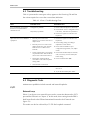
4.2 Troubleshooting ................................................................................................ 4-3
4.3 Diagnostic Tests ................................................................................................ 4-3
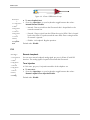
E1/T1.......................................................................................................................4-3
BRI ..........................................................................................................................4-4
FXS..........................................................................................................................4-5
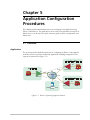
Chapter 5. Application Configuration Procedures
5.1 Overview .......................................................................................................... 5-1
Application ..............................................................................................................5-1
Guidelines ...............................................................................................................5-2
5.2 IPmux-1 ............................................................................................................ 5-4
Powering-up ............................................................................................................5-4
Configuring IPmux-1 for Station A ............................................................................5-5
Configuring IPmux-1 Station B .................................................................................5-8
5.3 IPmux-4 .......................................................................................................... 5-10
Powering-up ..........................................................................................................5-10
Configuring IPmux-4..............................................................................................5-11
5.4 Configuring the Management Option .............................................................. 5-14
5.5 Checking the Application ................................................................................ 5-17
Using IPmux Statistics – Step 1 ...............................................................................5-17
Using TDM Equipment Statistics and Functionality – Step 2....................................5-18
Appendix A. Boot Sequence for Downloading Software
Appendix B. Telnet
Appendix C. SNMP Management
Appendix D. TFTP Download Procedures
Appendix E. Parameters and Screens
Index
ii
IPmux-1/1E Installation and Operation Manual
Table of Contents
List of Figures
1-1. Multiplexing Voice and Data over an Ethernet Trunk................................................. 1-2
1-2. E1/T1 Circuit Extension over an IP Based Network .................................................... 1-3
1-3. Mixed BRI and POTS Support Application................................................................. 1-4
1-4. U Interface Concentration ......................................................................................... 1-5
1-5. Extending BRI Ports of a Small Office......................................................................... 1-5
1-6. Ethernet-based Multi-tenant Application with Voice and Data Integrated Access ....... 1-6
1-7. IPmux-1 3-D View .................................................................................................. 1-10
1-8. IPmux-1E 3-D View.................................................................................................. 1-10
1-9. IPmux-1 Functional Diagram ................................................................................... 1-11
1-10. Grooming of Timeslots from Remote Sites into a Single E1/T1 Port at Central Site. 1-12
1-11. TS Assignment in a Bundle for IPmux-1E/BRI......................................................... 1-14
1-12. IPmux-1 in Loopback Timing Mode....................................................................... 1-16
1-13. IPmux-1 in External Clock Mode ........................................................................... 1-16
1-14. IPmux-1 in Adaptive Timing Mode ........................................................................ 1-17
1-15. IPmux-1E in Adaptive Timing Mode ...................................................................... 1-17
1-16. TDMoIP Frame Structure....................................................................................... 1-17
1-17. VLAN Tag Format (802.1p&q) ............................................................................... 1-19
1-18. Packet Delay Variation .......................................................................................... 1-20
1-19. IPmux-1/1E with Ethernet User Port ...................................................................... 1-23
2-1. The IPmux-1E ISDN-S Jumpers.................................................................................. 2-4
2-2. IPmux-1 Front Panel.................................................................................................. 2-4
2-3. IPmux-1 Front Panel for Two Ethernet Ports .............................................................. 2-5
2-4. IPmux-1 Rear Panel................................................................................................... 2-5
2-5. IPmux-1 Rear Panel for Two Ethernet Ports ............................................................... 2-5
2-6. IPmux-1E Front Panel................................................................................................ 2-5
2-7. IPmux-1E Front Panel for Two Ethernet Ports ............................................................ 2-5
2-8. IPmux-1E Rear Panel (BRI Option) ............................................................................ 2-5
2-9. IPmux-1E Rear Panel (BRI Option) for Two Ethernet Ports ......................................... 2-6
2-10. External Clock Port Pinout ....................................................................................... 2-8
3-1. IPmux-1 Front Panel LEDs ......................................................................................... 3-2
3-2. IPmux-1 Rear Panel Switch........................................................................................ 3-2
3-3. IPmux-1E Front Panel Indicators................................................................................ 3-3
3-4. IPmux-1E Back Panel Indicators ................................................................................ 3-3
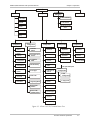
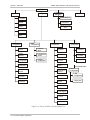
3-5. IPmux-1 (E1/T1) Terminal Menu Tree........................................................................ 3-7
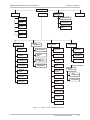
3-6. IPmux-1E ISDN-S Terminal Menu Tree ..................................................................... 3-8
3-7. IPmux-1E FXS Terminal Menu Tree ........................................................................... 3-9
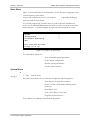
3-8. IPmux-1/1E Main Menu .......................................................................................... 3-10
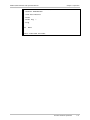
3-9. System Menu .......................................................................................................... 3-11
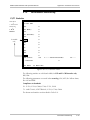
3-10. IPmux-1/1E Configuration Menu ........................................................................... 3-11
3-11. IPmux-1E ISDN-S Configuration Menu .................................................................. 3-11
3-12. IPmux-1E FXS Configuration Menu........................................................................ 3-12
3-13. Performance Monitoring Menu for IPmux-1 .......................................................... 3-13
IPmux-1/1E Installation and Operation Manual
iii
Table of Contents
3-14. Performance Monitoring Menu for IPmux-1E ISDN-S ............................................ 3-13
3-15. Performance Monitoring Menu for IPmux-1E FXS.................................................. 3-13
4-1.
4-2.
4-3.
4-4.
IPmux-1 External Loop .............................................................................................. 4-4
IPmux-1 Internal Loop............................................................................................... 4-4
IPmux-1E/BRI External Loop ...................................................................................... 4-4
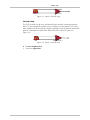
IPmux-1E/BRI Internal Loop ...................................................................................... 4-5
5-1. IPmux-1 Operating Opposite IPmux-4 ...................................................................... 5-1
5-2. Host IP Menu ............................................................................................................ 5-5
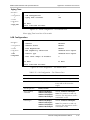
5-3. E1/T1 Configuration Menu ........................................................................................ 5-6
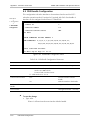
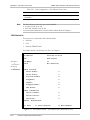
5-4. DS0 Bundle Configuration Menu............................................................................... 5-7
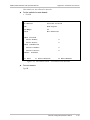
5-5. Bundle Connection Configuration ............................................................................. 5-8
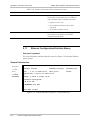
5-6. Physical Layer Configuration Menu.......................................................................... 5-12
5-7. Bundle Connection Configuration in IPmux-4 ......................................................... 5-14
5-8. Authentication/Community Menu ........................................................................... 5-15
5-9. Manager List Menu.................................................................................................. 5-16
5-10. Alarms Trap Mask Menu........................................................................................ 5-16
5-11. Default Gateway Menu ......................................................................................... 5-17
List of Tables
1-1.
1-2.
1-3.
1-4.
1-5.
Fiber Options ............................................................................................................ 1-8
Ethernet Frame Structure......................................................................................... 1-18
UDP Ports Definition............................................................................................... 1-19
Ethernet Throughput – Unframed E1 ....................................................................... 1-21
Ethernet Throughput – Unframed T1....................................................................... 1-21
2-1.
2-2.
2-3.
2-4.
2-5.
2-6.
E1/T1 Port Connectors Pinout.................................................................................... 2-7
Ethernet Port Pinout .................................................................................................. 2-7
Control Port Pinout ................................................................................................... 2-7
ISDN-S Interface Pin Assignments.............................................................................. 2-8
FXS Interface Pin Assignments for RJ-11..................................................................... 2-8
External Clock Port Pinout ......................................................................................... 2-8
3-1. IPmux-1 System Indicators and Switches ................................................................... 3-2
3-2. IPmux-1E (BRI/FXS) System Indicators and Switches .................................................. 3-3
4-1. Event Types ............................................................................................................... 4-2
4-2. IPmux-1 Troubleshooting Chart ................................................................................. 4-3
5-1. Bundle Configuration ................................................................................................ 5-3
5-2. Configuration Summary............................................................................................. 5-3
iv
IPmux-1/1E Installation and Operation Manual
Chapter 1
Introduction
1.1 Overview
IPmux-1/1E offers a solution for extending traditional E1/T1, ISDN, or POTS TDM
services transparently over the widely deployed IP networks. The device converts
the data stream coming from its user ports into configurable sized IP packets that
are extended over the Fast Ethernet port and vice versa. IPmux-1/1E offers
end-to-end synchronization for voice applications. IPmux-1/1E also offers large
buffers to compensate for the delay variation inserted by the network. The device
can be used to extend E1/T1 or ISDN/POTS circuits over IP networks for
Metropolitan Area Network applications. IPmux-1/1E also features a Fast Ethernet
user port for data (Ethernet) connectivity to the IP/Ethernet network. Management
is performed locally by a terminal, or remotely via Telnet or SNMP.
IPmux-1 has a single E1/T1 port.
IPmux-1E offers one of the following options:
•
4 BRI – a card with 4 ISDN standard S-interfaces
•
4 FXS – a card with 4 FXS ports
•
Optional user Ethernet port.
The IPmux family implements TDMoIP technology to carry TDM transport over IP.
IPmux-1E BRI channels are transported as TDM timeslots, while the Analog FXS
channels are digitized and carried as fractional E1/T1 with CAS.
Versions
•
IPmux-1 with E1 interface
− Balanced line with an RJ-45 connector
− Unbalanced line with a mini-coaxial connector (TBNC)
•
IPmux-1 with T1 interface – Balanced with an RJ-45 connector
•
IPmux-1E with ISDN BRI interface –4 ISDN ‘S’ RJ-45 connectors
•
IPmux-1E with FXS interface – 4 Analog ‘FXS’ RJ-11 connectors
An external clock port is optional for IPmux-1.
A user Ethernet interface is optional for IPmux-1/1E (Ordering options).
Overview
1-1
Chapter 1 Introduction
IPmux-1/1E Installation and Operation Manual
Applications
Typical IPmux-1/1E applications are shown with E1/T1, ISDN, and FXS interfaces.
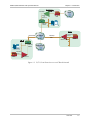
Figure 1-1 illustrates Multiplexing Voice and Data over an Ethernet Trunk.
Figure 1-2 shows an E1/T1 circuit extension over an IP based Network.
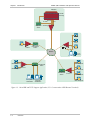
Figure 1-3 illustrates mixed BRI and POTS support application of V5.1
concentration of BRI remote terminals.
Figure 1-4 shows m-catmPtx-9-5.2T6 2.4(ppor7.1(3 a)10.6()-1.4a.5(at)c8TJc6(x-9-a.6()-1.at)c8TJo(m
1-2
Overview
IPmux-1/1E Installation and Operation Manual
Chapter 1 Introduction
100 Mbps
n × E1/T1
IPmux-16
or
IPmux-4
PSTN
PBX
Ethernet
Switch
10/100 Mbps
IP Network
Fractional
E1/T1
100 Mbps
Fiber
PBX
IPmux-1
Ethernet
Switch
Public Internet
Fractional
E1/T1
PBX
IPmux-1
Figure 1-2. E1/T1 Circuit Extension over an IP Based Network
Overview
1-3
IPmux-1/1E Installation and Operation Manual
Chapter 1 Introduction
Megaplex
For BRI
Grooming
E1 Link
E1 CAS
Telephone
Switch
V5.1
For FXS
Grooming
POTS
POTS
POTS
IPmux-1
Fast Ethernet
Switch
POTS
Network
Computer
Workstation
ISDN Telephone
ISDN Telephone
ISDN Telephone
Fast Ethernet
Switch
IPmux-1
ISDN Telephone
Fast Ethernet
Switch
Computer
Workstation
Computer
Workstation
IPmux-1
ISDN Telephone
ISDN Telephone
Figure 1-3. Mixed BRI and POTS Support Application (V5.1 Concentration of BRI Remote Terminals)
1-4
Overview
IPmux-1/1E Installation and Operation Manual
Chapter 1 Introduction
Megaplex
For BRI
Grooming
E1 Link
TE U Ports
E1 CAS
Telephone
Switch
ISDN Telephone
ISDN Telephone
For FXS
Grooming
ISDN Telephone
Fast Ethernet
Switch
IPmux-1
ISDN Telephone
Fast Ethernet
Switch
Computer
Workstation
Computer
Workstation
IPmux-1
ISDN Telephone
ISDN Telephone
Overview
1-5
IPmux-1/1E Installation and Operation Manual
Chapter 1 Introduction
E1/T1
IPmux-1
ISDN
Phones
FXS
IPmux-1E
BRI
Internet
IPmux-1E
Switch
Telephony Switch
IP Network
Ethernet
Switch
IPmux-16
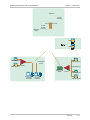
Figure 1-6. Ethernet-based Multi-tenant Application with Voice and Data Integrated Access
Features
IPmux-1/1E is a 1U high, easy-to-install standalone unit. A rack mount installation
option is available.
IPmux-1 can be ordered with AC or DC power supply. IPmux-1E is only available
with AC power supply.
Management
IPmux-1/1E can be managed locally by connecting an ASCII terminal to the
RS-232 port on the front panel or remotely via Telnet or SNMP. The SNMP
management capability enables fully graphical, user-friendly management using
the RADview network management stations offered by RAD, as well as
management by other SNMP-based management systems.
T1
The T1 port and framers comply with ANSI T1.403 standards. T1 jitter
performance is according to G.704, G.824, TR-62411. The T1 framers support
pass-through, SF, ESF and CAS framing. The T1 port supports long haul and short
haul input signals and can be monitored for alarms and error statistics. FDL and
transmit PRM for T1/ESF are also supported.
E1
The E1 port complies with G.703, G.704, and G.823 standards. E1 framers comply
with G.704. The E1 framers support pass-through, framed, CRC4 MF and CAS MF
framing. The E1 port supports long haul and short haul input signals and can be
monitored for alarms and error statistics.
1-6
Overview
IPmux-1/1E Installation and Operation Manual
Chapter 1 Introduction
ISDN BRI
IPmux-1E has 4-ports, S-interface only. Each port can be configured as either NT
or TE (Network/User) by jumper and software; NT or TE is configured per device.
IPmux-1E can be configured to 1, 2, 3 or 4 active ports.
IPmux-1E works in transparent mode (no termination/compression of D channels).
It operates opposite IPmux with E1/T1 and a Megaplex unit as a concentrator in
transparent mode or opposite another IPmux-1E with ISDN BRI ports.
FXS
IPmux-1E has 4 FXS interface ports for POTS connection. A central IPmux unit
with an E1/T1 CAS interface can groom FXS channels from the remote site.
IP
The data stream coming from the E1 or T1 port is converted into IP packets that
are transported over the Fast Ethernet port, and vice versa.
TDM bytes are encapsulated in a UDP frame that runs over IP and over Ethernet.
The number of TDM bytes in an IP frame is configurable for throughput/delay
tradeoff.
Each device has a single IP address (Host IP). A configurable destination IP address
is assigned to the IP packets. IP ToS field support can be configured for IP Level
Priority.
Ethernet User Port
IPmux-1E has an optional user port for user LAN connectivity/access as well as
TDM services connectivity. A transparent bridging mode is supported
(user/network Ethernet port) and a second mode which enables user port rate
limiting.
Ethernet Physical Port
IPmux-1/1E is available with Ethernet ports (user or network port). The Ethernet
network port can be either UTP or fiber. The Ethernet user port is UTP only.
•
UTP option – A standard 10/100BaseT half/full duplex port with
auto-negotiation support. If auto-negotiation is disabled, IPmux-1 capabilities
can be configured to 100BaseT – full duplex, 100BaseT – half duplex,
10BaseT – full duplex, or 10BaseT – half-duplex. Half-duplex operation in
IPmux-1 network port is not recommended, because collisions and backoffs
cause large delay variation and may exceed the delay variation buffer
tolerance at the receiving end, causing buffer underflows and errors to occur.
•
Fiber option – standard 100BaseF full duplex port (see Table 1-1).
Overview
1-7
Chapter 1 Introduction
IPmux-1/1E Installation and Operation Manual
Table 1-1. Fiber Options
Interface Type Wavelength
(nm)
1-8
Overview
Optical Power
(dBm)
cetivet( )] T J0 -1.2133 TD-0.0049 Tc[ S e
Optical
gt
(dB)*a oss ( )]TJ0 -1.2133 TD-0.0049 Tc0 Tw[((d)-101(B/c)-7.1kPpm)
IPmux-1/1E Installation and Operation Manual
Note
Chapter 1 Introduction
IPmux E1/T1 working opposite IPmux-1E with BRI ports should work in Fractional
E1/T1 mode (no CAS). When working opposite IPmux-1E with FXS, use E1/T1 CAS
mode.
QoS
QoS support:
•
Labeling IP level priority (ToS) for TDMoIP packets
•
VLAN tagging and priority labeling according to IEEE 802.1p&q for TDMoIP
packets.
The user can configure the ToS (Type of Service) of the outgoing TDMoIP packets.
This allows an en-route Layer 3 router or switch, which supports ToS, to give
higher priority to IPmux-1/1E TDMoIP traffic for delay-sensitive and secure
applications. IPmux-1 allows you to configure the WHOLE ToS byte field, since
different vendors may use different bits to tag packets for traffic prioritization.
This also enables you to work according to various RFC definitions (for example
RFC 2474, RFC 791). The user can also configure VLAN priority bits for
Level 2 Priority.
Timing
IPmux-1 maintains synchronization between TDM devices by deploying advanced
clock distribution mechanisms.
Available timing modes are:
Note
•
Loopback
•
Adaptive
•
Internal Clock
•
External Clock.
For more details see Timing Modes in Section 1.3.
Standards
G.703, G.704, G.706, G.823, ANSI T1.403, AT&T TR-62411, G.824, IEEE 802.3,
I.430, IEEE 802.3D, IEEE 802.1p&q, EMC Class B compliance – EN55022 Class B
Overview
1-9
Chapter 1 Introduction
IPmux-1/1E Installation and Operation Manual
1.2 Physical Description
IPmux-1 is a 1U high 19-in (IPmux-1E is a 1U high ½ 19-in), easy-to-install
standalone unit. A rack mounting kit option is available (ordered separately).
Figure 1-7 shows a 3-dimensional view of IPmux-1; Figure 1-8 shows a
3-dimensional view of IPmux-1E.
1-10
Physical Description
IPmux-1/1E Installation and Operation Manual
Chapter 1 Introduction
Front Panel
The control interface and indicator LEDs are located on the front panel of
IPmux-1/1E. For further details see Chapter 2.
Rear Panel
User and network ports and power supply are located on the rear panel of
IPmux-1/1E. For further details see Chapter 2.
1.3 Functional Description
IPmux-1 supports a single E1 or T1 TDM interface; it provides TDM connectivity
across the IP network. A single bundle (group of timeslots) can be transmitted to a
predefined far-end bundle. IPmux-1 supports ICMP (ping), and generates ARP in
case of unknown next hop MAC addresses, answers ARP requests, and supports
802.3 Ethernet format.
IPmux-1E supports 4 BRI or 4 FXS ports for transparent connectivity over the IP
network.
Both IPmux-1 and IPmux-1E support Ethernet user port for user LAN connectivity.
Configuration and management are provided via the IPmux-1/1E local terminal,
Telnet or RADview management tool (SNMP).
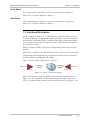
Figure 1-9 shows a typical application for IPmux-1.
10/100BaseT
E1/T1 Port
100BaseF
IP
10/100BaseT
E1/T1 Port
100BaseF
IPmux-1
IPmux-1
Figure 1-9. IPmux-1 Functional Diagram
IPmux-1/1E works in conjunction with the rest of the IPmux product line (see
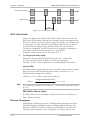
Figure 1-10). The combination of IPmux products provides up to 31 per E1 or
24 per T1 remote bundles, attached to one central IPmux-4/16 (see Figure 1-10).
Functional Description
1-11
IPmux-1/1E Installation and Operation Manual
Chapter 1 Introduction
Sub E1/T1
IPmux-1
IPmux-1
E1/T1 Line 1
E1/T1 Line 2
E1/T1 Line 3
E1/T1 Line 4
Sub E1/T1
IP over
Ethernet
IPmux-4/16
IPmux-1
Sub E1/T1
IPmux-1
Sub E1/T1
Figure 1-10. Grooming of Timeslots from Remote Sites into a
Single E1/T1 Port at Central Site
Other BRI/FXS applications are shown in Figure 1-3, Figure 1-4, and Figure 1-5.
Operation Modes
IPmux-1 E1/T1
IPmux-1 E1/T1 operation modes are:
•
Unframed
•
Fractional
•
Fractional with CAS.
Unframed
In the transparent mode, the incoming bit stream from each channel (regardless of
framing) is converted into IP over Ethernet frames. This option provides clear
channel end-to-end service (unframed).
Fractional
In the fractional mode, the incoming bit stream is regarded as a sequence of
n x 64 kbps channel groups (according to framing). Each predefined group of
channels is converted into a structure block. The structure block is packetized into
IP frames and transmitted.
This mode allows transmission of several selected timeslots without the whole E1
or T1 frame, as in transparent mode.
Note
1-12
Use Fractional mode when grooming ISDN BRI channels from a remote IPmux-1E
unit.
Functional Description
IPmux-1/1E Installation and Operation Manual
Chapter 1 Introduction
Fractional with CAS
In the fractional-with-CAS mode, the structure block (as described under
Fractional Operation Modes, above) also includes Channel Associated Signaling
(CAS). The relevant portion of the signaling channel is packetized and sent to the
destination.
Note
Use Fractional with CAS mode when grooming FXS channels from a remote
IPmux-1E unit.
IPmux-1E ISDN BRI
The IPmux-1E ISDN BRI S interface operation modes are:
•
TE mode
•
NT mode.
The selected mode applies to all 4 channels. The NT or TE mode is determined by
phantom feeding and software setting, which is enabled/disabled by jumpers
located on the BRI card (see Chapter 2).
TE Mode
All four channels are configured in TE (Terminal Equipment) as defined in I.430.
NT Mode
All four channels are configured in NT (Network Termination) as defined in I.430.
TE Deactivation is not used in NT mode, and Layer 1 is in active mode all the
time.
Note
If phantom feeding is enabled by the jumpers, the TE mode cannot be selected as
the IPmux-1E operation mode. If phantom feeding is disabled, both NT and TE are
valid options.
IPmux-1E FXS
IPmux-1E FXS operates in:
•
E1 mode
•
T1-D4 mode
•
T1 ESF mode.
Functional Description
1-13
IPmux-1/1E Installation and Operation Manual
Chapter 1 Introduction
The IPmux-1E FXS operation modes allow IPmux to work opposite E1, T1-D4, or
T1-ESF. Two parameters are set internally when choosing one of the options:
•
A-Law/µ-Law
− A-Law when E1 mode is selected
− µ-Law is used in PCM CODEC when T1 (D4 or ESF) is selected.
•
E1, T1-D4, and T1-ESF with CAS are structured differently in the TDM ↔IP
interworking function. A different structure must be used when working
opposite each one.
BRI/FXS TS Assignment in a Bundle
BRI
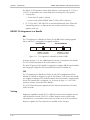
The TS assignment in a Bundle for IPmux-1E with BRI (when working opposite
IPmux with E1/T1 or Megaplex) is assigned as follows:
First Channel
B1
B2
Second Channel
D
MSB Bits 7, 6 contain
D channel information
B1
B2
D
…
MSB Bits 7, 6 contain
D channel information
Figure 1-11. TS Assignment in a Bundle for IPmux-1E/BRI
As shown in Figure 1-11, the 4 BRI channels consume 12 timeslots in the Bundle.
The E1/T1 IPmux should work in framed mode (no CAS).
The three TS groups in the bundle are assigned according to BRI channel numbers;
the first group is assigned to the lowest BRI channel that is enabled, etc.
FXS
The TS assignment in a Bundle for IPmux-1E with FXS is straightforward. Each
timeslot in a Bundle is assigned to a specific FXS channel. Time slots in the bundle
are assigned according to FXS channel numbers; the first timeslot is assigned to the
lowest FXS channel that is configured, etc. As shown in Figure 1-11, the 4 FXS
channels consume 4 timeslots in the Bundle.
The E1/T1 IPmux that works opposite the FXS channels should work in Framed
with CAS mode.
Testing
Diagnostic capabilities include E1/T1 or BRI S local and remote loopback tests for
rapid localization of faults. The E1/T1 or BRI S channel can be looped locally,
toward the line, or toward the remote end (see Chapter 4 for more information).
Remote Loopback and Tone Injection are available for the FXS port.
1-14
Functional Description
IPmux-1/1E Installation and Operation Manual
Chapter 1 Introduction
Timing Modes
The E1/T1 Tx clock, or ISDN/FXS PCM clock, can operate in several timing modes
to provide maximum flexibility for connecting the IPmux-1 E1, T1, ISDN or FXS
channels.
Each of the clocks must be configured correctly on both the Receive and Transmit
ends to ensure proper operation and prevent pattern slips (see Figure 1-12,
Figure 1-14, and Figure 1-15).
E1/T1
The E1/T1 available Tx modes are:
Note
•
Loopback Timing – the E1/T1 Tx clock is derived from the E1/T1 receive (Rx)
clock.
•
Adaptive Timing – in this mode, the E1 or T1 Tx clock is regenerated using the
Adaptive method. In this method, the fill level of the buffer receiving packets is
monitored. If the buffer begins to overfill, the regenerated Tx clock frequency
increases to avoid overflow. If the buffer begins to empty, the Tx clock (toward
the TDM device) decreases to avoid underflow.
•
Internal Clock Timing – in this mode, the Tx clock is received from an internal
oscillator.
•
External Clock Timing – in this mode the Tx clock is taken from the external
clock input (Ordering option). The External Clock port also outputs the input
clock signal to allow connection to other units, if needed.
In Adaptive Timing mode the regenerated clock is subject to network Packet Delay
Variation and may not comply with jitter and wander specifications.
FXS/BRI
The available timing modes for the PCM clock are:
•
Warning
Loopback Timing – available only when IPmux-1E BRI is configured as TE (not
available in BRI NT mode or for FXS interface). In this mode the PCM clock is
derived from Channel 1.
It is recommended not to deactivate Channel 1 while it is in loopback clock so
that data will not be damaged. If Channel 1 is disconnected or deactivated (by
the NT side), the PCM clock will change to Internal clock and a momentary
disruption will occur to the other channels (2,3,4), if they are active.
•
Adaptive Mode – the clock is regenerated using the Adaptive method, where
the rate of arriving packets is used to regenerate the clock (see E1/T1).
•
Internal Mode – the clock is received from an internal oscillator.
Functional Description
1-15
IPmux-1/1E Installation and Operation Manual
Chapter 1 Introduction
Network Timing Schemes
The following paragraphs describe typical timing schemes and the correct timing
mode settings for achieving end-to-end synchronization.
External Network Timing
When the edges of the network are synchronized according to an external
network clock source, all the IPmux-1 units should be configured to work in
loopback timing mode (see Figure 1-12). This topology enables any-to-any
connectivity.
Clock from External Distribution Network
E1/T1
E1/T1
E1/T1
E1/T1
IPmux-1
E1/T1 Device
IP over
Ethernet
LBT Mode
IPmux-1
LBT Mode E1/T1 Device
E1/T1
E1/T1 Device
LBT Mode
IPmux-1
IPmux-1
E1/T1
LBT Mode E1/T1 Device
Figure 1-12. IPmux-1 in Loopback Timing Mode
External timing from the network can also be issued to IPmux-1 by External Clock
input; in this case, the E1/T1 device will use the LBT mode.
Clock from External Distribution Network
E1/T1 Device
E1/T1 Device
E1/T1
IP over
Ethernet
LBT Mode
External
Clock Mode
IPmux-1
IPmux-1
E1/T1
LBT Mode
Figure 1-13. IPmux-1 in External Clock Mode
Single Source Clock Network
When a common clock is not available on all the ends of the network one of the
IPmux-1 devices is configured to work in Loopback timing mode, while the other
IPmux-1 device is configured to work in Adaptive timing mode (see Figure 1-14).
1-16
Functional Description
IPmux-1/1E Installation and Operation Manual
Chapter 1 Introduction
Loopback Timing Mode
E1/T1 Device
Adaptive Mode
E1/T1
Master Clock
Source Device
IP over
Ethernet
E1/T1
E1/T1 Device
E1/T1
E1/T1
IPmux-1
IPmux-1
Remote Loopback
Timing Device
Figure 1-14. IPmux-1 in Adaptive Timing Mode
Adaptive
Grooming
of BRI
LBT
E1
ISDN
LBT
Adaptive
Megaplex
IP over
Ethernet
ISDN
Grooming of FXS
in E1 CAS
IPmux-4/16
ISDN
V5.1
Telephone
Switch
Adaptive
POTS
Figure 1-15. IPmux-1E in Adaptive Timing Mode
Frame Format
The Ethernet frame sent by the IPmux-1 is a UDP datagram that transfers E1/T1
payload bytes over IP over Ethernet (UDP payload + UDP header + IP header +
Ethernet header).
The UDP payload size is equal to TDM bytes per frame (TDM bytes/frame
configuration).
Table 1-2 specifies the structure of the different headers, special fields, and the
payload in the Ethernet packet.
MAC
IP
UDP
Payload
Figure 1-16. TDMoIP Frame Structure
Functional Description
1-17
IPmux-1/1E Installation and Operation Manual
Chapter 1 Introduction
Table 1-2. Ethernet Frame Structure
MAC
Layer
LLC
Layer
IP Layer
UDP
Layer
Data
Layer
MAC
Layer
Field length (bytes)
Field
7
Preamble
1
SFD
6
Destination MAC Address
6
Source MAC Address
2
Type
1
Vers/HLEN
1
Service Type
2
Total Length
2
Identification
1
Flags/Fragment Offset (most)
1
Fragment Offset (least)
1
Time to Live
1
Protocol
2
Header Checksum
4
Source IP Address
4
Destination IP Address
2
UDP Source Port
2
UDP Destination Port
2
UDP Message Length
2
UDP Checksum
...
Payload
4
CRC
Note: IEEE 802.1p&q VLAN
Tagging (additional 4 bytes if
enabled)
Note: The UDP source port
field is used to transfer the
destination bundle number.
VLAN Support
VLAN, according to IEEE 802.1p&q, adds four bytes to the MAC layer of the
Ethernet frame. The contents of these bytes, MAC layer priority and VLAN ID, can
be set by the user. In this mode, only VLAN format frames are sent and received
by IPmux-1. Figure 1-17 describes the VLAN tag format.
1-18
Functional Description
IPmux-1/1E Installation and Operation Manual
Chapter 1 Introduction
Packets Leaving IPmux-1
t
Packets Arriving
t
PDV
Figure 1-18. Packet Delay Variation
PDVT (Jitter) Buffer
IPmux-1 is equipped with a Packet DVT (Delay Variation Tolerance) buffer. The
PDVT buffer or jitter buffer is filled by the incoming IP packets and emptied out to
fill the E1/T1 stream. The buffer begins to empty out only after it is half full in order
to compensate for packet starvation from the Ethernet side. The time it takes for
half of the buffer to empty out is the maximum DVT time. Delay Variation
Tolerance is configurable. The PDVT (jitter) buffer is designed to compensate for
packet delay variation caused by the network + intrinsic PDV.
It supports a delay variation of up to 300 ms for E1 or T1.
➤
To configure jitter buffer depth:
Estimated or Measured PDV introduced by the network + intrinsic PDV
(if it exists) introduced by the module as a result of configuring the
TDM bytes / frame > 48 (see explanation of calculating intrinsic PDV, below).
Intrinsic PDV
If TDM bytes/frame is greater than 48, there is an intrinsic delay variation (intrinsic
PDV). The intrinsic PDV introduced by the module is a function of n>1 in
TDM bytes/frame configuration as follows:
I.PDV (ms) = [(n-1) x 1000) / (frames per second × n]
where n =
Note
Configured TDM bytes/frame
48
(n = 1 to 8).
For a bundle that contains a few timeslots (i.e. 1–3) the minimal jitter buffer should
be 6 ms.
PDVT Buffer Effect on Delay
The PDVT buffer is on the TDM path; it adds to the total end-to-end delay (see
delay calculation, below).
Ethernet Throughput
Configuring the TDM bytes per frame (TDM bytes/frame) parameter can reduce
Ethernet throughput (bandwidth or traffic travelling through the Ethernet). This
parameter controls the number of TDM bytes encapsulated in one frame. The
TDM bytes/frame parameter can be configured to n x 48 bytes where n is an
1-20
Functional Description
IPmux-1/1E Installation and Operation Manual
Chapter 1 Introduction
integer between 1 and 8. Configuring TDM bytes/frame to a higher value reduces
the IP/Ethernet overhead segment of the total packet and thus can significantly
reduce the total Ethernet throughput.
On the other hand, packetization delay and intrinsic packet delay variation (PDVT)
are increased; this contributes to a higher end-to-end delay. This effect can be
small and negligible when a full E1 (or many timeslots) are transferred but can be
very significant when few timeslots are transferred. In this case, the packetization
delay and the intrinsic PDV when configuring a large value of
TDM bytes/frame can be very large and may exceed the maximum PDVT (jitter)
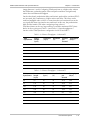
buffer on the receiving end. Table 1-4 and Table 1-5 show throughput as a
function of the TDM bytes/frame configuration for full E1 and full T1.
Table 1-4. Ethernet Throughput – Unframed E1
TDM
bytes/frame
Frame
Length
(bytes)
Overhead
(bytes)
Overhead
(%)
Packets
per
Second
Throughput
(Mbps)
48
94
46
96
5447
4.1
96
142
46
48
2724
3.1
144
190
46
32
1816
2.76
192
238
46
24
1362
2.6
240
286
46
19
1089
2.5
288
334
46
16
908
2.43
336
382
46
14
778
2.38
384
430
46
12
681
2.34
Table 1-5. Ethernet Throughput – Unframed T1
TDM
bytes/frame
Frame
length
(bytes)
Over head
(bytes)
Over head
(%)
Packets
per
Second
Throughput
(Mbps)
48
94
46
96
4107
3.08
96
142
46
48
2054
2.32
144
190
46
32
1369
2.07
192
238
46
24
1027
1.95
240
286
46
19
821
1.87
288
334
46
16
685
1.82
336
382
46
14
587
1.78
384
430
46
12
513
1.76
Functional Description
1-21
IPmux-1/1E Installation and Operation Manual
Chapter 1 Introduction
➤
To calculate Ethernet throughput and intrinsic PDV as a function of
TDM bytes/frame:
Ethernet load (bps) =
[(frame overhead (bytes) + TDM bytes/frame) x 8] x frames/second
Frame overhead = Ethernet overhead + IP overhead = 46 bytes
Note
The frame overhead does not include:
Preamble field: 7 bytes
SFD field: 1 byte
VLAN field (when used): 4 bytes.
Frame/second =
Unframed:
Framed:
5447/n for a full E1
4107/n for a full T1
8000 x k/(46.875 x n)
Where k = number of assigned timeslots
TDM bytes/frame
Where n =
48
Round Trip Delay
The voice path round-trip delay, which is a function of all connections and
network parameters, is calculated for E1/T1 as follows:
(±2 µs) RTDelay(µs) = 2 x (
48 × n
x 125 (µs) + PDVT buffer (µs) +1000 µs)+ Network Round Trip Delay
NTS
where n =
TDM bytes/frame
48
where NTS = number of timeslots assigned
in unframed E1 interface = 32
T1 interface = 24
End-to-End Alarm Generation
An end-to-end alarm generation mechanism exists in IPmux-1 to facilitate the
following alarms:
Unframed
AIS is transmitted toward the near-end PBX in event of:
• Far-end LOS, AIS
• PDVT underflow/overflow.
Framed
Timeslot/CAS configurable alarm pattern is transmitted toward the
near-end PBX in event of:
• Far-end LOS, LOF, AIS
• PDVT underflow/overflow.
1-22
Functional Description
IPmux-1/1E Installation and Operation Manual
Chapter 1 Introduction
Ethernet User Port
The Ethernet user port allows a user to aggregate both TDMoIP traffic and his
private network LAN traffic to a single Ethernet network connection without
requiring an access switch. This is a cost effective solution for MTU or small office
applications. A rate limiter to restrict user port traffic is supported.
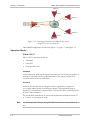
IPmux-1/1E contains an internal switch where one of its ports is connected to a
TDMoIP interworking function, another internal switch port is used as the user
port, and the third is used as an Ethernet network port.
Ethernet
User Port
E1 Port
Internal
Switch
Ethernet
Network Port
TDMoIP
Figure 1-19. IPmux-1/1E with Ethernet User Port
Note
Priority is always given to TDMoIP packets inside the internal switch.
Internal Switch Operation Modes
Bridge Mode (no user rate limiter)
In this mode the internal switch performs transparent bridging, ALL internal ports
learn, update the internal tables, and make forwarding decisions according to the
source MAC only (not MAC + VLAN ID).
VLAN tagged frames are supported, however forwarding decisions are based on
MAC only.
Rate Limiter Mode
In this mode a rate limiter is available to limit user port traffic. This feature is
valuable when a limited bandwidth DSL modem, for example, is used to extend
the Ethernet link (generally when the Ethernet link rate is limited/shaped to a lower
rate after IPmux). In this case TDMoIP packets will be dropped in the modem
even if it was prioritized at the IPmux internal switch. This is prevented by limiting
the user port to actual link rate minus TDMoIP bandwidth. The rate limiter can
limit user traffic at 50 kbps steps up to 5M and in 1 Mbps steps from 5M to 100M.
The internal switch (in the rate limiter mode) operates in the following way:
•
The network port is in lock mode (no learning takes place). If this port must be
connected to a switch (not a hub), this is not a limitation, since all applications
involve connection to a backbone on an access switch.
•
VLAN tagged frames are not supported (will be dropped)
•
Access to the IPmux host for management is possible only from the network
port.
Functional Description
1-23
IPmux-1/1E Installation and Operation Manual
Chapter 1 Introduction
Note
All of the above exist only in rate limiting mode, and do not exist in bridge mode.
The bridge/rate limiter modes are selected by the rate limiter parameter. When set
to 0 the bridge mode is selected, otherwise the rate limiter is selected by the
specified rate.
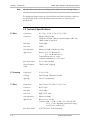
1.4 Technical Specifications
E1 Port
E1 Framing
T1 Port
1-24
Compliance
ITU-T Rec. G.703, G.706, G.732, G.823
Connector
Balanced: RJ-45 8-pin
Unbalanced: TBNC 75Ω (an external adapter cable from
TBNC to BNC is required)
Data Rate
2.048 Mbps
Line Code
HDB3
Line Impedance
Balanced: 120Ω; Unbalanced: 75Ω
Signal Levels
Receive: 0 to –32 dB with LTU
0 to –10 dB without LTU
Transmit Balanced: ±3V ±10%
Transmit Unbalanced: ±2.37V ±10%
Jitter Performance
ITU-T G.823 standard
External Adapter
Cable
TBNC to BNC required
Compliance
G.704, G.706
Framing
Pass Through, CRC4 MF, CAS MF
Signaling
CAS, CCS (transparent)
Compliance
ANSI T1.403, ITU-T Rec. G.703, G.704
Connector
RJ-45, 8-pin
Data Rate
1.544 Mbps
Line Code
B8ZS, B7ZS, AMI
Line Impedance
Balanced: 100Ω
Signal Levels
Receive: 0 to –30 dB
Transmit: 0 dB, –7.5 dB, –15 dB, –22.5 dB, with CSU
±2.7V ± 10%, adjustable, measured in range
0 to 655 feet, without CSU
Jitter Performance
AT&T TR-62411, G.824 standards
Technical Specifications
IPmux-1/1E Installation and Operation Manual
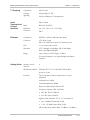
T1 Framing
Local
Terminal and
Control
Interface
Ethernet
Chapter 1 Introduction
Compliance
ANSI T1.403
Framing
Pass through, SF, ESF
Signaling
CAS (bit robbing), CCS (transparent)
DB-9, female
Mode
RS-232/V.24 (DCE)
Baud Rate
9.6, 19.2, 38.4, 57.6, 115.2 kbps
Connector
DB-9
Compliance
IEEE 802.3, 802.3u, Ethernet, 802.1p&q
Connector
UTP: RJ-45, 8-pin
Fiber: SC (without user port), LC (with user port)
Ports
1 or 2 (if user port is used)
Data Rate
UTP: 10 Mbps or 100 Mbps, full or half duplex
Fiber: 100 Mbps full duplex
Range
Up to 100m on UTP Category 5 cables
For optical interfaces: see optical budget calculation
(Features)
Analog Voice
Number of voice
channels
4
Modulation method
PCM (per ITU-T G.711 and AT&T PUB-43801)
µ-Law or A-Law
Interfaces
FXS: Loop start for direct connection to a 2-wire
telephone
Nominal level: 0 dBm
Nominal impedance: 600Ω
Return loss (ERL): Better than 20 dB
Frequency response: (Ref: 1020 Hz)
• ±0.5 dB, 300 TO 3000 Hz
• ±1.1 dB, 250 to 3400 Hz
Signal to total distortion, G.712, G.713 method 2:
• 0 to –30 dBm0, better than 33 dB
• +3 to –45 dBm0, better than 22 dB
Idle channel noise: Better than –70 dBm0 (+20 dBrnc)
Technical Specifications
1-25
IPmux-1/1E Installation and Operation Manual
Chapter 1 Introduction
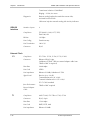
Transformer isolation: 1500 VRMS
Ringing – 22 Hz, sine wave
Diagnostics
Remote analog loopback towards the remote side,
activated from local side
1kHz tone injection towards analog side Activity indicators
ISDN S0
Interface
Number of ports
4
Compliance
ETS 300012, I.430, NTT, 5ESS,
DMS-100, NI1
Bit Rate
192 kbps
Line Coding
Pseudo-ternary
Line Termination
100 ± 5%
Connector
RJ-45
Compliance
ITU-T Rec. G.703, G.706, G.732, G.823
Connector
Balanced: RJ-45 8-pin
Unbalanced: TBNC 75Ω (an external adapter cable from
TBNC to BNC is required)
Data Rate
2.048 Mbps
Line Code
HDB3
Line Impedance
Balanced: 120Ω; Unbalanced: 75Ω
Signal Levels
Receive: 0 to –10 dB
Transmit Balanced: ±3V ±10%
Transmit Unbalanced: ±2.37V ±10%
External Clock
E1
Jitter Performance
External Adapter
Cable
T1
1-26
ITU-T G.823 standard
TBNC to BNC required
Compliance
ANSI T1.403, ITU-T Rec. G.703, G.704
Connector
RJ-45, 8-pin
Data Rate
1.544 Mbps
Line Code
B8ZS, B7ZS, AMI
Line Impedance
Balanced: 100Ω
Technical Specifications
IPmux-1/1E Installation and Operation Manual
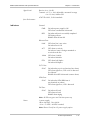
Signal Levels
Jitter Performance
Indicators
Chapter 1 Introduction
Receive: 0 to –10 dB
Transmit: ±2.7V ± 10%, adjustable, measured in range
0 to 133 feet, without CSU
AT&T TR-62411, G.824 standards
General:
PWR
ON when power supply is OK
OFF when a malfunction is detected
RDY
ON when self-test is successfully completed
OFF during self-test
BLINKS when self-test fails
Ethernet Port:
LINK
OFF when line is not active
ON when line is OK
ACT
OFF when no activity
ON when a frame is being transmitted or
received on the line
100M
OFF when 10 MHz
ON when 100 MHz
FDX
OFF when half duplex
ON when full duplex
E1/T1 Port:
SYNC
ON when the port is synchronized (no alarm)
OFF when signal loss, LOF or AIS is detected
(local alarm)
BLINKS when RDI is detected (remote alarm)
ISDN Port:
SYNC
ON when the ISDN BRI frame is
synchronized (no alarm)
OFF when signal loss, LOF is detected
FXS Port:
SYNC
ON when off-hook
OFF when on-hook
BLINKS when ringing
Note: All LEDs are green and ON after power-up.
Power
1 power supply
100 to 240 VAC, 50 or 60 Hz
–36 to –72 VDC (–48 VDC nominal)
Note: IPmux-1E only has AC power supply option.
Technical Specifications
1-27
IPmux-1/1E Installation and Operation Manual
Chapter 1 Introduction
Power consumption
IPmux-1: 4W
IPmux-1 (with LAN): 10W
IPmux-1E: 25W
IPmux-1E (with LAN switch): 32W
Physical
1-28
IPmux-1
Height
Width
Depth
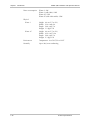
Weight
4.4 cm/1.7 in (1U)
21.4 cm/8.4 in
24.6 cm/9.7 in
1.2 kg/2.7 lb
IPmux-1E
Height
Width
Depth
Weight
4.4 cm/1.7 in (1U)
43.2 cm/17.0 in
24.6 cm/9.7 in
2.3 kg/5.1 lb
Environment
Temperature: 0 to 50°C/32 to 122°F
Humidity
Up to 90%, non-condensing
Technical Specifications
Chapter 2
Installation
This chapter includes:
•
Site requirements and prerequisites
•
Package contents
•
Equipment needed
•
Installation and setup
2.1 Introduction
IPmux-1/1E is delivered completely assembled for bench-top installation. The only
mechanical installation procedures that may be necessary are optional installation
in a 19-in rack. For rack installation instructions refer to the Rack Mounting Kit for
19-inch Racks guide that comes with the RM kit.
After installing the unit, configure IPmux-1/1E using an ASCII terminal connected
to the IPmux-1/E Control port, or Telnet or RADview TDMoIP management
application. The IPmux-1/1E configuration procedures are described in Chapter 3
and Appendix E of this manual. Configuration parameters are explained in
Appendix E.
If problems are encountered, refer to Chapter 4 for test and diagnostics
instructions.
Warning
No internal settings, adjustment, maintenance and repairs may be performed
by either the operator or the user; such activities may be performed only by
skilled service personnel who are aware of the hazards involved.
Always observe standard safety precautions during installation, operation, and
maintenance of this product.
2.2 Site Requirements and Prerequisites
Install AC-powered IPmux-1/1E units within 1.5m (5 feet) of an easily-accessible
grounded AC outlet capable of furnishing the required supply voltage, in the range
of 100 to 240 VAC.
DC-powered IPmux-1 units require a 48 VDC power source. The positive pole can
be earthed.
Site Requirements and Prerequisites
2-1
IPmux-1/1E Installation and Operation Manual
Chapter 2 Installation
Caution The DC power source must be isolated from the mains supply by double or
reinforced insulation. A suitable fuse or a circuit breaker should be integrated in
the negative power-supply line.
Allow at least 90 cm (36 inches) of frontal clearance for operator access. Allow at
least 10 cm (4 inches) clearance at the rear of the unit for cable connections. Make
sure that the ventilation holes are not blocked.
The ambient operating temperature of IPmux-1/1E is 0o to 50o C (32o F to 122o F),
at a relative humidity of up to 90%, non-condensing.
2.3 Package Contents
The IPmux-1/1E package contains the following items:
•
IPmux-1/1E unit
•
Power cord
•
Kit containing hardware for mounting the unit in a 19-in rack (optionally
supplied)
− RM-25 for IPmux-1
− RM-27 for IPmux-1E.
Power Cable
IPmux-1/1E comes equipped with the power cord connected to the AC/DC
interface on the rear panel.
2.4 Equipment Needed
IPmux-1/1E needs no special tools for installation. A screwdriver is necessary when
mounting IPmux-1/1E in a 19-in rack.
2.5 Installation and Setup
Setting Jumpers
IPmux-1
In general, IPmux-1 internal jumpers and switches do not need to be configured
by the user. Therefore, removing the product cover is not required.
2-2 Installation and Setup
IPmux-1/1E Installation and Operation Manual
Chapter 2 Installation
IPmux-1E
The IPmux-1E FXS version needs NO user internal jumper configuration.
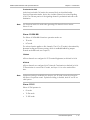
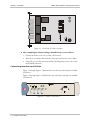
The IPmux-1E ISDN version contains jumpers for phantom feed (see Figure 2-1).
Open the case and check the positions of internal jumpers before the IPmux-1E
installation.
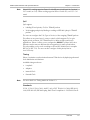
➤
To open the IPmux-1E case:
1. Disconnect all the cables connected to the IPmux-1E.
2. Release the cover screws at the rear panel (one is near the POWER connector).
3. Slide the IPmux-1E top cover by pulling it straight out.
➤
To set the IPmux-1E ISDN-S module jumpers:
If necessary, change the settings in accordance with the specific requirements of
your application:
•
ENA – enable phantom feed
•
DIS – disable phantom feed
The phantom feed ENA/DIS setting influences the IPmux-1E BRI operation mode.
When phantom feed is disabled, the S interface can be configured (through
software) to the TE or NT mode. When phantom feed is enabled, only the NT
mode is possible.
Only qualified and authorized service personnel should have access to the
inside of the unit.
Warning
Disconnect the unit from the power line and from all the cables before
removing the cover.
Line voltages are present inside IPmux-1E when it is connected to power.
Moreover, under certain external fault conditions, dangerous voltages may
appear on the lines connected to IPmux-1E.
Any adjustment, maintenance, and repair of the opened device under voltage
should be avoided as much as possible and, when inevitable, should be
carried out only by a skilled technician who is aware of the hazards involved.
Capacitors inside the device may still be charged even after it has been
disconnected from its source of power.
Caution The IPmux-1E contains components sensitive to electrostatic discharge (ESD). To
prevent ESD damage, avoid touching the internal components, and before moving
jumpers, touch the IPmux-1E rear panel.
Installation and Setup
2-3
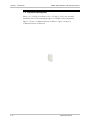
ENA
DIS
IPmux-1/1E Installation and Operation Manual
Chapter 2 Installation
Figure 2-1. The IPmux-1E ISDN-S Jumpers
➤
After completing the internal settings, reinstall the top cover as follows:
1. Position the IPmux-1/1E case on a flat, clean surface.
2. Slide the cover into the slots from the rear panel, and set the cover in place.
3. Fasten the cover to the rear panel with the locking spring screws (one is near
the POWER connector).
Connecting Interfaces and Cables
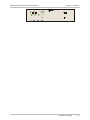
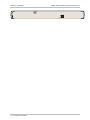
Figure 2-2 through Figure 2-5 illustrate the front and rear panel options available
for IPmux-1.
Figure 2-6 through Figure 2-9 illustrate the rear and front panel options available
for IPmux-1E.
Figure 2-2. IPmux-1 Front Panel
2-4 Installation and Setup
IPmux-1/1E Installation and Operation Manual
Chapter 2 Installation
Installation and Setup
2-5
1A T 250V
100-240 VAC
Chapter 2 Installation
2-6 Installation and Setup
IPmux-1/1E Installation and Operation Manual
IPmux-1/1E Installation and Operation Manual
Chapter 2 Installation
Table 2-1. E1/T1 Port Connectors Pinout
Pin
Designation
Direction
Function
1
RD (R)
Input
Receive data (ring)
2
RD (T)
Input
Receive data (tip)
3,6
–
–
FGND
4
TD (R)
Output
Transmit data (ring)
5
TD (T)
Output
Transmit data (tip)
7,8
–
N/A
Not connected
Table 2-2. Ethernet Port Pinout
Pin
Pinout
1
Tx+
2
Tx–
3
Rx+
4
–
5
–
6
Rx–
7
–
8
–
Table 2-3. Control Port Pinout
Pin
Pinout
1
–
2
Rx
3
Tx
4
–
5
GND
6
–
7
–
8
–
9
–
Installation and Setup
2-7
IPmux-1/1E Installation and Operation Manual
Chapter 2 Installation
Table 2-4. ISDN-S Interface Pin Assignments
Pin Number
Signal Name
3
Tx+
4
Rx+
5
Rx-
6
Tx-
Table 2-5. FXS Interface Pin Assignments for RJ-11
Pin Number
Designation
Direction
Function
1,2
Not connected
3
RING
IN/OUT
2W input/output
4
TIP
IN/OUT
2W input/output
5,6
Not connected
Connecting the Control Port
The Control port is located on the IPmux-1/1E front panel (Figure 2-2). The
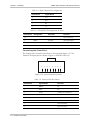
External Clock port pinout is shown in Figure 2-10 listed in Table 2-6.
8
7
6
5
4
3
2
1
Figure 2-10. External Clock Port Pinout
Table 2-6. External Clock Port Pinout
Pin Number
Signal Name
Function
RRING
Rx
2
RTIP
Rx
3
GND
Usually not connected
4
TRING
Tx
5
TTIP
Tx
6
GND
Usually not connected
7
Not connected
8
Not connected
2-8 Installation and Setup
IPmux-1/1E Installation and Operation Manual
Chapter 2 Installation
Connecting the Power
To connect power to Ipmux-1/1E, refer to the appropriate section below,
depending on your version of the unit (AC or DC).
AC Power Connection
AC power is supplied to IPmux-1/1E through the 5-ft (1.5m) standard power cable
terminated by a standard 3-prong plug. The cable is supplied with the unit.
➤
To connect AC power to IPmux-1/1E:
1. Verify that the AC outlet is grounded properly. Ensure that the supply voltage is
in the range 100 VAC to 240 VAC.
2. Check that both Power switches on the rear panel are set to OFF.
3. Connect the power cable to the rear panel connector first and then to the
AC mains outlet.
DC Power Connection
A DC power supply option is available to be ordered for IPmux-1 only (not
available for IPmux-1E. For information about connecting the DC power supply
refer to the DC Power Supply Connection Supplement at the back of this manual.
Installation and Setup
2-9
Chapter 2 Installation
2-10 Installation and Setup
IPmux-1/1E Installation and Operation Manual
Chapter 3
Operation
This chapter:
•
Provides a detailed description of the front panel controls and indicators and
their functions
•
Explains power-on and power-off procedures
•
Provides instructions for using a terminal connected to the IPmux-1/1E Control
port
•
Describes how to navigate menus
•
Illustrates some menus:
− Main menu
− Configuration menu
− Viewing System Information
− Monitoring IPmux-1/1E performance.
For a detailed explanation of parameters on the menus, see Appendix E.
3.1
Front Panel Controls, Connectors, and Indicators
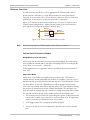
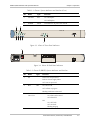
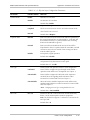
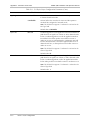
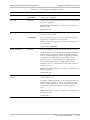
The unit's LEDs (see Figure 3-1, Figure 3-2, Figure 3-3 and Figure 3-4) are located
on the left side of the front panel. Table 3-1 and Table 3-2 list the functions of the
IPmux-1 and IPmux-1E system indicators and switches.
Front Panel Controls, Connectors, and Indicators
3-1
Chapter 3 Operation
3-2 Front Panel Controls, Connectors, and Indicators
IPmux-1/1E Installation and Operation Manual
IPmux-1/1E Installation and Operation Manual
Chapter 3 Operation
Table 3-1. IPmux-1 System Indicators and Switches (Cont.)
No.
Name
Type
Function
7
ETH FDX
LED
On: Full duplex
Off: Half duplex
8
1
POWER
Switch
Turns IPmux-1/1E power On and Off
2
IPmux-1E
4
5
6
7
3
Figure 3-3. IPmux-1E Front Panel Indicators
8
POWER
:
I/O
3
IISDN
S
1 A T 250V
100-240 VAC
CAUTION
1
2
3
4
Figure 3-4. IPmux-1E Back Panel Indicators
Table 3-2. IPmux-1E (BRI/FXS) System Indicators and Switches
No.
Name
1
PS1
Type
Function
Green On: Unit powered
Red On: Power supply failure
Off: Unit not powered
2
RDY
LED
On: Device OK
Off: Self-test in progress
Blinking: Malfunction detected
3
SYNC
CH1–CH4
LED
ISDN
On: ISDN synchronized
Off: ISDN LOF
FXS
On: OFF hook
Off: ON hook
Blinking: Ringing
Front Panel Controls, Connectors, and Indicators
3-3
IPmux-1/1E Installation and Operation Manual
Chapter 3 Operation
Table 3-2. IPmux-1E (BRI/FXS) System Indicators and Switches (Cont.)
No.
Name
Type
Function
4
ETH LINK
LED
On: Line OK
Off: Link not active
5
ETH ACT
LED
On: Frame being transferred on line
Off: No activity
6
7
ETH
100M
LED
ETH FDX
LED
On: 100 Mbps
Off: 10 Mbps
On: Full duplex
Off: Half duplex
8
3.2
POWER
Switch
Turns IPmux-1E power ON and OFF
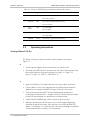
Operating Instructions
Turning IPmux-1/1E On
Without Control Terminal
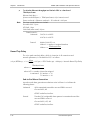
The IPmux-1/1E power switch is located on the back panel, as shown in
Figure 3-2.
To power up IPmux-1/1E without a Control terminal:
1. Turn the power supply switch, located on the rear panel, to ON.
2. Check the unit LED indicators, located on the left side of the front panel, and
the module indicators for proper operation (see Figure 3-1, Figure 3-2,
Figure 3-3, Figure 3-4, Table 3-1, and Table 3-2).
With Control Terminal
To power up IPmux-1/1E with a Control terminal:
1. Make sure all IPmux-1/1E cables and connectors are properly connected.
2. Connect IPmux-1/1E to a PC equipped with an ASCII terminal-emulation
application (for example, Windows 95 Hyper Terminal or Procomm).
3. Turn on the control-terminal PC and set its default port parameters to
19,200 baud, 8 bits/character, 1 stop bit, No Parity. Set the terminal emulator
to ANSI VT100 emulation (for optimal view of system menus).
4. Switch ON the POWER supply switch, located on the rear panel.
5. When the initialization and self-test are over, a menu appears displaying
initialization and self-test results. If the self-test is successful, the RDY LED
(Figure 3-1 and Figure 3-3) on the left side of the front panel lights. If problems
are encountered, refer to Chapter 4 for instructions.
3-4 Operating Instructions
IPmux-1/1E Installation and Operation Manual
Chapter 3 Operation
6. Press <Esc> to open the configuration software.
7. Enter your User Name according to your assigned system privileges (either
Supervisor (su) or User and then your Password when prompted (the
factory-set password is xxxxxxxxxx).
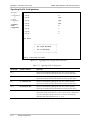
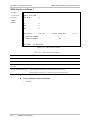
The Main Menu is displayed (Figure 3-8).
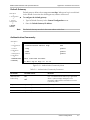
Note
If the password is invalid in three consecutive attempts, the system becomes
inaccessible for 15 minutes.
Login
User Name and Password
To enter as a superuser:
1. Enter su for User Name.
2. Enter xxxxxxxxxx for Password.
This allows you to configure all the parameters of Ipmux-1/1E, and to change the
su and user passwords.
To view the unit’s comfiguration:
1. Enter user for User Name.
2. Enter xxxxxxxxxx for Password.
This does not allow you to make configuration changes.
To set all passwords to the default value (xxxxxxxxxx):
•
Note
Delete the unit’s configuration through the Configuration screens.
Deleting the unit’s configuration using <Cntl+A> and choosing 4 in the Boot
Menu does not set the password to the default value.
If you forget your password:
•
Consult Technical Support at RAD for further assistance (send email to
[email protected]).
Turning IPmux-1/1E Off
To power off the unit:
•
Switch PWR to OFF.
Operating Instructions
3-5
IPmux-1/1E Installation and Operation Manual
Chapter 3 Operation
3.3
Getting Started
After installation, there are no special operating procedures for IPmux-1/1E. Once
it is powered up, the unit operates automatically. The front panel LED indicators
(Figure 3-1 and Figure 3-3) indicate proper operation. The unit operational status
can be monitored constantly.
If required, IPmux-1/1E can be reconfigured. Both the IPmux-1/1E configuration
and monitoring operations are performed locally from an ASCII terminal
connected to the Control port. Detailed configuration procedures are given in
Overview of Menu Operations and Appendix E.
The following functions are supported (see menu trees in Figure 3-5, Figure 3-6,
and Figure 3-7):
•
Viewing system information
•
Modifying configuration and mode of operation, including setting system
default values
•
Viewing statistics and status
•
Performing diagnostics.
3.4
Overview of Menu Operations
Navigating
Navigate the IPmux-1/1E terminal menus to set and view configuration
parameters:
•
Figure 3-5 maps the IPmux-1 terminal menus
•
Figure 3-6 maps the IPmux-1E ISDN-S terminal menus
•
Figure 3-7 maps the IPmux-1E FXS terminal menus.
Use these menu trees as a reference aid while performing configuration and
control functions. Appendix E illustrates menus, explains parameters, and lists
default values. Refer to Appendix E to find specific parameters.
3-6 Overview of Menu Operations
IPmux-1/1E Installation and Operation Manual
Chapter 3 Operation
Main Menu
1. System
2. Configuration
3. Performance
Monitoring
1. General
Information
1. E1/T1 Statistics
2. Self-Test
Results
2. LAN Statistics
4. Exit
3.Bundle Connection
Status
3. Reset
4. Event Log
5. Ping
1. General
Configuration
2. E1/T1
Configuration
3. Bundle Connection
Configuration
4. LAN
Configuration
5. DS0 Bundle
Configuration
1. Host IP
1. Channel
Status
1. Bundle ID
1. Auto
Negotiation
1.Bundle ID
2. Default
Gateway
2. Transmit Clock
Source
2. IP TOS
2. Max Capability
Advertised
2.Time Slot
Number
3. Loopback
State
3. TDM Bytes in
a Frame
3. Default Type
3. Time Slot
Current Status
4. ASCII Terminal
Configuration
4. Rx Sensitivity
4. Connection
Status
5. Time/Date
Update
5. Line Type
5. Destination IP
Address
6. Software
Download
6. Idle Code
6. Next Hop
7. Set Default
Parameters
7. Signaling Mode
7. Destination
Bundle
8. Cond. Data
Pattern
8. Jitter Buffer
9. Cond. CAS
(ABCD) Pattern
9. VLAN Tagging
3. Management
Configuration
Two-port LAN Option
4. Switch
Configuration
1. LAN
Configuration
2. Aging Time
A. VLAN ID
B. VLAN Priority
Figure 3-5. IPmux-1 (E1/T1) Terminal Menu Tree
Overview of Menu Operations
3-7
IPmux-1/1E Installation and Operation Manual
Chapter 3 Operation
Main Menu
1. System
2. Configuration
3. Performance
Monitoring
4. Exit
1. General
Information
1. ISDN Statistics
2. Self-Test
Results
2. LAN Statistics
3.Bundle Connection
Status
3. Reset
4. Event Log
5. Ping
1. General
Configuration
2. ISDN
Configuration
3. Bundle Connection
Configuration
4. LAN
Configuration
1. Host IP
1. Interfaces
Mode
1. Bundle ID
1. Auto
Negotiation
2. Default
Gateway
2. Transmit Clock
Source
2. IP TOS
2. Max Capability
Advertised
3. Channel
Configuration
3. TDM Bytes in
a Frame
3. Default Type
3. Management
Configuration
4. ASCII Terminal
Configuration
4. Connection
Status
5. Time/Date
Update
5. Destination IP
Address
6. Software
Download
6. Next Hop
7. Set Default
Parameters
7. Destination
Bundle
8. Jitter Buffer
9. VLAN Tagging
A. VLAN ID
B. VLAN Priority
Figure 3-6. IPmux-1E ISDN-S Terminal Menu Tree
3-8 Overview of Menu Operations
Two-port LAN Option
4. Switch
Configuration
1. LAN
Configuration
2. Aging Time
IPmux-1/1E Installation and Operation Manual
Chapter 3 Operation
Main Menu
1. System
2. Configuration
3. Performance
Monitoring
4. Exit
1. General
Information
1. Analog Status
2. Self-Test
Results
2. LAN Statistics
3.Bundle Connection
Status
3. Reset
4. Event Log
5. Ping
1. General
Configuration
2.Analog
Configuration
3. Bundle Connection
Configuration
4. LAN
Configuration
1. Host IP
1. Clock Source
1. Bundle ID
1. Auto
Negotiation
2. Default
Gateway
2. Far End
Type
2. IP TOS
2. Max Capability
Advertised
3. Channel
Configuration
3. TDM Bytes in
a Frame
3. Default Type
4. Signaling Profile
Configuration
4. Connection
Status
3. Management
Configuration
4. ASCII Terminal
Configuration
5. Time/Date
Update
5. Destination IP
Address
6. Software
Download
6. Next Hop
7. Set Default
Parameters
7. Destination
Bundle
Two-port LAN Option
4. Switch
Configuration
1. LAN
Configuration
2. Aging Time
8. Jitter Buffer
9. VLAN Tagging
A. VLAN ID
B. VLAN Priority
Figure 3-7. IPmux-1E FXS Terminal Menu Tree
Overview of Menu Operations
3-9
IPmux-1/1E Installation and Operation Manual
Chapter 3 Operation
Main Menu
Figure 3-8 shows the IPmux-1/1E Main Menu. Access all system configuration and
control functions via this menu.
At any point and from any screen, you can press <Esc> repeatedly, backing up
until you reach the main menu.
You exit the program only from this menu. In order to prevent unauthorized
access, it is recommended that when you finish a session, you return to the Main
Menu and type 4 to exit the program. A password is then required for reentry.
MAIN MENU
1.System
2.Configuration
3.Performance Monitoring
4.Exit
>
>
>
Select item from the menu:
_
Use keys <1> to <4>
Figure 3-8. IPmux-1/1E Main Menu
The Main Menu options are:
1. System
View and modify system parameters
2. Configuration
Define system configuration
3. Performance Monitoring
Monitor system performance
4. Exit
Exit the control software
System Menu
To access the System menu:
Main Menu
↓
1. System
•
Type 1 (System) in the Main Menu.
From the System menu you can view and configure the following options:
1. General Information
View IPmux-1/1E general information.
2. Self-Test Results
Review self-test results obtained during system
power-up.
3. Reset
Reset IPmux-1/1E.
4. Event Log
View a list of IPmux-1/1E events.
5. Ping
Ping other network devices.
These options are explained in full detail in Appendix E.
3-10 Overview of Menu Operations
IPmux-1/1E Installation and Operation Manual
Chapter 3 Operation
SYSTEM
1. General Information
2. Self-Test Results
3. Reset
4. Event Log
>
5. Ping
ESC.
Exit
Select item from the menu.
Overview of Menu Operations
3-11
IPmux-1/1E Installation and Operation Manual
Chapter 3 Operation
CONFIGURATION
1. General Configuration
2. Analog Configuration
3. Bundle Connection Configuration
4. LAN Configuration
ESC. Exit
_
Select item from the menu:
Figure 3-12. IPmux-1E FXS Configuration Menu
From the Configuration menu you can view and configure the following options:
1. General Configuration
Configure Host IP, Default Gateway,
ASCII Terminal Configuration, Time/Date
update, and Default parameters, and
download software updates.
2. E1/T1/ISDN/FXS Configuration
E1/T1, ISDN, or FXS physical layer
configuration.
3. Bundle Connection Configuration
Configure Connection parameters:
Configure IP ToS, TDM bytes/frame and
VLAN tagging.
4. LAN Configuration
Ethernet physical layer configuration.
5. DS0 Bundle Configuration
Configure TS assignment to the bundle
(only for IPmux-1).
Specific parameters are explained in Appendix E.
Note
DS0 Bundle Configuration is only available in IPmux-1.
3-12 Overview of Menu Operations
IPmux-1/1E Installation and Operation Manual
Chapter 3 Operation
Performance Monitoring
To view Performance Statistics:
•
Type 3 (Performance Monitoring) in the Main menu.
Typical menus are shown in Figure 3-13, Figure 3-14, and Figure 3-15.
PERFORMANCE MONITORING
1. E1/T1 Statistics
2. LAN Statistics
3. Bundle Connection Status
ESC. Exit
Select item from the menu.
Figure 3-13. Performance Monitoring Menu for IPmux-1
PERFORMANCE MONITORING
1. ISDN Statistics
2. LAN Statistics
3. Bundle Connection Status
ESC. Exit
Select item from the menu.
Figure 3-14. Performance Monitoring Menu for IPmux-1E ISDN-S
PERFORMANCE MONITORING
1. FXS Statistics
2. LAN Statistics
3. Bundle Connection Status
ESC. Exit
Select item from the menu.
Figure 3-15. Performance Monitoring Menu for IPmux-1E FXS
From the Performance Monitoring menu you can view:
1. E1/T1/ ISDN/ Analog Statistics
Statistics for E1/T1, ISDN, or FXS.
2. LAN Statistics
3. Bundle Connection Status
Further details for specific parameters are explained in Appendix E.
Overview of Menu Operations
3-13
Chapter 3 Operation
3-14 Overview of Menu Operations
IPmux-1/1E Installation and Operation Manual
Chapter 4
Troubleshooting and
Diagnostics
This chapter describes how to:
•
Detect errors
•
Troubleshoot problems
•
Perform diagnostic tests.
4.1 Error Detection
Using Front Panel LEDs
LED indicators on the front panel IPmux-1/1E indicate the operating status of the
module. The LED indicators are described in Chapter 3 of this manual.
Working with the Alarm Buffer
IPmux-1/1E maintains an Event Log File. All events are time-stamped. The user can
view the contents of the Event Log File via an ASCII terminal or a Telnet Session.
The user can also clear the contents of the Log File.
Table 4-1 presents the event types that appear on the Event Log File alphabetically,
as well as the actions required to correct the event (alarm) indication.
To correct the reported problem, perform corrective actions in the given order
until the problem is corrected. If the problem cannot be fixed by carrying out the
listed actions, IPmux-1/1E MUST be checked by the authorized technical support
personnel.
Error Detection
4-1
IPmux-1/1E Installation and Operation Manual
Chapter 4 Troubleshooting and Diagnostics
Table 4-1. Event Types
Event
Description
Corrective Action
COLD_START
The IPmux-1/1E has been powered up
None
PWR_ACTIVE
IPmux-1/1E power supply unit is
powered on
None
FATAL ERR
IPmux-1/1E has encountered an
internal fatal error
The IPmux-1 requires servicing
SYS USER RESET
IPmux-1/1E was reset by the user
None
LOS START
IPmux-1 has a LOS (loss of signal) state
on its E1/T1 port
1. Check the port cable connection
2. Check input signal
LOS END
The LOS state detected has ended
LOF START
IPmux-1 has a LOF (Loss of frame
synchronization) state on its E1/T1 port
1. Check port cable connection
LOF END
The LOF state detected has ended
None
LINE AIS START
IPmux-1 has AIS (alarm indicator signal)
state on its E1/T1 port
Check for a fault at the PDH network, on the
receive direction
LINE AIS END
The line AIS state detected has ended
None
LINE RDI START
IPmux-1 has LINE RDI (remote defect
indicator) state on its E1/T1 port
Check for a fault at the E1/T1 connectivity
on the transmit direction
LINE RDI END
The LINE RDI state detected has ended
None
LINE FEBE START
IPmux-1 has LINE FEBE state on its
E1/T1 port
Check for errors in the E1/T1 connection on
the transmit direction
LINE FEBE END
The LINE FEBE state detected has
ended
None
REMOTE FAIL START
Ethernet frames are not received by the
remote IPmux-1 on the specified
connection
Check Eth/IP path
REMOTE FAIL END
Remote fail state has ended
None
LOCAL FAIL START
Ethernet frames are not received by the
local IPmux-1 on the specified
connection
Check Eth/IP path
LOCAL FAIL END
Local fail state has ended
None
4-2 Error Detection
2. Check input signal
IPmux-1/1E Installation and Operation Manual
Chapter 4 Troubleshooting and Diagnostics
4.2 Troubleshooting
Table 4-2 presents the event types as they appear on the Event Log File and lists
the actions required to correct the event (alarm) indication.
Table 4-2. IPmux-1 Troubleshooting Chart
Fault
Probable Cause
Remedial Action
E1/T1 equipment connected to
IPmux-1 is not synchronized
with IPmux-1/1E.
Configuration problems
1. Check cables and physical connectivity.
Physical layer problems
2. Check IPmux-1 E1/T1 configuration and,
if necessary, other IPmux-1 parameters.
3. Check E1/T1 physical connection (use
loopbacks).
Slips and errors in E1/T1/BRI/FXS
equipment
Echo in voice
•
Ethernet port in switch and
IPmux-1 are not in the same rate or
duplex mode
•
Ethernet port is set to work in half
duplex mode (may cause extreme
PDV because of collisions and
backoffs)
•
Timing configuration is not properly
set (periodic buffer under/overflows
shown on IP channel status menu)
•
Deactivation employed by NT
when IPmux is TE and in loopback
timing mode
•
Network PDV or lost frames
High delay in voice path
1. Check E1/T1 physical connection (use
loopbacks).
2. Check timing settings according to
explanation in this manual.
3. Check switch and IPmux-1 port
configuration (negotiation, rate, duplex
mode)
4. Check PDV introduced by the network,
and, if necessary, increase PDVT jitter
buffer setting.
5. Check NT deactivation (BRI).
1. Check network delay and try to
decrease it.
2. Try to decrease PDVT (jitter) buffer.
4.3 Diagnostic Tests
Maintenance capabilities include external and internal loopbacks.
E1/T1
External Loop
IPmux-1 can be set to an external loop to test the connection between the E1/T1
port and the PBX (refer to Chapter 3). In this mode, data coming from the PBX is
both looped back to the PBX and transmitted forward to the IP network (see
Figure 4-1).
This mode can also be achieved by a T1 FDL line loopback command.
Diagnostic Tests
4-3
IPmux-1/1E Installation and Operation Manual
Chapter 4 Troubleshooting and Diagnostics
PBX
IPmux-1
Figure 4-1. IPmux-1 External Loop
Internal Loop
The E1/T1 module can be set to an internal loop to test the connection between
the E1/T1 port and the IP network (refer to Chapter 3). In this mode (E1/T1 only),
data coming from the IP network is both looped back to the IP network and an AIS
pattern is transmitted forward to the PBX connected to the E1/T1 port (see
Figure 4-2).
PBX
AIS
IPmux-1
Figure 4-2. IPmux-1 Internal Loop
➤
To run a loopback test:
•
Press the <Spacebar>
4-4 Diagnostic Tests
IPmux-1/1E Installation and Operation Manual
Chapter 4 Troubleshooting and Diagnostics
ISDN S
IPmux-1
Figure 4-4. IPmux-1E/BRI Internal Loop
Main Menu
↓
2. Configuration
↓
2. ISDN
Configuration
↓
3. Channel
Configuration
↓
1. Choose
Channel
↓
3. Loopback
State
➤
•
To run a loopback test:
Press the <Spacebar> on your keyboard to toggle between the values:
Internal/External /Disable.
− Internal: Data received from the IP network side is looped back to the
network transmit line.
− External: Data received from the PBX at the receive ISDN S line is looped
back to the ISDN S Tx path (toward the same PBX). Data coming from the
IP network is ignored.
− Disable: No loopback. Regular operation.
Default value: Disable
FXS
Main Menu
↓
2. Configuration
↓
2. ISDN
Configuration
↓
3. Channel
Configuration
↓
1. Choose
Channel
↓
5. Testing
Remote Loopback
You can set a remote loopback analog signal, per port, in IPmux-1E with FXS
interface. The analog signal is looped back towards the IP network.
Tone Injection
A 1 kHz tone, per port, is injected towards the local telephone set.
➤
•
To run a test:
Press the <Spacebar> on your keyboard to toggle between the values:
Remote Loopback/Tone Injection/Disable.
Default value: Disable
Diagnostic Tests
4-5
Chapter 4 Troubleshooting and Diagnostics
4-6 Diagnostic Tests
IPmux-1/1E Installation and Operation Manual
Chapter 5
Application Configuration
Procedures
This chapter provides detailed instructions for setting up a test application using
IPmux-1 and IPmux-4. The application can be used as an optional test setup for an
IPmux unit, or can be used as a quick reference guide for basic configuration of an
IPmux unit.
5.1 Overview
Application
The section provides detailed instructions for configuring an IPmux-1 unit opposite
an IPmux-4 unit in a point-to-multipoint application including configuration via a
supervisory terminal (see Figure 5-1).
E1
1
ETH
E1
32
33
PBX
IPmux-4
PBX
IPmux-1
ETH
IP Network
ETH
E1
1
IPmux-1
PBX
Network Management
Station
Figure 5-1. IPmux-1 Operating Opposite IPmux-4
Overview
5-1
Chapter 5 Application Configuration Procedures
IPmux-1/1E Installation and Operation Manual
Guidelines
Certain guidelines/assumptions for configuring IPmux-1 working opposite
IPmux-4 that are relevant to this application are explained below.
IP Configuration
•
The IP network can consist of either switches or routers. The minimum
requirement is 10M full duplex. Hubs or any half-duplex environments should
not be used.
•
Each IPmux should be given an IP Address and a Default Gateway (if a routed
network is used).
E1/T1 Configuration
•
TDM traffic will be sent between the central IPmux-4 and the two remote
IPmux-1 units at Station A and Station B over the IP network.
•
The TDM traffic can either be generated by a BER tester connected to the
IPmux units or by a PABX. If a BER tester is connected to IPmux-4, a physical
loop can be inserted in the remote IPmux-1 E1 port to avoid using more BER
testers.
•
The TDM equipment connected to the central IPmux-4 should be the clock
source for the whole application (i.e. it will operate in internal mode). The two
other TDM devices connected to IPmux-1 receive the clock from the Tx path
of the IPmux-1 units.
•
Set the TDM device’s E1 parameters in accordance with the E1 parameters of
the IPmux units connected to them. For details, see Table 5-1and Table 5-2,
and the E1/T1 Configuration on the following pages.
•
On the IPmux-4, only E1 port 2 will be used to connect to the remote
IPmux-1 units.
Creating Bundles and Connections
5-2
•
After IP addresses and E1 parameters have been configured, create bundles on
each IPmux, followed by connections between the bundles.
•
A bundle is a group of timeslots, encapsulated in UDP over IP over ETH
frames, which is sent over the IP network between the IPmux units. A bundle
can include between 1 and 31 timeslots for E1, and 1 to 24 for T1.
IPmux-1 can only be configured for 1 bundle. IPmux-4 can be configured to
have up to 31x4=124 bundles for E1 or 4x24=96 for T1. Each configured
bundle is given a Bundle Number that indicates to which E1 channel it
belongs, according to Table 5-1.
Overview
IPmux-1/1E Installation and Operation Manual
Chapter 5 Application Configuration Procedures
Table 5-1. Bundle Configuration
E1 Channel
Bundle Number for E1
Bundle Number for T1
1
1-31
1–24
2
32-62
25–48
3
63–93
49–72
4
94–124
73–96
•
A bundle containing 10 timeslots will be created on each IPmux-1 unit.
Two bundles, each containing 10 timeslots, will be created on IPmux-4.
•
Bundle 1 on IPmux-1/Station A will be connected to Bundle 32 on IPmux-4.
Bundle 1 on IPmux-1/Station B will be connected to Bundle 33 on the central
IPmux-4.
Configuration Summary Table
Table 5-2. Configuration Summary
Device
E1 Parameters
Bundle Creation
Bundle Connection
IPmux-1/A
Clock: Adaptive
CRC: Disabled
CAS: Disabled
Bundle No. 1
Timeslots in Bundle:
1–10
1→IPmux-4/32
IPmux-1/B
Clock: Adaptive
CRC: Disabled
CAS: Disabled
Bundle No. 1
Timeslots in Bundle:
1–10
1→IPmux-4/33
IPmux-4
Clock: Loopback
CRC: Disabled
CAS: Disabled
Bundle No. 32
Timeslots in Bundle:
1–10
32→IPmux-1/A
33→IPmux-1/B
Bundle No. 33
Timeslots in Bundle:
11–20
Perform initial configuration of IPmux-1 and IPmux-4 via a standard ASCII terminal
connected to the IPmux-1 control port. However, after performing the initial
configuration (Host IP Address and Default Gateway), you can manage IPmux-1
and IPmux-4 using any of the following options:
•
Use the terminal as a supervisory terminal, for performing all the management
activities supported by IPmux-1/4
•
Manage IPmux-1/4 from any IP host using the Telnet protocol. After
establishing a Telnet session with IPmux-1, the Telnet protocol offers the same
functionality as the supervisory terminal, and in addition enables remote
access over IP networks.
Overview
5-3
Chapter 5 Application Configuration Procedures
•
IPmux-1/1E Installation and Operation Manual
Manage IPmux-1/4 by means of SNMP-based network management stations,
e.g., the RADview network management station offered by RAD.
Changing Parameters
•
Use the <Spacebar> on your keyboard to toggle between options in the
menus, and then save.
•
Press <Enter> after entering a new parameter, such as the IP address, and
then save by pressing S.
•
At any point and from any screen, you can press <Esc> repeatedly, backing
up until you reach the Main menu.
Checking Connectivity
After the configuration has been completed, several tests should be performed in
order to verify proper connectivity. For testing procedures see Section 5.5.
5.2 IPmux-1
Powering-up
➤
To turn on IPmux-1:
1. Make sure all IPmux-1 cables and connectors are properly connected.
2. Connect IPmux-1 to a PC equipped with an ASCII terminal-emulation
application (for example, Windows 95 Hyper Terminal or Procomm).
3. Turn on the control-terminal PC and set its default port parameters to
19,200 baud, 8 bits/character, No Parity, 1 stop bit.
4. Set the terminal emulator to ANSI VT100 emulation (for optimal view of
system menus).
5. Switch ON the POWER supply switch, located on the rear panel.
When the initialization and self-test are over, a menu appears displaying
initialization and self-test results. If the self-test is successful, the RDY LED
on the left side of the front panel lights up.
➤
To logon:
1. Press <Esc> to open the configuration software.
2. Enter your User Name as Supervisor (su) and press <Enter>.
3. Enter your Password (the factory-set password is xxxxxxxxxx).
Note
5-4
IPmux-1
If the password is invalid in three consecutive attempts, the system becomes
inaccessible for 15 minutes.
IPmux-1/1E Installation and Operation Manual
Chapter 5 Application Configuration Procedures
Configuring IPmux-1 – Station A
Procedure for Modifying Parameters
➤
To modify parameters:
1. Choose the number of the parameter to be changed.
2. Press the <Spacebar> to toggle through the possible values.
3. Select the desired value by pressing <Enter>.
4. When you have finished modifying all the parameters on a menu, press <S>
to save the configuration.
5. To return to a previous menu, press <Esc>.
Host IP Address
Note
Main Menu
↓
2. Configuration
➤
Frames will not leave the device until IP and Mask addresses are defined.
To configure the Host IP Address:
1. From the Main menu, select 2 Configuration.
↓
1. General
Configuration
2. From the Configuration menu select 1 General Configuration.
↓
1. Host IP
4. Enter the Host IP Address and Mask.
3. From the General Configuration menu, press 1 Host IP (see Figure 5-2).
5. Press <Esc> a few times back to the General Configuration menu.
Note
Remember to press <Enter> after modifying each parameter. Press <S> to save
all changes on the menu.
HOST IP
1. IP Address
192.168.100.11
2. IP Mask
255.255.255.0
ESC. Exit
S.Save
Select item from the menu.
Figure 5-2. Host IP Menu
IPmux-1
5-5
Chapter 5 Application Configuration Procedures
IPmux-1/1E Installation and Operation Manual
E1/T1 Configuration
➤
To configure E1/T1:
Main Menu
↓
2. Configuration
1. From the Main menu, select 2 Configuration.
↓
2. E1/T1
Configuration
3. Select Transmit Clock and choose Adaptive.
2. From the Configuration menu select 2 E1/T1 Configuration (see Figure 5-3).
4. Select Line Type and choose CRC4 Disable.
5. Select Signaling Mode and choose CAS Disable.
6. Press <S> to save the configuration.
7. Press <Esc> a number of times to return to the Configuration screen.
Note
Remember to press <Enter> after modifying each parameter. Press <S> to save
all changes on the menu.
E1/T1 CONFIGURATION
1. Channel Status
Enable
2. Transmit Clock Source
Adaptive
3. Loopback State
Disable
4. Rx. Sensitivity
-10dB
5. Line Type
CRC4 Disable
6. Idle Code
7E
7. Signaling Mode
CAS Disable
8. Cond. Data pattern
FF
9. Cond. Cas <ABCD> pattern 01
ESC. Exit
Select item from the menu.
Figure 5-3. E1/T1 Configuration Menu
DS0 Bundle Configuration
➤
Main Menu
↓
2. Configuration
↓
5. DS0 Bundle
Configuration
To create the bundles:
1. From the Configuration menu select 5 DS0 Bundle Configuration (see
Figure 5-4).
2. Select Time slot number and enter 1 – 10.
3. Select Time slot Current Status and choose Set.
4. Press <S> to Save.
5. Press <Esc> to return to the Configuration screen.
5-6
IPmux-1
IPmux-1/1E Installation and Operation Manual
Note
Chapter 5 Application Configuration Procedures
Remember to press <Enter> after modifying each parameter. Press <S> to save
all changes on the menu.
DS0 BUNDLE CONFIGURATION
1. Bundle ID
1
2. Time Slot Number
1–10
3. Time Slot Current Status
Set
ESC. Exit
ACTIVE TIME SLOTS IN THIS BUNDLE:
FREE TIME SLOTS:
1–10
11,12,13,14,15,
16,17,18,19,20,21,22,23,24,25,26,27,28,29,30,31
Select item from the menu.
Figure 5-4. DS0 Bundle Configuration Menu
Bundle Connection Configuration
➤
Main Menu
↓
2. Configuration
↓
3. Bundle
Connection
Configuration
To link the bundles to IPmux-4:
1. From the Configuration menu select 3 Bundle Connection Configuration
(see Figure 5-5).
2. Select Connection Status and choose Enable.
3. Select Destination IP Address and enter the IP Address of IPmux-4.
4. Select Next Hop and enter the next hop router IP address (this parameter is
only necessary if the Destination IP Address is not in the same subnet as this
IPmux. In such cases the Ethernet frame will be sent to the next hop IP
address).
5. Select Destination Bundle and enter 32 (which is the destination bundle on
IPmux-4).
6. Press <Esc> a few times to return to the Main menu.
Note
Remember to press <Enter> after modifying each parameter. Press <S> to save
all changes on the menu.
IPmux-1
5-7
Chapter 5 Application Configuration Procedures
IPmux-1/1E Installation and Operation Manual
BUNDLE CONNECTION CONFIGURATION
1. Bundle ID
1
2. IP TOS
Empty!
3. TDM Bytes in Frame
48
4. Connection Status
Empty!
5. Destination IP Address
192.168.200.10
6. Next Hop
Empty!
7. Destination Bundle
Empty!
8. Jitter Buffer<x10 µsec> rounded up 1000 µsec steps! 3 ms
9. VLAN Tagging
Empty!
10. VLAN ID
Empty!
11. VLAN Priority
Empty!
ESC. Exit
Select item from the menu.
Figure 5-5. Bundle Connection Configuration
Note
TDM Bytes in Frame and Jitter Buffer are automatically set to default values: 48
for TDM Bytes, 3 ms for Jitter Buffer.
Configuring IPmux-1 – Station B
Power-up in the same manner as for IPmux-1 Station A.
Host IP Address
Note
Main Menu
↓
2. Configuration
➤
To configure the Host IP Address:
1. From the Main menu, select 2 Configuration.
2. From the Configuration menu select 1 General Configuration.
↓
1. General
Configuration
3. From the General Configuration menu, press 1 Host IP (refer to Figure 5-2).
4. Enter the Host IP Address and Mask.
↓
1. Host IP
5-8
Frames will not leave the device until IP and Mask addresses are defined.
5. Press <Esc> a few times back to the General Configuration menu.
IPmux-1
IPmux-1/1E Installation and Operation Manual
Note
Chapter 5 Application Configuration Procedures
Remember to press <Enter> after modifying each parameter. Press <S> to save
all changes on the menu.
E1/T1 Configuration
➤
To configure E1/T1:
1. From the Main menu, select 2 Configuration.
Main Menu
↓
2. Configuration
2. From the Configuration menu select 2 E1/T1 Configuration (refer to
Figure 5-3).
↓
2. E1/T1
Configuration
3. Select Transmit Clock and choose Adaptive.
4. Select Line Type and choose CRC4 Disable.
5. Select Signaling Mode and choose CAS Disable.
6. Press <S> to save the configuration.
7. Press <Esc> a number of times to return to the Configuration screen.
Note
Remember to press <Enter> after modifying each parameter. Press <S> to save
all changes on the menu.
DS0 Bundle Configuration
➤
Main Menu
↓
2. Configuration
To create the bundles:
1. From the Configuration menu select 5 DS0 Bundle Configuration (refer to
Figure 5-4).
2. Select Time slot number and enter 1 – 10.
↓
5. DS0 Bundle
Configuration
3. Select Time slot Current Status and choose Set.
4. Press <S> to Save.
5. Press <Esc> to return to the Configuration screen.
Note
Remember to press <Enter> after modifying each parameter. Press <S> to save
all changes on the menu.
Bundle Connection Configuration
Main Menu
↓
2. Configuration
↓
3. Bundle
Connection
Configuration
➤
To link the bundles to IPmux-4:
1. From the Configuration menu select 3 Bundle Connection Configuration
(refer to Figure 5-5).
2. Select Connection Status and choose Enable.
3. Select Destination IP Address and enter the IP Address of IPmux-4.
IPmux-1
5-9
IPmux-1/1E Installation and Operation Manual
Chapter 5 Application Configuration Procedures
4. Select Next Hop and enter the next hop router IP address (this parameter is
only necessary if the Destination IP Address is not in the same subnet as this
IPmux. In such cases the Ethernet frame will be sent to the next hop IP
address).
5. Select Destination Bundle and enter 33 (which is the destination bundle on
IPmux-4).
6. Press <Esc> to return to the Bundle Connection Configuration screen.
7. Press <Esc> to return to the Main screen.
Remember to press <Enter> after modifying each parameter. Press <S> to save
all changes on the menu.
5.3 IPmux-4
Powering-up
➤
To turn on IPmux-4:
1. Make sure all IPmux-4 cables and connectors are properly connected.
2. Connect IPmux-4 to a PC equipped with an ASCII terminal-emulation
application (for example, Windows 95 Hyper Terminal or Procomm).
3. Turn on the control-terminal PC and set its default port parameters to
19,200 baud, 8 bits/character, No Parity, 1 stop bit.
4. Set the terminal emulator to ANSI VT100 emulation (for optimal view of
system menus).
5. Switch ON the POWER supply switch, located on the rear panel.
6. When the initialization and self-test are over, a menu appears displaying
initialization and self-test results. If the self-test is successful, the RDY LED on
the left side of the front panel lights up.
➤
To logon:
1. Press <Esc>
t
o
o p e
n
t
h e
c
o n
2. Enter your User Name as Supervisor (su) and press <Enter>.
3. Enter your Password (the factory-set password is xxxxxxxxxx).
5-10
IPmux-4
f
i
g
u
r
a
t
i
o
IPmux-1/1E Installation and Operation Manual
Chapter 5 Application Configuration Procedures
Configuration
Host IP Address
Note
➤
Frames will not leave the device until IP and Mask addresses are defined.
To configure Host IP Address:
1. From the Main menu, select 2 Configuration.
Main Menu
↓
2. Configuration
2. From the Configuration menu select 1 General Configuration (refer to
Figure 5-2).
↓
1. General
Configuration
3. From the General Configuration menu, press 1.
4. Enter the Host IP Address and Mask.
↓
1. Host IP
5. Press <Esc> a few times back to the General Configuration menu.
Note
Remember to press <Enter> after modifying each parameter. Press <S> to save
all changes on the menu.
E1/T1 Configuration
➤
Main Menu
↓
2. Configuration
↓
3. E1/T1
Configuration
To configure E1/T1:
1. From the Configuration menu select 3 E1/T1 Configuration.
2. The Channel Number Configuration menu appears, press 2 (to choose
Channel Number 2).
3. The E1/T1 Configuration menu appears, press 1 Physical Layer Configuration
(see Figure 5-6).
↓
2. Channel
Number
Configuration
4. Select Transmit Clock Source and chose Loopback.
↓
1. Physical
6. Select Signaling Mode and choose CAS Disable.
Layer
Configuration
Note
5. Select Channel Type and choose CRC4 Disable.
7. Press <Save>.
8. Press <Esc> to exit the Physical Layer Configuration menu and return to the
E1/T1 Configuration menu.
Remember to press <Enter> after modifying each parameter. Press <S> to save
all changes on the menu.
IPmux-4
5-11
Chapter 5 Application Configuration Procedures
IPmux-1/1E Installation and Operation Manual
PHYSICAL LAYER CONFIGURATION
1. Channel Status
Enable
2. Transmit Clock Source
Loopback
3. Loopback State
Disable
4. Rx. Sensitivity
–10dB
5. Channel Type
CRC4 Disable
6. Idle Code
7E
7. Signaling Mode
CAS Disable
8. Cond. Data pattern
FF
9. Cond. CAS (ABCD) pattern 01
ESC. Exit
Current port is the USER PORT, Channel #2
Select item from the menu.
Figure 5-6. Physical Layer Configuration Menu
DS0 Bundle Configuration
➤
To configure DS0 Bundles for Station A:
Main Menu
↓
2. Configuration
1. From the Configuration menu select 2 DS0 Bundle Configuration (refer to
Figure 5-4).
↓
2. DS0 Bundle
Configuration
2. From the DS0 Bundle Configuration menu, press 1.
3. Select Bundle ID and type 32.
4. Select Time slot number type 1–10.
5. Select Time slot Current Status and choose SET.
6. Press <S> to Save.
Note
➤
Remember to press <Enter> after modifying each parameter. Press <S> to save
all changes on the menu.
To configure DS0 Bundles for Station B:
1. From the DS0 Bundle Configuration menu, press 1 (refer to Figure 5-4).
2. Select Bundle ID and type 33.
3. Select Time slot number type 11–20.
4. Select Time slot Current Status and choose SET.
5. Press <S> to Save.
6. Press <Esc> to return to the Configuration menu.
5-12
IPmux-4
IPmux-1/1E Installation and Operation Manual
Note
Chapter 5 Application Configuration Procedures
Remember to press <Enter> after modifying each parameter. Press <S> to save
all changes on the menu.
Bundle Connection Configuration
➤
Main Menu
↓
2. Configuration
↓
5. Bundle
Connection
Configuration
To link the bundles to IPmux-1 Station A:
1. From the Configuration menu select 5 Bundle Connection Configuration
(see Figure 5-7).
2. Select Bundle ID and enter 32.
3. Select Connection Status and choose Enable.
4. Select Destination IP Address and enter the IP Address of IPmux-1 Station A.
5. Select Next Hop and enter the next hop router IP address (this parameter is
only necessary if the Destination IP Address is not in the same subnet as this
IPmux. In such cases the Ethernet frame will be sent to the next hop IP
address).
6. Select Destination Bundle and enter 1 (which is the destination bundle on
IPmux-1 Station A).
7. Press <S> to save the configuration.
8. Press <Esc> to return to the Bundle Connection Configuration screen.
Note
➤
Main Menu
↓
2. Configuration
↓
5. Bundle
Connection
Configuration
1. Remember to press <Enter> after modifying each parameter. Press <S> to
save all changes on the menu.
2. TDM Bytes in Frame and Jitter Buffer are automatically set to default values:
48 for TDM Bytes, 3 ms for Jitter Buffer.
To link the bundles to IPmux-1 Station B:
1. From the Configuration menu select 5 Bundle Connection Configuration
(see Figure 5-7).
2. Select Bundle ID and enter 33.
3. Select Connection Status and choose Enable.
4. Select Destination IP Address and enter the IP Address of IPmux-1 Station B.
5. Select Next Hop and enter the next hop router IP address (this parameter is
only necessary if the Destination IP Address is not in the same subnet as this
IPmux. In such cases the Ethernet frame will be sent to the next hop IP
address).
6. Select Destination Bundle and enter 1 (which is the destination bundle on
IPmux-1 Station B).
7. Press <S> to save the configuration.
IPmux-4
5-13
Chapter 5 Application Configuration Procedures
IPmux-1/1E Installation and Operation Manual
8. Press <Esc> a few times to return to the Main menu.
Note
1. Remember to press <Enter> after modifying each parameter. Press <S> to
save all changes on the menu.
2. TDM Bytes in Frame and Jitter Buffer have been automatically set to default
values: 48 for TDM Bytes, 3 ms for Jitter Buffer.
BUNDLE CONNECTION CONFIGURATION
1. Bundle ID
32
2. Connection State
Enable
3. Destination IP Address
192.168.10.1
4. Next Hop
0.0.0.0
5. Destination Bundle
1
6. Jitter Buffer(x10usec)
300
ESC. Exit
D. Delete
Select item from the menu.
N. Next
Total used bundles: 1
Figure 5-7. Bundle Connection Configuration in IPmux-4
5.4 Configuring the Management Option
To configure this application for RADview or an SMNP management station
perform the following steps on each station of IPmux-1 and IPmux-4.
Authentication/Community
Main Menu
↓
2. Configuration
↓
1. General
Configuration
➤
1. From the Management Configuration menu, press 1
Authentication/Community menu (see Figure 5-8).
2. Select Authentication Failure Trap and choose On.
↓
3. Management
Configuration
↓
To configure Authentication/Community:
3. Select Trap and choose Public.
4. Select Read and choose Public.
1. Authentication/
5. Select Write and choose Public.
Community
6. Press <S> to save the configuration.
7. Press <Esc> to return to the Management Configuration menu.
5-14
Configuring the Management Option
IPmux-1/1E Installation and Operation Manual
Note
Chapter 5 Application Configuration Procedures
Remember to press <Enter> after modifying each parameter. Press <S> to save
all changes on the menu.
AUTHENTICATION/COMMUNITY MENU
1. Authentication Failure Trap
On
2. Trap
Public
3. Read
Public
4. Write
Public
ESC> Exit
Select item from the menu:
Figure 5-8. Authentication/Community Menu
Note
Verify that your Read and Write communities on the NMS match the ones on
IPmux-1/4.
Manager List
➤
Main Menu
↓
2. Configuration
↓
1. General
Configuration
↓
3. Management
Configuration
↓
2. Manager List
To configure the Manager in IPmux-1/4:
1. From the Management Configuration menu, press 2 Manager List (see
Figure 5-9).
2. Enter the Manager IP Address (the Manager IP Address in Figure 5-9 is used
as an example. Choose the Manager IP Address of your application).
3. Select Status Change Trap according to your application requirements (for
details refer to Manager List in the IPmux-4 manual.
4. Select Alarm Trap according to your application requirements (for details refer
to Manager List in the IPmux-4 manual.
5. Select System Trap according to your application requirements (for details
refer to Manager List in the IPmux-4 manual.
6. Press <S> to save the configuration.
7. Press <Esc> a few times to return to the Main menu.
Note
Remember to press <Enter> after modifying each parameter. Press <S> to save
all changes on the menu.
Configuring the Management Option
5-15
IPmux-1/1E Installation and Operation Manual
Chapter 5 Application Configuration Procedures
MANAGER LIST
1. Manager IP Address
192.114.35.1
2. Status Change Trap
On
3. Alarm Trap
On
3. System Trap
Off
ESC. Exit
S. Save
N. Next
Select item from the menu.
Figure 5-9. Manager List Menu
Note
Main Menu
↓
2. Configuration
↓
1. General
Configuration
If you set Alarm Trap to Off no Alarm Trap will be sent, regardless of the mask
defined in the Alarm Trap Mask screen. For further details refer to Manager List in
the IPmux-4 or IPmux-1 manual.
Alarms Trap Mask
➤
To configure the Alarms Trap Mask:
1. From the Management Configuration menu, press 3 Alarms Trap Mask (see
Figure 5-10).
↓
3. Management
Configuration
2. Select Trap Status and choose a value according to your application
requirements (for details refer to Alarms Trap Mask in the IPmux-4 manual.
↓
3. Alarms Trap
Mask
ALARMS TRAP MASK
1. Alarm ID
1
2. Trap Status
Active
ESC. Exit
S. Save
ACTIVE ALARM TRAPS:
Figure 5-10. Alarms Trap Mask Menu
Default Gateway
Main Menu
↓
2. Configuration
↓
1. General
Configuration
↓
2. Default
Gateway
5-16
If the Manager is not on the same subnet as IPmux-4, configure the Default
Gateway.
➤
To configure the Default Gateway:
1. From the General Configuration menu, press 2 Default Gateway (see
Figure 5-11).
2. Enter the Gateway IP Address.
Configuring the Management Option
IPmux-1/1E Installation and Operation Manual
Chapter 5 Application Configuration Procedures
DEFAULT GATEWAY
1. Gateway IP
0.0.0.0
ESC. Exit
Select item from the menu.
Figure 5-11. Default Gateway Menu
5.5 Checking the Application
Once you have finished configuring all the IPmux units, there are several levels on
which to check the application:
1. Use the IPmux Statistics
2. Check the TDM equipment statistics and functionality.
Using IPmux Statistics – Step 1
➤
To check the application using IPmux Statistics:
1. Select the Performance Monitoring menu in IPmux-4.
2. Select the Bundle Connection Status menu and verify that the connectivity
status is OK, and that you don’t have any sequence errors, underflows or
overflows rising. Verify this for both Bundle 32 and Bundle 33.
3. If the connectivity status is not OK (either local or remote failure):
Check that all cables and physical connections on the IP side are OK.
Check that the Bundle Connection configuration was properly made.
Check that the IP Addresses and Default Gateways are configured correctly.
4. If you have sequence errors and underflows:
Check under LAN Statistics that your Ethernet connection is full duplex. If
it is detected as half duplex, this could indicate that a problem exists in the
Auto-negotiation mechanism between IPmux and the switch/router. In this
case, set both devices to Auto-negotiation Disable, default type on IPmux
to full duplex, and either 10M or 100M, according to the switch/router
capability.
Check under LAN Statistics that only the correct frames and correct octets
are received and transmitted. If other counters are rising, check the physical
connection of the IP side (cables, switch/router port, etc.).
5. If you have underflows or overflows at set intervals of time:
Check that all IPmux units are configured to the correct clock modes.
Check that the TDM device is configured to the correct clock mode.
Checking the Application
5-17
Chapter 5 Application Configuration Procedures
IPmux-1/1E Installation and Operation Manual
6. If you have underflows or overflows at non-set intervals of time:
Try to gradually increase the jitter buffer size.
Check that there are no E1alarms (such as LOS or LOF), through the IPmux
E1/T1 Statistics. If problems do exist on the E1/T1 level, check both physical
connections (cables and E1 ports) and E1/T1 parameter configuration
compatibility between the TDM equipment and the IPmux units (such as
CRC and CAS Enable/Disable).
Check that the Bundle connection configuration was made correctly.
For further information, see the IPmux Troubleshooting and Diagnostics chapter.
Using TDM Equipment Statistics and Functionality – Step 2
After you have verified all the issues in Step 1, make the following checks.
1. Check that there are no alarms or BER on the TDM equipment.
2. If you are using a PABX check voice quality. IF echo exists, verify that you
haven’t configured the jitter buffer size to be too large (remember that the
initial configuration should be 3 ms, unless it is required to be larger due to
problems seen under the Bundle Connection Status).
5-18
Checking the Application
Appendix A
Boot Sequence for
Downloading Software
A.1 General
This chapter provides a description of the IPmux-1/1E boot procedure via an ASCII
terminal for downloading software.
The IPmux-1/1E software is stored in flash memory in two sections, in the boot
sector and in the file system. The boot sector holds a boot program that calls up
the rest of the program from the file system.
The file system can hold two compressed copies of the IPmux-1/1E code. One
copy is called the operating file, and the other is called the backup file. The
operating file is the default-executable IPmux-1/1E code. The backup file is used
whenever the operating file is absent or corrupted.
A.2 Booting IPmux-1/1E
General
IPmux-1/1E boots up automatically. After powering up, no user intervention is
required, except when the user wants to access the file system to modify or update
the software or the IPmux-1/1E configuration.
Boot Sequence
The following is a description of the boot sequence. If the system is working
normally, the entire process is completed within 30 seconds. Refer to Figure A-1.
Booting IPmux-1/1E
A-1
Appendix A Boot Sequence for Downloading Software
IPmux-1/1E Installation and Operation Manual
BOOT Program V 1.21 7-1-2001 08:35
Flash : size 3e0000h, FileSys sectors 62
BOOT Program is running !!!
Checking File System.........-> exists.
Backup file EXIST
Operating file EXIST
Press Cntl-A within 3 seconds to get File-System Menu !!!
FileName: ipmux1.bin
#c1cod code: V 2.00 8-9-2000 11:58
got start addr : 100000
Decompression-process........
Decompression Ended !!!
Jumping to Application, addr = 100008.
Figure A-1. Boot Screen
1. The boot program searches for the operating file in the file system.
− If the file exists, a message appears on the screen and the program
continues.
− If the file does not exist, the boot program searches for the backup file,
renames the file to Operating file (a message appears on the screen) and
continues.
− If there is no backup file, you must download a file via the out-of-band
interface (XMODEM protocol). The received file is saved as the operating
file in the file system.
2. Files in the file system are compressed and automatically decompressed into
the RAM memory before execution begins. A message appears on the screen.
3. After decompression, the IPmux-1/1E software starts to execute and the user
can begin working.
Accessing the File System
The file system menu is an option that allows the user to perform basic file transfer
operations. These operations are all optional.
If an operating file exists in the file system, there is a three-second delay.
To access the file system;
•
Press <Cntl-A> within this delay interval
The File System menu is displayed (see Figure A-2). .
Note If you do not press <Cntl-A> within three seconds, booting continues normally.
A-2 Booting IPmux-1/1E
IPmux-1/1E Installation and Operation Manual
Appendix A Boot Sequence for Downloading Software
IPmux-1/1E BOOT MENU
The device can store two software files in its File System.
One is called Operating file and the Second is called Backup file.
Operating file
EXIST
Backup file
EXIST
Configuration file
EXIST
0. Exit
1. File swap: Operating⇔
⇔Backup
2. Download NEW Operating file
(existing Operating file will be saved as Backup)
3. Delete Operating file
(existing Backup file will be saved as Operating)
4. Delete Configuration file
9. Delete ALL FileSystem (Software and Configuration files)
Type in one of the above option numbers (or <ESC> to exit) :
Figure A-2. File System Menu
From the File System menu, you can:
•
Exchange the operating and backup files.
•
Download a new operating file; the previous operating file is saved as the
backup file.
•
Delete the operating file; the backup file becomes the operating file.
•
Delete the configuration file.
•
Delete all the software and configuration files.
If you choose to exchange or delete a file, you are prompted for confirmation.
Booting IPmux-1/1E
A-3
Appendix A Boot Sequence for Downloading Software
A-4 Booting IPmux-1/1E
IPmux-1/1E Installation and Operation Manual
Appendix B
Telnet
B.1 General
Telnet, which stands for Telecommunications Network, is a protocol that gives you
the ability to connect to a remote machine, by giving commands and instructions
interactively to that machine, thus creating an interactive connection. In such a
case, the local system becomes transparent to the user, simulating a direct
connection to the remote computer. The commands typed by the user are
transmitted directly to the remote machine and the response from the remote
machine is displayed on the user’s monitor screen. It is possible to manage the
IPmux-1/1E inband via remote ASCII Terminal using the Telnet IP protocol.
B.2 Using Telnet to Manage the IPmux-1/1E
Starting a Telnet Session
IPmux-1/1E is normally controlled by an ASCII terminal emulation application
Using Telnet to Manage the IPmux-1/1E
B-1
IPmux-1/1E Installation and Operation Manual
Appendix B Telnet
Figure B-1. Telnet Logon Dialog
Telnet Operation
Telnet and ASCII terminal cannot be active at the same time.
If a terminal is active, a Telnet session cannot be established.
To establish a Telnet session:
•
Exit the terminal by selecting Exit in the Main menu.
If the auto-disconnect is ON, the terminal will be disconnected
automatically after 15–30 minutes if no characters were sent (see the ASCII
terminal Configuration Menu – Appendix E).
Terminal management has priority over Telnet, if a Telnet session is active
and a user logs on to the terminal, the Telnet session will be disconnected
and the terminal will be the active form of management.
Parameters set to default values via Telnet will not erase the Host and
Default Gateway parameters, to prevent a loss of connectivity.
Note
When configured to default values from the terminal, Host and Default Gateway
parameters will be optionally erased. The user can configure to default parameters
and then decide to keep/erase the Host and Default Gateway.
System Security
A user name and password is required to log on and initiate a Telnet session.
•
Note
The Terminal session exits to the password screen and the Telnet session
disconnects after 15 to 30 minutes of inactivity.
The inactivity time-out feature may be deactivated via the ASCII Terminal
Configuration window.
Main Menu ⇒ Configuration ⇒ General Configuration ⇒ ASCII Terminal
Configurations, menu line 4: 15 Minute Timeout)
B-2
Using Telnet to Manage the IPmux-1/1E
Appendix C
SNMP Management
Appendix C provides specific information for IPmux-1/1E management by SNMP
(Simple Network Management Protocol).
The SNMP management functions of IPmux-1/1E are provided by an internal
SNMP agent. The SNMP management communication uses UDP (User Datagram
Protocol), which is a connectionless-mode transport protocol, part of the IP
(Internet Protocol) protocol suite.
This appendix covers the information related to the SNMP environment.
C.1 SNMP Environment
SNMP Principles
The SNMP management protocol is an asynchronous command-response polling
protocol. All management traffic is initiated by the SNMP-based networkmanagement station, which addresses the managed entities in its management
domain. Only the addressed managed entity answers the polling of the
management station (except for trap messages).
The managed entities include a function called an SNMP agent, which is
responsible for interpretation and handling of the management station requests to
the managed entity, and the generation of properly formatted responses to the
management station.
SNMP Operations
The SNMP protocol includes four types of operations:
•
getRequest: Command for retrieving specific management information from
the managed entity. The managed entity responds with a getResponse
message.
•
getNextRequest: Command for retrieving sequentially specific management
information from the managed entity. The managed entity responds with a
getResponse message.
•
setRequest: Command for manipulating specific management information
within the managed entity. The managed entity responds with a getResponse
message.
•
trap: Management message carrying unsolicited information on extraordinary
events, which are events that occurred not in response to a management
operation reported by the managed entity.
SNMP Environment
C-1
Appendix C SNMP Management
IPmux-1/1E Installation and Operation Manual
Management Information Base (MIB)
The MIB includes a collection of managed objects. A managed object is defined as
a parameter that can be managed, such as a performance statistics value. The MIB
includes the definitions of relevant managed objects. Various MIBs can be defined
for various management purposes or types of equipment.
An object definition includes the range of values (also called instances) and the
following access rights:
•
Read-only: Instances of that object can be read, but cannot be set.
•
Read-write: Instances of that object can be read or set.
•
Write-only: Instances of that object can be set, but cannot be read.
•
Not accessible: Instances of that object cannot be read, or set.
MIB Structure
The MIB has an inverted tree-like structure, with each definition of a managed
object forming one leaf, located at the end of a branch of that tree.
Each leaf in the MIB is reached by a unique path. Thus, by numbering the
branching points starting with the top, each leaf can be uniquely defined by a
sequence of numbers.
The formal description of the managed objects and the MIB structure is provided
in a special standardized format, called ASN.1 (Abstract Syntax Notation 1). Since
the general collection of MIBs can also be organized in a similar structure, under
IAB (Internet Activities Board) supervision, any parameter included in a MIB that is
recognized by the IAB is uniquely defined.
To provide the flexibility necessary in a global structure, MIBs are classified in
various classes (branches). One is the experimental branch and another the group
of private (enterprise-specific) branch.
Under the private enterprise-specific branch of MIBs, each enterprise
(manufacturer) can be assigned a number, which is its enterprise number. The
assigned number designates the top of an enterprise-specific sub-tree of nonstandard MIBs. Within this context, RAD has been assigned the enterprise number
164. Therefore, enterprise MIBs published by RAD can be found under
1.3.6.1.4.1.164.
MIBs of general interest are published by the IAB in the form of a Request for
Comment (RFC) document. In addition, MIBs are also often assigned informal
names that reflect their primary purpose. Enterprise-specific MIBs are published
and distributed by their originator, who is responsible for their contents.
MIBs Supported by the IPmux-1/1E SNMP Agent
The interpretation of the relevant MIBs is a function of the SNMP agent of each
managed entity. The general MIBs supported by the IPmux-1/1E SNMP agent are:
C-2
•
rfc1213.mib (except the interfaces view which is supported via RFC 2233)
•
ianaiftype.mib (defines the ifType)
SNMP Environment
IPmux-1/1E Installation and Operation Manual
Appendix C SNMP Management
•
rfc2233.mib (IF-MIB)
•
rfc1493.mib
•
rfc2665.mib
•
rfc1907.mib
•
rfc2493.mib
•
ces.mib
•
rfc2127 (ISDN-MIB)
•
rfc2495.mib (except Far End objects and RW configuration objects which are
different for each configuration) - replaces RFC 1406; which is now obsolete.
•
rfc2494.mib
•
rfc2239.mib
•
IP-MUX RAD private mib
The IPmux-1 object id is
iso (1).org(3).dod(6).internet(1).private(4).enterprises(1).rad(164).radGen(6).
systems(1).radSysIPMux(3).IPmux1(82)
The IPmux-1E object id is
iso (1).org(3).dod(6).internet(1).private(4).enterprises(1).rad(164).radGen(6).
systems(1).radSysIPMux(3).IPmux1E(84)
Enterprise-specific MIBs supported by RAD equipment, including IPmux-1/1E6,
are available in ASN.1 format from the RAD Technical Support Department.
Management Domains under SNMP
In principle, SNMP allows each management station that recognizes the MIBs
supported by a device to perform all the management operations available on that
device. However, this is not desirable in actual practice, it is necessary to provide a
means to delimit management domains.
SNMP Communities
SNMP delimits management domains by defining communities. Each community
is identified by a name, which is an alphanumeric string of up to 255 characters
defined by the user.
The IPmux-1/1E SNMP agent defines strings of up to 10 characters (case sensitive,
numeric and alphabetical).
Any SNMP entity (both managed entities and management stations) is assigned a
community name by its user. In parallel, the user defines a list of the communities
for each SNMP entity that are authorized to communicate with the entity, and the
access rights associated with each community (this is the SNMP community name
table of the entity).
SNMP Environment
C-3
Appendix C SNMP Management
IPmux-1/1E Installation and Operation Manual
In general, SNMP agents support two types of access rights:
Read-Only: The SNMP agent accepts and processes only SNMP getRequest and
getNextRequest commands from management stations which have a Read-Only
community name.
Read-Write: The SNMP agent accepts and processes all the SNMP commands
received from a management station with a Read-Write community name.
Authentication
In accordance with SNMP protocol, the SNMP community of the originating entity
is sent in each message.
When an SNMP message is received by the addressed entity, it first checks the
originator's community. Messages with community names not included in the
SNMP community names table of the recipient are discarded. SNMP agents of
managed entities usually report this event by means of an authentication failure
trap.
The SNMP agents of managed entities evaluate messages originated by
communities appearing in the agent's SNMP community names table in
accordance with the access rights, as previously explained. Thus, a setRequest for
a MIB object with read-write access rights will nevertheless be rejected if it comes
from a management station whose community has read-only rights with respect to
that particular agent.
Network Management Stations
The IPmux-1/1E SNMP agent stores the IP address of the Network Management
Station (NMS) that is intended to manage it.
C-4
SNMP Environment
Appendix D
TFTP Download Procedures
D.1 Inband TFTP Download Procedure
General
New IPmux-1/1E software version can be downloaded to the IPmux-1/1E using
TFTP. There are three possible procedures:
•
Users who access IPmux using Telnet can perform software download and
configuration upload/download using the configuration screens. For details,
see Download/Upload using TFTP (see Appendix E).
•
Users who have access to the RADview Network Management – for more
details refer to RADview-HPOV Network Management System for IP
Applications.
•
Users who access a MIB browser – the TFTP downloading procedure is
illustrated in Figure D-1.
IPdata
IP
Network
IPdata
IPmux-1
IP 192.168.113.5
NMS Server
IP 192.168.113.2
Figure D-1. TFTP Downloading Procedure
The IPmux-1 manager station must be equipped with a TFTP server and the
new software.
Warning
➤
The procedures in this chapter should be performed only by a UNIX expert.
To start download:
1. Set the appropriate IPmux-1/1E MIB parameter. IPmux-1/1E then sends
requests to the TFTP server (where the new software resides) and receives
packets of data.
2. If there is no TFTP server available to the main manager, assign a station where
there is a TFTP server installed. This server becomes a secondary manager. In
this case, the main manager only initiates the download process (by setting the
MIB parameter), which is then performed between IPmux-1/1E and the
TFTP server.
Inband TFTP Download Procedure
D-1
Appendix D TFTP Download Procedures
IPmux-1 Installation and Operation Manual
Preliminary Procedure
➤
Before performing TFTP download:
1. Ping IPmux-1/1E from the station running the TFTP server to ensure that
IPmux-1/1E has communication with the machine.
2. Log in as SUPERUSER (su).
3. Edit the file named inetd.conf found at the /etc directory, as follows:
− Search for the line starting with a # sign followed by tftp, for example, #
tftp and delete the # sign.
− At the end of that line, there is -S <directory name>.
In <directory name> specify only the path to the file that is to be
downloaded to the IPmux-1; for example, /export/home/demo/tftp).
4. Save modified file inetd.conf and INIT the Unix machine; for example, in
Solaris type init 0 (not the same for SunOS or IRIX or HP-Unix).
5. After the Station reboots, type ovw & to open HPOV.
6. Open the MIB Browser under MISC Æ SNMP MIB BROWSER.
7. Type iso.org.dod.internet.private.enterprises.rad.radGen.
agnt.filetranster; The Browse MIB window showing the Agent IP and Server
IP addresses is displayed.
The fields in are:
•
fileServerIP: Specify the IP address of the TFTP server where the software file
resides.
•
fileName: Specify the file name containing the new software version,
including any path to the file. This name must be under the root directory
where the TFTP server was initiated. The name can be up to 12 characters in
length; for example, anteappl.cmp.
•
fileTransCmd: Set this parameter to sw download (Entry Number 1) to start
software download.
•
tftpRetryTimeOut: Specify the desired time interval, in seconds, between
retries (default = 15).
•
tftpTotalOut: Specify the retry duration, in seconds (default = 60).
•
Set the MIB Instance field to 0 (zero).
Downloading should take between 60 to 120 seconds.
D-2
Inband TFTP Download Procedure
IPmux-1 Installation and Operation Manual
Appendix D TFTP Download Procedures
Figure D-2. Agent and Server IP Addresses
Checking the Download
➤
To check the download:
1. Log on the MIB Browser again, as follows: iso.org.dod.internet.
mgmt.mib-2.system.sysDescr; the MIB Browser window showing the system
description is displayed (see Figure D-3).
2. Press <Start Query>.
3. Scroll right to check that the application version you have just loaded is the
correct one.
Inband TFTP Download Procedure
D-3
Appendix D TFTP Download Procedures
IPmux-1 Installation and Operation Manual
Figure D-3. System Description
D-4
Inband TFTP Download Procedure
Appendix E
Parameters and Screens
This appendix illustrates the IPmux-1/1E screens and explains the parameters for:
•
Main Menu in Section E.1
•
Viewing the IPmux-1/1E System in Section E.2
General Information
Self-Test Results
Reset
Logfile Events
Ping
•
General Configuration in Section E.3
Host IP
Default Gateway
Authentication/Community
Manager List
Alarm Traps Mask
ASCII Terminal Configuration
Time/Date Update
Download/Upload Using Xmodem
TFTP
Set Default Parameters
•
IPmux-1 E1/T1 Configuration in Section E.4
E1 Configuration
T1 Configuration
•
IPmux-1E ISDN Configuration in Section E.5
ISDN Channel Configuration
•
IPmux-1E Analog Configuration in Section E.5
FXS Channel Configuration
•
Signaling Profile Configuration in Section E.6
•
Bundle Connection Configuration in Section E.7
•
LAN Configuration (no User port) in Section E.8
Main Menu
E-1
IPmux-1/1E Installation and Operation Manual
Appendix E Parameters and Screens
•
DS0 Bundle Configuration in Section E.9
•
Performance Monitoring in Section E.10
E1/T1 Statistics
ISDN Statistics in IPmux-1E with ISDN
FXS Statistics in IPmux-1E with FXS
LAN Statistics
Bundle Connection Statistics
•
Ethernet Menus – two ports in Section E.11
General Information
LAN Configuration
Aging Time
LAN Statstics
E.1 Main Menu
The Main Menu options are:
1. System
View and modify system parameters
2. Configuration
Define system configuration
3. Performance Monitoring
Monitor system performance
4. Exit
Exit the control software
The following sections in this appendix explain the parameters in each of the
menu options.
MAIN MENU
1.System
2.Configuration
3.Performance Monitoring
4.Exit
>
>
>
Select item from the menu:_
Use keys <1> to <4>
Figure E-1. IPmux-1/1E Main Menu
E-2
Main Menu
IPmux-1/1E Installation and Operation Manual
Appendix E Parameters and Screens
E.2 Viewing the IPmux-1/1E System
General Information
Main Menu
↓
1. System
Menu
↓
1. General
Information
This screen displays information including software and hardware versions and
module descriptions.
A typical General Information window is shown:
•
IPmux-1 E1/T1 in Figure E-2
•
IPmux-1E ISDN-S in Figure E-3
•
IPmux-1E FXS in Figure E-4.
GENERAL INFORMATION
Software Version
Hardware Version
Inventory No.
Boot: 1.21 7-1-2001 08:35
HW:0.0
236946
Application: 2.00 9-4-01 12:02
Backup:
2.00 9-4-01 12:02
Interface Description
E1 over UTP
ETHERNET over UTP
Press ESC to exit
Figure E-2. General Information Window
GENERAL INFORMATION
Software Version
Hardware Version
Inventory No.
Boot: 1.21 7-1-2001 08:35
HW:0.0
314153
Application: 2.00 9-4-01 12:02
Backup:
2.00 9-4-01 12:02
Interface Description
ISDN-S over UTP
ETHERNET over UTP
Press ESC to exit
Figure E-3. General Information Window – ISDN
Viewing the IPmux-1/1E System
E-3
IPmux-1/1E Installation and Operation Manual
Appendix E Parameters and Screens
GENERAL INFORMATION
Software Version
Hardware Version
Inventory No.
Boot: 1.21 7-1-2001 08:35
HW:0.0
314154
Application: 2.00 9-4-01 12:02
Backup:
2.00 9-4-01 12:02
Interface Description
FXS over RJ11
ETHERNET over UTP
Press ESC to exit
Figure E-4. General Information Window – FXS
Self-Test Results
Main Menu
↓
1. System
Menu
↓
2. Self-Test
Results
SELF-TEST RESULTS
FRAMER TEST..........................PASS
FAST ETHERNET TRANSCEIVER TEST.......PASS
Press ESC to exit
Figure E-5. Last Self-Test Results Window
➤
For details:
•
Type M. If a problem is encountered refer to Chapter 4.
Table E-1. Last Self-Test Results Parameters
Parameter
Possible Values
Framer Test
Pass, Fail
Fast Ethernet Transceiver Test
Pass, Fail
Remarks
Reset
Main Menu
↓
1. System
Menu
↓
3. Reset
➤
To reset the IPmux-1/1E configuration:
1. Type 3 (Reset) in the System Menu.
A confirmation message appears.
2. Press Y to confirm System Reset for IPmux-1/1E.
Are you sure you want a total reset??? (Y/N)
Figure E-6. Reset Confirmation Message
E-4
Viewing the IPmux-1/1E System
IPmux-1/1E Installation and Operation Manual
Appendix E Parameters and Screens
Logfile Events
LOGFILE EVENTS
Main Menu
↓
1. System Menu
↓
4. Event Log
↓
1. Read Logfile
2053-08-07 00:01:20 LOS START
TDM SLOT
2053-08-07 00:01:20 COLD START
2053-08-07 00:01:20 LOS START
TDM SLOT
2053-08-07 00:01:20 COLD START
2053-08-07 00:01:20 LOS START
TDM SLOT
2053-08-07 00:01:20 COLD START
2053-08-07 00:01:20 LOS START
TDM SLOT
2053-08-07 00:01:20 COLD START
ESC. Exit
N. Next
Figure E-7. Logfile Events – Sample Menu
For the full Events List see Chapter 4.
Ping
Main Menu
↓
1.System
Menu
↓
5. Ping
This option enables the user to ping other network devices for diagnostic purposes.
1. Enter the destination IP address and press <Enter>.
2. To determine the number of ping repetitions, use the <Space bar> and then
press <Enter> to start pinging.
Viewing the IPmux-1/1E System
E-5
IPmux-1/1E Installation and Operation Manual
Appendix E Parameters and Screens
PING
Enter Destination IP And Press Enter.
Destination IP: 1.1.1.2
Use Space Bar to Choose Ping Repetitions
Ping Repetitions: Endless Repeats
Pinging.
-------------------------------------------|Ping Result:Host 1.1.1.2 Request Timed Out|
|Ping Result:Host 1.1.1.2 Request Timed Out|
|Ping Result:Host 1.1.1.2 Request Timed Out|
|Ping Result:Host 1.1.1.2 Request Timed Out|
|Ping Result:Host 1.1.1.2 Request Timed Out|
|Ping Result:Host 1.1.1.2 Request Timed Out|
|Ping Result:Host 1.1.1.2 Request Timed Out
Ping Result:Host 1.1.1.2 Request Timed Out|
|Ping Result:Host 1.1.1.2 Request Timed Out|
|Ping Result:Host 1.1.1.2 Request Timed Out|
|Ping Result:Host 1.1.1.2 Request Timed Out|
-------------------------------------------Scrolling Up
ESC. Stop Pings
Figure E-8. Ping Dialog Box
E.3 General Configuration
Host IP
➤
Main Menu
↓
2. Configuration
↓
1. General
Configuration
↓
1. Host IP
To configure the Host IP address and IP Mask:
1. Type the IP Address.
2. Type the IP Mask.
HOST IP
1. IP Address 192.168.217.12
2. IP Mask
255.255.255.0
ESC. Exit
Select item from the menu:_
Figure E-9. Host IP Menu
➤
To change a configured Host IP:
•
Note
E-6
Set the device to the default settings.
Frames are not sent until IP and Mask addresses are defined.
General Configuration
IPmux-1/1E Installation and Operation Manual
Appendix E Parameters and Screens
Default Gateway
Main Menu
↓
2. Configuration
↓
1. General
Configuration
↓
2. Default
Gateway
Default gateway defines the management next hop. When next hop is not defined
for the bundle connection the default gateway address will be used.
➤
Note
To configure the default gateway:
1. Type 2 (Default Gateway) in the General Configuration menu.
2. Enter the Default Gateway IP address.
The Default Gateway must be in the same subnet as the Host.
Authentication/Community
Main Menu
↓
2. Configuration
↓
1. General
Configuration
↓
3. Management
Configuration
↓
1. Authentication/
Community
AUTHENTICATION/COMMUNITY
1. Authentication Failure Trap
Off
2. Trap
public
3. Read
public
4. Write
public
Select item from the menu.
Use <Esc> key or keys <1> to <4>
Figure E-10. Authentication/Community Menu
Table E-2. Authentication/Community Parameters
Parameter
Possible Values
Remarks
Authentication
Failure Trap
On
Off
On – an authentication-failure trap is generated
when a system manager attempts to set a
parameter within IPmux-1/1E with an incorrect
community value
Trap
Up to 10 alphanumeric characters
The entry is case-sensitive
Read
Up to 10 alphanumeric characters
The entry is case-sensitive
Write
Up to 10 alphanumeric characters
The entry is case-sensitive
General Configuration
E-7
IPmux-1/1E Installation and Operation Manual
Appendix E Parameters and Screens
Manager List
Main Menu
↓
2. Configuration
↓
1. General
Configuration
↓
3. Management
Configuration
↓
2. Manager
➤
List
The Manager List window parameters are used when IPmux-1 inband
management capability is used. The parameters define the parameters for up to
eight managers. These parameters are:
•
Manager IP address
•
Host index
In addition, the Manager List window parameters configure the traps to be
received by a manager. The default value for all traps is Off.
To access additional manager-list parameters:
•
Press <N> to go to the next Manager List window.
MANAGER LIST
1. Manager IP Address
192.333.234.172
2. Alarm Trap
On
3. Status Change Trap
On
ESC. Exit
S. Save
N. Next
Select item from the menu.
Use <Esc> key or keys <1> to <3>
Figure E-11. Manager List Menu
Table E-3. Manager List Parameters
Parameter
Possible Values
Function
Manage IP Address
0.0.0.0. to
255.255.255.255
Set the manager IP address
Alarm Trap
On
The alarm trap informs the manager of the
occurrence of any alarm enabled in the Alarms
Trap Mask screen. It informs the manager of both
entry and exit from an alarm state.
Off
No Alarm Trap will be sent regardless of the Mask
defined in the Alarm Trap Mask screen
On
The status-change trap informs the manager that a
LED indicator on the front panel has changed its
indication.
Off
No Status Change Trap will be sent
Status Change Trap
E-8
General Configuration
IPmux-1/1E Installation and Operation Manual
Appendix E Parameters and Screens
Alarm Traps Mask
Main Menu
↓
2. Configuration
↓
1. General
Configuration
↓
3. Management
Configuration
↓
3. Alarm Traps
Mask
Each of the IPmux-1/1E alarms can activate a trap toward the NMS. It is possible to
enable/disable the trap operation for each one of the alarms, using the Alarm Trap
Mask screen.
ALARM TRAPS MASK
1. Alarm ID <refer to Manual>
1
2. Trap Status
Active
Alarm Active Traps:
Select item from the menu.
Use <Esc> key or keys <1> to <2>
Figure E-12. Alarm Traps Mask Menu
Table E-4. Alarm Traps Mask Parameters
Parameter
Possible Values
Remarks
Alarm ID
1, 2, 6, 8, 21, 26, 27
IPmux-1/1E alarm
Trap Status
Active
Generates an alarm
Masked
Does not send an alarm
Default for all traps: Masked
Table E-5. IPmux-1/1E Alarms
Alarm ID
Alarm Description
Trap Sent to NMS
1
Loss of Signal (LOS Physical Layer)
Alarm LOS
1.3.6.1.4.1.164.6.1.3.0.7
2
Loss of Frame (LOF Physical Layer)
Alarm LOF
1.3.6.1.4.1.164.6.1.3.0.8
6
Alarm Indication Signal Received (AIS
Line Physical Layer)
Alarm AIS
1.3.6.1.4.1.164.6.1.3.0.10
8
Remote Defect Indication Received (RDI
Line Physical Layer)
Alarm RDI
1.3.6.1.4.1.164.6.1.3.0.11
21
Far End Block Error (FEBE Line Layer)
Alarm FEBE
1.3.6.1.4.1.164.6.1.3.0.12
26
Local Connectivity Fail
Local Conn Status Trap
1.3.6.1.4.1.164.6.1.3.0.13
27
Remote Connectivity Fail
Remote Conn Status Trap
1.3.6.1.4.1.164.6.1.3.0.14
General Configuration
E-9
IPmux-1/1E Installation and Operation Manual
Appendix E Parameters and Screens
Note
The other alarms are not used.
ASCII Terminal Configuration
ASCII TERMINAL CONFIGURATION
Main Menu
↓
2. Configuration
↓
1. General
Configuration
↓
4. ASCII
Terminal Config
1. Display Mode
Color
2. Baud Rate (bps)
19200
3. Change Password
4. 15 Min. Timeout
On
ESC. Exit
NOTICE:
Change the Baud Rate of the ASCII terminal after
changing and saving of new Baud Rate data !
Select item from the menu:_
Use <Esc> key or keys <1> to <4>
Figure E-13. ASCII Terminal Configuration Menu
Table E-6. ASCII Terminal Configuration Parameters
Name
Possible Values
Display Mode
Color
MonoChrome 3 color
MonoChrome 2 color
Baud Rate
9600, 19200, 38400, 57600,
115200 – in units of bps
Change Password
15 Min. Timeout
E-10
Remarks
Default: 19200 bps
Choose this option to enter a menu that allows the
user to change the current password
On, Off
General Configuration
On – terminal/Telnet exits to the password screen if
no characters are sent by the terminal for
15 minutes
IPmux-1/1E Installation and Operation Manual
Appendix E Parameters and Screens
Time/Date Update
TIME/DATE UPDATE
Main Menu
↓
2. Configuration
↓
1. General
Configuration
↓
5. Time/Date
1. Set Time (hh:mm:ss)
16:09:12
2. Set Date (yyyy-mm-dd)
2001-04-17
ESC. Exit
Select item from the menu:_
Use <Esc> key or keys <1> to <2>
Figure E-14. Time/Date Update Menu
Table E-7. Time/Date Update Parameters
Parameter
Possible Values
Remarks
Set Time
00:00:00 – 23:59:59
Time setting in the device
Set Date
1970/01/01 – 2099/01/01
Date setting in the device
Download/Upload Using Xmodem
Main Menu
↓
2. Configuration
↓
1. General
Configuration
↓
6. Software
Download
↓
1. Download/
Upload by
X-Modem
Only configuration files can be uploaded. If you enter a software file, the
U. Upload option is not displayed.
➤
To Download/Upload using Xmodem:
1. On the Software Download menu, select 1 (Download/Upload Using
Xmodem).
A confirmation message appears.
2. Select Y.
Upon confirmation, the download or upload procedure begins.
DOWNLOAD/UPLOAD USING XMODEM
1. File
Application code
ESC. Exit
D. Download
Select item from the menu.
Use <Esc> key or keys <1> to <1>
Figure E-15. Download/Upload Using X-Modem Window
General Configuration
E-11
IPmux-1/1E Installation and Operation Manual
Appendix E Parameters and Screens
Table E-8. Download/Upload Using X-Modem Parameters
Parameter
Possible Values
Remarks
File
Application code,
Configuration code, Boot code
Download/Upload
D
Download a software or configuration file
U
Upload a configuration file
TFTP
Main Menu
↓
2. Configuration
↓
1. General
Configuration
↓
6. Software
Download
↓
2. Download/
Upload by
TFTP
DOWNLOAD/UPLOAD USING TFTP
1. File name
2. Command
No Operation
3. Server IP
0.0.0.0
4. Retry timeout
15
5. Total timeout
60
6. View transfer status
ESC. Exit
Select item from the menu.
Use <Esc> key or keys <1> to <6>.
Figure E-16. Download/Upload Using TFTP Window
Table E-9. Download/Upload Using TFTP Parameters
Parameter
Possible Values
Remarks
File name
No Operation,
Software Download,
Configuration Download,
Configuration Upload
Command
Server IP
IP address of the server from which the file is
loaded
Retry Timeout
Selected retry timeout period (in seconds)
Total Timeout
Selected total timeout period (in seconds), which
is the maximum time allowed for attempted
transmission
View Transfer Status
View the transfer status in real-time. It is updated
every second. The screen is read-only.
E-12
General Configuration
IPmux-1/1E Installation and Operation Manual
➤
Appendix E Parameters and Screens
To save the parameters and start the transmission process:
•
Enter S.
If all parameters are correct, you will be asked for confirmation. After
confirmation, the TFTP session begins. You can view the Transfer Status
(see Figure E-17).
The View Transfer Status values are listed in listed in Table E-10.
Note
Note
Boot code download is not possible using TFTP.
Reboot the system after you have completed TFTP download via X-Modem screens.
VIEW TRANSFER STATUS
Status
Transferring Data
Error
No Error
Use <Esc> key to Exit
Figure E-17. View Transfer Status Window
Table E-10. View Transfer Status Parameters
Parameter
Values
Remarks
Status Indication
No Operation, Connecting, Transferring Data,
Ended on Time Out, Ended OK, Error
Error Message
Unavailable (no host IP), No Error, File Not Found,
Illegal TFTP Operation, Unknown Transfer ID,
Illegal PDU Size, Illegal File Mode, No Empty Connection,
No Empty UDP Port, Server Overflow
Set Default Parameters
Main Menu
↓
2. Configuration
↓
1. General
Configuration
↓
7. Set Default
Parameters
Setting Default Parameters reconfigures the device according to default
parameters. Before overwriting the system, the warning in Figure E-18 appears
asking you to confirm your selection.
Configuration will be overwritten and system will RESET.
Continue ? (Y/N)
Figure E-18. Reset Default Warning
General Configuration
E-13
IPmux-1/1E Installation and Operation Manual
Appendix E Parameters and Screens
➤
To overwrite the system and reconfigure it according to default settings:
•
Type Y.
IPmux-1 is reconfigured according to default settings. Following this,
IPmux-1 performs an automatic Reset.
OR
•
Note
Type N to exit and return to the General Configuration menu.
1. Setting default parameters from an ASCII terminal erases all the configurations
and optionally asks if you want to erase Host IP and Default Gateway
Configuration.
2. Setting default parameters from Telnet or NMS does not erase the Host IP or
Default Gateway Configuration.
E.4 IPmux-1 E1/T1 Configuration
E1 Configuration
E1 CONFIGURATION
Main Menu
↓
2. Configuration
↓
2. E1/T1
Configuration
1. Channel Status
Enable
2. Transmit Clock Source
Adaptive
3. Loopback State
Disable
4. Rx. Sensitivity
-10dB
5. Line Type
CRC4 enable
6. Idle Code
7E
7. Signaling Mode
CAS enable
8. Cond. Data pattern
FF
9. Cond. CAS (ABCD)pattern
01
ESC. Exit
Select item from the menu.
Use <Esc> key or keys <1> to <9>
Figure E-19. E1 Physical Layer Configuration Menu
Note
E-14
When “unframed” mode is selected, the Idle Code, Signaling Mode, Cond Data
Pattern and Cond CAS Pattern fields are not present.
When CAS Disabled is selected, the Cond CAS Pattern field is not present.
IPmux-1 E1/T1 Configuration
IPmux-1/1E Installation and Operation Manual
Appendix E Parameters and Screens
Table E-11. E1 Physical Layer Configuration Parameters
Parameter
Possible Values
Remarks
Channel Status
Enable
Detection of LOS alarm
Disable
No detection of LOS alarm
Default value: Enable
Transmit Clock Source
Adaptive
Adaptive clock regeneration
Loopback
The E1 recovered receive clock is used as the transmit clock.
Internal
Loopback State
A local clock source is used.
Default value: Adaptive
Internal
Data received from the IP network side will be looped back to
the network transmit line. An unframed all ‘1’ code (AIS) will
be transmitted in the E1 Tx path toward the PBX. Incoming
data from the PBX will be ignored.
External
Data received from the PBX at the receive E1 line will be
looped back to the E1 Tx path (toward the same PBX), and will
continue its way to the IP network. Data coming from the IP
network will be ignored.
Disable
No loopback; regular operation
Default value: Disable
Rx Sensitivity
–10 dB,–32 dB
Maximum attenuation of the receive signal that can be
compensated for by the interface receive path
Default value: E1: –10 dB
Line Type
Framing mode and operation mode for each configuration
Unframed
Framer will be configured to pass through mode and the
operation mode will be set to Transparent (see Chapter 1)
CRC4 Enable
Framer will be configured to CRC4 MF mode. Operation
mode will be set by Signaling Mode field #6 to either
Fractional or Fractional with CAS (see Chapter 1).
CRC4 Disable
CRC4 MF mode is disabled. Operation mode will be set by
Signaling Mode field #6 to either Fractional or Fractional with
CAS (see Chapter 1).
Note: Changing the Line Type setting disables the Line.
Default value: CRC4 enabled
Idle Code
00 to FF
Determines the idle code inserted into unused timeslots by
IPmux-1 at the transmit path towards E1 equipment.
Note: This field will not appear if “unframed” is selected in the
Line Type field.
Default value: 7E
IPmux-1 E1/T1 Configuration
E-15
IPmux-1/1E Installation and Operation Manual
Appendix E Parameters and Screens
Table E-11. E1 Physical Layer Configuration Parameters (Cont.)
Parameter
Possible Values
Remarks
Signaling mode
CAS enable
The E1 framer is set to CAS MF mode and the operation mode
to fractional with CAS mode.
CAS disable
CAS MF will not be set in the E1 framer and the operation
mode will be configured to fractional mode.
Note: This field will not appear if “unframed” is selected in the
Line Type field.
Default value: CAS Enable
Byte Code
00 to FF
Conditioning pattern can be applied to timeslots toward the IP
path when loss of signal, loss of frame or AIS is detected at the
E1 line. Conditioning pattern can also be applied to timeslots
toward the E1 line when packet receive buffer overrun or
under-run occurs. In Unframed mode, conditioning state will
result in AIS transmission. This will be applied when a LOS is
detected at E1 line, or when packet receive buffer overrun or
under run occurs.
Note: This field will not appear if “unframed” is selected in the
Channel Type field.
Default Value: FF
4 bit code
1 to F
The ABCD conditioning pattern can be applied toward the IP
path when loss of signal, loss of frame, or AIS is detected at the
E1 line. Conditioning pattern can also be applied toward the
E1 line when packet receive buffer overrun or underrun occur.
Note: This field will not appear if “Unframed” is selected in the
Channel Type field.
Default Value: 1
E-16
IPmux-1 E1/T1 Configuration
IPmux-1/1E Installation and Operation Manual
Appendix E Parameters and Screens
T1 Configuration
Main Menu
↓
2. Configuration
↓
2. E1/T1
Configuration
T1 CONFIGURATION
1. Channel Status
Enable
2. Transmit Clock Source
Adaptive
3. Loopback State
Disable
4. Line Type
T1-ESF
5. Line Code
B8ZS
6. Line Mode
DSU
7. Line Length/Tx Gain
0-133
8. Restore Time
1 second
9. Idle Code
7E
A. Signaling Mode
CAS enable
B. Cond. Data pattern
7F
C. Cond. CAS (AB/ABCD) pattern
01
D. Cond. CAS first 2.5 sec pattern(FF=NULL) FF
ESC. Exit
Select item from the menu.
Figure E-20. T1 Physical Layer Configuration Menu
Note
When “unframed” mode is selected, the Restore Time, Idle Code, Signaling Mode,
Cond Data Pattern, Cond CAS (AB/ABCD) Pattern and Cond. CAS first 2.5 sec
pattern (FF=NULL) fields are not present.
When CAS Disabled is selected, the Cond CAS Pattern and Cond. CAS first 2.5 sec
pattern (FF=NULL) fields are not present.
IPmux-1 E1/T1 Configuration
E-17
IPmux-1/1E Installation and Operation Manual
Appendix E Parameters and Screens
Table E-12. T1 Configuration Parameters (Cont.)
Parameter
Possible Values
Remarks
Restore Time
1 second,
10 seconds
Selects the T1 red alarm recovery time
Default value: 1 second
Idle Code
00 to FF
Inserted into unused timeslots by IPmux-1 at the transmit path
towards T1 equipment
Note: This field will not appear if “unframed” is selected in the
Line Type field.
Default value: 7E
Signaling Mode
CAS enable
T1 framer is set to CAS mode and the operation mode to
Fractional with CAS mode
CAS disable
CAS mode will not be set in the T1 framer and the operation
mode will be configured to Fractional mode
Note: This field will not appear if “Unframed” is selected in the
Line Type field.
Default value: CAS Enable
Cond. data pattern
00 to FF
Byte Code applied to timeslots when fault conditions occur
Conditioning pattern can be applied to timeslots toward the IP
path when loss of signal, loss of frame or AIS detected at the
T1 line. Conditioning pattern can also be applied to timeslots
toward the T1 line when packet receive buffer overrun or
under-run occurs. In Unframed mode, conditioning state
results in AIS transmission. This is applied when a LOS is
detected at T1 line, or when packet receive buffer overrun or
under run occurs.
Note: This field will not appear if “Unframed” is selected in the
Channel Type field.
Default value: 7F
Cond CAS (ABCD)
pattern
1 to F
2 or 4 Bit Code applied to AB(D4) or ABCD (ESF) bits when
fault conditions occur
The ABCD conditioning pattern can be applied toward the IP
path when loss of signal, loss of frame or AIS detected at the
T1 line. Conditioning pattern can also be applied toward the
T1 line when packet receive buffer overrun or under run
occur.
Note: This field will not appear if “Unframed” is selected in the
Channel Type field.
Default value: 1
IPmux-1 E1/T1 Configuration
E-19
IPmux-1/1E Installation and Operation Manual
Appendix E Parameters and Screens
Table E-12. T1 Configuration Parameters (Cont.)
Parameter
Possible Values
Remarks
Cond. CAS first 2.5 sec
pattern
0 to F (ESF)
0 to 3 (D4)
FF
2 or 4 Bit Code applied (during the first 2.5 seconds) to
AB(D4) or ABCD (ESF) bits (relevant in CAS mode only) when
fault conditions occur. After the first 2.5 seconds the code
specified in ‘Cond. CAS (ABCD) pattern’ is applied. ABCD
conditioning pattern can be applied toward the IP path when
loss of signal, loss of frame or AIS detected at the T1 line.
Conditioning pattern can also be applied toward the T1 line
when packet receive buffer overrun or underrun occurs.
When configuring FF to this function, this parameter is ignored
and the CAS pattern applied in the first 2.5 seconds is the
same as defined in ‘ Cond. CAS (ABCD) pattern’.
Note: This field does not appear if “unframed” is selected in
the Line Type field or if CAS Disable is selected.
Default value: FF
E.5 IPmux-1E ISDN Configuration
ISDN CONFIGURATION
Main Menu
↓
2. Configuration
↓
2. ISDN
Configuration
1. Interfaces Mode
Terminal
2. Transmit Clock Source
Adaptive
3. Channel Configuration
>
ESC. Exit
Select item from the menu.
Figure E-21. ISDN Configuration Menu
E-20
IPmux-1E ISDN Configuration
IPmux-1/1E Installation and Operation Manual
Appendix E Parameters and Screens
Table E-13. ISDN Configuration
Parameter
Possible Values
Remarks
Interfaces Mode
Terminal
ISDN S ports are in TE mode
Network
ISDN S ports are in NT mode
Adaptive
Adaptive clock regeneration
Loopback
Only when IPmux-1E BRI ports are
configured as TE mode – clock is taken
from the opposite NT device connected
to Channel 1
Internal
Local clock source is used
Transmit Clock Source ????
Channel Configuration
Next screen
ISDN Channel Configuration
Main Menu
↓
2. Configuration
↓
2. ISDN
Configuration
↓
3. ISDN
Channel
Configuration
ISDN CHANNEL CONFIGURATION
1. Channel Number
1
2. Channel Status
Enable
3. Loopback Status
Disable
4. Phantom Feeding
Disable
ESC. Exit
Select item from the menu.
Figure E-22. ISDN Channel Configuration Menu
Table E-14. ISDN Channel Parameters
Parameter
Possible Values
Remarks
Channel Number
1, 2, 3, 4
Select chanel to be configured
Channel Status
Enable
Channel is enabled
Disable
Channel is disabled
Disable
No loopback; regular operation
Internal
An internal loop on IPmux-1E tests the ISDN S line
Loopback State
External
Phantom Feeding
Enable, Disable
An external loop on IPmux-1E tests the ISDN S line
Read-only according to jumper setting on the board
IPmux-1E ISDN Configuration
E-21
IPmux-1/1E Installation and Operation Manual
Appendix E Parameters and Screens
E.6 Analog Configuration
Main Menu
↓
2. Configuration
↓
2. FXS
Configuration
ANALOG CONFIGURATION
1. Clock Source
Adaptive
2. Far End Type
E1
3. Channel Configuration
>
4. Signaling Profile Configuration
>
ESC. Exit
+----------------------------------------+
|NOTICE: The connection must be disabled |
|
before any changes!
|
+----------------------------------------+
Select item from the menu.
Figure E-23. Analog Configuration Menu
Table E-15. Analog Configuration
Parameter
Possible Values
Remarks
Clock Source
Internal
Local clock source is used
Adaptive
Adaptive clock regeneration
E1
Sets A-Law/µ-Law and TDMoIP
encapsulation mode
Far End Type
T1-ESF, T1-D4
Channel Configuration
Next screen
Signaling Profile Configuration
Next screen
E-22
Analog Configuration
IPmux-1/1E Installation and Operation Manual
Appendix E Parameters and Screens
Channel Configuration
Main Menu
↓
2. Configuration
↓
2. FXS
Configuration
↓
3. Channel
Configuration
CHANNEL CONFIGURATION
1. Channel Number
1
2. Channel Status
Enable
3. Rx Gain
–4dBm
4. Tx Gain
0dBm
5. Testing
Disable
ESC. Exit
Select item from the menu.
Figure E-24. Channel Configuration Menu
Table E-16. Analog Configuration
Parameter
Possible Values
Remarks
Channel Number
1,2,3,4
Selects channel to be configured
Channel Status
Enable
Channel is enabled
Disable
Channel is disabled
Rx Gain
–10, –8, –6, –4, –2, 0, 1, 2, 3, 4, 5 (dBm)
Sets the gain towards the phone
Tx Gain
–10, –8, –6, –4, –2, 0, 1, 2, 3, 4, 5 (dBm)
Sets the analog gain as transmitted
from the phone to configure the
analog receiver dynamic range
Testing
Tone Injection
1 kHz tone is injected towards the
local phone
Remote Loopback
A remote loopback analog signal is
set for IPmux-1E FXS
Disable
Analog Configuration
E-23
IPmux-1/1E Installation and Operation Manual
Appendix E Parameters and Screens
Signaling Profile Configuration
Main Menu
↓
2. Configuration
↓
2. Analog
Configuration
↓
4. Signaling
Profile
Configuration
SIGNALING PROFILE CONFIGURATION
1. Rx A
A
2. Rx B
N/C
3. Rx C
N/C
4. Rx D
N/C
5. Tx A
A
6. Tx A
1
7. Tx A
0
8. Tx A
1
ESC. Exit
+------------------------+
|
Rx: From Network
|
|
Tx: To Network
|
+------------------------+
Select item from the menu.
Figure E-25. Signaling Profile Configuration Parameters
Table E-17. Signaling Profile Configuration
Parameter
Possible Values
Remarks
Rx A
A, A Inverse, N/C
Specifies which ABCD Signaling Bit (only one), and its polarity,
carries the on hook/off hook information from the far-end device
Rx B
B, B Inverse, N/C
Specifies which ABCD Signaling Bit (only one), and its polarity,
carries the on hook/off hook information from the far-end device
Rx C
C, C Inverse, N/C
Specifies which ABCD Signaling Bit (only one), and its polarity,
carries the on hook/off hook information from the far-end device
Rx D
D, D Inverse, N/C
Specifies which ABCD Signaling Bit (only one), and its polarity,
carries the on hook/off hook information from the far-end device
Tx A
A, A Inverse, 0, 1
Specifies which ABCD Signaling Bit carries the on hook/off hook
information to the far-end device. One or more can be configured to
carry the off-hook/on-hook information (or inverse information),
while the other bits should be set to ‘1’ or ‘0’.
E-24
Analog Configuration
IPmux-1/1E Installation and Operation Manual
Appendix E Parameters and Screens
Table E-17. Signaling Profile Configuration (Cont.)
Parameter
Possible Values
Remarks
Tx B
B, B Inverse, 0, 1
Specifies which ABCD Signaling Bit carries the on hook/off hook
information to the far-end device. One or more can be configured to
carry the off-hook/on-hook information, while the other bits should
be set to ‘1’ or ‘0’.
Tx C
C, C Inverse, 0, 1
Specifies which ABCD Signaling Bit carries the on hook/off hook
information to the far-end device. One or more can be configured to
carry the off-hook/on-hook information, while the other bits should
be set to ‘1’ or ‘0’.
Tx D
D, D Inverse, 0, 1
Specifies which ABCD Signaling Bit carries the on hook/off hook
information to the far-end device. One or more can be configured to
carry the off-hook/on-hook information, while the other bits should
be set to ‘1’ or ‘0’.
Note
Main Menu
↓
2. Configuration
↓
3. Bundle
Connection
Configuration
For example, if Rx = A, then all other Rx must be NC. If Rx = A Inverse, then all
other Rx must be NC. Tx can be A, B , 0, 1.
E.7 Bundle Connection Configuration
BUNDLE CONNECTION CONFIGURATION
1. Bundle ID
1
2. IP TOS
1
3. TDM Bytes in Frame
48
4. Connection Status
Disable
5. Destination IP Address
0.0.0.0
6. Next Hop
0.0.0.0
7. Destination Bundle
1
8. Jitter Buffer (x10 µsec) rounded up 1000 µsec steps! 300
VLAN ID and
VLAN Priority are
configurable only if
VLAN Tagging is
set to Yes.
9. VLAN Tagging
YES
A. VLAN Id
EE
B. VLAN Priority
00
ESC. Exit
Select item from the menu.
Figure E-26. Bundle Connection Configuration
Parameters must be configured for each connection. To configure all parameters,
first select the bundle ID and then proceed with the parameter configuration.
Bundle Connection Configuration
E-25
IPmux-1/1E Installation and Operation Manual
Appendix E Parameters and Screens
Note
First define the bundle.
Table E-18. Bundle Connection Parameters
Parameter
Possible Values
Remarks
Bundle ID
1
IPmux-1 has a single bundle, with the number set
at 1
IP ToS
0 to 255
Type of Service – sets the IP ToS field in the IP
frames transmitted by the device.
ToS configuration configures the WHOLE byte, since
different vendors may use different bits to tag
packets for traffic prioritization.
ToS assignment applies to all TDM packets leaving
IPmux-1.
Default configuration: 0
TDM Bytes in Frame
48, 96, 144, 192, 240,
288, 336, 384
Allows you to set the UDP payload length – this
parameter enables reduction of Ethernet throughput
(detailed explanation in Chapter 1).
Default payload: single payload (48)
Connection Status
Enable
Connection enabled
Disable
Frames will not be sent from this connection
Destination IP Address
IP address of the destination device
Next Hop
Use the next hop parameter when the Destination IP
address is not in the device subnet. In such cases the
Ethernet frame is sent to the next hop IP. If it is not
configured, the default gateway is used. Default
value: 0.0.0.0 (not configured)
Note: The next hop IP must be in the device subnet.
Destination Bundle
E1: 1 to 496
Bundle number in the destination device
T1: 1 to 384
3 to 300 milliseconds
(ms)
Desired depth of the jitter buffer (PDVT buffer).
Yes
You must set options 9 and A in the Bundle
Connection Configuration menu
No
Note: For an explanation of VLAN tagging see
Chapter 1.
VLAN ID
0 to 4095
Default value: 0.
VLAN Priority
0 to 7
Jitter Buffer
VLAN Tagging
E-26
Bundle Connection Configuration
Default value: 300 (10 x µs), i.e. 3 msec
IPmux-1/1E Installation and Operation Manual
Appendix E Parameters and Screens
E.8 LAN Configuration (no User port)
Note
For LAN configuration for two LANs, see Ethernet Configuration/Statistics Menus.
LAN CONFIGURATION
Main Menu
↓
2. Configuration
↓
4. LAN
Configuration
1. Auto Negotiation
Enable
2. Max Capability advertised
100baseT Full Duplex
3. Default type
100baseT Full Duplex
ESC. Exit
Select item from the menu.
Figure E-27. LAN Configuration Menu
Table E-19. LAN Configuration Parameters
Parameter
Possible Values
Remarks
Auto Negotiation
Enable, Disable
Auto Negotiation mode is according to RFC 2239
Default: Enable
Maximum Capabilities
Advertised
Maximum Capabilities of the port for the Auto
Negotiation process (can be lower then the actual
capabilities)
Default: 100baseT Full Duplex
Default Type
Note
10BaseT Half Duplex,
10BaseT Full Duplex,
100BaseT Half Duplex,
100BaseT Full Duplex
Default: 100baseT Full Duplex
Note: This parameter is valid only when the Auto
Negotiation mode is disabled (RFC 2239).
If Auto Negotiation is set to Enable and you experience some incompatibility in the
Auto Negotiation process, set Auto Negotiation to Disable and set Default type to
the desired mode.
When the physical port is fiber, the operation mode is:
Auto Negotiation Off//full duplex/100 Mbps. This is the only possible setting.
LAN Configuration (no User port)
E-27
IPmux-1/1E Installation and Operation Manual
Appendix E Parameters and Screens
E.9 DS0 Bundle Configuration
This configuration selects the timeslots to be transferred end-to-end for E1/T1
when the operation mode is Fractional or Fractional with CAS. One bundle of
timeslots can be configured in the IPmux-1 TDMoIP link.
Main Menu
↓
2. Configuration
↓
5. DS0 Bundle
Configuration
DS0 BUNDLE CONFIGURATION
1. Bundle ID
1
2. Timeslot number
1-1
3. Timeslot Current Status
SET
ESC. Exit
ACTIVE TIMESLOTS IN THIS BUNDLE: 1
FREE TIMESLOTS: 2,3,4,5,6,7,8,9,10,11,12,13,14,15,17,
18,19,20,21,22,23,24,25,26,27,28,29,30,31
Select item from the menu.
Use <Esc> key or keys <1> to <3>
Figure E-28. DS0 Bundle Configuration Menu
Table E-20. DS0 Bundle Configuration Parameters
Parameter
Possible Values
Remarks
Bundle ID
1
This is the only valid option
Timeslot Number
E1:
Timeslot 0 is always invalid and
timeslot 16 is not valid for
Fractional with CAS data format.
T1: Valid timeslots are 1 to 24
Timeslot Current Status
Free
Frees the timeslot from the
bundle
Set
Adds the timeslot to the bundle
Active timeslots in this
Bundle
Assigned timeslots – read-only
Free Timeslots
Unassigned timeslots – read-only
➤
To save the change:
•
Type <S>.
IPmux-1 will associate the new timeslot with the bundle.
E-28
DS0 Bundle Configuration
IPmux-1/1E Installation and Operation Manual
E.10
Appendix E Parameters and Screens
Performance Monitoring
E1/T1 Statistics
Main Menu
↓
3. Performance
Monitoring
↓
1. E1/T1
Statistics
E1 models
only
E1 STATISTICS
E1 over UTP
LOS:
0
LOF (Red):
0
LCV:
0
RAI (Yellow):
0
AIS:
0
FEBE:
0
BES:
0
DM:
0
ES:
0
SES:
0
UAS:
0
LOMF:
0
Time Since:
sec
7------Valid Intervals
1. Interval
ESC. Exit
12----
0
N. Next Inv:
Figure E-29. E1/T1 Statistics Menu
The following statistics are valid (and visible) for ESF and E1-CRC4 modes only:
BES, DM.
The following parameters are saved in the event log: LOS, LOF, Rcv.Yellow alarm,
Rcv. AIS and FEBE.
Compliance to Standards
E1: G.703, G.704, G.804, G.706, G.732, G.823
T1: ANSI T1.403, AT&T TR62411, G.703, G.704, G.804
The alarms and statistics are described in Table E-21.
Performance Monitoring
E-29
IPmux-1/1E Installation and Operation Manual
Appendix E Parameters and Screens
Table E-21. E1/T1 Statistics Parameters
Alarm
Failure
Comments
LOS
Loss of Signal
Sync LED Off
• For T1: A second during which 192 contiguous pulse positions have no
pulse of either positive or negative polarity (signal is more than 30 dB
below nominal amplitude.
• For E1: A second during which 255 contiguous pulse positions have no
pulse of either positive or negative polarity.
LOF
Loss of Frame
Sync LED Off
• For E1/T1: A second during which an OOF (see below) error persists for
2.5 seconds and no AIS error (see below) is detected.
LCV
Line Code
Violation
Line Code Violation
• For T1: A second during which BPV (Bipolar Violation) or EXZ errors have
occurred.
• For E1: A second during which two consecutive BPVs of the same polarity
are received.
BPV is the occurrence of a pulse with the same polarity as the previous
pulse.
EXZ is the occurrence of a zero string greater than 15 for AMI or 7 for B8ZS.
Complies with ITU-TI.431, 0.161, G.775 and G.821 standards.
Rcv RAI
(Yellow
Alarm)
Remote
Alarm
Indication
Sync LED flashes
AIS
Alarm
Indication
Signal–
Received
from User
Sync LED is Off
Far End Block
Error
Number of seconds in which the FEBE indication is received from the
remote E1 device.
FEBE
• For E1/T1, a second during which tan RAI pattern is received from the far
end when the far-end framer enters a RED state (Loss of Frame).
• For T1: A second during which an unframed “all 1” signal is received for
3 milliseconds.
• For E1: A second during which a string of 512 bits contains fewer than
three zero (0) bits.
• For E1 MF-CRC4 only
BES
Bursty Errored
Seconds
(Errored
Second type
B)
Number of seconds with from two to 319 CRC error events with no AIS nor
SEF (Framing Bit Errors) error detection
Complies with AT&T TR-62411 and TR-54016 standards.
Not applicable if Line Type is set to Unframed
T1-ESF or E1-CRC4 modes
E-30
Performance Monitoring
IPmux-1/1E Installation and Operation Manual
Appendix E Parameters and Screens
Table E-21. E1/T1 Statistics (Cont.)
Alarm
Failure
Comments
DM
Degraded
Minutes
A Degraded Minute is calculated by collecting all of the available seconds,
subtracting any SESs and sorting the result in 60 second groups.
A Degraded Minute is a 60 second group in which the cumulative errors
during the 60-second interval exceed 1x10⁻⁶.
T1-ESF or E1-CRC4 modes
ES
Errored
Second (If any
error occurs
during one
second)
For E1/T1: Any second containing the following error events:
• CRC
• SEF (OOF)
• AIS (T1 only).
If SES is also active (see below) ES runs for 10 seconds and then stops.
SES
Severely
Errored
Seconds
Any second containing the following errored events is counted as severely
errored seconds:
For E1/T1:
• If 320 or more CRC error events
• One or more SEF (OOF) events
• One or more AIS events occurred (for T1 only).
UAS
LOMF
Unavailable
Seconds
Activated when there are 10 consecutive SES occurrences and
Loss of
Framing
Loss Of Framing sequence in Timeslot 16.
E1 CAS mode only
Deactivated as a result of 10 consecutive seconds without SES.
The following parameters can be monitored from the Link Status menu:
Valid Intervals – number of 15-minute intervals stored in the system since
power- up.
Time Since – elapsed time since the beginning of the current interval (interval 0).
This is displayed only when the current interval is monitored.
Interval Number – number of the interval to be displayed.
Interval number 0 (zero) is the current interval.
The current interval display is continuously updated.
The elapsed time since the beginning of the interval is displayed.
Start Time – time and date when the monitored interval started. This is displayed
only when viewing previous intervals.
Prev – displays the previous interval. From the first interval (current interval = 0)
Prev is not visible.
Next – displays the next interval.
The number of valid intervals is displayed.
From the last valid interval Next is not visible.
Performance Monitoring
E-31
IPmux-1/1E Installation and Operation Manual
Appendix E Parameters and Screens
ISDN Statistics in IPmux-1
Main Menu
↓
3. Performance
Monitoring
↓
1. ISDN
Statistics
ISDN STATISTICS
ISDN-S over UTP
LOF (Red):
0
ES:
0
SES:
0
UAS:
0
Time Since:
710 sec
------Valid Intervals
1. Interval Number
0
2. Channel Number
1/1
ESC. Exit
N. Next Inv:
Figure E-30. ISDN Statistics Menu
Table E-22. ISDN Statistics Parameters
Parameter
Possible Values / Remarks
LOF (Loss of Frame)
A second during which a loss of ISDN frame occurs
ES (Errored Second)
IF SES is also active (below) ES runs for 10 seconds and then stops
SES (Severely (Errored
Second)
Any second containing one or more LOF events
UAS (Unavailable Seconds)
Activated when there are 10 consecutive SES occurrences
Deactivated as a result of 10 c0nsecutive seconds without SES
➤
To view statistics for the next interval:
•
E-32
Press N.
Performance Monitoring
11----
IPmux-1/1E Installation and Operation Manual
Appendix E Parameters and Screens
Analog Status – IPmux-1E with FXS
Main Menu
↓
3. Performance
Monitoring
↓
1. Analog Status
ANALOG STATUS
Channel 1:
ON HOOK
Channel 2:
ON HOOK
Channel 3:
ON HOOK
Channel 4:
ON HOOK
ESC. Exit
Figure E-31. Analog Status
The options for each channel are: On-hook, Off-hook, Ringing.
LAN Statistics (no User port)
LAN STATISTICS
Main Menu
↓
3. Performance
Monitoring
↓
2. LAN Statistics
Mac Address
00-20-D2-16-3B-3D
Mode
Half duplex
Rate(Mbps)
10
Status
Not connected
Frames received from the user
Correct frames:
0
Correct Octets:
0
Alignment Err:
0
FCS Errors:
0
Frames transmitted to the user
Correct frames:
0
Correct Octets:
0
Sngl Collision:
0
Mlty Collision:
0
Deferred transm:
0
Late Collision:
0
Carrier Sense:
0
Esc. Exit
R. Reset Counters
Figure E-32. LAN Statistics Menu
LAN statistics are not collected in intervals.
Performance Monitoring
E-33
IPmux-1/1E Installation and Operation Manual
Appendix E Parameters and Screens
➤
To reset counters:
Type R.
Table E-23. LAN Statistics
Statistics
Values
Description
MAC Address
Hard Coded
Port local MAC address
Mode
Half duplex, Full duplex
Port mode is set by either the default mode or via auto
negotiation results
Rate
10Mbps, 100Mbps
Port rate is set by either the default mode or via auto
negotiation results
Status
Not connected, Connected
Not connected: Link loss
Connected: Normal operation
Frames received from the user
Correct frames
Total number of correct frames received
Correct Octets
received
Total number of correct octets received
Alignment Errors
Counter of frames received that are not an integral
number of octets in length (RFC 1643)
FCS Error
Counter of frames received that do not pass the FCS
check (RFC 1643)
Frames transmitted to the network
Correct Frames
Total number of frames successfully transmitted
Correct Octets
Total number of octets successfully transmitted
Single Collision
Valid only in half duplex mode
(RFC 1643)
Counter of successfully transmitted frames for which
transmission is inhibited by exactly one collision
Multiple Collision
Valid only in half duplex mode
(RFC 1643)
Counter of successfully transmitted frames for which
transmission is inhibited by more than one collision
Deferred
Transmission
Valid only in half duplex mode
(RFC 1643)
Counter of frames for which the first transmission
attempt is delayed because the medium is busy
Late Collision
Valid only in half duplex mode
(RFC 1643)
Number of times that a collision is detected on a
particular interface later than 512 bit-times into the
transmission of a packet
Carrier Sense Error
Valid only in half duplex mode
(RFC 1643)
Number of times that the carrier sense condition was
lost or never asserted when attempting to transmit a
frame
E-34
Performance Monitoring
IPmux-1/1E Installation and Operation Manual
Appendix E Parameters and Screens
Bundle Connection Statistics
BUNDLE CONNECTION STATUS
Main Menu
↓
3. Performance
Monitoring
↓
3. Bundle
Connection
Statistics
Destination IP Address:
192.192.192.1
Next Hop MAC Address:
00-00-00-00-00-00
Connectivity Status:
LOCAL FAIL
Sequence Errors:
0
Jitter Buffer Underflows:
1
Jitter Buffer Overflows:
0
Esc. Exit
R. Reset Counters
Figure E-33. Bundle Connection Status Menu
➤
To reset counters:
•
Type R.
Table E-24. Bundle Connection Status Parameters
Parameter
Possible Values
Remarks
Destination IP Address
Destination IP address of the bundle configured
under Bundle Connection Configuration
Destination Mac Address
In this screen Destination Mac Address displayed is
in fact the resulting Mac Address of the ARP
process for the destination IP address.
Connectivity Status
Sequence Errors
Disabled
Channel is disabled
OK
Connection is Ok. Frames are received by the
remote and the local IPmux
Local Failure
Frames are not received by the local IPmux
Remote Failure
Frames are not received by the remote IPmux
The number of times a frame was dropped
because frames were received from the network
with SN fields not equal to the last SN+1 (or 2)
Performance Monitoring
E-35
IPmux-1/1E Installation and Operation Manual
Appendix E Parameters and Screens
Table E-24. Bundle Connection Statistics Parameters (Cont.)
Parameter
Possible Values
Remarks
Jitter Buffer Underflows
The number of times frames were dropped
because the receive buffer was in an underrun
state. The buffer enters underflow state when:
• Sequence errors occur
• Flow underrun takes place due to PDV
expiration
• An overflow condition occurs.
Jitter Buffer Overflows
Number of times that frames were dropped
because the receive buffer exceeded the
maximum allowed depth
E.11
Ethernet Configuration/Statistics Menus
User port is present
This section illustrates and describes the menus for IPmux-1/1E when the Ethernet
port is present.
General Information
Main Menu
↓
1. System
Menu
↓
1. General
Information
GENERAL INFORMATION
Software Version
Hardware Version
Inventory No.
Boot:
HW:1.0/0.0
232635
1.21 7-1-2001 08:35
Application: 3.00-D1 9-2-2001 16:55
Backup: 3.00-D1 9-2-2001 16:55
Interface Description
E1 over UTP
ETHERNET over UTP
Press ESC to exit
Figure E-34. General Information Window – Two Ethernet Ports
E-36
Ethernet Configuration/Statistics Menus
IPmux-1/1E Installation and Operation Manual
Appendix E Parameters and Screens
Aging Time
Main Menu
↓
2. Configuration
↓
4. Switch
Configuration
↓
2. Aging Time
SWITCH CONFIGURATION
1. LAN Configuration
>
2. Aging Time <seconds>
120
ESC. Exit
Select item from the menu.
Figure E-35. Switch Configuration – Two Ethernet Ports
Select Aging Time from 10 to 450 seconds.
LAN Configuration
LAN CONFIGURATION
Main Menu
↓
2. Configuration
↓
4. Switch
Configuration
↓
1. LAN
Configuration
1. Channel
Network
2. Channel Status
Enable
3. Auto Negotiation
Enable
4. Max Capability advertised
100BaseT Full Duplex
5. Default type
100BaseT Full Duplex
6. Rate limit <kbps> <0-Disable>
0
ESC. Exit
N. Next
Select item from the menu.
Figure E-36. LAN Configuration – Two Ethernet Ports
Table E-25. LAN Configuration – Two Ethernet Ports
Parameter
Values
Remarks
Channel
Network, User
Selects port to be configured
Channel Status
Enable, Disable
When disabled, Ethernet LOS
Events will not be sent to the
Logfile
Auto Negotiation
Enable, Disable
Max Capability
advertised
10BaseT Full Duplex,
10BaseT Half Duplex,
100BaseT Full Duplex,
100BaseT Half Duplex
Default: 100baseT Full Duplex
Default type
10BaseT Full Duplex,
10BaseT Half Duplex,
100BaseT Full Duplex,
100BaseT Half Duplex
Default: 100baseT Full Duplex
Note: This parameter is valid only
when the Auto Negotiation mode is
enabled (RFC 2239).
Note: This parameter is valid only
when the Auto Negotiation mode is
enabled (RFC 2239).
Ethernet Configuration/Statistics Menus
E-37
IPmux-1/1E Installation and Operation Manual
Appendix E Parameters and Screens
Table E-25. LAN Configuration – Two Ethernet Ports (Cont.)
Note
Parameter
Values
Remarks
Rate limit <kbps>
<0-Disable>
0 …100,000
Only relevant to Network port
The Rate Limiter restricts the user port bandwidth:
• In steps of 50K, up to 5M
• From 5M–100M in steps of 1M.
A more detailed explanation is found in Rate Limiter Mode in Chapter 1.
LAN Statistics
Three ports are connected to the internal switch:
•
Network
•
User
•
Internal (TDMoIP/Host).
For further details, see Ethernet User Port in Chapter 1.
LAN STATISTICS
Main Menu
↓
3. Performance
Monitoring
↓
2. LAN Statistics
Mac Address
00-20-D2-16-3B-3D
Mode
Half duplex
Rate(Mbps)
10
Status
Not connected
Frames received
Total Frames:
0
Total Octets:
0
Oversize Frames:
0
Fragments:
0
Jabber:
0
Dropped Frames:
0
CRC Errors:
0
Frames transmitted
Correct frames:
0
Correct Octets:
0
Collision:
0
Channel: Network/User
Esc. Exit
R. Reset Counters
N. Next Channel
Figure E-37. LAN Statistics Menu – Two Ethernet Ports (Network or User)
E-38
Ethernet Configuration/Statistics Menus
IPmux-1/1E Installation and Operation Manual
Appendix E Parameters and Screens
LAN statistics are not collected in intervals.
➤
To view statistics for next channel:
•
Press N.
LAN STATISTICS
Mac Address
00-20-D2-16-3B-3D
Mode
Half duplex
Rate(Mbps)
10
Status
Not connected
Frames received
Total Frames:
0
Total Octets:
0
Frames transmitted
Correct frames:
0
Correct Octets:
0
Channel: Internal
Esc. Exit
R. Reset Counters
N. Next Channel
Figure E-38. LAN Statistics Menu – Two Ethernet Ports (Internal)
➤
To reset counters:
Type R.
Ethernet Configuration/Statistics Menus
E-39
Appendix E Parameters and Screens
IPmux-1/1E Installation and Operation Manual
Table E-26. LAN Statistics – Two Ethernet Ports
Statistics
Values
Description
MAC Address
Hard Coded
Port local MAC address
Mode
Half duplex, Full duplex
Port mode is set by either the default mode or via auto
negotiation results
Rate
10Mbps, 100Mbps
Port rate is set by either the default mode or via auto
negotiation results
Status
Not connected, Connected
Not connected: Link loss
Connected: Normal operation
Frames received
Total Frames
Total number of correct frames received
Total Octets
Total number of correct octets received
Oversize Frames
Number of frames that are too long, and CRC is valid
Fragments
Number of frames that are shorter than 64 bytes and
have an invalid CRC
Jabber
Number of frames that are too long and have an
invalid CRC
Dropped Frames
Number of dropped frames due to delivery problems
CRC Errors
The number of good frames with invalid CRC
Frames transmitted
Correct Frames
Total number of frames successfully transmitted
Correct Octets
Total number of octets successfully transmitted
Collision
A counter of successfully transmitted frames for which
transmission is inhibited by collision event, valid only
in half duplex mode.
Channel1
E-40
Network, User, Internal
Ethernet Configuration/Statistics Menus
Index
—A—
access rights, C-4
adaptive, E-18
Agent IP Address, D-2
Aging Time, E-40
AIS, E-9, E-30
alarm buffer, 4-1
alarms, E-9, E-10
alarm trap, E-8
alarm trap mask, E-9
End-to-End, 1-22
trap, E-7
AMI, E-18
ANSI VT100 emulation, 3-4
applications, 1-2
ASCII terminal, 2-1, 3-6
ASCII Terminal
Configuration, E-10
authentication, C-4
Authentication/Community, E-7
auto negotiation, E-27
—B—
B7ZS, E-18
B8ZS, E-18
Backup File, A-1, A-2
Exchange, A-3
baud rate, E-10
BES, E-30
bit code, E-16
Booting
Boot Procedure, A-1
Boot Program, A-2
Boot Sector, A-1
Boot Sequence, A-1
Browse MIB, D-3
Bundle Connection, E-35
Bundle ID, E-26
Byte Code, E-16
—C—
Carrier Sense Error, E-34
CAS, 1-13, E-16, E-19
CDC4, E-15
channel, E-21, E-22
Checking the Download, D-3
clock, E-21, E-22
rate, E-18
code, A-1
collision, E-34
Command-Response Polling Protocol, C-1
community, C-3, E-7
conditioning pattern, E-19
configuration, 3-6, E-6
channel, E-23
DS0 Bundle, E-28
E1, E-14
FXS, E-22
ISDN, E-20
LAN, E-27
T1, E-17
configuration bundle connection, E-26
Configuration File
Delete, A-3
Connectivity Status, E-35
control port, 2-1, 2-8
control terminal, 3-4
CSU, E-18
—D—
datagram, 1-17
date, E-11
default gateway, E-7
default parameters, E-13
Destination IP Address, E-26
display mode, E-10
distance calculation, 1-8
DM, E-31
download, E-11, E-12
TFTP, D-1, D-2
Download
Operating File, A-3
Software, A-1
DS0 Bundle Configuration, E-28
DSU, E-18
—E—
E1, 1-6, E-14
enterprise number, C-2
environmental requirements, 2-2
ES, E-31
Channel Status, E-15, E-18
I-1
Index
Ethernet
two ports, E-36
Ethernet Throughput, 1-21
Event Log File, 4-1
events, 4-2
—F—
FEBE, E-9, E-30
fiber optic, 1-7
length calculation, 1-8
File System, A-1, A-2
fileName, D-2
fileServerIP, D-2
fileTransCmd, D-2
Flash Memory, A-1
fractional, 1-8, 1-12
with CAS, 1-13
frame format, 1-17
frames, E-34, E-40
front panel, 2-8, 3-4, E-8
fuses, 2-6
FXS, 1-7, E-33
Configuration, E-22
—G—
General Information, E-36
General Information, E-3, E-4
getNextRequest, C-1, C-4
getRequest, C-1, C-4
grounding, 2-6
—H—
Host IP, E-6
Hyper Terminal, 3-4
—I—
Idle Code, E-19
inetd.conf, D-2
interface conectors, 2-6
Interfaces Mode, E-21
IP Address, 1-7, E-6, E-35
Manager, E-8
IP Mask, E-6
IP packets, 1-7
IP ToS, E-26
ISDN, E-20
Channel Configuration, E-21
S interface pin assignments, 2-8
ISDN BRI, 1-7
—J—
jitter buffer, 1-20, E-26
overflow, E-36
underflow, E-36
jumpers, 2-2
I-2
IPmux-1 Installation and Operation Manual
—L—
LAN, E-27, E-33, E-38, E-39
LAN Configuration, E-37
LCV, E-30
LED indicators, 3-2, 3-3, 3-4, 3-6, 4-1
line
Line Code, E-18
Line Length, E-18
Line Mode, E-18
Line Type, E-15, E-18
LOF, E-9, E-30
logfile, E-5
LOMF, E-31
loopbacks, E-15, E-18
E1/T1 External Loop, 4-3
E1/T1 Internal Loop, 4-4
ISDN External Loop, 4-4
ISDN Internal Loop, 4-4
remote in FXS, 4-5
tests, 4-4, 4-5
tone injection, 4-5
LOS, E-9, E-30
—M—
MAC Address, E-34, E-35, E-40
managed objects, C-2
management, 1-6
management domains, C-3
Management Information Base (MIB). See MIBs
Manager List, E-8
menus
Aging Time, E-37
Alarm Traps Mask, E-9
Analog Status, E-33
ASCII Terminal Configuration, E-10
Authentication/Community, E-7
Bundle Connection Configuration, E-26
Bundle Connection Status, E-35
Channel Configuration, E-23
Default Gateway, E-7
Download/Upload, E-11
Download/Upload Using TFTP, E-12
DS0 Bundle Configuration, E-28
DS0 Bundle Configuration, E-28
E1 Configuration, E-14
E1 Physical Layer Configuration, E-15
E1 Statistics, E-29
File System, A-2
File System, A-3
FXS Configuration, E-22
General Information, E-3, E-4
General Information, E-3, E-36
Host IP, E-6
ISDN Channel Configuration, E-21
ISDN Configuration, E-20
ISDN Statistics, E-32
LAN Configuration, E-27, E-37
LAN Statistics, E-33, E-38, E-39
Index
TFTP server, D-1
tftpRetryTimeOut, D-2
tftpTotalOut, D-2
time, E-11
timeout, E-10
timeslot, E-28
timing, 1-9, 1-16
adaptive, 1-15
internal clock, 1-15
loopback, 1-15
modes, 1-15
tone injection, 4-5
Transmit Clock Source, E-15
traps, E-9
traps, C-1
troubleshooting, 4-3
Tx, E-24
Tx gain, E-18
I-4
IPmux-1 Installation and Operation Manual
—U—
UAS, E-31
UDP, 1-19, C-1
unframed, 1-8, 1-12, E-15, E-18
upload, E-11, E-12
User Datagram Protocol, C-1
—V—
Version, D-3
VLAN, 1-18
ID, E-26
Priority, E-26
Tagging, E-26
—X—
XMODEM, E-11
DC Power Supply Connection – Terminal Block Connector
Note: Ignore this supplement if the unit is AC-powered.
DC-powered units are equipped with a plastic 3-pin VDC-IN power input connector, located on the unit
rear panel. Supplied with such a unit, is a mating Terminal Block (TB) type connector plug for attaching to
your power supply cable.
Connect the wires of your power supply cable to the TB plug, according to the voltage polarity and
assembly instructions provided below.
Caution: Prepare the connections to the TB plug before inserting it into the VDC-IN connector.
Preparing and Connecting the TB Plug
Refer to Figure 1 for assistance.
DC Power Input
Connector
20 m m
(on un it pa ne l)
W ire stripping
dim ensions
5 mm
1. Strip the insulation of your power supply
cable wires according to the dimensions
shown.
Term in al screw s
2. Place each wire lead into the
appropriate TB plug terminal
according to the voltage polarity
mapping shown in Figure 2.
(If the terminal is not already open,
loosen its terminal screw.)
3. Tighten the three terminal screws.
N ylon ca ble tie
Se e Fig ure 2
fo r m ap ping
4. Pull a nylon cable tie (supplied) around
the power supply cable to secure it
firmly to the TB plug grip (pass the tie
through the holes on the grip).
M ating
TB C onnector
Plug
D C pow er
cable
TB plug g rip
Fig ure 1
5. Isolate the exposed terminal screws / wire
leads using a plastic sleeve or insulating tape, to prevent the possibility of short-circuit.
6. Connect the assembled power supply cable to the unit by inserting the TB plug into the unit’s
VDC-IN connector, until it snaps into place.
DC Power Supply Wire Voltage Polarity
Refer to Figure 2 for proper mapping of the
power supply wire leads to the TB plug’s three
terminals.
For -24 or -48 V D C input:
0
Warning:
Reversing the wire voltage polarity can cause
serious damage to the unit!
G ro u nd
(0 )
For +24 or +48 V D C input:
0
-4 8 (or -24 )
C ha ssis
(fra m e )
G ro u nd
V D C in p ut
(n eg a tive po le)
Figure 2
-4 8 (or -24 )
V D C in p ut
C ha ssis
(p ositive p ole ) (fra m e )
G ro u nd
G ro u nd
(0 )
SUP-220-04/00