1
Version: 1.0
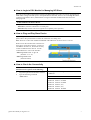
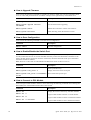
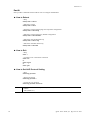
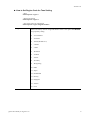
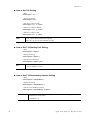
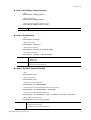
S How to Set SIP local port Setting
- Help
IVD/voip/sip> localport ?
- Display the setting
IVD/voip/sip> localport –s
- Edit sip local port number
IVD/voip/sip> localport <Port>
1…65535 (Default is 5060)
Port
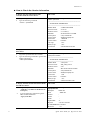
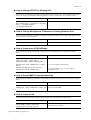
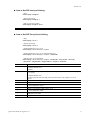
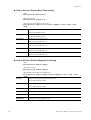
S How to Set SIP Proxy Server Setting
- Help
IVD/voip/sip> server ?
- Display the setting
IVD/voip/sip> server -s
- Enable/Disable the proxy server
IVD/voip/sip> server <Proxy#> <Active>
- Enable/Disable the proxy server and outbound proxy
IVD/voip/sip> server <Proxy#> <Active> <Outbound>
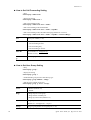
- Edit the proxy server parameters
IVD/voip/sip> server <Proxy#> <Active> <Outbound> <ProxyName> <ProxyIP>
<ProxyPort> <RegistrarIP> <RegistrarPort> <Expires> <Domain>
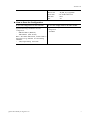
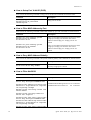
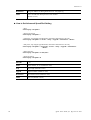
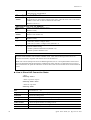
Proxy#
Active
Outbound
Proxy number is from 1 to 3.
0: Disable (Default is 0)
1: Enable
If users click this option, it means that each SIP protocol packet will be sent to SIP proxy
server always.
0: Disable (Default is 0)
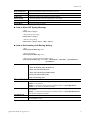
ProxyName
ProxyIP
ProxyPort
RegistrarIP
RegistrarPort
Expires
Domain
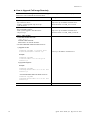
1: Enable (It means that each SIP protocol packet will be sent to SIP proxy server
always.)
Assign a name of SIP proxy server. (Default is none)
Assign an IP address of SIP proxy server. (Default is 0)
Assign a port number of SIP proxy server.
1...65535 (Default is 5060)
Assign an IP address or domain name of SIP register server. (Default is 0)
Assign a port number of SIP register server.
1...65535 (Default is 5060)
Assign a timeout value for SIP protocol, the default value is 300.
(minimum 60 seconds)
Assign an IP address or domain name of SIP Domain/Realm. (Default is 0)
Quick Start Guide for VigorAccess
19