1
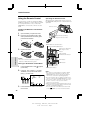
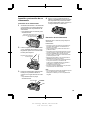
Using the Counter Memory
5
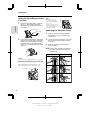
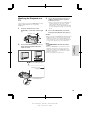
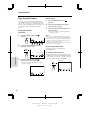
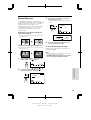
Press the REW button (C).
• The tape will automatically stop when the
counter reaches 0:00.00.
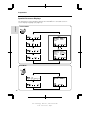
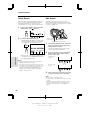
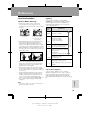
Use the counter memory feature when you
want to return to the beginning of a particular
scene. The position where the counter was
reset (0:00.00) is stored in memory to make it
easier to return to that point on the tape.
VCR mode
1
M 0 11 24
REW P L A Y F F
S T OP S T I L L
REW P L A Y F F
S T OP S T I L L
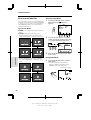
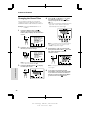
During playback, press the MENU
appears.
button until
M 0 00 00
0 18 00
GAMA COU- MEM- R E- S E E F F . NT E R ORY SE T ARCH
Notes:
• The FF button (B) can be used in the
same way.
• The tape may stop slightly ahead or behind
the point where you reset the counter to
“M 0:00.00”.
• If “MEMORY” is not displayed, press the
COUNTER button.
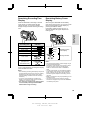
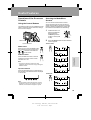
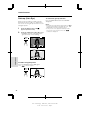
2
Press the MEMORY button to set the
counter to Counter Memory mode.
• “M” will be displayed to the left of the
counter.
MEMORY
6
Camera mode
Memory indicator
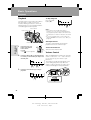
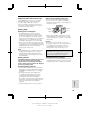
1
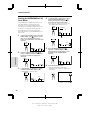
Press the RESET button to reset the
counter to zero at the beginning of the
scene that you want to return to later.
RE SE T
M 0 00 00
GAMA COU - MEM- RE - SEE F F . NT ER ORY SE T ARCH
4
Press the MENU button until
appears. When you are ready to finish
playback, press the STOP button (A).
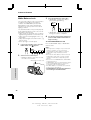
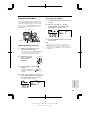
During recording, press the MENU
appears.
button until
• If “MEMORY” is not displayed, press the
COUNTER button.
2
Perform steps 2 and 3 above.
3
When you are ready to finish recording,
press the REC START/STOP button.
4
Set the Power switch to VCR, then
perform steps 5 and 6 above.
Useful Features
M 0 18 31
GAMA COU- MEM- R E- S E E F F . NT E R ORY SE T ARCH
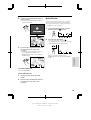
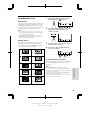
3
Press the PLAY button (D) to view the
desired scene.
To cancel Counter Memory mode
Perform step 1 above, and press the MEMORY
button. “M” will disappear from the screen.
Note:
• This feature does not work during video search.
38
V L - A 11 0 U / p p . 0 2 6 - 0 3 9 ; 0 0 / 11 / 2 1 / 1 8 : 0 0
G. K . A s s o c i a t e s , To k y o