1
8
Chapter 1
Brooktrout Analog Fax Boards
Installing Brooktrout TR1034 fax boards
Fax boards can be installed in the RightFax server or in a separate computer called a “remote
BoardServer.” For information on using remote BoardServers, refer to the RightFax Administrator’s
Guide.
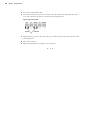
After you have properly set the module numbers on each of your Brooktrout TR1034 fax boards, you
are ready to install them. Always turn your computer off before inserting or removing any board,
and take all necessary precautions to prevent static discharge when handling any fax board.
Brooktrout TR1034 fax boards can be installed in any PCI bus slot.
After the fax boards are properly installed, refer to your Brooktrout documentation for instructions
on connecting the loop-start phone cables.
Downloading firmware to the Brooktrout TR1034
After your Brooktrout TR1034 fax boards have been installed, you must download the fax firmware
to the installed Brooktrout TR1034 boards.
To download the TR1034 fax firmware
1. Open a command prompt and change to the RightFax\RFBoard folder on the RightFax server.
2. Enter the following command:
Firmload.bat c channels path module
Where channels is the total number of channels on all of the installed TR1034 fax boards, path
is the path to the RFBoard\Boston folder on the RightFax server (this command only supports
short file names, so you may need to truncate folder names such as “Program Files”), and
module is the module number you have assigned to the board. If you have multiple TR1034 fax
boards installed, leave the module parameter out. This forces the program to scan for all module
numbers from 3 through F.
Example
Firmload.bat c 4 c:\Progra~1\RightFax\RFBoard\Boston 3
Completing the installation of your Brooktrout TR1034 fax boards
After your Brooktrout TR1034 fax boards have been installed and the fax firmware has been
downloaded to them, you should test the fax channels to ensure that the boards have been properly
configured and installed. For information on testing your fax channels, see ”Testing the ability to
send a fax” on page 15.
When you have completed installing and testing your Brooktrout TR1034 fax boards, you must
configure the RightFax software to communicate with the boards. For information on configuring
RightFax to work with your fax boards, refer to the chapter on configuring the RightFax
BoardServer in the RightFax Administrator’s Guide.