1
MyPBX Standard User Manual
2. System set up
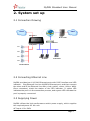
2.1 Connection Drawing
PSTN
PSTN
FXO Lines
IP Provider
FXS Lines
LAN
Router
601
602
603
IP Phone
Soft Phone
604
Normal Phone
2.2 Connecting Ethernet Line
MyPBX provides two 10/100M Ethernet ports with RJ45 interface and LED
indicator. Plug Ethernet line into MyPBX’s Ethernet port, and then connect
the other end of the Ethernet line with a hub, switch, router, LAN or WAN.
Once connected, check the status of the LED indicator. A yellow LED
indicates the port is in the connection process, and a green LED indicates the
port is properly connected.
2.3 Supplying Power
MyPBX utilizes the high-performance switch power supply, which supplies
the required power for the unit.
AC Input: 100~240V
www.yeastar.com
Page 7