1
!AL-2050CS.book
63 ページ
2008年1月7日 月曜日 午後8時10分
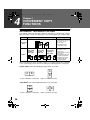
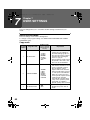
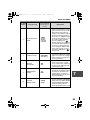
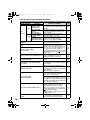
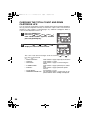
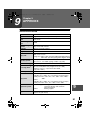
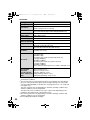
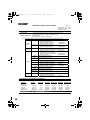
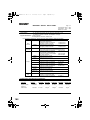
USER SETTINGS
Program
number
4
7
8
9
10
Program name
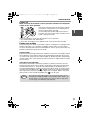
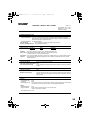
AUTO SHUT-OFF
TIME
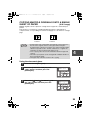
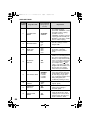
LAYOUT IN 2IN1
OFFSET
FUNCTION
ROTATE ORIG.
IMAGE
AE/TEXT
RESOLUTION
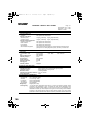
Setting codes
(factory default
setting appears
in bold)
Explanation
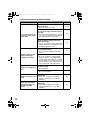
1: 5 MIN.
2: 30 MIN.
3: 60 MIN.
4: 120 MIN.
5: 240 MIN.
• This function automatically
switches the machine to a state
that consumes even less power
than preheat mode if the set
duration of time elapses without
the machine being used when
the power is on. All lights except
the power save indicator go off.
To resume normal operation,
press the [START] key (
).
Normal operation also resumes
automatically when a print job is
received or scanning is begun
from a computer. While in auto
power shut-off mode, no keys
(except the [START] key (
))
can be used.
1: PATTERN 1
2: PATTERN 2
• Use this setting to select the
layout pattern when two original
pages are copied onto a single
sheet of paper (see page 35 for
the layout patterns).
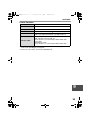
1: ON
2: OFF
• When enabled, this function
offsets the position of each
set of copies in the output tray
in copy mode, and each print
job in printer mode.
1: ON
2: OFF
• When two-sided copying is
performed, this function rotates
the image on the back of the
original. This is convenient
when binding the copies at the
top (tablet binding).
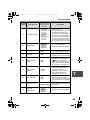
1: 300dpi
2: 600dpi
• This setting is used to change
the copy resolution in AUTO and
TEXT mode from 600 x 300 dpi
to 600 x 600 dpi (high-quality
mode). Scanning is slower
when high-quality mode is used.
7
63