1
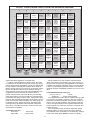
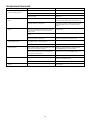
TROUBLESHOOTING GUIDE
SYMPTOMS
1. The computer doesn’t react, or
“freezes” during the game.
2. The computer will not play a
move.
3. The computer will not accept your
move.
4. The computer seems to be
making illegal moves.
5. The computer makes instant or
irrational moves.
6. The computer is silent.
7. You cannot hear a voice, only
beeps.
POSSIBLE CAUSES
ACTION TO TAKE
Batteries are not inserted properly.
Install batteries as shown in 1.1.
Batteries are weak or bad.
Replace the batteries.
Static discharge or an electrical disturbance has
caused a lock-up.
Press into the hole marked ACL, as described in
Section 5.1.
Non Auto Mode may be in effect.
The computer only responds to moves automatically if Non Auto Mode is OFF (see Section 2.10).
You may be on one of the higher levels, where the
computer thinks for a longer time.
You may interrupt the computer by pressing play.
It forces the computer to make a move at a level
other than Mate Finder or Combination Finder
Levels.
Is it your turn? Is your King in check? Will your
move put your King into check? Did you move the
Rook first when castling? Are you moving to an
illegal square?
Verify the position. Use TAKE BACK to reconstruct
the last move.
The computer is thinking (check the color indicator
lights).
To interrupt the computer, press PLAY.
You have entered the computer’s last move incorrectly (wrong from or to square).
Check the indicated move. Press the correct
square to complete the computer’s move.
The computer has made a special move, such as
en passant, castle, or pawn promotion.
Use TAKE BACK to reconstruct the last move.
Your board position is incorrect.
Verify the board (see Section 2.9).
The computer may be set on a very low level,
where it moves quickly and plays weaker than usual
because its search depth is limited.
Press LEVEL to see which level is selected (see
Section 3), and change levels, if desired. Then
press LEVEL again to exit Level Mode.
The computer may be set on one of the Fun Levels,
where it often makes common chess mistakes so
the beginner can study them.
Press LEVEL to check the current playing level
(see Section 3). Then press LEVEL again to exit.
The batteries are running out.
Replace the batteries.
The Volume Control Slider is turned down.
Turn up the volume with the volume control slider
next to the GO/STOP switch.
Voice/Coach Level H is in effect.
Press VOICE/COACH to change the level.
Voice/Coach Level G is in effect.
Press VOICE/COACH to change to Level E or F for
voice output.
12