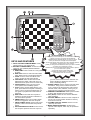
1
INTRODUCTION
Congratulations on becoming the proud owner of this
new and very unique chess computer—your very own
talking chess tutor! You are about to experience computer
chess that’s as “human” as possible—you’ll be delighted
as your new chess partner helps you with your game,
coaches you as you play, and even gives you hints and
chess information on demand! You’ll be thrilled as the
voice output follows your every move, even occasionally
offering helpful advice and encouraging words—chess
simply couldn’t be more fun!
• Exciting and informative voice output makes chess
easy to learn and a pleasure to play!
• Sensory chessboard for easy move input; 16 bright
board lights used to indicate all moves.
• Special coaching features allow you to learn as you
play—the computer will even warn you when your
pieces are threatened!
• Includes five different Teach Modes—study the
tactics of each chess piece individually!
• The 384 level settings mean you can constantly
improve your skills! The Extended Playing Range
features 64 levels of play for learning, variety and
experimentation—including Beginner, Practice, and
Fun Levels; Quiet and Aggressive Game Levels;
Tactical and Fixed Depth Levels; Mate and Combination Finder Levels; Normal Playing Levels, and
even a special Infinite Level!
• Openings library includes all major chess openings.
• Request an evaluation of the current board position,
and look in on the computer’s thinking process!
• Unsure of the position? Verify the entire board!
• Change your mind about a move? Take back up to
six individual moves!
• Use Non Auto Mode to play chess against a friend,
with the computer acting as referee!
• Play using the voice or beeps, or turn the sound off!
• Handy built-in compartment stores the pieces.
• Turn off at any time—your current game stays in
memory for up to 18 months!
1. USING YOUR CHESS COMPUTER
1
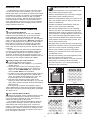
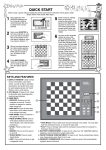
First, Install the Batteries
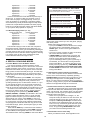
Your chess computer runs on four “AA” (AM3/R6)
batteries. For longer battery life, be sure to use fresh
alkaline batteries. Slide the GO/STOP switch to GO.
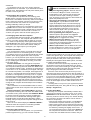
Insert the batteries as shown in Figure 1-1. The computer
will go through a self-test, then a Welcome message will
greet you, signalling that the computer is ready to play! If
the unit does not respond, use a paper clip or another
sharp object to press into the hole marked ACL in the
base of the unit for at least one second. This will reset the
computer.
If you would rather not power your unit with batteries,
you may purchase an optional AC adapter. Please use
only the adapter specified for use with this computer.
Important: To ensure that the computer’s memory contents are not lost, keep good batteries installed in the unit
even when you are using the optional AC adapter.
2
Ready to Play? Here’s How to Move!
Follow these steps to start a game:
a. Switch to GO to turn the computer on, if you haven’t
already done so.
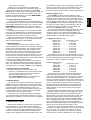
b. Set up the chess pieces in their starting positions,
with the White pieces nearest to you, as shown in
Figure 1-2. Press NEW GAME; the computer will
announce New Game as a confirmation.
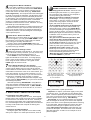
c. To make a move, lightly press down on the piece you
want to move until you hear the voice identify that
piece. The sensory board registers your move, and
two board lights turn on to indicate the piece.
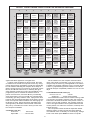
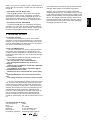
d. Take the piece and gently press it down on the
square you want to move to (see Figure 1-3). You will
hear a beep, and the computer will then start thinking
about its move.
At the beginning of a game, the computer’s reply is
often instantaneous on many levels, because it is playing
moves which are stored in its openings library (for details,
see Section 2.12).
RrstuvwxyS
8jbielchd8
7agagagag7
6MmMmMmMm6
5mMmMmMmM5
4MmMmMmMm4
3mMmMmMmM3
2GAGAGAGA2
1DHCKFIBJ1
TrstuvwxyU
4x
AA/AM3/R6
Fig.1-1
Fig.1-2
PRESS
PRESS
3
The Computer Makes Its Move
When the computer moves, it beeps and turns on two
board lights indicating the horizontal row and vertical
column of the piece it wishes to move. Press the indicated piece down gently on the square.
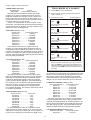
The computer then uses the board lights to show you
where the piece should go. Move the piece to the indicated square and press the piece down, as shown in
Figure 1-4. Once you have pressed this square, you have
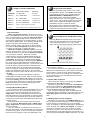
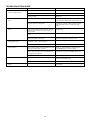
completed the computer’s move! For an example of how
the board lights would indicate a computer move from e7
to e5, see Figures 1-5a and b.
3
PRESS
PRESS
Fig.1-3
Fig.1-4
RrstuvwxyS
8jbielchd8
7agagagag7
6MmMmMmMm6
5mMmMmMmM5
4MmMmGmMm4
3mMmMmMmM3
2GAGAMAGA2
1DHCKFIBJ1
TrstuvwxyU
RrstuvwxyS
8jbielchd8
7agagmgag7
6MmMmMmMm6
5mMmMaMmM5
4MmMmGmMm4
3mMmMmMmM3
2GAGAMAGA2
1DHCKFIBJ1
TrstuvwxyU
Fig.1-5a - Press down on e7…
Fig.1-5b …and then on e5.
ENGLISH
COMPUTER FEATURES TO WATCH FOR!