1
8
7
6
5
4
3
NEW
GAME
NON
AUTO
LEVEL
TAKE
BACK
VOICE
COACH
PLAY
EVALUATE
SMART
HINT
2
1
A
B
C
D
E
F
G
H
SAY AGAIN
DISPLAY MOVE
LISTEN —
as the exciting voice output…
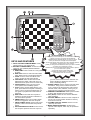
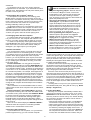
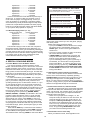
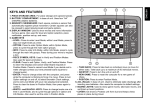
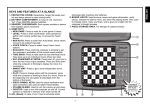
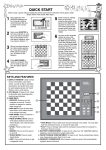
KEYS AND FEATURES
1. PIECE STORAGE COMPARTMENT: Handy
storage area for your chess pieces.
2. BATTERY COMPARTMENT: In base of unit.
Uses four “AA” (AM3/R6) alkaline batteries.
3. GAME KEYS
a. NEW GAME: Press to reset for a new game
of chess.
b. NON AUTO: Press to enter Non Auto Mode,
which allows moves to be entered manually.
c. LEVEL: Press to enter Level Mode. Also
used to access the five Teach Modes.
d. TAKE BACK: Press to take back the last
individual move made. Take back up to six
individual moves (three moves for each side).
e. VOICE/COACH: Press to access Coach
Level options and Voice/Beep options.
f. PLAY: Press to change sides with the computer; press while the computer is thinking to
force it to move. Press at the beginning of a
new game to play Black from the bottom of
the board.
g. EVALUATE: Press while the computer is
thinking to get the computer’s evaluation of
the current board position.
h. SMART HINT: Press to get a level independent move suggestion from the computer.
i. PIECE SYMBOL KEYS: Used to verify piece
positions, select teach modes and promote
pawns.
j. SAY AGAIN/DISPLAY MOVE: Press to have
the computer repeat its last voice output on
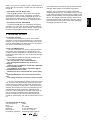
• gives you hints when you’re not sure what to do!
• cautions you when your pieces are threatened!
• identifies pieces automatically as you press on them!
• alerts you whenever an illegal move is attempted!
• announces special chess moves such as en passant captures
and castling—making them so easy to learn!
• guides you through move take-backs when you make a mistake
or change your mind about a move!
• identifies the piece to be replaced after taking back a capture—
you won’t ever have to guess!
• announces all wins, losses and draws!
• evaluates the board position on demand—
you’ll always know who’s winning!
your turn. Press and hold down while the computer is thinking to display the move it is currently considering making.
4. BOARD LIGHTS: Used to show moves and game
information, verify pieces, indicate the side to
move, and show the playing levels. Also used to
indicate check, mate, and draw, and to give you
insight into the computer’s thought process.
5. SENSORY CHESSBOARD: Each square contains
a sensor that registers piece movement.
6. ACL (Reset): In base of unit. Used to eliminate
static discharge.
7. GO/STOP SWITCH: Used to turn the computer on
and off. The current position remains in memory
even when turned off.
8. VOLUME CONTROL SLIDER: Used to turn the
volume up and down.
9. MAINS ADAPTOR SOCKET: Socket for the
optional mains adapter, which may be purchased
separately.
2