1
True to the Music
USING THE PZ-Select
The Radial PZ-Select is pretty much ‘plug and play’ easy to use.
There are only a few little extras that one needs to be aware of to
take full advantage of the PZ-Select’s feature set. The easiest way
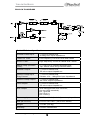
to understand the PZ-Select is to follow the basic block diagram:
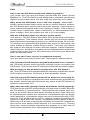
There are two inputs each of which drives a separate channel: one
for the magnetic (electric pickup) and one for the piezo (acoustic
pickup). Because both of these sources are very different, they
are treated individually to maximize performance.
Making Connections
As with any audio system, always make your connections with
your equipment turned off or levels set to zero. This will avoid
transients that can damage speakers. There is no power switch on
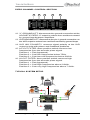
the PZ-Select. As soon as you connect the 15VDC power supply
it will turn on. To check powering, simply depress one of the two
footswitches and the LED indicator will illuminate.
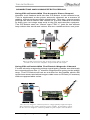
Most combination magnetic-piezo guitars have either stereo ¼”
TRS output or are equipped with separate ¼” outputs for each
pickup type. When you connect to the PZ-Select with a TRS
cable, the tip of the connector feeds the electric channel and the
ring feeds the acoustic. If your guitar is not set up this way, you
simply need to reverse the connections at the output end of your
cable to accommodate. The PZ-Select will break out each signal
internally and send it to the appropriate channel.
Radial Engineering Ltd.
4
PZ-Select™ User Guide