1
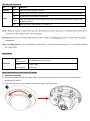
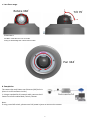
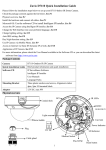
c. Lens focus range
Rotate 360°
Tilt 79°
Rotate Notice:
DO NOT rotate the lens over 2 rounds.
Doing so will damage the camera lens module.
Pan 344°
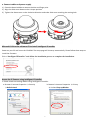
d. Completion
The camera has only Power over Ethernet (PoE) built-in.
(there is no DC connector inside.)
1. Using a standard RJ-45 network cable, connect the IP
Camera to a PoE-enabled Hub / Switch / Router.
Note:
If using a non-PoE switch, please use a PoE power injector to connect the camera.
6