1
OPERATION
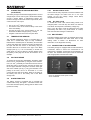
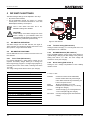
The battery is empty when only the first LED Bulk/ON
illuminates. In this stage the Mass Charger gives full
current (see fig. 2 stage A) and the battery voltage will
slowly increase.
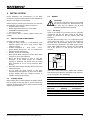
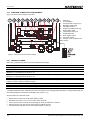
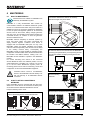
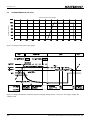
See figure 4. When the battery temperature is low, the
charge voltage increases. On the other hand, when the
battery temperature is high, the charge voltage is
decreased. Over charge and gassing are prevented this
way. This will extend the life of your batteries.
3.3.2
3.5
3.3.1
Bulk (LED 1 illuminates)
(LED 1 and 2 illuminate)
After reaching the level of 27.6V (24V charger) the battery
is charged for about 25% and the second LED will also
illuminate. The Mass Charger still gives the maximum
output current and the voltage will increase till the
absorption voltage level (see fig. 2 stage A). The
maximum time of stage A is 8 hours.
3.3.3
Absorption (LED 1, 2 and 3 illuminate)
The battery has been charged for 80% (fig. 2 stage B).
The Mass Charger limits the charge voltage to a safe level
and the charge current will decrease slowly during
charging.
3.3.4
(LED 1 to 4 illuminate)
The charge voltage is limited at the absorption level. As
the battery is almost full, the charge current will further
decrease.
3.3.5
Float (LED 1 to 5 illuminate)
When all LEDs are illuminated the battery is fully charged.
The float charge stage provides a lower output voltage,
sufficient enough to maintain the batteries at 100% charge
but low enough to prevent your batteries from
unnecessary stress. In this stage the Mass Charger is able
to supply full current to the connected users/loads.
The Mass Charger automatically resumes
operation in Bulk stage after it was
disconnected from an AC-source temporarily.
3.4
TEMPERATURE COMPENSATED
CHARGING
Charge voltage (V)
By installing the battery temperature sensor the charge
voltages are automatically adapted for deviating
temperatures. This can increase the battery’s life time
substantially and save you a lot of money.
Battery temperature (°C)
Figure 4:
Temperature compensated charging
8
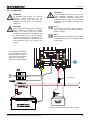
COMPENSATION OF THE CABLE LOSSES
The Mass Charger can compensate the voltage drop
occurring over the DC cables. For this purpose the Mass
Charger is provided with terminals for sense wires. The
sense wires are connected closest possible to the
batteries in order to charge them with the right voltage.
When only the minus sense wire is connected only the
losses of the minus DC cable will be compensated.
Connecting both cables produces the best result, all
losses will be compensated until a maximum of 3V in total.
3.6
ALARM FUNCTION
The battery charger is equipped with an integrated alarm
function. External equipment can be controlled by the
potential free contacts of this alarm. The maximum switch
current of the relay is 1A. Exceeding the setpoints (refer to
section 7.7) will activate the alarm.
3.7
CHARGING A SECOND BATTERY
Some installations have a main battery set and besides
this a smaller (cranking) battery with the same voltage. It is
possible to maintain this second battery with the 3A output
of the battery charger.
3.8
EQUALIZE MODE
An equalizing charge can be necessary after very deep
discharges and/or inadequate charges. This has to be
carried out according to the specifications of the battery
manufacturer.
WARNING!
Equalization is ONLY applicable for wet type
batteries and will damage gel/AGM/Spiral type
batteries!
Incorrect use of the equalize mode may lead to
hazardous situations. Do not smoke or use any
naked flame or other sources of ignition due to
risk of explosion. Always ventilate the battery
room during equalizing to clear the air.
During equalizing the batteries are brought into the gas
state and permitted load voltages may be exceeded. Refer
to chapter 9 for characteristics. Therefore appropriate
measures must be taken, e.g. disconnect all loads from
the battery and ventilate the room. For these reasons the
equalizing mode should only be used by trained technical
engineers.
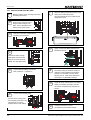
The equalizing mode can only be started when the Mass
Charger is in operation. To start the equalize mode, select
Equalize in the MasterBus device settings (section 7.2).
March 2014 / Mass Charger 24/15-2; 24/25-2; 24/25-2 DNV / EN