1
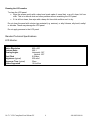
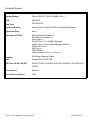
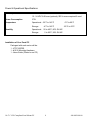
Cleaning the LCD monitor To clean the LCD panel: Wipe the screen gently with a clean lens brush made of camel hair, or a soft, clean, lint free cloth. This is to remove dust and other particles without scratching the LCD panel. If it is still not clean, then wipe with a damp lint free cloth and blow on it to dry. Do not clean the panel with a keton-type material (e.g. acetone), or ethyl toluene, ethyl acid, methyl or chloride. These may damage the LCD panel. Do not apply pressure to the LCD panel. Standard Technical Specifications: LCD Monitor: Size / Type Native Resolution Contrast Ratio Viewing Angles Pixel Pitch Brightness (typical) Response Time (typical) Colors Supported 10.4” SVGA TFT LCD 800 x 600 500:1 Horizontal: 120° Vertical: 100° 0.264mm 230 cd/m² 35ms 16.8 million 10.4” C1-D2 Compliant Panel Mount PC 6 486-0029-00-00