1
Plug & Play DDC1/2B Feature
This monitor is equipped with VESA DDC1/2B capabilities according to the
VESA DDC STANDARD. These capabilities allow the monitor to inform the
host system of its identity and, depending on the level of DDC used,
communicate additional information about its display capabilities. The
communication channel is defined in two levels: DDC1 and DDC2B.
The DDC1 is a uni-directional data channel from the display to the host that
continuously transmits EDID information. The DDC2B is a bi-directional data
channel based on the I²C protocol. The host can request EDID information
over the DDC2B channel.
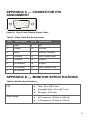
See “Appendix C — Connector Pin Assignment” on page 17 for connector
pin assignments.
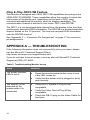
APPENDIX A — TROUBLESHOOTING
If the following information does not successfully solve your issue, please
visit the MicronPC Technical Support Site at
http://www.micronpc.com/support/index.html.
If you do not have Internet access, you may also call MicronPC Technical
Support at (800) 877-8856.
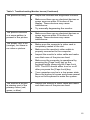
Table 3: Troubleshooting Monitor Issues
Issue
Solution
The power indicator
LED is not lit.
•
Press the monitor power button once to see
if the LED comes on.
•
Verify that the power cord is plugged in firmly
and correctly.
•
Verify the PC system is Plug & Play
compatible.
•
Verify the Video Card is Plug & Play
compatible.
•
Check the DB-15 plug on the Video Cable for
bent pins.
The monitor is not
detected by the
system when it is
connected.
14