1
To connect the power cord to your monitor and a power source, use the
following instructions:
Caution: If the AC outlet is not grounded (with three holes), install the
proper grounding adapter (not supplied).
1
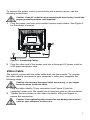
Plug the power cord into your monitor’s power input socket. See Figure 3
for the socket’s location.
Figure 3: Connecting Cables
2
Plug the other end of the power cord into a three-pin AC power outlet or
a UL-approved power strip.
Video Cable
The monitor comes with the video cable built into the monitor. To connect
the video cable’s connector to your computer’s video port, complete the
following steps:
Caution: Do not bend the signal cable excessively, or you might
break the wires inside the cable.
1
2
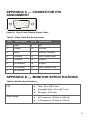
Plug the video cable's 15-pin connector (see Figure 3) into the
computer's video port. Be careful not to bend any pins on the connector.
Tighten the two screws on the video connector with your fingers to
secure the connection.
Caution: Over-tightening this connection can damage the monitor
cable or your computer’s video card.
7