1
Content
1
Instruction................................................................................................ 1
1.1 General Description.......................................................................... 1
1.2 Camera Body Interfaces ................................................................... 1
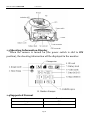
1.3 Shooting Information Display .......................................................... 2
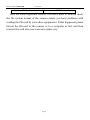
1.4 Supported Format............................................................................. 2
2
Cautions................................................................................................... 4
3
Easy Operations ...................................................................................... 5
3.1 Power Supply .................................................................................... 5
3.2 Insert the SD-card ............................................................................. 5
3.3 Power on and Entering into the ON Mode ...................................... 6
3.4 Enter into the TEST Mode ................................................................ 6
3.4.1 Customer Settings...................................................................... 7
3.4.2 Manual Capturing ....................................................................... 7
3.4.3 View Images or Videos ............................................................... 7
3.5 Power Off ........................................................................................... 7
4
Advanced Operations ............................................................................. 9
4.1 Settings Menu ................................................................................... 9
4.1.1 Default Settings ........................................................................ 10
4.1.2 Set Camera Mode ..................................................................... 11
4.1.3 Format SD-Card ........................................................................ 11
4.1.4 Set Image Size .......................................................................... 12
4.1.5 Set Video Size ........................................................................... 12
4.1.6 Set Date and Time .................................................................... 13
4.1.7 Set Continuous Capturing Number............................................. 13
4.1.8 Set Video Length ...................................................................... 13
4.1.9 Set Triggering Interval Time .................................................... 14
4.1.10 Set PIR Sensitivity .................................................................... 14
4.1.11 Set Date and Time Stamp......................................................... 15
4.1.12 Set Timer ................................................................................... 15
4.1.13 Reset to Default Settings ......................................................... 16
4.1.14 View Image or Video................................................................. 16
4.1.15 Delete Image or Video .............................................................. 16