1
ENGLISH
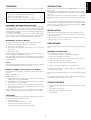
CONTROLS AND THEIR FUNCTIONS (See
page 50)
!0 ST. NAME Button (See page 5)
q POWER (STANDBY/ON) Button
!2 FM MODE Button
!1 NEXT Step Button (See page 5)
Used to select stereo or mono when listening to FM broadcasts.
FRANçaIS
w SLEEP Button
NOTES:
e TIMER Button
• The AM scan step can be changed by pressing the FM MODE
buttons simultaneously for 5 seconds. (overseas version only)
Press this button with DAILY preset and the indicator will shown on
the display.
r Multi-function Display
!3 MEMORY Button
z SLEEP Indicators
• MANUAL: To preset FM or AM (MW) in the system, pres briefly
(0.5 second or less).
• AUTO: When you press the button for long (more than 0.5 second), FM or AM (MW) broadcasting will automatically be preset
in the system.
x RDS, FILE, SLEEP TIME mode Indicators
DEUTSCH
• RDS: PS, PTY DATA will be displayed, and RDS indicator
lights.
• FILE: Alphabets, symbols, and numbers will be displayed
when you write a broadcasting name with File Button (up to
4 letters).
• Timer mode: When the DAILY function is programmed, the
daily ON/OFF times will be shown in the display.
!4 BAND selector Button
Press the button to switch between FM and AM (MW) bands.
ESPAÑOL
NEDERLANDS
c Tuned Indicator
This indicator lights when correctly tuned to a broadcast.
v STEREO Indicator
This indicator will light up when FM stereo broadcasting is received.
b TIMER Indicator
n Frequency mode, TIME Indicator
• The frequencies of FM, AM (MW) will be displayed.
• Hour, Minute: When you program current time, DAILY, the
times of On/Off, and the hour and minute of CT among RDS
will be displayed.
m Channel Display
The channel number selected by use of the PRESET UP/DOWN
button will be shown in the display.
, Signal Indicator
t PRESET UP/DOWN Buttons
•
Broadcast Memory function: Each time you press the PRESET
UP/DOWN button briefly (for 0.5 second or less), you can listen
to broadcasts in a programmed sequence. This function is used
to memorize FM or AM (MW) broadcasting, or to select memorized broadcasts.
y TUNING UP/DOWN Buttons (▼/▲)
Used to select the broadcast you want to listen to or adjust the
current time, DAILY, SLEEP presets, etc.
u DISPLAY Buttons
1) The button works only when you receive FM broadcasting stations, and is used to set the RDS mode.
2) Press the button longer than 1 second, and PTY search will
become operable.
i DAILY Button
o TIME ADJUST Button (See page 5)
DANSK
SVENSKA
PORTUGUÊS
ITALIANO
The reception status of the broadcasting.
. MEMORY Indicator
4