1
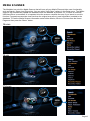
VIDEO FILE COVER ART PREVIEW
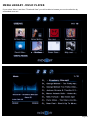
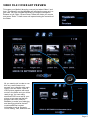
To browse your Media Library by cover art just select “Menu” and
then “Thumbnails” and the Mede8er will preview the cover art in a
grid view. You can navigate the library by using the Navigation
Buttons ie Left, Right, Up and Down. Select the folder you require
and press “Enter”. A new screen will open showing the contents of
the folder.
All you need to do in order to use
this very useful feature is to
arrange your collection with each
video, in its own folder. Place a
JPEG picture together with each
movie in the folder and you will be
ready to go. You can easily
download DVD cover art for your
picture or you can use the free
program like Y2M (YAMJ to
Mede8er) to make your folder.jpg
and about.jpg pictures that will
contain additional content
information such as Synopsis,
Cover, Rating, Year, Actors etc etc
Page17