1
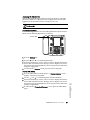
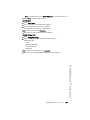
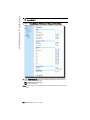
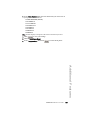
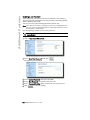
57i IP Phone
User Guide
Release 2.0
41-001201-00
Rev 01
Aastra Telecom will not accept liability for any damages and/or long
distance charges, which result from unauthorized and/or unlawful
use.
While every effort has been made to ensure accuracy, Aastra Telecom
will not be liable for technical or editorial errors or omissions
contained within this documentation. The information contained
in this documentation is subject to change without notice.
Copyright 2007 Aastra Telecom. www.aastra.com
All Rights Reserved.
Software License Agreement
Aastra Telecom Inc., hereinafter known as "Seller", grants to Customer a
personal, worldwide, non-transferable, non-sublicenseable and non-exclusive, restricted use license to use Software in object form solely with the
Equipment for which the Software was intended. This Product may integrate programs, licensed to Aastra by third party Suppliers, for distribution
under the terms of this agreement. These programs are confidential and
proprietary, and are protected as such by copyright law as unpublished
works and by international treaties to the fullest extent under the applicable law of the jurisdiction of the Customer. In addition, these confidential
and proprietary programs are works conforming to the requirements of
Section 401 of title 17 of the United States Code. Customer shall not disclose to any third party such confidential and proprietary programs and
information and shall not export licensed Software to any country except in
accordance with United States Export laws and restrictions.
Customer's use of this software shall be deemed to reflect Customer's
agreement to abide by the terms and conditions contained herein. Removal
or modification of trademarks, copyright notices, logos, etc., or the use of
Software on any Equipment other than that for which it is intended, or any
other material breach of this Agreement, shall automatically terminate this
license. If this Agreement is terminated for breach, Customer shall immediately discontinue use and destroy or return to Seller all licensed software
and other confidential or proprietary information of Seller. In no event
shall Seller or its suppliers or licensors be liable for any damages whatsoever (including without limitation, damages for loss of business profits,
business interruption, loss of business information, other pecuniary loss, or
consequential damages) arising out of the use of or inability to use the software, even if Seller has been advised of the possibility of such damages.
Model 57i IP Phone User Guide
iii
Software License Agreement
Customer agrees to not reverse engineer, decompile, disassemble or display Software furnished in object code form. Customer shall not modify,
copy, reproduce, distribute, transcribe, translate or reduce to electronic
medium or machine readable form or language, derive source code without the express written consent of the Seller and its Suppliers, or disseminate or otherwise disclose the Software to third parties. All Software
furnished hereunder (whether or not part of firmware), including all copies
thereof, are and shall remain the property of Seller and its Suppliers and
are subject to the terms and conditions of this agreement. All rights
reserved.
Table of Contents
Software License Agreement..................................................................... iii
About this Guide .......................................................................................... 1
Documentation............................................................................................. 1
Introduction .................................................................................................. 2
Phone Features .......................................................................2
Requirements ..........................................................................2
Installation and Setup.............................................................2
Getting Started ............................................................................................. 3
Plugging in and Starting the Phone ........................................3
Network Connected/Network Disconnected ..........................7
Idle Screen ..............................................................................8
Phone Options via the IP Phone UI .......................................12
References ............................................................................13
Phone Options via the Aastra Web UI...................................14
User Password ........................................................................................... 18
Using Your Phone ...................................................................................... 20
Key Descriptions........................................................................................ 20
Multiple Line and Call Appearances .....................................23
Softkeys ...................................................................................................... 24
Restarting your phone............................................................................... 65
v
Table of Contents
Softkey Functions .................................................................25
State-Based Softkeys (Bottom Keys only) ...........................26
Softkeys as Line/Call Appearances ......................................28
Softkeys as Speeddials .........................................................31
Softkeys as "Do not Disturb" ................................................35
Softkeys as Busy Lamp Field (BLF) ......................................36
Softkeys as BLF List .............................................................38
Softkeys for Accessing XML Services ..................................40
Softkeys as Flash Key...........................................................44
Softkeys as Sprecode ...........................................................45
Static and Softkey Settings for Park/Pickup ........................47
Softkeys as Last Call Return (lcr) (Sylantro Servers only)...53
Softkeys as Services.............................................................55
For more information about Services you can access on your
phone, contact your system administrator. .......................55
Softkeys as Directory............................................................57
Softkeys as Callers List ........................................................59
Softkeys as an Intercom Key................................................61
Softkeys as an Empty Key ....................................................63
Deleting a Softkey ................................................................64
Table of Contents
Table of Contents
Making Calls ............................................................................................... 66
Dialing a Number...................................................................66
Pre-dialing a Number.............................................................66
Using Handsfree Speakerphone............................................................ 67
Using a Headset ...................................................................................... 67
Intercom ................................................................................69
Redial.....................................................................................71
Mute.......................................................................................72
Receiving Calls .......................................................................................... 73
Answering an Incoming Call .................................................73
Sending an Incoming Call to Voicemail................................73
Handling Calls ............................................................................................ 74
Placing a Call on Hold ...........................................................74
Transferring Calls..................................................................76
Conferencing Calls ................................................................77
Picking up Calls.....................................................................80
Ending Calls...........................................................................80
Managing Calls .......................................................................................... 81
Directory List.........................................................................81
Callers List ............................................................................88
Call Forwarding .....................................................................93
Missed Calls Indicator ..........................................................96
Voicemail...............................................................................97
Additional Features ................................................................................... 98
Star Codes .............................................................................98
Suppressing DTMF Playback ................................................98
Display DTMF Digits ..............................................................99
Stuttered Dial Tone .............................................................100
Play Call Waiting Tone ........................................................101
Incoming Intercom Calls and Auto-Answer ........................102
Using Redial Key for “Last Number Redial” .......................103
Ring Tones and Tone Sets ..................................................104
Time and Date .....................................................................108
Locking and Unlocking the Phone ......................................112
Resetting a User Password ................................................114
Defining an Emergency Dial Plan........................................115
Language ...................................................................................................117
Specifying the Language to Use .........................................117
Model 536 and 560 Expansion Modules .................................................119
Troubleshooting Solutions ..................................................................... 121
vi
Table of Contents
Limited Warranty...................................................................................... 125
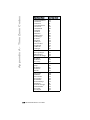
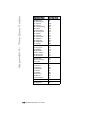
Appendix A - Time Zone Codes.............................................................. A-1
Table of Contents
vii
About this Guide
This guide explains how to use the basic features of your new 57i phone.
Not all features listed are available by default. Contact your system or
network administrator to find out which features and services are available
to you on your system.
Your system administrator has the ability to customize some features on
this phone. For information on more advanced settings and
configurations, administrators should refer to the Aastra SIP 53i, 55i,
57i, and 57i CT IP Phone Administration Guide.
Documentation
• Aastra 57i IP Phone Installation Guide – Installation and set-up
instructions, general features and functions, and basic options list customization. This Installation Guide is included with the telephone.
• Aastra 57i IP Phone User Guide – Describes the most commonly used
features and functions for an end user.
• Aastra 53i, 55i, 57i, and 57i CT IP Phone Administration Guide –
Describes how to set the 57i phone up on the network and contains
advanced configuration instructions for the 57i. This guide has instructions that are at a user level.
About this Guide
Model 57i IP Phone User Guide
1
Introduction
Introduction
This 57i IP telephone has all the features of a regular business phone,
allowing you to make and receive calls, transfer, conference and more. The
57i IP telephone provides communications over an IP Network using the
SIP IP telephony protocol.
Phone Features
• 11 line graphical LCD screen (144 x 128 pixels) with white backlight
• 12 multi-functional softkeys
— 6 Top Keys:
Programmable static softkeys
(up to 10 programmable functions)
— 6 Bottom Keys: Programmable state-based softkeys
(up to 20 programmable functions)
• 4 call appearance lines with LEDs
• Supports up to 9 call lines
• Full-duplex speakerphone for handsfree calls
• Headset support (modular connector)
• Built-in-two-port, 10/100 Ethernet switch - lets you share a connection
with your computer.
• Inline power support (based on 802.3af standard) which eliminates
power adapters.
• AC power adapter (included)
• Enhanced busy lamp fields*
• Set paging*
* Availability of feature dependant on your phone system or service provider.
Requirements
The 57i IP Phone requires the following environment:
• SIP-based IP PBX system or network installed and running with a SIP
account created for the 57i phone.
• Access to a Trivial File Transfer Protocol (TFTP), File Transfer Protocol
(FTP), Hypertext Transfer Protocol (HTTP) server, or Hyper Text Transfer Protocol over Secure Sockets Layer (SSL) (HTTPS).
• 802.3af Ethernet/Fast Ethernet LAN
• Category 5/5e straight through cabling
• Power over Ethernet (PoE) inline power injector (optional accessory necessary only if your network provides no inline power and if you do
not use the IP Phone’s power adapter).
Installation and Setup
If your system administrator has not already setup your 57i phone, please
refer to the Aastra 57i Installation Guide for basic installation and
physical setup information. For more advanced administration and
configuration information, system administrators should refer to the
Aastra SIP 53i, 55i, 57i, 57i CT IP Phone Administrators Guide.
2
Model 57i IP Phone User Guide
Getting Started
The 57i must be set up and be configured prior to its first use. This section
describes phone behavior and start up screens you may see when the
phone is first plugged in, or when it is restarted.
Plugging in and Starting the Phone
The 57i automatically begins the start up sequence as soon as it is
connected. The phone goes through this process the first time you plug in
your phone and every time you restart your phone.
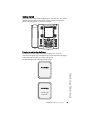
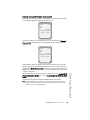
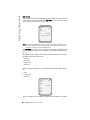
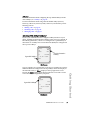
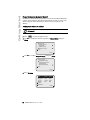
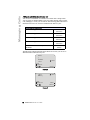
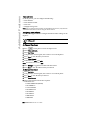
The phone displays the following startup screens.
Getting Started
Checking for
Firmware.....
Model 57i IP Phone User Guide
3
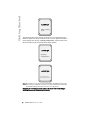
Getting Started
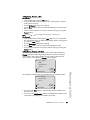
DHCP: waiting
for IP...
The 57i phone then checks settings and looks for new configuration and
firmware updates for the phone from a server. If a new update is found, the
phone displays the message “Updating Configuration”. This may take a few
moments while the phone downloads the latest updates.
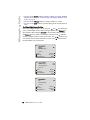
Updating
configuration.....
Checking for firmware...
Do not unplug the phone!
Note: New updates to your phone can be automatically scheduled from the server.
This is set up on the phone system by your system administrator and should
be scheduled during non-business hours or slow call periods.
Important! Do not unplug or remove power to the phone while it is checking or
installing firmware and configuration information.
4
Model 57i IP Phone User Guide
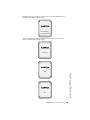
If language packs were loaded to your phone by your system administrator, the
following screen displays during startup.
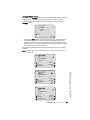
Downloading
Language Packs
When the configuration update is complete, the phone displays the following
screens and then displays the Idle screen..
Network
DSP
Getting Started
.
SIP
Model 57i IP Phone User Guide
5
Getting Started
Done
.
Services
Dir
Callers
Icom
John Smith
L1
Sat Jan 1 12:18am
Idle Screen
6
Model 57i IP Phone User Guide
Network Connected/Network Disconnected
If your phone is successful when connecting to the network the following
screen displays before changing to the Idle screen..
Services
Dir
Callers
Icom
John Smith
L1
Network Connected
Sat Jan 1 12:18am
If your phone did not successfully connect to the network, the "Network
Disconnected" prompt appears on the display and the telephone status
light turns on.
Services
Dir
Callers
Icom
John Smith
L1
Network Disconnected
Sat Jan 1 12:18am
Check that the cables are tightly connected to the phone and to the wall
jack. The phone should automatically detect when it is reconnected and
dispalys the "Network Connected" prompt for a few seconds. However, if
changes have been made to your phone’s network settings, you may need
to restart your phone.
Check with your system or network administrator for assistance.
Note: f the phone displays "No Service" you can still use the phone but it is not
registered with the Registrar. For more information about registering your
phone, see your system administrator.
Model 57i IP Phone User Guide
7
Getting Started
For more information about connecting your phone, see the Aastra 55i IP
Phone Installation Guide, the section "Connecting to the Network and to
Power".
Getting Started
Idle Screen
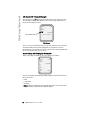
When the phone has successfully updated the configuration and connected
to the network, the phone displays the Idle State screen. The idle screen is
shown whenever your phone is not in use.
Services
Dir
Callers
Icom
John Smith
L1
Sat Jan 1 12:18am
Note: Your system administrator sets up your SIP screen name, line number, and
any other administrative features required. If your name does not display on
the screen, contact your system administrator.
The Idle State screen lists your name (SIP screen name) and day, date, and
time. In the above screen, the "L1" indicates John Smith is configured on
Line 1.
The idle screen also displays the following default softkeys located on the
top left and top right of the screen:
•
•
•
•
Services
Directory
Callers List
Intercom
When you lift the handset, the screen displays the default bottom softkeys
of:
• Dial
• Conference
• Transfer.
Services
Dir
Callers
L1
Icom
John Smith
>
Dial
Conf
Xfer
You can configure the 6 top softkeys and the 6 bottom softkeys as required.
8
Model 57i IP Phone User Guide
Reference
For more information about configuring the top default softkeys and all
other softkeys, see "Softkeys" on page 24.
For more information about using all of the default sofkeys (Services,
Directory, Callers List, Intercom, Dial, Conference, and Transfer), see the
following sections:
• "Making Calls" on page 66.
• "Handling Calls" on page 74.
• "Managing Calls" on page 81.
Idle Screen With Softkeys Configured
If you or your administrator have configured softkey functions on your
phone, the labels for those functions display on the screen. For example, in
the following illustration, "Home" was configured as a speeddial key on
the bottom set of softkeys and "Do Not Disturb" (DND) was configured on
the top set of softkeys..
Services
Dir
Callers
John Smith
L1
Speedial Softkey
Icom
DND
More
"Do Not Disturb"
Softkey
Sat Jan 1 12:18am
Home
Idle Screen
HR
Support
More
Speedial Softkeys
John Smith
L1
Sat Jan 1 12:18am
Home
Idle Screen
Model 57i IP Phone User Guide
9
Getting Started
You can configure up to 10 functions on the top set of softkeys. If you have
additional functions configured on the top softkeys that do not display on
the main idle screen, a "More" displays at the top right of the screen.
Pressing the More softkey toggles between the first screen and a second
screen of softkeys configured on your phone.
Getting Started
Idle Screen with Voicemail Messages
The envelope icon
displays on the Idle State screen only if you have
new messages waiting. The number next to the envelope indicates how
many new messages you have.
Services
Dir
Callers
Icom
1
John Smith
L1
Voicemail Icon
Sat Jan 1 12:18am
Idle Screen
To access your voicemail messages, use the star codes for your system if a
voicemail softkey has not been configured on your phone. For more
information on your system’s star codes, please refer to the documentation
for the voicemail system you are using.
Screen Display After Picking Up the Handset
When you pickup the handset, the screen displays as follows:
Services
Dir
Callers
L1
Icom
John Smith
>
Dial
Conf
Xfer
More
This screen displays the following default softkeys located on the bottom
left of the screen:
• Dial
• Conference
• Transfer
A More softkey also displays at the bottom right of the screen if you have
configured softkeys other than the default softkeys.
10
Model 57i IP Phone User Guide
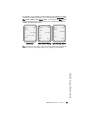
For example, if you configure a bottom softkey for speeddialing to Home,
and then you pickup the handset, the screen displays the Dial, Conf, and
Xfer default softkeys with a More softkey. You can press the More softkey
to toggle between the first and second screens to display all configured
softkeys. See illustrations below.
Services
Dir
Callers
Icom
John Smith
L1
Sat Jan 1 12:18am
Home
Idle Screen
Services
Dir
Callers
L1
Icom
John Smith
L1
Icom
John Smith
>
>
Dial
Conf
Xfer
Services
Dir
Callers
Home
More
More
After Handset Pickup After Pressing "More"
Note: The bottom set of 6 softkeys map to the current state-based configurable softkeys. The top set of 6 softkeys allow you to configure up to 10 functions.
Getting Started
Model 57i IP Phone User Guide
11
Getting Started
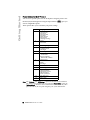
Phone Options via the IP Phone UI
You can access specific options for the 57i IP phone using the phone’s user
interface (UI) via the keypad. Pressing the Option button
a list of configurable options.
gives you
These options allow you to customize your phone settings.
1
Language
2
Time and Date
1 Time Server
2 Set Time
3 Time Format
4 Set Date
5 Date Format
6 Time Zone
7 Daylight Savings
3
Tones
1 Set Ring Tone
2 Tone Set
4
Clear Msg. Wtg.
5
Display
1 Contrast Level
2 Backlight
6
Live Dialpad
7
Set Audio
Audio Mode
Advanced Setting
Headset Mic Volume
8
Call Forward
Number:
Mode:
No. Rings:
9
Network*
10
SIP Settings*
11
Phone Status
1 Network Status
2 Firmware Version
3 Restart Phone
4 Factory Default*
12
User Password
13
Phone Lock
Note: *The "Network" and "SIP Settings" options are administrator level functions
only, and are not accessible by the user. Under the "Phone Status" option, the
"Factory Default" selection is also an administrator level function only. These
options should only be set up and changed by your system administrator.
12
Model 57i IP Phone User Guide
Using the IP Phone UI
IP Phone UI
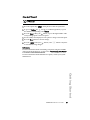
1. Press the Options key
on the phone to enter the options list.
2. To go to an Option, use
and
to scroll through the list, or press
the number corresponding to the Option.
3. Press the Show softkey, the
button, or press the digit number of the
corresponding option to select an option.
4. Use the softkeys that display for each option to change a selected option.
5. Press the Done button to save the change.
6. Press the
button, the
button, or the N button at any time
to exit without saving changes.
References
For more information about customizing your phone using the available
options from the IP Phone UI, see the section "Customizing Your Phone"
in the Aastra 57i Installation Guide.
For more information about administrator options, contact your system
administrator.
Getting Started
Model 57i IP Phone User Guide
13
Getting Started
Phone Options via the Aastra Web UI
In addition to the IP Phone UI options, you can also customize additional
options on the IP Phone using the Aastra Web UI. In order to access your
phone using the Aastra Web UI, you need to know your phone’s IP
address.
Finding Your Phone’s IP Address
IP Phone UI
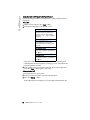
1. Press
to enter the Options List.
2. Use s to scroll down the list of options to Phone Status and press
Show.
Options List
8.Call Forward
9.Network
10.SIP Settings
11.Phone Status
Show
Done
3. Use s to scroll to Network Status and press Show.
Phone Status
1.Network Status
2.Firmware Version
3.Reset Phone
4.Factory Default
Show
Done
4. Press IP Addr.
Attr.
LinkStat.
Negotiat.
Speed
Duplex
IP Addr
MAC Addr
Port0
Link
Auto
100M
Full
Port1
N/Link
Auto
10M
Half
Done
14
Model 57i IP Phone User Guide
5. Your phone’s IP Address displays.
IP Address of Phone
192.168.0.100
Done
Using the Aastra Web UI
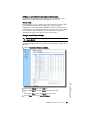
Aastra Web UI
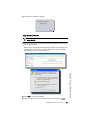
1. Open your web browser and enter the phone’s IP address or host name
into the address field.
If the browser is using HTTP, the following redirect screen displays, followed by the “Security Alert” window. This process redirects HTTP to
use HTTPS for a more secure connection..
Getting Started
2. Click YES to accept the certificate
3. At the prompt, enter your username and password and click
Model 57i IP Phone User Guide
.
15
Getting Started
The Network Status window displays for the IP phone you are accessing.
Note: For a user, the default user name is “user” and the password field is left blank.
The Network Status window displays for the IP phone you are accessing.
4. You can logout of the Aastra Web UI at any time by clicking Log Off.
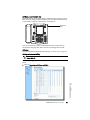
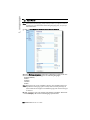
The following categories display in the side menu of the Aastra Web UI:
Status, Operation, Basic Settings.
Status
The Status section displays the network status and the MAC address of the
IP phone. It also displays hardware and firmware information about the IP
phone. The information in the Network Status window is read-only.
Operation
The Operation section provides the following options:
- User Password - Allows you to change user password
- Phone Lock - Allows you to assign an emergency dial plan to the
phone, lock the phone to prevent any changes to the phone and to
prevent use of the phone, and reset the user password.
- Softkeys and XML - Allows you to configure up to 6 top softkeys and 6
bottom softkeys for a specific function (none, line, speeddial, do not
disturb (DND), Busy Lamp Field (BLF), BLF list, flash, Extensible
Markup Language (XML), flash, sprecode, park, pickup, Last Call
Return (lcr), Directory, Callers List, Conference, and Transfer.) You can
configure up to 10 functions on the top softkeys and up to 20 functions
on the bottom softkeys.
- Directory - Allows you to copy the Callers List and Directory List from
your IP phone to your PC.
- Reset - Allows you to restart the IP phone when required.
- Expansion Modules - Allows you to configure an additional 36
softkeys (with 536EM) or 60 softkeys (with 560EM) if an expansion
module is attached to the phone. If no expansion module is attached,
the following message displays: "No expansion modules are
currently attached".
16
Model 57i IP Phone User Guide
Basic Settings
The Basic Settings section provides the following options:
- Preferences - Allows you to enable/disable the following: static
configuration of park/pickup, suppression of DTMF playback, display
of DTMF digits, the playing of call waiting tone, and stuttered dial tone.
This category also allows you to configure incoming intercom call
settings, ring tones (global and per-line basis), and ring tone sets, time
and date settings, and language settings.
- Call Forward - Allows you to set a phone number destination for
where you want calls forwarded. Call forward can be configured using
a specific mode (off, all, busy, no answer, busy no answer) on a global
or per-line basis.
Getting Started
Model 57i IP Phone User Guide
17
User Password
User Password
This category allows you to change the user password for your phone.
Changing your password ensures that only you can alter your phone
settings, and helps keep your system secure. You can change your user
password using the IP Phone UI or the Aastra Web UI.
If you change the password
you will need to:
using the IP Phone UI,
use that new password to log into
the Aastra Web UI.
using the Aastra Web UI,
use that new password when
changing the user password via
the IP Phone UI.
Note: Valid values when creating or changing a password are 0 to 4294967295 (integers only; symbols and alpha characters are not allowed). Default password is
an empty string "" (field is blank).
IP Phone UI
1. Press
on the phone to enter the Options List.
2. Select User Password and press
.
.
3. Enter the current user password and press
4. Enter the new user password and press
.
5. Re-enter the new user password and press
.
A message, "Password Changed" displays on the screen.
Aastra Web UI
1. Click on Operation->User Password.
18
Model 57i IP Phone User Guide
2. In the "Current Password" field, enter the current user password.
Note: By default, the user name is “user” (all lowercase) and the password field is
left blank.
3. In the "New Password" field, enter the new user password.
4. In the "Password Confirm" field, enter the new user password again.
5. Click
to save your changes.
User Password
Model 57i IP Phone User Guide
19
Using Your Phone
Using Your Phone
The following sections describe the various 57i phone key functions, and
how they help you make and manage your calls and caller information.
Key Descriptions
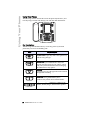
The following table identifies the keys on the key panel of your 57i IP
phone that you can use for handling calls.
Keys
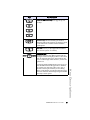
Key Description
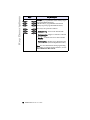
Goodbye key - Ends an active call. The Goodbye
key also exits an open list, such as the Options List,
without saving changes.
Options key - Accesses options to customize your
phone. Your System Administrator may have
already customized some of your settings. Check
with your System Administrator before changing
the administrator-only options.
Hold key - Places an active call on hold. To retrieve
a held call, press the call appearance button beside
the light that is flashing.
Redial key - Redials up to 100 previously dialed
numbers. Pressing the Redial key twice
simultaneously redials the last dialed number.
Volume control key - Adjusts the volume for the
handset, headset, ringer, and handsfree speaker.
20
Model 57i IP Phone User Guide
Keys
Key Description
Line/Call Appearance key - Connects you to a line
or call. The Aastra 57i IP phone supports up to 4
line keys.
Handsfree key - Activates Handsfree for making
and receiving calls without lifting the handset.
When the audio mode option is set, this key is used
to switch between a headset and the handsfree
speakerphone.
Mute key - Mutes the microphone so that your
caller cannot hear you (the light indicator flashes
when the microphone is on mute).
Navigation keys - Pressing the UP and DOWN
arrow keys lets you view different status and text
messages on the LCD display (if there is more than
1 line of status/text messages). These buttons also
let you scroll through menu selections, such as the
Options List.
Model 57i IP Phone User Guide
21
Key Descriptions
Pressing the LEFT and RIGHT arrow keys lets you
view the different line/call appearances. While in
the Options List, these keys allow you to exit or
enter the current option. When you are editing
entries on the display, pressing the LEFT arrow key
erases the character on the left; pressing the RIGHT
arrow key sets the option.
Key Descriptions
Keys
Key Description
Softkeys - 12 softkeys on the 57i IP Phone.
- 6 Top Keys: programmable static softkeys (up to
10 programmable functions)
- 6 Bottom Keys: programmable state-based
softkeys (up to 20 programmable functions)
These keys also perform as follows:
• Callers list key - Accesses the last 200 calls
received.
• Conference key - Begins a conference call with
the active call.
• Xfer Key - Transfers the active call to another
number.
• Directory Key - Displays up to 200 names and
phone numbers (stored in alphabetical order)
Note: For more information about programming
the softkeys to perform specific functions, see the
Aastra Model 57i User Guide.
22
Model 57i IP Phone User Guide
Multiple Line and Call Appearances
The 57i has 4 hard line/call appearance buttons each with a corresponding
status light. These line/call appearance buttons and lights can represent
physical lines, calls for your extension or calls from a group that your
extension is part of. By pressing a line/call appearance button, you connect
to the line or a call it represents. The line/call appearance light indicates
the status of that line or call. When the phone is taken off-hook, the phone
automatically selects a line for you.
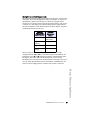
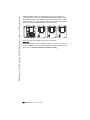
Line/Call
Appearance
Light Behavior
Line/Call
Appearance
Status
Off
Idle line or no
call activity
Light flashes
quickly
Ringing
Light is solid
Connected
Light flashes
slowly
Hold
When you have more than one call, you can use the left and right
navigation buttons (3 and 4) to scroll left and right to the different call
information. Icons 3 and 4 will appear if there is call information either
left, right or both sides of the current information you are viewing.
The display shows which line the call information is referring to (L1, L2, L3,
etc.), the Caller ID information (name and number, if available), the call
status (Connected, Ring, Hold etc.) and the timer specific to that call.
Key Descriptions
Model 57i IP Phone User Guide
23
Softkeys
Softkeys
Your 57i has 12 multi-functional softkeys:
• 6 Top Keys: programmable static softkeys
(up to 10 programmable functions)
• 6 Bottom Keys: programmable state-based softkeys
(up to 20 programmable functions).
Note: If 536 or 560 Expansion Module(s) are attached to the phone, click on
Operation->Expansion Keys to access and configure up to 36 softkeys on each
536EM and up to 60 softkeys on each 560EM. (Phone allows up to 3 expansion
modules totaling up to 108 additional softkeys on the 536EM and up to 180
softkeys on the 560EM). These keys allow you to configure BLF, Speeddial,
and Shared Call Appearance functions only. For more information about
expansion modules, see "Model 536 and 560 Expansion Modules"on page 119.
You can program these softkeys for call handling and extension
management of the SIP system. The softkey menus on the IP phone UI
change depending on the phone’s state, displaying relevant softkeys only.
Note: The softkey functions outlined in this section represent the default arrangement of softkeys on the 57i IP phone. Only the bottom softkeys are statebased.
The 57i default softkeys are shown in the following illustration.
Top Softkeys
Bottom Softkeys
24
Model 57i IP Phone User Guide
Softkey Functions
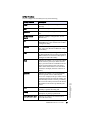
You can configure the 57i softkeys for any of the following:
Description
None
Indicates softkey is disabled (option for Web
UI only)
Line
Indicates softkey is configured for line use.
Speeddial
Indicates softkey is configured for speeddial
use.
Do Not Disturb
(DND)
Indicates softkey is configured for "do not
disturb" use.
BLF
Indicates softkey is configured for Busy Lamp
Field (BLF) use. A user can dial out on a BLF
configured softkey.
BLF\List
Indicates softkey is configured for BLF list
use. A user can dial out on a BLF\List configured softkey.
XML
Indicates the softkey is configured to accept
an XML application for accessing customized
XML services.You can also use this option to
configure an XML URI softkey.
Flash
Indicates the softkey is set to generate a flash
event when it is pressed, or when a feature
key is pressed on the 57i CT handset. The IP
phone generates flash events only when a
call is connected and there is an active RTP
stream (for example, when the call is not on
hold.)
Sprecode
Indicates the softkey is set to automatically
activate specific services offered by the
server. For example, if the spre value of *82 is
configured, then by pressing the softkey, *82
automatically activates a service provided by
the server. The value you enter for this field is
dependent on the services provided by the
server.
Park
Indicates the softkey is set to be used as a
park key to park an incoming call.
Pickup
Indicates the softkey is set to be used as a
pickup key to pick up a parked call.
Last Call Return (lcr)
Indicates the softkey is set to be used as a
“last call return” key.
Model 57i IP Phone User Guide
Softkeys
Softkey Function
25
Softkeys
Services
Indicates the softkey is set to be used as the
Services key.
Callers List
Indicates the softkey is set for accessing the
Callers List.
Directory
Indicates the softkey is set for accessing the
Directory List.
Intercom
Indicates the softkey is set to be used as the
Intercom key.
Empty
Indicates the softkey is configured to force a
blank entry on the IP phone display for a specific softkey. The soft keys are added in order
(from softkey1 to softkey20) after any hardcoded keys have been added. If a particular
soft key is not defined, it is ignored.
State-Based Softkeys (Bottom Keys only)
On the 57i bottom softkeys, you can configure a specific state to display
when a softkey is being used. Available states you can configure for each
softkey include:
•
•
•
•
•
idle - The phone is not being used.
connected - The current line is in an active call (or the call is on hold)
incoming - The phone is ringing.
outgoing - The user is dialing a number, or the far-end is ringing.
busy - The current line is busy because the line is in use or the line is set
as “Do Not Disturb”.
The following table identifies the applicable default states for each softkeys
type on the IP phone.
Softkey Type
Default States
None
All states disabled.
Line
idle, connected, incoming, outgoing, busy
DND
idle, connected, incoming, outgoing, busy
Speeddial
idle, connected, incoming, outgoing, busy
BLF
idle, connected, incoming, outgoing, busy
BLF List
idle, connected, incoming, outgoing, busy
XML
idle, connected, incoming, outgoing, busy
lcr
idle, connected, incoming, outgoing, busy
Directory
idle, connected, incoming, outgoing, busy
Callers List
idle, connected, incoming, outgoing, busy
Intercom
idle, connected, incoming, outgoing, busy
26
Model 57i IP Phone User Guide
Softkey Type
Default States
Services
idle, connected, incoming, outgoing, busy
empty
idle, connected, incoming, outgoing, busy
Flash
All states disabled.
Sprecode
connected
Park
connected
Pickup
idle, outgoing
In the Aastra Web UI, the operational states for each softkey display
enabled. To disable a state, you uncheck the box for that operational state.
The IP phone idle screen condenses the softkeys. For example, if you set
softkey 12 as the following:
Type: speeddial
Label: Voicemail
Value *89
State: outgoing
then softkey 12 appears in position 1 if no other softkeys are set. A softkey
type of "empty" does not display on the idle screen at all.
Softkeys
Model 57i IP Phone User Guide
27
Softkeys
Softkeys as Line/Call Appearances
You can customize the softkeys on your 57i phone to function as line/call
appearance softkeys. These line/call appearance softkeys function in a
similar manner to the 4 line/call appearance hard keys and lights on your
phone. For details on the line/call appearance hard keys and lights, please
refer to the section "Multiple Line and Call Appearances" on page 23 of
this manual.
Lines/call appearance softkeys appear on the phone’s display as shown in
the following image.
Services
Dir
Callers
1
L5
L6
L7
Icom
John Smith
L8
L9
Sat Jan 1 12:18am
Icons next to the softkeys within the phone’s display indicate the status for
that line or call and have equivalent status to the line/call appearance
lights of the hard keys on the phone. The following table provides a
description for each icon.
Softkey Line/Call Appearance Lights
Activity
Idle
Connected
Light Icon
Solid
Solid
Ringing Flashing
On Hold Flashing
28
Definition
There is no call activity for the line/call appearance
softkey.
A call is connected to your phone on this
line/call appearance softkey.
The equivalent on a line/call appearance hard key
is a solid green light.
A call is ringing at your phone on this line/call
appearance softkey.
The equivalent on a line/call appearance hard key
is a fast flashing green light.
A call is on hold on your phone on this line/call
appearance softkey.
The equivalent on a line/call appearance hard key
is a slow flashing green light.
Model 57i IP Phone User Guide
Depending on how the phone has been configured, the maximum number
of total line/call appearances that can be set up is 8 or 9 (4 line/call
appearance as hard keys and 4 or 5 as softkeys). If all line/call appearances
have been set up for the same number, a total of 9 lines can be configured.
If all line/call appearances have been set up between two different
numbers, a total of 8 lines can be configured. This means that when all line/
call appearances are in use, 1 call is connected while the rest are on hold.
No further outgoing or incoming calls can be made until one of the line/call
appearances becomes available.
In active states, such as ringing, conference, connected, etc., all softkeys
disappear except softkeys that have been set up as line/call appearances,
and any context dependent softkeys required for the active state, such as
the Drop softkey in the connected state. Typically, context dependent
softkeys appear in the top left position and all line/call appearance softkeys
appear in the remaining positions.
Note: In some situations, such as during a conference call, the line/call appearance
softkeys may overwrite some of the context dependent soft keys. In this case,
instead of the Previous and Next softkeys, up or down icons,
appear
navigation keys, you can access the
on the display. By using the
same functionality as the Previous and Next softkeys.
Softkeys
Model 57i IP Phone User Guide
29
Softkeys
Setting a Line Softkey
You can set a softkey as an additional line on the 57i. The softkey acts as a
line that behaves the same as a hard line key. For more information about
the behavior of line keys, see "Multiple Line and Call Appearances" on
page 23.
You can use the Aastra Web UI only to set a softkey as a line. On the 57i,
you can set the top softkeys with up to 10 functions and the bottom softkeys
with up to 20 functions.
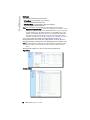
Aastra Web UI
Use the following procedure to set a softkey to function as a line.
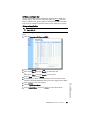
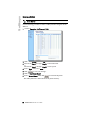
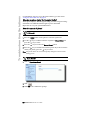
1. Click on Operation->Softkeys and XML.
2. Click on the Bottom Keys tab or the Top Keys tab.
3. Select from "Key 1" through "Key 20" on the bottom tab.
or
Select from "Key 1" through "Key 10" on the top tab.
4. In the "Type" field, select Line to apply to the softkey.
5. In the "Label" field, enter a label to apply to this softkey.
6. In the "Line" field, select a line to apply to this softkey.
Valid values are 5 through 9.
7. If configuring a softkey on the Bottom Keys, in the state fields, check
(enable) or uncheck (disable) the states you want to apply to this softkey.
8. Click
to save your changes.
9. Click on Operation->Reset.
10.In the "Restart Phone" field click
30
Model 57i IP Phone User Guide
to restart the IP phone.
Softkeys as Speeddials
You can set up custom softkeys as speeddials. Speeddial softkeys can dial a
star code for a feature on the system or a phone number or a set of digits. A
customized label displays inside the phone’s display for each softkey. If
you press a custom softkey, the phone goes off-hook and dials the star code
or the number set up for this softkey.
Setting a Speeddial Softkey
The speeddial function can be set using the IP Phone UI or the Aastra Web
UI.
You can save up to 30 speed dial numbers and names on the 57i. These can
be programmed to dial directly to another person’s line or extension, or set
up to quickly access features such as Caller ID (*69), Voicemail.
Use the following procedures to set speeddial on the 57i IP phone.
Entering a Name/Number for Speeddial Key
IP Phone UI
To enter a number and name in a programmable key:
1. Press the Save key. The screen displays "Save to?"
Save to?
2. Select a softkey you want to save to.
3. At the "Enter Number" prompt, use the dial pad key to enter the number.
4. Press the Save key to save the speeddial configuration.
5. At the "Enter Name" prompt, use the dial pad keys to select the letters.
Model 57i IP Phone User Guide
31
Softkeys
Enter Number >
5553491234
Softkeys
Continue to press the number key to access the next letter for that key
(i.e. press 2 three times to access C). Press
to move to the next space,
or wait a moment and the cursor automatically advances. To insert a
space between letters, press
. To backspace and erase a mistake,
press
or the Delete key. You can save up to 16 letters and numbers
on each softkey entry.
Enter Name >
John Smith
6. Press the Save key to finish.
Saved Memory key
5553491234
32
Model 57i IP Phone User Guide
Aastra Web UI
On the 57i, you can set the top softkeys with up to 10 speeddials and the
bottom softkeys with up to 20 speeddials.
1. Click on Operation->Softkeys and XML.
2. Click on the Bottom Keys tab or the Top Keys tab.
3. Select from "Key 1" through "Key 20" on the bottom tab.
or
Select from "Key 1" through "Key 10" on the top tab.
4. In the "Type" field, select Speeddial to apply to the softkey.
5. In the "Label" field, enter a label to apply to this softkey.
6. In the "Value" field, enter the phone number or extension to apply to
this softkey.
7. In the "Line" field, select a line to apply to this softkey.
Valid values are 1 through 9.
9. Click
to save your changes.
10.Click on Operation->Reset.
11.In the "Restart Phone" field click
to restart the IP phone.
Model 57i IP Phone User Guide
33
Softkeys
8. If configuring a softkey on the Bottom Keys, in the state fields, check
(enable) or uncheck (disable) the states you want to apply to this softkey.
Softkeys
Saving an Entry from the Redial, Callers, or Directory Lists to a
Speeddial key
IP Phone UI
Use the following procedure to save an entry from your Directory List,
Callers List, or Redial List on the IP phone.
Directory List Key
Callers List Key
Redial List Key
1. Press the Directory List, Callers List, or Redial List key. From the Callers
List or Redial List, scroll through the list to find the name and number
that you wish to save to your speed dial.
2. Press the Save key.
3. Press the selected speed dial. If the name is displayed with the number,
both are saved to the speed dial. If no name is displayed, you can enter
the name using the dial pad.
34
Model 57i IP Phone User Guide
Softkeys as "Do not Disturb"
The IP phones have a feature you can enable called "Do not Disturb
(DND). The DND function allows you to turn "do not disturb" ON and
OFF.
Note: You can configure DND using the Aastra Web UI only.
If DND is ON, callers calling into the phone hear a busy signal or a
message, depending on how your system administrator set up the
configuration server. The second line on the screen of the IP phone shows
when DND is set.
If the phone shares a line with other phones, only the phone that has DND
configured is affected.
You can set DND on the softkeys using the Aastra Web UI only. DND is not
configurable from the IP phone UI.
Setting a "Do Not Disturb" Softkey
Aastra Web UI
Setting "Do Not Disturb" Softkey
1. Click on Operation->Softkeys and XML.
2. Click on the Bottom Keys tab or the Top Keys tab.
6. Click
to save your changes.
7. Click on Operation->Reset.
8. In the "Restart Phone" field click
to restart the IP phone.
Model 57i IP Phone User Guide
35
Softkeys
3. Select from "Key 1" through "Key 20" on the bottom tab.
or
Select from "Key 1" through "Key 10" on the top tab.
4. In the "Type" field, select Do Not Disturb to apply to the softkey.
5. If configuring a softkey on the Bottom Keys, in the state fields, check
(enable) or uncheck (disable) the states you want to apply to this softkey.
Softkeys
Softkeys as Busy Lamp Field (BLF)
You can set a softkey to Busy Lamp Field (BLF).
The BLF feature on the IP phones allows a specific extension to be
monitored for state changes. BLF monitors the status (busy or idle) of
extensions on the IP phone.
Note: The BLF setting is applicable to the Asterisk server only.
Example
A Supervisor configures BLFs on his phone for monitoring the status of a
worker’s phone use (busy or idle). When the worker picks up his phone to
make a call, a busy indicator on the Supervisor’s phone shows that the
worker’s phone is in use and busy.
On the 57i, the busy and idle indicators show on the IP phone screen
display next to the softkey programmed for BLF functionality. When the
monitored user is idle, an icon with the handset on-hook shows next to the
BLF softkey. When the monitored user is on an active call, a small
telephone icon is shown with the handset off-hook.
Note: You can also use the BLF configured softkey to dial out. Contact your system
administrator for more information.
Setting a BLF Softkey
Aastra Web UI
1. Click on Operation->Softkeys and XML.
2. Click on the Bottom Keys tab or the Top Keys tab.
3. Select from "Key 1" through "Key 20" on the bottom tab.
or
Select from "Key 1" through "Key 10" on the top tab.
36
Model 57i IP Phone User Guide
4. In the "Type" field, select BLF to apply to the softkey.
5. In the "Label" field, enter a label to apply to this softkey.
6. In the "Value" field, enter the phone number or extension you want to
monitor.
7. In the "Line" field, select a line for which to apply this softkey.
Valid values are 1 through 9.
8. If configuring a softkey on the Bottom Keys, in the state fields, check
(enable) or uncheck (disable) the states you want to apply to this softkey.
9. Click
to save your changes.
10.Click on Operation->Reset.
11.In the "Restart Phone" field click
to restart the IP phone.
Softkeys
Model 57i IP Phone User Guide
37
Softkeys
Softkeys as BLF List
(For use with the BroadSoft Broadworks Rel 13 or higher platform only)
You can set a softkey to BLF list.
The BLF list feature on the IP phones is specifically designed to support the
BroadSoft Broadworks Rel 13 Busy Lamp Field feature. This feature allows
the IP phone to subscribe to a list of monitored users defined through the
BroadWorks web portal.
Note: Your system administrator must have BLF List enabled on the BroadWorks
Server. Contact your system administrator for more information.
In addition to monitoring the idle and busy state, the BLF list feature also
supports the ringing state. When the monitored user is idle, there is a
small telephone icon shown with the handset on-hook. When the
monitored user is on an active call then a small telephone icon is shown
with the handset off-hook.
Note: You can also use a BLF/List configured key to dial out.
Example
A receptionist has a 57i running Broadsoft firmware that subscribes to a list
of extensions from the BroadWorks Application Server. On the 57i, the
softkey LEDs illuminate either flashing, solid, or turn off depending on the
state of those extensions.
Note: The Broadworks BLF feature is not the same as the Broadworks Shared Call
Appearance (SCA) feature and does not permit call control over the monitored extension.
Setting a BLF List Softkey
The BLF List functions can be configured on the 57i using the Aastra Web
UI only. If you set a softkey to use BLF/List, you must also enter a BLF List
URI at Operation->Softkeys and XML->Services. The BLF List URI is the
name of the BLF list defined on the BroadSoft BroadWorks Busy Lamp
field page for your particular user. For example, [email protected]. The value of the BLF\List URI parameter must
match the list name configured. Otherwise, no values display on the 57i
screen and the feature is disabled.
38
Model 57i IP Phone User Guide
Aastra Web UI
1. Click on Operation->Softkeys and XML.
2. Click on the Bottom Keys tab or the Top Keys tab.
3. Select from "Key 1" through "Key 20" on the bottom tab.
or
Select from "Key 1" through "Key 10" on the top tab.
4. In the "Type" field, select "BLF\List" (BroadSoft BroadWorks).
Note: The "Label" and "Value" field are not required. The BroadWorks BLF List
name is configured in the "BLF List URI" field instead.
7. In the "BLF List URI" field, enter the name of the BLF list defined on the
BroadSoft BroadWorks Busy Lamp field page for your particular user.
For example, [email protected].
Note: Contact your System Administrator for the BLF List URI.
8. Click
to save your changes.
9. Click on Operation->Reset.
10.In the "Restart Phone" field click
to restart the IP phone.
Model 57i IP Phone User Guide
39
Softkeys
5. In the "Line" field, select a line number that is actively registered to the
appropriate SIP proxy you are using.
6. If configuring a softkey on the Bottom Keys, in the state fields, check
(enable) or uncheck (disable) the states you want to apply to this softkey.
Softkeys
Softkeys for Accessing XML Services
The 57i IP phone has a feature you can enable called "XML" (Extensible
Markup Language). XML is a markup language much like HTML. Your
system administrator can create customized XML menu services and load
them to your IP phone. These services include things like weather and
traffic reports, contact information, company info, stock quotes, or custom
call scripts.
Note: You can configure XML using the Aastra Web UI only.
On the 57i IP phone, you can access the XML applications from the IP
Phone UI in two ways:
• Via the "Services" menu
• Via an XML softkey
Note: The XML services must be set up by your system administrator before you can
use the key. Contact your system administrator for more information.
By default, the Services key is the first key on the "Top" softkeys.
Services Key
Top and bottom keys are
softkeys
Using the Aastra Web UI, you can setup the Services menu on the IP phone
to display XML applications. Under Operations->Softkeys and XML, you
can click on the "Top Keys" tab and enter the XML URI and Services Label
in the "XML Application URI" and XML Application Title" fields,
respectively.
Note: Contact your system administrator for the applicable URI to enter in this field.
After the Services menu is configured, you can use the IP Phone UI and
press the Services key to access the XML applications.
Using the Aastra Web UI, you can also configure a softkey to access XML
applications. Under Operations->Softkeys and XML, you can click on the
"Bottom Keys" or "Top Keys" tabs and assign a key type as "XML". You
must also set the following for XML softkeys:
• XML Application URI
• XML Application Title
40
Model 57i IP Phone User Guide
The XML Application URI is the URI loaded by your phone. The phone
performs an HTTP GET. Contact your system administrator for the
applicable XML URI to enter in the "XML Application URI" field.
The XML Application Title is the label that displays beside the XML
softkey on your phone. If you use the Services key to access the XML
features, the "XML Application Title" is the label that displays on the
Services Menu in the IP Phone UI.
Setting XML Services
Aastra Web UI
1. Click on Operation->Softkeys and XML.
2. Click on the Bottom Keys tab or the Top Keys tab.
3. Select from "Key 1" through "Key 20" on the bottom tab.
or
Select from "Key 1" through "Key 10" on the top tab.
4. Select "Key 1" (Services).
7. Under the "Services" section in the "XML Application URI" field, enter
the applicable URI(s) .
8. in the "XML Application Title" field, enter the applicable label to display for the Services Menu .
Model 57i IP Phone User Guide
41
Softkeys
5. In the "Type" field, select "XML".
6. If configuring a softkey on the Bottom Keys, in the state fields, check
(enable) or uncheck (disable) the states you want to apply to this softkey.
Softkeys
Note: Contact your system administrator for the appropriate value(s) to enter in the
"XML Application URI" field.
9. Click
to save your changes.
10.Click on Operation->Reset.
11.In the "Restart Phone" field click
to restart the IP phone.
Setting an XML Softkey
Aastra Web UI
1. Click on Operation->Softkeys and XML.
2. Click on the Bottom tab or the Top tab.
3. Select from "Key 1" through "Key 20" on the bottom tab.
or
Select from "Key 1" through "Key 10" on the top tab.
4. In the "Type" field, select "XML".
5. In the "Label" field, enter a label to apply to this softkey.
6. In the "Value" field, enter a URI to apply to this softkey.
Note: Contact your system administrator for the appropriate value(s) to enter in the
"Value" field.
7. If configuring a softkey on the Bottom Keys, in the state fields, check
(enable) or uncheck (disable) the states you want to apply to this softkey.
8. Click
to save your changes.
9. Click on Operation->Reset.
10.In the "Restart Phone" field click
42
Model 57i IP Phone User Guide
to restart the IP phone.
Accessing the XML Service
After an XML application(s) has been saved to your IP phone, and either
the Services Menu or a softkey have been configured to access the XML
applications, the customized service is ready for you to use.
IP Phone UI
From the Services Menu
Use the following procedure to access XML applications from the Services
Menu. Use the following illustration as a reference.
Services Key
1. Press the Services key.
2. Use the
and
to scroll through the items.
3. For menu and directory services, select a service to display the information for that customized service. Message services display to the screen
after pressing the programmable key. For user input services, follow the
prompts as appropriate.
4. To exit from the "Services" menu, press the Services key again.
From an XML Softkey
1. Press the XML softkey on the 57i phone. A "Custom Features" screen
displays or the title you specified.
2. Use the
and
to scroll through the customized features.
4. To exit from the "Customized Features" screen, press the XML softkey
again.
Model 57i IP Phone User Guide
43
Softkeys
3. For menu and directory services, select a service to display the information for that customized service. Message services display to the screen
after pressing the programmable key. For user input services, follow the
prompts as appropriate.
Softkeys
Softkeys as Flash Key
You can set a softkey to generate a flash event when it is pressed on the 57i
or 57i handset. You do this by setting the softkey to "flash". The IP phone
generates flash events only when a call is connected and there is an active
RTP stream (for example, when the call is not on hold).
Setting a Flash Softkey
Aastra Web UI
1. Click on Operation->Softkeys and XML.
2. Click on the Bottom tab or the Top tab.
3. Select from "Key 1" through "Key 20" on the bottom tab.
or
Select from "Key 1" through "Key 10" on the top tab.
4. In the "Type" field, select "Flash".
5. In the "Label" field, enter a label to display on the phone for the softkey.
6. Click
to save your changes.
7. Click on Operation->Reset.
8. In the "Restart Phone" field click
44
Model 57i IP Phone User Guide
to restart the IP phone.
Softkeys as Sprecode
You can set a softkey to automatically activate specific services offered by
the server by setting a softkey to "sprecode". For example, if the sprecode
value of *82 is configured, then by pressing the softkey, *82 automatically
activates a service provided by the server. The value you enter for this field
is dependent on the services provided by the server. Contact your system
administrator for information about available services.
Setting a Sprecode Softkey
Aastra Web UI
Use the following procedure to configure a sprecode softkey on the 57i
phone.
1. Click on Operation->Softkeys and XML.
2. Click on the Bottom tab or the Top tab.
4. In the "Type" field, select Sprecode.
5. In the "Label" field, enter a label to display on the IP phone for this softkey.
6. In the "Value" field, enter the appropriate value for accessing specific
services from the server.
Note: For values to enter in this field, contact your system administrator.
Model 57i IP Phone User Guide
45
Softkeys
3. Select from "Key 1" through "Key 20" on the bottom tab..
or
Select from "Key 1" through "Key 10" on the top tab.
Softkeys
7. If configuring a softkey on the Bottom Keys, in the state fields, check
(enable) or uncheck (disable) the "Connected" state to apply to this softkey.
8. Click
to save your changes.
9. Click on Operation->Reset.
10.In the "Restart Phone" field click
46
Model 57i IP Phone User Guide
to restart the IP phone.
Static and Softkey Settings for Park/Pickup
The IP phone has a park and pickup call feature that allows you to park a
call and pickup a call when required. There are two ways a user can
configure this feature:
• Using a static configuration
• Using a programmable configuration (using softkeys)
Note: The IP phone accepts both methods of configuration. However, to avoid
redundancy, Aastra Telecom recommends you configure either a static configuration or a programmable configuration.
The IP phone supports the Park/Pickup feature on the Asterisk,
BroadWorks, Sylantro, and ININ PBX servers.
The following paragraphs describe the park and pickup methods of
configuration on the IP phones.
Park/Pickup Static Configuration
You can configure a static configuration for parking and picking up a call
using the Aastra Web UI at Basic Settings-> Preferences. By entering the
appropriate value in the "Park Call" and "Pickup Parked Call" fields, you
tell the phone where to park a live call and where to pickup the parked call.
On the IP phone UI, the static configuration method displays the following:
• When a call comes in, and you pickup the handset, the default label of
"Park" displays on the Phone UI.
• After pressing the "Park" softkey to park the call, the default label of
"Pickup" displays on the phone UI.
Note: On the 57i handset, pressing Ï displays the "Park" and "Pickup" labels.
The values you enter in the Aastra Web UI for the Park/Pickup call feature
are dependant on your type of server. The following table provides the
values you enter for the "Park Call" and "Pickup Parked Call" fields in the
Aastra Web UI.
Park/Pickup Call Server Configuration Values
Server
Park Values*
Pickup Values*
Aasterisk
700
700
Sylantro
*98
*99
BroadWorks
ININ PBX
*68
*88
callpark
pickup
*Leave "value" fields blank to disable the park and pickup feature.
Softkeys
Model 57i IP Phone User Guide
47
Softkeys
Configuring Park /Pickup using Static Configuration
Use the following procedure to configure the Park/Pickup call feature
using the static configuration method.
Note: Aastra recommends you configure either the static or the programmable configuration, but not both.
Aastra Web UI
1. Click on Basic Settings->Preferences->General.
2. Enter a server value in the Park Call field to which incoming live calls
will be parked.
Note: For values to enter in this field, see the table "Park/Pickup Call Server Configuration Values" on page 47.
48
Model 57i IP Phone User Guide
3. Enter a server value in the "Pickup Parked Call" field.
Note: For values to enter in this field, see the table "Park/Pickup Call Server Configuration Values" on page 47.
4. Click
to save your changes.
5. Click on Operation->Reset.
6. In the "Restart Phone" field click
to restart the IP phone.
Park/Pickup Softkey Configuration
The programmable method of configuration creates park and pickup
softkeys that you can configure on the 57i phone.
You can set a softkey as "Park" or "Pickup" and then:
• specify a customized label to display on the Phone UI
• specify a value
• specify which line to use
• specify the state of the park and/or pickup keys
On the IP phone UI, the Park/Pickup feature displays the following:
• When a call comes in, and you pickup the handset, the custom label that
you configured for the Park softkey displays on the Phone UI.
• After the call is parked, the label that you configured for the Pickup softkey displays on other phones in the network. You can then press the
"Pickup" softkey, followed by the applicable value to pickup the call on
another phone in your network.
You can configure a Park and Pickup programmable configuration using
the Aastra Web UI.
Softkey Configuration Using the Aastra Web UI
On the 57i, you configure a Park and/or Pickup key at Operation->Softkeys
and XML. You enter a key label, and value for a specific line on the phone.
The default state of the Park configuration is "connected". The default state
of the Pickup configuration is "idle, outgoing".
Note: Applicable values depend on the server in your network (Asterisk, BroadWorks, Sylantro, ININ PBX. See the table "Park/Pickup Call Server Configuration Values" on page 47.
Softkeys
Model 57i IP Phone User Guide
49
Softkeys
Configuring Park/Pickup using Softkey Configuration
Use the following procedure to configure the Park/Pickup call feature
using the softkey configuration method.
Aastra Web UI
1. Click on Operation->Softkeys and XML.
2. Click on the Bottom tab or the Top tab.
3. Select from "Key 1" through "Key 20" on the bottom tab for parking a
call..
or
Select from "Key 1" through "Key 10" on the top tab for parking a call.
4. In the "Type" field, select Park.
5. In the "Label" field, enter a label for the Park softkey.
6. In the "Value" field, enter the appropriate value based on the server in
your network.
Note: For values to enter in this field, see the table "Park/Pickup Call Server Configuration Values" on page 47.
7. In the "Line" field, select a line for which to apply the Park configuration.
8. If configuring a softkey on the Bottom Keys, in the state fields, check
(enable) or uncheck (disable) the "Connected" state to apply to this softkey.
50
Model 57i IP Phone User Guide
9. Pick another softkey (from top or bottom keys) to configure for Picking
up a call.
10.In the "Label" field, enter a label for the Pickup softkey.
11.In the "Value" field, enter the appropriate value based on the server in
your network.
Note: For values to enter in this field, see the table "Park/Pickup Call Server Configuration Values" on page 47.
12.In the "Line" field, select a line for which to apply the Pickup configuration.
13.If configuring a softkey on the Bottom Keys, in the state fields, check
(enable) or uncheck (disable) the "Idle" and "Outgoing" states to apply
to this softkey.
14.Click
to save your changes.
15.Click on Operation->Reset.
16.In the "Restart Phone" field click
to restart the IP phone.
Softkeys
Model 57i IP Phone User Guide
51
Softkeys
Using the Park Call/Pickup Parked Call Feature
Use the following procedure on the IP phones to park a call and pick up a
parked call.
Park a Call
1. While on a live call, press the "Park" softkey.
2. Perform the following for your specific server:
For Asterisk Server
- Server announces the extension
number where the call has been
parked. Once the call is parked,
press the y key to complete
parking.
For BroadWorks Server
- After you hear the greeting from
the CallPark server, enter the
extension where you want to park
the call.
For Sylnatro Server
- Enter the extension number where
you want to park the call, followed
by "#" key.
For ININ Server
- Enter the extension number where
you want to park the call, followed
by "#" key.
If the call is parked successfully, the response is either a greeting voice
confirming that the call was parked, or a hang up occurs. The parked call
party will get music on hold.
3. If the call fails, you can pick up the call (using the next procedure) and
press the "Park" softkey again to retry step 2.
Pickup a Parked Call
1. Pick up the handset on the phone.
2. Enter the extension number where the call was parked.
3. Press the "Pickup" softkey.
If the call pick up is successful, you are connected with the parked call.
52
Model 57i IP Phone User Guide
Softkeys as Last Call Return (lcr) (Sylantro Servers only)
Using the Aastra Web UI, you can configure the "Last call return" (lcr)
function on a softkey. This feature is for Sylantro servers only.
How it works
If you configure "lcr" on a softkey, and a call comes into your phone, after
you are finished with the call and hangup, you can press the key
configured for “lcr” and the phone dials the last call you received. When
you configure an “lcr” softkey, the label “LCR” displays next to that softkey
on the IP phone. When the Sylantro server detects an “lcr” request, it
translates this request and routes the call to the last caller.
Setting a Last Call Return Softkey
Aastra Web UI
Use the following procedure to configure a Last Call Return softkey on the
57i phone.
1. Click on Operation->Softkeys and XML.
Softkeys
2. Click on the Bottom tab or the Top tab.
3. Select from "Key 1" through "Key 20" on the bottom tab.
or
Select from "Key 1" through "Key 10" on the top tab.
4. In the "Type" field, select Last Call Return.
Model 57i IP Phone User Guide
53
Softkeys
5. In the "Line" field, select the line you want to apply to this softkey.
Valid values are 1 through 9.
6. If configuring a softkey on the Bottom Keys, in the state fields, check
(enable) or uncheck (disable) the states you want to apply to this softkey.
7. Click
to save your changes.
8. Click on Operation->Reset.
9. In the "Restart Phone" field click
54
Model 57i IP Phone User Guide
to restart the IP phone.
Softkeys as Services
By default, the 57i has a Services key configured on key 1 of the top set of
keys. However, you can use any softkey to configure a "Services" key.
Services
Key
The Services key accesses enhanced features and services provided by
third parties. Using the "Services" key, you can:
•
•
•
•
Select customized (XML) features
Utilize a Caller List
Utilize a Directory
Utilize Voicemail
Note: Other than the Services Menu, you can also configure the Caller List and
Directory List on separate softkeys.
The XML customized services are created and provided by your system
administrator through the diverse web based language of XML.
Availability of these services depends on your phone system or service
provider.
Reference
For more information about XML, Caller List, Directory, and Voicemail, see
the following:
•
•
•
•
"Softkeys for Accessing XML Services" on page 40
"Callers List" on page 88
"Directory List" on page 81
"Voicemail" on page 97
For more information about Services you can access on your phone, contact your system administrator.
Softkeys
Model 57i IP Phone User Guide
55
Softkeys
Setting Services Softkey
Aastra Web UI
Use the following procedure to configure a Services softkey on the 57i
phone.
1. Click on Operation->Softkeys and XML.
2. Click on the Bottom tab or the Top tab.
3. Select from "Key 1" through "Key 20" on the bottom tab.
or
Select from "Key 1" through "Key 10" on the top tab.
4. In the "Type" field, select Services.
5. In the "Label" field, enter a label to apply to this softkey.
6. In the "Line" field, select the line you want to apply to this softkey. Valid
values are 1 through 9.
7. If configuring a softkey on the Bottom Keys, in the state fields, check
(enable) or uncheck (disable) the states you want to apply to this softkey.
8. Click
to save your changes.
9. Click on Operation->Reset.
10.In the "Restart Phone" field click
56
Model 57i IP Phone User Guide
to restart the IP phone.
Softkeys as Directory
By default, the 57i has a Directory key configured on key 2 of the top set of
keys. However, using the Aastra Web UI, you can assign the Directory key
to any softkey on the top or bottom keys on the phone..
Directory
Key
The "Directory List" feature allows you to store frequently used names and
numbers on the phone. You can also dial directly from a directory entry.
You can use the Directory key to access a Directory List which contains a
customized list of names with phone numbers and labels.
In addition to creating a Directory softkey, you can also download a
Directory List to your PC if required using the Aastra Web UI.
Reference
For more information about the Directory List, see "Directory List" on
page 81.
Softkeys
Model 57i IP Phone User Guide
57
Softkeys
Setting Directory Softkey
Aastra Web UI
Use the following procedure to configure a Directory softkey on the 57i
phone.
1. Click on Operation->Softkeys and XML.
2. Click on the Bottom tab or the Top tab.
3. Select from "Key 1" through "Key 20" on the bottom tab.
or
Select from "Key 1" through "Key 10" on the top tab.
4. In the "Type" field, select Directory.
5. In the "Label" field, enter a label to apply to this softkey.
6. If configuring a softkey on the Bottom Keys, in the state fields, check
(enable) or uncheck (disable) the states you want to apply to this softkey.
7. Click
to save your changes.
8. Click on Operation->Reset.
9. In the "Restart Phone" field click
58
Model 57i IP Phone User Guide
to restart the IP phone.
Softkeys as Callers List
By default, the 57i has a Callers List key configured on key 3 of the top set
of keys. However, using the Aastra Web UI, you can assign the Callers List
key to any softkey on the top or bottom keys on the phone.
Callers List
Key
The Callers list is a stored log of your incoming calls. You can use the
Callers List key to access a list of callers that called your phone.
Reference
For more information about the Callers List, see "Suppressing DTMF
Playback" on page 98.
Setting Callers List Softkey
Aastra Web UI
Use the following procedure to configure a Callers List softkey on the 57i
phone.
Softkeys
Model 57i IP Phone User Guide
59
Softkeys
1. Click on Operation->Softkeys and XML.
2. Click on the Bottom tab or the Top tab.
3. Select from "Key 1" through "Key 20" on the bottom tab.
or
Select from "Key 1" through "Key 10" on the top tab.
4. In the "Type" field, select Callers List.
5. In the "Label" field, enter a label to apply to this softkey.
6. If configuring a softkey on the Bottom Keys, in the state fields, check
(enable) or uncheck (disable) the states you want to apply to this softkey.
7. Click
to save your changes.
8. Click on Operation->Reset.
9. In the "Restart Phone" field click
60
Model 57i IP Phone User Guide
to restart the IP phone.
Softkeys as an Intercom Key
By default, the 57i has an Intercom key configured on key 4 of the top set of
keys. However, using the Aastra Web UI, you can assign the Intercom key
to any softkey on the top or bottom keys on the phone..
Intercom
Key
You can use the Intercom key to automiatically connect with a remote
extension for outgoing calls, and to answer an incoming intercom call.
Reference
For more information about the Intercom key, see "Intercom" on page 69.
Setting an Intercom Softkey
Aastra Web UI
Use the following procedure to configure an Intercom softkey on the 57i
phone.
1. Click on Operation->Softkeys and XML.
Softkeys
Model 57i IP Phone User Guide
61
Softkeys
2. Click on the Bottom tab or the Top tab.
3. Select from "Key 1" through "Key 20" on the bottom tab.
or
Select from "Key 1" through "Key 10" on the top tab.
4. In the "Type" field, select Intercom.
5. In the "Label" field, enter a label to apply to this softkey.
6. If configuring a softkey on the Bottom Keys, in the state fields, check
(enable) or uncheck (disable) the states you want to apply to this softkey.
7. Click
to save your changes.
8. Click on Operation->Reset.
9. In the "Restart Phone" field click
62
Model 57i IP Phone User Guide
to restart the IP phone.
Softkeys as an Empty Key
You can set a softkey to force a blank entry on the IP phone display for a
specific softkey. You do this by setting the softkey to "empty". The soft
keys are added in order (from softkey1 to softkey20) after any hard-coded
keys have been added. If a particular soft key is not defined, it is ignored.
Setting an EmptySoftkey
Aastra Web UI
Use the following procedure to configure an Empty softkey on the 57i
phone.
1. Click on Operation->Softkeys and XML.
2. Click on the Bottom tab or the Top tab.
3. Select from "Key 1" through "Key 20" on the bottom tab.
or
Select from "Key 1" through "Key 10" on the top tab.
4. In the "Type" field, select Empty.
5. If configuring a softkey on the Bottom Keys, in the state fields, check
(enable) or uncheck (disable) the states you want to apply to this softkey.
to save your changes.
Softkeys
6. Click
7. Click on Operation->Reset.
8. In the "Restart Phone" field click
to restart the IP phone.
Model 57i IP Phone User Guide
63
Softkeys
Deleting a Softkey
Aastra Web UI
Use the following procedure to delete a softkey function using the Aastra
Web UI.
1. Click on Operation->Softkeys and XML.
2. Click on the Bottom tab or the Top tab.
3. Select from "Key 1" through "Key 20" on the bottom tab.
or
Select from "Key 1" through "Key 10" on the top tab.
4. In the "Type" field, select none.
5. Click
to save your changes.
6. Click on Operation->Reset.
7. In the "Restart Phone" field click
to restart the IP phone.
The softkey function is deleted from the IP phone memory.
64
Model 57i IP Phone User Guide
Restarting your phone
You may want to restart your phone to check for updates on the server.
You may occasionally need to restart your phone to set changes or updates
to your phone or network settings. You may also need to restart your
phone if you have been asked to do so by your system administrator, or
should you experience any unexpected behaviour.
IP Phone UI
1. Press the
button on the phone to enter the Options List.
2. Use the
key to scroll down the list of options to Phone Status and
press Show to select.
3. Press the
key to scroll to the Restart Phone option.
4. Press Show to select the Restart Phone option.
5. Press Restart to restart of the phone. If you do not wish to restart your
phone, press Cancel.
Note: Your phone will be out of service temporarily during the restart and downloading process.
Aastra Web UI
Restarting your phone
1. Click on Operation->Reset.
2. Click
.
3. Click OK at the confirmation prompt.
Model 57i IP Phone User Guide
65
Making Calls
Making Calls
Dialing a Number
First, take the phone off-hook by:
• lifting the handset
• pressing
or
• pressing a line/call appearance button.
At the dial tone, enter the number you wish to call. If you are unable to
make calls within certain area codes, check with your system administrator
for any toll restrictions placed on your extension that may restrict your
access to long distance area codes or dialling prefixes.
Tue Jan 01 10:10am
L1 Dial
> 201
When your party picks up, a timer appears on your display that records the
length of your call.
Pre-dialing a Number
Tue Jan 01 10:10am
> 1203
Dial
Backspace
Pause
Quit
You can also make a call by pre-dialling a number. Pre-dialling lets you
view a number before you dial. Use the Backspace softkey to correct any
errors.
66
Model 57i IP Phone User Guide
Using Handsfree Speakerphone
The handsfree feature allows you to speak to someone without using the
handset or headset. Your phone must be in either the Speaker or Speaker/
Headset audio mode. You can set your desired audio mode using the
Headset Settings option from the Options list. For more information, see
the section "Customizing Your Phone" in the 57i Installation Guide.
IP Phone UI
• To dial using handsfree, first press
tone.
and enter a number at the dial
• If in speaker audio mode, press
handset.
to switch between handsfree and
• If in speaker/headset audio mode, press
handsfree and headset.
• When the handset is on hook, press
call.
to switch between
to disconnect a handsfree
When handsfree is on, the speaker light turns on.
Using a Headset
The 57i accepts headsets through the modular RJ22 jack on the back of the
phone. Contact your telephone equipment retailer or distributor to
purchase a compatible headset.
Note: Customers should read and observe all safety recommendations contained in
headset operating guides when using any headset.
Advanced Volume Controls for the Headset Mic
On the 57i, there are 3 options for the headset microphone volume.
IP Phone UI
1. Press
2. Use
Show.
to enter the Options list.
to scroll down the list of options to Headset Settings and press
or
3. Press the list number to jump directly to this option, and press Show.
4. Press
to scroll down to headset/mic volume and press Show.
5. Use
to scroll down the list and press Show to select your desired
volume.
Model 57i IP Phone User Guide
67
Making Calls
To change this volume
Making Calls
6. Press Done to save changes and exit.
7. If you do not wish to save changes, press Cancel to return to the previous
screen.
NOTE: By default, the volume for the headset microphone is set to medium.
To Make and Receive Calls Using a Headset
IP Phone UI
1. Ensure that you have selected a headset audio mode by accessing the
Options list (under option Headset Settings).
2. Plug the headset into the jack.
3.Press the
key to obtain a dial tone or to answer an incoming call.
Depending on the audio mode selected from the Options menu, a dial
tone or an incoming call will be received on either the headset or the
handsfree speakerphone.
4.Press the Nto end the call.
68
Model 57i IP Phone User Guide
Intercom
On the 57i, you can use the Intercom key to automatically connect with a
remote extension. By default, the Intercom key is configured as Key 4 on
the top set of softkeys.
Intercom
Key
IP Phone UI
To use the Intercom key
1. Press the Intercom key.
2.Enter the extension number of the person you wish to intercom or the BLF
softkey for that extension.
3.After a beep tone, your phone will automatically connect with the remote
extension and you can speak through its speaker.
4.To cancel intercom, press Nor the Cancel softkey.
5.When you are finished speaking, hang up the phone by placing the
handset back on-hook or by pressing N or the line/call
appearance button for the active call. When you hang up, the remote
phone will also hang up.
On the 57i, you can receive incoming intercom calls. By default, the
microphone for an incoming intercom call is OFF, and the automatic
answer for an intercom call is ON.
Using the Aastra Web UI, you can enable (turn ON) or disable (turn OFF)
the microphone or automatic answering (auto-answer) on the IP phone for
incoming intercom calls. If auto-answer is enabled on the IP phone, the
phone plays a tone to alert the user before answering the intercom call. If
auto-answer is disabled, the phone rejects the incoming intercom call and
sends a busy signal to the caller.
Model 57i IP Phone User Guide
69
Making Calls
Incoming Intercom Calls
Making Calls
Enabling/Disabling Microphone and Auto-Answer
Aastra Web UI
Use the following procedure to enable/disable the microphone and/or
auto-answer on the IP phone.
1. Click on Basic Settings->Preferences->Incoming Intercom Settings.
The "Microphone Mute" field is enabled by default (turned OFF).
The "Auto-Answer" field is enabled by default (turned ON).
2. To disable the "Microphone Mute" field (turn ON), uncheck the check
box.
3. To disable the "Auto-Answer" field (turn OFF), uncheck the check box.
4. Click
to save your changes.
5. Click on Operation->Reset.
6. In the "Restart Phone" field click
to restart the IP phone.
Refer to the following procedure for using the Intercom feature.
70
Model 57i IP Phone User Guide
Redial
IP Phone UI
• Press
to dial the most recent number you dialed from the phone.
• If you are off-hook and press
the last number you called will be
called back.
• If you are on-hook and press
, a Redial Directory list appears on-
screen.
The redial list stores up to the last 100 numbers you called, allowing you to
scroll through and select the number you wish to redial.
Note: Your system administrator can set your Redial key to speedial a specific number. Contact your system administrator for more information.
Accessing the Redial List
IP Phone UI
1. If you are off-hook and press
, the telephone automatically dials
the last number you called.
2. If you are not on the phone, press
dialed number and use
other numbers
to display the most recently
to scroll through the list to view the
3. Press
to see the second most recently dialed number, or
the oldest call on your list.
4. To dial the displayed number press
to see
, or lift the Handset or press
any line keys.
5. Press N or the
key to cancel.
Note: You cannot delete individual entries in the Redial List.
IP Phone UI
To Delete All Items
1. Press
.
2. Press the Delete Key, then press the Delete Key again at the prompt to
erase all items.
Model 57i IP Phone User Guide
71
Making Calls
Deleting from the Redial List
Making Calls
Mute
IP Phone UI
Press the
button at any time to mute handset, headset or handsfree.
The speaker light will flash slowly and you can hear the caller, but they
cannot hear you. To switch mute on or off, press
.
Note: If you place a muted call on hold, the phone automatically takes the call off
mute when you reconnect to the call.
72
Model 57i IP Phone User Guide
Receiving Calls
When a call is ringing at your extension, you will see the "Inbound Call"
Screen. The line/call appearance light flashes quickly for the incoming
call.
Tue May 17 10:19am
L1 Ring
201
Keri March
Answering an Incoming Call
IP Phone UI
To answer the call
• For handsfree operation, press
or the line/call appearance but-
ton for the incoming call.
• Press
for handsfree or headset operation.
Note: The audio mode setting you have selected in the options list under Headset
Settings determines if the call goes to handsfree or headset operation. For
more information, see the section "Customizing Your Phone" in the 53i
Installation Guide.
• Lift the handset for handset operation.
If the phone is already connected to a call, pressing the line/call
appearance button for the new incoming call automatically places the
connected call on hold and answers the new call. To reconnect to a party,
press the line/call appearance button for that call.
Note: The
N button can be used to cancel the call pickup procedure.
Sending an Incoming Call to Voicemail
You can send an incoming call directly to voicemail without answering the
call. To do this, press N without picking up the handset. If you're
already on the phone your incoming call should go directly to voicemail.
Your phone screen displays a voicemail icon (
) along with the number
of waiting messages, if you have unheard messages
(example:
x4).
Note:
Model 57i IP Phone User Guide
73
Receiving Calls
If you cannot answer the call, the caller goes to voicemail if voicemail has
been configured for your extension.
Handling Calls
Handling Calls
When you are connected to a call, you can use the softkeys or hard keys on
the phone to transfer, conference, or place a call on hold.
Placing a Call on Hold
When you place a call on hold, only your phone can retrieve the call.
IP Phone UI
To place a call on hold
1. Connect to the call (if not already connected).
2. Press the Hold
key.
Tue May 17 10:19am 00:27
L1 Hold
>201
Keri March
The line/call appearance light will begin to flash slowly and after a short
time the phone will beep softly to remind you that you still have a call on
hold. The screen displays "Call Held" with the line number the call is held
at the phone.
Note: The phone will not beep to remind you that you still have a call on hold if you
are connected to another call.
When on Hold
To let your caller know that they are still on hold, music plays softly (if this
has been set up for your system). The call/line appearance light for the line
you are on remains solid to indicate that you are still connected.
Tue May 17 10:19am 00:27
L1 Connected
>201
Keri March
74
Model 57i IP Phone User Guide
Automatic Hold
When juggling between calls, you do not have to press the hold button to
go from one call to the next. The phone automatically puts your current call
on hold as soon as you press a new line/call appearance button. If you have
more than one call on hold, you can reconnect to a held call by pressing the
line/call appearance button where that call is being held. Press N to
disconnect the call.
Retrieving a Held Call
If you have more than 1 call on hold, you can scroll through the held call
information by pressing 3 and 4 navigation keys. To reconnect to a call
press the line/call appearance button where that call is being held. If you
press the call/line appearance button again, you will disconnect from the
call.
Handling Calls
Model 57i IP Phone User Guide
75
Handling Calls
Transferring Calls
Blind Transfer
A blind transfer is when you transfer a call directly to another extension
without consulting with the person receiving the call. To do this, simply
complete the transfer immediately after you have entered the number. The
call goes directly to the extension or outside line you transferred to. If the
party you are transferring the call to does not answer, the transferred call
rings back to your extension.
Consultative Transfer
You also have the option to consult with the person you are transferring
the call to, before you complete the transfer. To do this, simply remain on
the line until the receiving party answers the call. After consulting with the
receiving party, you can either complete the transfer or cancel the transfer
to go back to the original call.
IP Phone UI
When you lift the handset on the phone, the Transfer key displays on the
bottom set of softkeys by default. Use this key to transfer calls
Services
Dir
Callers
L1
Icom
John Smith
>
Dial
Conf
Xfer
Use the following procedure to transfer a call to another extension. Use the
following illustration as a reference.
Transfer Key
when handset is
lifted
76
Model 57i IP Phone User Guide
To transfer a call to another extension
1. Connect to the call you wish to transfer (if not already connected).
2.Press the Intercom key.
Tue May 17 10:19am 00:27
L2 Dial
>203
Karen Batz
3.Press a line/call appearance button followed by the extension number of
the person you wish to transfer the call to.
4.If you do not wish to transfer the call, press the line/call appearance
button again to abort the transfer. This disconnects the new call, leaving
the original call on hold. To go back to theoriginal call, press the line/call
appearance button for this call.
5.To complete the transfer, you can press the Intercom key again, or
disconnect by placing the handset back on hook, pressing Nor
pressing the line/call appearance button for the active call.
Note: To complete a "blind" transfer, press the Intercom Key again before the phone
begins dialing. To complete a consultive transfer, remain on the line to speak
with the party, before pressing the Intercom Key again. To cancel the transfer,
selet Cancel on the display screen.
Conferencing Calls
The 57i phone system supports up to 3 parties (including yourself) in a
conference call.
Note: Your system administrator can set your conference key to speeddial a specific
number. Contact your system administrator for more information.
When you lift the handset on the phone, the Conference key displays on
the bottom set of softkeys by default. Use this key to create conference call.
L1
Handling Calls
Services
Dir
Callers
Icom
John Smith
>
Dial
Conf
Xfer
Model 57i IP Phone User Guide
77
Handling Calls
IP Phone UI
Use the following procedure to create a conference call. Use the following
illustration as a reference.
Conference
Key
1. Connect to the first party you wish to include in the conference (if not
already connected).
Note: A "Conference" softkey automatically appears in the display when on a call.
2.Press the Conference key. A new line opens.
Tue May 17 10:19am 00:27
L2 Dial
>203
3.Press a line/call appearance button followed by the extension number of
the person you wish to add to the conference.
4.Wait for the new party to answer. You can consult with the new party first
before adding them to the conference.
5.If you do not wish to add the new party to the conference, press the line/
call appearance button for this call. This disconnects the new party,
leaving the original call on hold. To go back to the original call, press the
line/call appearance button for this call.
6.To add the new party to the conference, press the Conference key again.
7.To drop the new party from the conference, press the Conference key one
more time.
78
Model 57i IP Phone User Guide
Note: You can use
to scroll through and see the numbers and names (if
available) of the parties in the conference call.
8.If you wish to exit the conference leaving the other two parties connected,
disconnect by placing the handset back on-hook or by pressingN.
To conference two calls you are already connected to
IP Phone UI
1. Begin with active calls on two different lines.
2. Press the Conference key. A new line will open.
3. Press the line key of the call you wish to conference with.
4. Press the Conference key again. The two lines link into a conference call.
NOTE: When a name is displayed, pressing
call.
Note: When a name is displayed, pressing
call.
drops the displayed party from the
drops the displayed party from the
Handling Calls
Model 57i IP Phone User Guide
79
Handling Calls
Picking up Calls
Press the line/call appearance button for an incoming call. If the phone is
connected to a call, pressing one of the line/call appearance buttons will
automatically place this call on hold before opening up a new line for the
new call.
IP Phone UI
To pickup a call
1. Press the line/call appearance button for that call.
Tue May 17 10:19am 00:27
L2 Dial
>203
Karen Batz
Pickup
2.Press Nif you do not wish to pickup a call. This cancels the call
pickup procedure.
Ending Calls
IP Phone UI
To end a call, you first need to connect to the call if not already connected. To
end a call, you first need to reconnect to the call if not already connected
(for example, if your caller is on hold). Press Nor the line/call
appearance button of the active call to end the call. If connected through
the handset, you can also place the handset back on hook to end the call.
80
Model 57i IP Phone User Guide
Managing Calls
The 57i has several features that make it easier to manage calls, and to keep
track of your caller history, as well as your business and personal contacts.
These features include:
•
•
•
•
•
Directory List
Callers List
Call Forwarding
Missed Calls Indicator
Voicemail
Directory List
The 57i IP phone has a "Directory List" feature that allows you to store
frequently used numbers on the phone. You can also dial directly from a
directory entry.
From the Directory List in the IP Phone UI, you can add, delete, change, or
move entries as required. The following is an example of the Directory List
Header screen with 97 entries in the List.
Directory
97 items
Use
to view
Press 1st letter
DeleteList
Quit
Add New
Sorting Entries and Quick Search Feature
You can also sort multiple numbers according to preference and perform a
quick-search feature that allows you to enter the first letter that
corresponds to a name in the Directory to find specific line items. The
phone displays the first name with this letter. The quick-search feature in
the Directory List works only when the Directory is first accessed.
Model 57i IP Phone User Guide
81
Managing Calls
Note: The quick-search feature in the Directory List works only when the Directory
is first accessed.
Managing Calls
Adding to and Editing the Directory List
You can store a maximum of 7 numbers associated with a unique name.
You can apply pre-defined labels to the entry which include, Office, Home,
Cell, and Pager, or create your own labels. The following table indicates the
maximum characters for each line and field in the Directory List.
Directory List Limitations
Maximum length of a line
255
characters
Maximum length of a name
16
characters
Maximum length of a label
14
characters
Maximum length of a URI
45
characters
Maximum number directory entries in the
NVRAM
200
entries
The following examples illustrate the IP Phone UI screens you can use to
add/edit entries in the Directory List.
Name
|
Number
Line: 1
Save
Backspace
abc
more
Cancel
Screen 1
Label
Office |
more
Save
Backspace
abc
Screen 2
82
Model 57i IP Phone User Guide
Label
Cancel
Adding Names, Numbers, Labels
On Screen 1:
• You can add names using the abc softkey.
• You can add numbers (up to 7 numbers per name) using the numbers
on the phone’s keypad.
• Use the Backspace softkey when required.
• Use the Save softkey when you are finished addnig the name and number(s).
• You can exit from Screen 1 at any time without saving by pressing the
Cancel softkey.
Note: Use the
keys to toggle between Screen 1 and Screen 2.
On Screen 2:
• You can add a label or URI using the abc softkey; Or you can populate
the "Label" field with a pre-defined label (Office, Home, Cell, Pager) by
pressing the Label softkey.
• Use the Backspace softkey when required.
• Use the Save softkey when you are finished addnig the Label.
• You can exit from Screen 2 at any time without saving by pressing the
Cancel softkey.
Editing Names, Numbers, and Labels
On Screen 1, when the cursor is in the "Line" field, softkey 5 displays a
Change softkey. The following example illustrates a Directory entry for
"Steve Smith", with a phone number and an "Office" label. Since the
cursor is in the "Line" field, the Change softkey displays.
001 Steve Smith
Office
905-760-9999
Line: 1 |
Dial
Add Number
The following example shows the same Directory entry without a label.
001 Steve Smith
905-760-9999
Line: 1 |
Dial
Add Number
Delete
Change
Quit
• You can use the Dial softkey to automatically dial the number in the
Directory entry.
• You can use the Add Number softkey to add additional numbers to the
current Directory entry (up to 7 numbers per name).
Model 57i IP Phone User Guide
83
Managing Calls
Delete
Change
Quit
Managing Calls
• You can use the Delete softkey to delete a number or to delete multiple
numbers in an entry (see "Deleting Single and Multiple Numbers in an
Entry" on page 86.
• You can use the Change softkey to change a number or a name.
• You can use the Quit softkey to quit the editing of the current Directory
entry.
Scrolling Multiple Screens Per Entry
If there are multiple numbers for an entry, the
and
keys display for
you to scroll multiple screens. The following examples show Screen 1 as
Steve Smith’s Office number, Screen 2 as Steve Smith’s Home number,
and Screen 3 as Steve Smith’s Cell number. The first scroll
there are multiple number entries for the name. The
can scroll forward or backward between screens. The
the last number entry for the name.
001
905-760-9999
Line: 1 |
Dial
Arrange
Add Number
Delete
Change
Quit
001
Home
783-555-7676
Line: 1 |
Dial
Arrange
Add Number
Delete
Change
Quit
001
Cell
783-444-5555
Line: 1 |
Dial
Arrange
Add Number
84
Model 57i IP Phone User Guide
Delete
Change
Quit
indicates
indicates you
indicates this is
Arranging Multiple Screens
You can use the Arrange softkey to move the number/label/line forward or
backward between screens for the specified name. If there is a label
assigned to the entry, the following screen displays after pressing the
Arrange softkey.
Label: Cell
1. Office
2. Home
3. Cell
Save
Cancel
• Pressing the Save softkey in the above screen places the Cell label, the
Cell number, and line associated with the Cell number, into the one
position. So the first screen to display for the entry would be the Cell
number screen. If no label is assigned to the entry, the numbers would
be arranged in the order you specify.
The following example illustrates the new arrangement of Steve Smith’s
numbers.
Note: The Office label moves to the second position and the Home label moves to
the last position.
001
Cell
783-444-5555
Line: 1 |
Dial
Arrange
Add Number
Delete
Change
Quit
Managing Calls
001
905-760-9999
Line: 1 |
Dial
Arrange
Add Number
Delete
Change
Quit
001
Home
783-555-7676
Line: 1 |
Dial
Arrange
Add Number
Delete
Change
Quit
Model 57i IP Phone User Guide
85
Managing Calls
Deleting Single and Multiple Numbers in an Entry
You use the Delete softkey to delete a single number or multiple numbers
for an entry. For a single number assigned to a name, pressing the Delete
softkey displays the following screen.
Delete?
Steve Smith
Cancel
Yes
• You can press Yes to delete the directory entry (name, number, label,
and line) from the Directory List.
• You can press Cancel to cancel the delete function.
For multiple numbers assigned to a name, pressing the Delete softkey
displays the following screen.
Delete number
2272939
or delete all
Steve Smith
Entries entries?
Number
Cancel
• You can press Entries to delete the directory entry (name, all numbers,
labels, and lines associated with the name) from the Directory List.
• You can press Number to delete only a specific number associated with
a name.
• You can press Cancel to cancel the delete function.
86
Model 57i IP Phone User Guide
Downloading the Directory List to Your PC
You can download the Directory List to your PC via the Aastra Web UI. The
phone stores the directorylist.csv file to your PC in comma-separated
value (CSV) format.
You can use any spreadsheet application to open the file for viewing. The
following is an example of a Directory List in a spreadsheet application.
The file displays the name, phone number, and line number for each
Directory entry.
Server to IP Phone Download
Your system administrator can populate your IP phone Directory List with
server directory files. Contact your system administrator for more details.
Accessing the Directory List
Use the following procedures to access the Directory List.
IP Phone UI
2. Use the
List.
keys to scroll through the line items in the Directory
3. To dial a displayed entry from the Directory List, pick up the handset,
press the
handsfree key, or press the Dial softkey.
4. To exit the Directory List, press the Quit softkey.
Model 57i IP Phone User Guide
87
Managing Calls
1. Press the Services key on the phone to display the Services menu, and
select "Directory List".
or
Press the Directory softkey (default key is key 2 on the Top Keys).
Managing Calls
Callers List
The Callers list is a stored log of your incoming calls. The 57i telephone
stores information on up to 200 incoming calls in the Callers list. Your
telephone logs the number and name (if available) of the caller, when they
last called, and the number of times they tried to reach you.
When the Callers list is full, the oldest call records are deleted to accommodate the information of new callers.
If the telephone number of an incoming or outgoing call matches a number
that you have programmed with a name in a programmable key or the
Directory, the Callers list will display the name and number.
The display shows you how many callers have been added to the list since
you last checked it.
Caller’s List Screen Display
Display Item
Description
450-349-0438
Indicates you have returned the call from the
Callers list.
N MAR 04 3:30pm
2x
"N" indicates a new call.
XX New Callers
When you’re not on the telephone and not in
the Callers list, the display shows you how
many callers have been added to the list since
you last checked it.
Indicates an unanswered call in the Callers list.
Indicates an answered call in the Callers list.
Indicates a Call Waiting call in the Callers list.
Indicates an incoming Call Waiting call.
John Burns
9054550055
Jun 8 2:41pm
2X
"2x" indicates this caller has called twice. The
display shows the date and time of the last call
from that caller.
You can view, scroll, and delete line items in the Callers List from the IP
phone UI. You can also directly dial from a displayed line item in the
Callers List.
You can also download the Callers List to your PC for viewing using the
Aastra Web UI. When you download the Callers List, the phone stores the
callerlist.csv file to your computer in comma-separated value (CSV)
format.
88
Model 57i IP Phone User Guide
You can use any spreadsheet application to open the file for viewing. The
following is an example of a Callers List in a spreadsheet application. This
file displays the name, phone number, and the line that the call came in on.
Using the Callers List
IP Phone UI
Use the following procedure to access the Callers List. Use the following
illustration as a reference.
Callers List
Key
1. Press the Callers List key.
or
Press the Services key if your system administrator has configured the
Services key to access the Callers List.
2. Use the
keys to scroll through the line items in the Callers List.
Note: To the left of a line item, a b icon displays with the handset ON or OFF the
receiver. The ON receiver indicates the call came in as a missed call. The OFF
receiver indicates the call came in and was answered.
3. To delete all entries in the Callers list, press the Delete softkey at the
"Callers List" header.
To delete a line item from the Callers List, select the line item you want
to delete and press the Delete softkey.
Model 57i IP Phone User Guide
89
Managing Calls
Handsfree
Button
Managing Calls
4. To cancel a delete function, press the
or the
Scroll keys.
5. To save a line item to a softkey for speeddialing, press the Save softkey
and enter the line number at the "Save to?" prompt that is already configured for speeddialing at a softkey.
6. To dial a displayed entry from the Callers List, pick up the handset,
press the
handsfree button, or press a line key.
7. To exit the Callers List, press the Callers List key.
Editing in the Callers List
Important: The Caller List does not save changes. Editing in the Callers List
is generally used if you plan to call the number and need to add a prefix.
In the Callers List, if a dial pad key is pressed when a number and/or a
name is displayed, the cursor will automatically add the digit at the left
side of the number to enable the entry of the prefix.
N
007
Jun 8 2:55pm
John Burn
rns
9054550055
IP Phone UI
Use the following procedure to edit the Callers List. Use the following
illustration as a reference.
Callers List
Key
Handsfree
Button
1. Press the Callers List Key.
90
Model 57i IP Phone User Guide
2. Press
to find the entry you want to edit. Press
to view the
most recent call, or
to see the oldest call on your list.
3. Press any key on the dial pad to begin editing.
4. To move the cursor one digit to the right, press
the left of the cursor, press
. To erase one digit to
.
5. To dial the displayed number press
, or just lift the handset, or
press any line keys.
Deleting from the Callers List
You can delete individual items from the Callers List, or you can delete all
items in the Callers List..
IP Phone UI
Use the following procedure to delete an individual item from the Callers
List. Use the following illustration as a reference.
Callers List
Key
Managing Calls
1. Press the Callers List Key.
2. Use
keys to find the item you want to delete.
3. Press the Delete softkey.
4. Press the Delete softkey again at the prompt to erase the item.
IP Phone UI
Use the following procedure to delete all items from the Callers List.
1. Press the Callers List Key.
2. Press the Delete softkey.
3. Press the Delete softkey again at the prompt to erase all items.
Model 57i IP Phone User Guide
91
Managing Calls
Downloading the Callers List
Use the following procedure to download the Callers List to your PC using
the Aastra Web UI.
Aastra Web UI
1. Click on Operation->Directory.
2. In the Callers List field, click on
A File Download message displays.
.
3. Click OK.
4. Enter the location on your computer where you want to download the
Callers List and click SAVE.
The callerslist.csv file downloads to your computer.
5. Use a spreadsheet application to open and view the Callers List.
92
Model 57i IP Phone User Guide
Call Forwarding
The call forwarding feature on the IP phone allows incoming calls to be
forwarded to another destination. The phone sends the SIP message to the
SIP proxy, which then forwards the call to the assigned destination.
Call forwarding is disabled by default. You can enable call forwarding on a
global basis or on an individual line-basis, for each line. If you have
configured call forwarding on an individual line, then the settings for this
line are used; otherwise, the phone-wide call forward settings are used.
You can enable call forwarding on all phones (global settings) or on specific
lines (local settings) of a single phone. For local settings, you can set call
forwarding on up to 9 individual lines.
For global and local call forwarding, you can set the following:
• Call forward mode
• Destination number
• Number of rings before forwarding the call (from 1 to 9 rings)
The following are the call forward modes you can set:
Call
ForwardMode
Description
Disables call forward
All
Phone forwards all incoming
calls immediately to the
specified destination.
Busy
Phone forwards incoming calls
if the line is already in use.
No Answer
Phone forwards the call if it is
not answered in the specified
number of rings
Busy No Answer
Phone forwards the call if
either the line is already in use
or the call is not answered in
the specified number of rings.
Note: You can set the global call forward settings using the IP phone UI or the Aastra
Web UI. However, you must use the Aastra Web UI to set the per-line call forward settings. The per-line settings override the settings for global call forwarding.
Model 57i IP Phone User Guide
93
Managing Calls
Off
(Aastra Web UI only)
Managing Calls
Setting Call Forwarding
Use the following procedure to set global call forwarding.
For Global Call Forward Settings
IP Phone UI
1. Press
on the phone to enter the Options List.
2. Select Call Forward and press Show.
3. Enter the "Call Forward" number destination for which you want your
incoming calls to be forwarded.
Note: If you leave the "Number" field blank, call forwarding is disabled.
4. Enter the "Call Mode" that you want to set on your phone.
5. Enter the "Number of Rings" you want to set before the call is
forwarded. Valid values are 1 to 9.
Note: "Number of Rings" field applys to No Answer and Busy No Answer modes
only.
6. Press Enter to save the settings.
Aastra Web UI
1. Click on Basic Settings->Call Forward.
For Global Call Forward Settings:
2. In the "Mode" field, select the mode you want to set on your phone.
Note: To disable call forwarding in the Aastra Web UI, set the mode to OFF and
remove the phone number in the "Number" field.
3. In the "Number" field, enter the call forward number for which you
want your calls to be call forwarded.
94
Model 57i IP Phone User Guide
4. In the "Number of Rings" field, enter the number of rings you want to
set before the call is
forwarded. Valid values are 1 to 9.
5. Click
to save the Call Forward settings. The changes are
dynamic and are immediately applied to the phone.
For Per-Line Call Forward Settings:
1. Select a line to set Call Forwarding on.
2. In the "Mode" field, select the mode you want to set on this line.
Note: To disable call forwarding in the Aastra Web UI, set the mode to OFF and
remove the phone number in the "Forward Number" field.
Note: To force a line to use the global settings, set the "Mode" field to Global.
3. In the "Forward Number" field, enter the call forward number for which
you want your calls on this line to be call forwarded.
4. In the "Number of Rings" field, select the number of rings on the line
before the call is forwarded. Valid values are 1 to 9.
5. Click
to save the Call Forward settings. The changes are
dynamic and are immediately applied to the phone.
Managing Calls
Model 57i IP Phone User Guide
95
Managing Calls
Missed Calls Indicator
The IP phone has a "missed calls" indicator that increments the number of
missed calls to the phone. This feature is accessible from the IP phone UI
only.
The number of calls that have not been answered increment on the
phone’s idle screen as "<number> New Calls". As the number of
unanswered calls increment, the phone numbers associated with the calls
are stored in the Callers List. The user can access the Callers List and clear
the call from the list. Once the user accesses the Callers List, the
"<number> New Calls" on the idle screen is cleared.
Accessing and Clearing Missed Calls.
IP Phone UI
Use the following procedure to access and clear missed calls from the
Callers List. Once you display the Callers List, the "<number> New Calls"
indicator clears. Use the following illustration as a reference.
Services
Key
Callers List
Key
.
1. Press Callers List key on the phone.
or
Press the Services key and select Callers List from the menu.
2. Use the
keys to scroll through the line items in the Callers List
to find the line items that have the b icon with the receiver ON. These
are the missed calls to the phone.
3. To clear a line item from the Callers List, select the line item you want to
delete and press the Clear softkey.
The line item is deleted from the Callers List.
96
Model 57i IP Phone User Guide
Voicemail
The Voicemail feature on the 57i IP phone allows you to use a line,
configured with a phone number for dialing out, to connect to a voicemail
server.
For each assigned Voicemail number, there can be a minimum of 0 or a
maximum of 1 Voicemail access phone number.
The Voicemail list displays a list of phone numbers assigned to the
57i that have registered voicemail accounts associated with them.
Note: The Voicemail list does not display the voicemail access number.
The phone displays up to 99 voicemails for an account even if the number
of voicemails exceeds the limit.
Registered account numbers/URIs that exceed the length of the screen,
either with or without the voicemail icon and the message count, are
truncated with an ellipse character at the end of the number/URI string.
The end of the Voicemail list displays the number of new voicemail
messages (if any exist).
Contact your system administrator for lines configured for Voicemail.
Using Voicemail
IP Phone UI
1. Press the Services key on the phone.
2. Select "Voicemail".
3. Use the
list.
keys to scroll through the line items in the Voicemail
4. When you have selected a line item, press the
handsfree key,
Scroll Right key, or press a line softkey to make an outgoing call using
the voicemail access phone number associated with the line for which
the voicemail account is registered.
Model 57i IP Phone User Guide
97
Managing Calls
From a selected item in the Voicemail list, you can also lift the handset
(go offhook) to make an outgoing call using the voicemail access phone
number.
Additional Features
Additional Features
This section describes additional features you can use on the 57i phone.
Star Codes
All of the main call handling and extension management features for your
system can be set up as speed dials on softkeys on your phone. Contact
your system administrator for more information.
If these have not been set up, you can dial any star code commands on the
57i phone the same way you would on a regular telephone.
Suppressing DTMF Playback
A feature on the IP phones allows you to enable or disable the suppression
of DTMF playback when a number is dialed from the softkeys.
When suppression of DTMF playback is disabled, and you press a softkey,
the IP phone dials the stored number and displays each digit as dialed in
the LCD window.
When the suppression of DTMF playback is enabled, the IP phone dials
the stored number and displays the entire number immediately in the LCD
window, allowing the call to be dialed faster.
DTMF playback suppression is disabled by default. Suppressing DTMF
playback can be configured using the Aastra Web UI.
Configuring Suppression of DTMF Playback
Aastra Web UI
Use the following procedure to configure suppression of DTMF playback.
1. Click on Basic Settings->Preferences.
2. Go to the "General" section.
3. Enable the "Suppress DTMF Playback" field by checking the check box.
(Disable this field by unchecking the box). Default is disabled.
4. Click
to save your settings. These changes are not dynamic.
You must restart your IP phone for the changes to take affect.
5. Click on Operation->Reset.
6. In the "Restart Phone" field click
apply the changes.
98
Model 57i IP Phone User Guide
to restart the IP phone and
Display DTMF Digits
A feature on the 57i phone allows users to enable or disable DTMF (dualtone multi-frequency) digits to display to the IP phone when using the
keypad to dial, or when dialing from a softkey or programmable key.
DTMF is the signal sent from the phone to the network that you generate
when you press the phone’s touch keys. This is also known as “touchtone”
dialing. Each key you press on your phone generates two tones of specific
frequencies. One tone is generated from a high-frequency group of tones
and the other from a low frequency group.
If you enable the Display DTMF Digits parameter, the digits you are
dialing from the keypad or from a programmable key display to the IP
phone’s LCD display. This parameter is disabled by default (no digits
display when dialing).
You can enable the "Display DTMF Digits" parameter using the Aastra
Web UI.
Configuring Display of DTMF Digits
Aastra Web UI
Use the following procedure to configure the display of DTMF digits on the
IP phone.
1. Click on Basic Settings->Preferences->General.
Additional Features
2. Enable the "Display DTMF Digits" field by checking the check box.
Disable this field by unchecking the box). Default is disabled.
3. Click
to save your settings. These changes are not dynamic.
You must restart your IP phone for the changes to take affect.
4. Click on Operation->Reset.
5. In the "Restart Phone" field click
apply the changes.
to restart the IP phone and
Model 57i IP Phone User Guide
99
Additional Features
Stuttered Dial Tone
You can enable or disable the playing of a stuttered dial tone when there is
a message waiting on the IP phone.
You can configure this feature using the Aastra Web UI.
Configuring Stuttered Dial Tone
Aastra Web UI
Use the folllowing procedures to configure stuttered dial tone on the IP
phone.
1. Click on Basic Settings->Preferences->General.
2. Stuttered dial tone is enabled by default. If required, disable the "Stuttered Dial Tone" field by unchecking the check box.
3. Click
to save your settings.
4. Click on Operation->Reset.
5. In the "Restart Phone" field click
100 Model 57i IP Phone User Guide
to restart the IP phone.
Play Call Waiting Tone
You can enable or disable the playing of a call waiting tone when a caller is
on an active call and a new call comes into the phone.
You can configure this feature using the Aastra Web UI.
Configuring Call Waiting Tone
Aastra Web UI
Use the folllowing procedures to configure a call waiting tone on the IP
phone.
1. Click on Basic Settings->Preferences->General.
2. A call waiting tone is enabled by default. If required, disable the "Play
Call Waiting Tone" field by unchecking the check box.
3. Click
to save your settings.
4. Click on Operation->Reset.
5. In the "Restart Phone" field click
to restart the IP phone.
Additional Features
Model 57i IP Phone User Guide
101
Additional Features
Incoming Intercom Calls and Auto-Answer
A feature on the 57i IP phone allows you to set intercom settings and
automatic answering for incoming intercom calls.
On incoming intercom calls, you can enable (turn ON) or disable (turn
OFF) the microphone on the IP phone. You can also enable or disable
“Auto-Answer” and “Play Warning Tone” for incoming intercom calls.
If “Auto-Answer” is enabled, the phone automatically answers an
incoming intercom call. If “Play Warning Tone” is also enabled, the phone
plays a tone to alert the user before answering the intercom call. If “AutoAnswer” is disabled, the phone rejects the incoming intercom call and
sends a busy signal to the caller. By default, auto-answer, the microphone,
and playing a warning tone are all enabled for incoming intercom calls.
You can set incoming intercom settings and auto-answer using the Aastra
Web UI only.
Configuring Incoming Intercom and Auto-Answer
Aastra Web UI
Use the folllowing procedures to configure incoming intercom calls and
auto-answer on the IP phone.
1. Click on Basic Settings->Preferences->Incoming Intercom Settings.
2. The "Auto-Answer" field is enabled by default. The automatic answering feature is turned on for the IP phone for answering Intercom calls.
To disable this field, uncheck the box.
Note: If the Auto-Answer field is not checked (disabled), the phone rejects the
incoming intercom call and sends a busy signal to the caller.
3. The "Microphone Mute" field is enabled by default. The microphone is
muted on the IP phone for Intercom calls made by the originating caller.
To disable this field, uncheck the box.
4. The "Play Warning Tone" field is enabled by default. If “Auto-Answer”
is enabled, the phone plays a warning tone when it receives in incoming
intercom call. To disable this field, uncheck the box.
5. Click
to save your settings.
6. Click on Operation->Reset.
102 Model 57i IP Phone User Guide
7. In the "Restart Phone" field click
to restart the IP phone.
Using Redial Key for “Last Number Redial”
The IP phone has an enhanced redial user interface that allows a user to
quickly redial the last number that was dialed out from the phone. You can:
• Press the REDIAL button twice to redial the last number dialed.
• Press the REDIAL button once, scroll the list of numbers, then press the
REDIAL button again to dial the number that displays on the screen.
The “last number redial” feature for the Redial key is static and is not
configurable.
Additional Features
Model 57i IP Phone User Guide
103
Additional Features
Ring Tones and Tone Sets
You can configure ring tones and ring tone sets on the IP phone.
Ring Tones
There are several distinct ring tones a user can select from to set on the IP
phones. You can enable/disable these ring tones on a global or per-line
basis.
The following table identifies the valid settings and default values for each
type of configuration method.
Ring Tone Settings Table
Configuration Method
Valid Values
Default Value
IP Phone UI
Global:
Tone 1
Tone 2
Tone 3
Tone 4
Global:
Tone 1
Aastra Web UI
Global:
Tone 1
Tone 2
Tone 3
Tone 4
Tone 5
Silent
Global:
Tone 1
Per-Line:
Global
Tone 1
Tone 2
Tone 3
Tone 4
Tone 5
Silent
Per-Line:
Global
104 Model 57i IP Phone User Guide
Ring Tone Sets
In addition to ring tones, you can configure ring tone sets on a global-basis
on the IP phone. Ring tone sets consist of tones customized for a specific
country. The ring tone sets you can configure on the IP phones are:
• US (Default - also used in Canada)
• United Kingdom
• Italy
• Germany
• France
• Europe (generic tones)
• Australia
When you configure the country's tone set, the country-specific tone is
heard on the phone for the following:
- dial tone
- secondary dial tone
- ring tone
- busy tone
- congestion tones
- call waiting tone
- ring cadence pattern
You configure global ring tones and tone sets using the Aastra Web UI and
the IP Phone UI.
Configuring Ring Tones and Tone Sets
IP Phone UI
(global configuration only)
1. Press
on the phone to enter the Options List.
2. Select Tones.
3. Select Set Ring Tone.
4. Select the type of ring tone (Tone 1 through Tone 5, or Silent).
5. Select Set and then press
.
6. Select Tone Set.
7. Select the country for which you want to apply the tone set. Valid values
are Australia, Europe, France, Germany, Italy, UK, and US. Default is
US.
8. Press
.
The ring tone and tone set you select is immediately applied to the IP
phone.
Model 57i IP Phone User Guide
105
Additional Features
Use the following procedures to configure ring tones and tone sets on the
IP phone.
Additional Features
Aastra Web UI
1. Click on Basic Settings->Preferences->Ring Tones.
For global configuration:
2. In the "Ring Tones" section, select a country from the "Tone Set" field.
3. Select a value from the "Global Ring Tone" field.
Note: See the Ring Tone Settings Table on page 104 for valid values.
For per-line configuration:
4. In the "Ring Tone" section, select a line for which you want to set ring
tone.
5. Select a value from the "LineN" field.
Note: See the Ring Tone Settings Table on page 104 for valid values.
106 Model 57i IP Phone User Guide
6. Click
to save your settings. These changes are not dynamic.
You must restart your IP phone for the changes to take affect.
7. Click on Operation->Reset.
8. In the "Restart Phone" field click
apply the ring tone.
to restart the IP phone and
Additional Features
Model 57i IP Phone User Guide
107
Additional Features
Time and Date
On the IP phones, you can configure the following:
•
•
•
•
Time and date
Time and date format
Time zone
Daylight savings time
Note: You can set all the above features on the IP Phone UI. However, only the Time
and Date Formats can be set using the Aastra Web UI.
Configuring Time and Date
Use the following procedures to configure the time and date settings on the
IP phone.
IP Phone UI
Set Time and Time Format
1. Press
on the phone to enter the Options List.
2. Select Time and Date.
3. Select Set Time.
4. Using the keys on the keypad, enter a time to set on the IP phone.
5. Press Done to save the time you entered.
6. Select Time Format.
7. Valid values are 12hr and 24hr.
Note: The default Time Format is 12hr.
8. Press Change to toggle between 24hr and 12hr format.
9. Press Done to save the Time Format you selected.
Set Date and Date Format
1. Select Set Date.
2. Using the keys on the keypad, enter a date to set on the IP phone.
3. Press Done to save the date you entered.
4. Select Date Format.
5. Select a date format from the list of options.
Valid values are:
•
•
•
•
•
•
•
•
WWW MMM DD (default)
DD-MMM-YY
YYYY-MM-DD
DD/MM/YYYY
DD/MM/YY
DD-MM-YY
MM/DD/YY
MMM DD
108 Model 57i IP Phone User Guide
Note: The default Date Format is WWW MMM DD (Day of Week, Month, Day)
6. Press Done to save the Date Format.
Set Time Zone
1. Select Time Zone.
2. Press * to display a list of Time Zone options.
3. Select a Time Zone from the list of options.
For valid time zone values, see Appendix B.
Note: The default Time Zone is US-Eastern.
4. Press Done to save the Time Zone you selected.
Daylight Savings Time
1. Select Daylight Savings.
2. Select a Daylight Savings time from the list of options.
Valid values are:
•
•
•
•
OFF
30 min summertime
1 hr summertime
automatic
Note: The default for Daylight Savings is Automatic.
3. Press Done to save the Daylight Savings value you selected.
Additional Features
Model 57i IP Phone User Guide
109
Additional Features
Aastra Web UI
1. Click on Basic Settings->Preferences->Time and Date Setting.
2. In the “Time Format” field, select the time format you want to use on
your phone. Valid values are:
12h (12 hour format) (default)
24h (24 hour format)
Note: The time displays on the phone’s idle screen in the format you select for this
field.
110 Model 57i IP Phone User Guide
3. In the “Date Format” field, select the date format you want to use on
your phone. Valid values are:
•
•
•
•
•
•
•
•
WWW MMM DD (default)
DD-MMM-YY
YYYY-MM-DD
DD/MM/YYYY
DD/MM/YY
DD-MM-YY
MM/DD/YY
MMM DD
Note: The date displays on the phone’s idle screen in the format you select.
4. Click
to save your settings.
5. Click on Operation->Reset.
6. In the "Restart Phone" field click
to restart the IP phone.
Additional Features
Model 57i IP Phone User Guide
111
Additional Features
Locking and Unlocking the Phone
You can lock your phone to prevent the phone from being used or
configured. You can lock the phone using the IP Phone UI or the Aastra
Web UI.
In the Aastra Web UI, the Operation->Phone Lock path also allows you to
perform the following:
• Reset a user password. Clicking on the “Reset” button in the “Reset
User Password” field displays a screen that allows you to enter and save
a new user password.
• Set an emergency dial plan. An emergency dial plan can be 911, 999, 112,
110 or all of the above. The default emergency dial plan is
911|999|112|110.
The following procedures describe locking the phone, setting an
emergency dial plan, and resetting the user password.
Locking/Unlocking a Phone
Use the following procedures to lock an IP phone and prevent it from being
used or configured.
IP Phone UI
Lock the Phone
1. Press
on the phone to enter the Options List.
2. Select Phone Lock and press
3. Press
.
to set the phone to lock.
4. Press
on the phone.
The following message displays:
"Phone is locked".
Unlock the Phone
1. Press
on the phone to enter the Options List.
2. Enter your user password and press
The phone unlocks.
112 Model 57i IP Phone User Guide
.
Aastra Web UI
1. Click on Operation->Phone Lock.
Lock the Phone
2. In the "Lock the Phone?" field, click
.
The phone locks dynamically and displays the following message:
"Phone is locked".
Unlock the Phone
3. Click on Operation->Phone Lock.
4. In the "Unlock the Phone?" field, click
.
The phone unlocks dynamically and displays the following message:
"Phone is unlocked".
Additional Features
Model 57i IP Phone User Guide
113
Additional Features
Resetting a User Password
If you forget your password, you can reset it and enter a new password.
The reset user password feature resets the password to the factory default
which is blank (no password).
You can reset a user password using the Aastra Web UI only.
Note: Valid values when creating or changing a password are 0 to 4294967295 (integers only; symbols and alpha characters are not allowed). Default password is
an empty string "" (field is blank).
Use the following procedure to reset a user password.
Aastra Web UI
1. Click on Operation->Phone Lock.
2. In the "Reset User Password" field, click
The following screen displays.
.
3. In the "Current Password" field, leave this blank.
4. In the "New Password" field, enter a new password.
5. In the "Password Confirm" field, re-enter your new user password.
6. Click
to save your settings.
114 Model 57i IP Phone User Guide
Defining an Emergency Dial Plan
Public telephone networks in countries around the world have a single
emergency telephone number (emergency services number), that allows a
caller to contact local emergency services for assistance when required.
The emergency telephone number may differ from country to country. It is
typically a three-digit number so that it can be easily remembered and
dialed quickly. Some countries have a different emergency number for
each of the different emergency services.
You can specify the digits to dial on the IP phone for contacting emergency
services. Once you specify the emergency number(s) on the phone, you can
dial those numbers directly on the dial pad when required and the phone
automatically dials to those emergency services.
Note: Contact your local phone service provider for available emergency numbers in
your area.
The following table describes the default emergency numbers on the IP
phones.
Description
911
A United States emergency number
999
A United Kingdom emergency number
112
An international emergency telephone number for
GSM mobile phone networks.
In all European Union countries it is also the
emergency telephone number for both mobile and
fixed-line telephones.
110
A police and/or fire emergency number in Asia,
Europe, Middle East, and South America.
Model 57i IP Phone User Guide
Additional Features
Emergency
Number
115
Additional Features
You can set the emergency dial plan using the Aastra Web UI.
Use the following procedure to specify the numbers to use on your phone
for dialing emergency services in your area.
Aastra Web UI
1. Click on Operation->Phone Lock.
2. In the "Emergency Dial Plan" field, enter the 3-digit number used in
your local area to contact emergency services. For multiple numbers,
enter a “|” between each emergency number. For example:
911|110
Default for this field is 911|999|112|110.
3. Click
to save the emergency dial plan to your phone.
116 Model 57i IP Phone User Guide
Language
The IP phones support several different languages. You can have the IP
Phone UI and the Aastra Web UI display in a specific language as required.
When you set the language to use, all of the display screens (menus,
services, options, configuration parameters, etc.) display in that language.
The IP phones support the following languages:
•
•
•
•
•
English (default)
French
Spanish
German
Italian
Specifying the Language to Use
Once the language pack(s) are available on your phone from your System
Administrator, you can specify which language to use on the phone and/or
the Aastra Web UI.
Note: All languages may not be available for selection. The available languages are
dependant on the language packs currently loaded to the IP phone.
IP Phone UI
Use the following procedure to specify which language to use for the IP
Phone UI.
1. Press
on the phone to enter the Options List.
2. Select Language and press
.
3. Select English (English), Francais (French), Espanol (Spanish), Deutsch
(German), or Italiano (Italian). Default is English.
Note: All languages may not be available for selection. The available languages are
dependant on the language packs currently loaded to the IP phone. English is
the default language and cannot be changed or removed. For more information about loading language packs, see your System Administrator.
Model 57i IP Phone User Guide
117
Language
4. Press
to set the language on the phone.
The language you select displays a check mark indicating this is the current language for the IP Phone UI. The change is dynamic. When you
exit the Options Menu, the phone displays alll menu items in the language you selected.
Language
Aastra Web UI
Note: You must have the language pack(s) already loaded to your phone in order to
use them. For more information about loading language packs, see your System Administrator.
1. Click on Basic Settings->Preferences->Language Settings.
2. In the “Webpage Language” field, select a language to apply to the Aastra Web UI. The IP phone supports the following languages:
English (default)
French
Spanish
German
Italian
Note: All languages may not be available for selection. The available languages are
dependant on the language packs currently loaded to the IP phone by your
System Administrator. English is the default language and cannot be changed
or removed.
3. Click
to save your settings. The change is dynamic. The Aastra
Web UI displays all screens in the language you selected.
118 Model 57i IP Phone User Guide
Model 536 and 560 Expansion Modules
(536EM, 560EM)
The 57i IP Phone offers optional Expansion Modules that attach to the right
side of the phone to provide additional softkeys.
Model 536EM
The 536EM provides 36 additional softkeys on a 57i IP Phone. The 560EM
provides 60 additional softkeys. The softkeys support the following
features:
• BLF
• Speedial
• Shared Call Appearance
Each key provides an LED for indicating call status. The 536EM provides a
paper label for convenient key labeling, and the 560EM provides an LCD
for displaying key labeling.
Model 57i IP Phone User Guide
119
Model 536 and 560 Expansion Modules
Model 560EM
Model 536 and 560 Expansion Modules
Additional modules (up to 3 total modules) can be piggy-backed to an
existing module providing an additional 108 softkeys with 536EMs and an
additional 180 softkeys with 560EMs. You connect the additional modules
to the right side of an existing module. The following figure illustrates the
addition of multiple 536EM modules on the 57i IP Phone.
You can configure the softkeys using the Aastra Web UI.
References
For more information about configuring softkeys, see Softkeys on page 24.
For more information about installing 536EM and 560EM modules on your
phone, see the Aastra 57i IP Phone Installation Guide.
120 Model 57i IP Phone User Guide
Troubleshooting Solutions
This section describes solutions to some most commonly occurring
problems.
Why is my display blank?
Ensure that power is being provided to your phone. If your network does
not provide inline power over Ethernet, you can obtain an additional
accessory, the Aastra PoE (Power over Ethernet) inline power supply, to
provide power over Ethernet locally to your phone. See the section
“Connecting to the Network and to Power” in the Aastra 57i Installation
Guide for details.
Why is my speakerphone not working?
If you press the
button and the speaker light flashes and you do not
hear dial tone through the speaker phone, the Set Audio option in the
phone’s Options list has been set up for headset use. Press
a second
time and if the light goes out, the phone has been set up to be used only
with a headset or handset. If the light stays on steady and you hear dial
tone, the phone has been set up so that you can alternate between the
speakerphone and the headset by pressing
. See the section
Why can’t I get a dial tone?
Check for any loose connections and that the phone has been installed
properly. For installation instructions, please refer to the “Installation and
Setup” section in the Aastra 57i Installation Guide provided with your
phone.
Why doesn’t my phone ring?
Check the ring volume on your phone. It may be turned down or turned
off. To adjust the ringer volume setting, press the volume button when the
phone is on-hook and idle. For more information, refer to the “Adjusting
Volume section” in the Aastra 57i Installation Guide provided with your
phone.
Why is the light not coming on with a new Voice Mail Message?
Your phone system or service provider must provide “Visual” Message
Waiting service for this function to work. Check with your system
administrator for more information.
Why is my handset not working?
Check to ensure that the handset cord is fully connected to both the phone
and handset. See the section “Connecting a Handset or Headset” in the
Aastra 57i Installation Guide for information.
Model 57i IP Phone User Guide
121
Troubleshooting Solutions
“Customizing your phone” in the 57i Installation Guide for instructions
on how to change the Set Audio option.
Troubleshooting Solutions
What are services, and how do I use them?
Services on the IP phone include:
• XML Applications
• Callers List
• Directory List
• Voicemail
See the section, "Setting Services Softkey" on page 56 more information
about the options available under "Services".
How do I find the IP address of my phone?
Instructions on where to find the IP address of your phone can be found in
this guide in the section, "Finding Your Phone’s IP Address" on page 14.
Why does my phone display the “No Service” message?
The phone displays the “No Service” message if the SIP settings have not
been set up correctly.
Contact your system adminstrator for more information.
How do I change my user password?
You can change the user password from the IP phone UI or the Aastra Web
UI.
IP Phone UI
1. Press
on the phone to enter the Options List.
2. Select User Password and press
..
3. Enter the current user password and press
4. Enter the new user password and press
..
..
.
5. Re-enter the new user password and press
A message, "Password Changed" displays on the screen.
Aastra Web UI
1. Click on Operation->User Password.
2. In the "Current Password" field, enter the current user password.
Note: By default, the user name is “user” (all lowercase) and the password field is
left blank. If you have forgotten your password, contact your system administrator for assistance.
3. In the "New Password" field, enter the new user password.
4. In the "Password Confirm" field, enter the new user password again.
5. Click
to save your changes.
122 Model 57i IP Phone User Guide
Troubleshooting Solutions
For information on how to access the Aastra Web UI, go to the section
"Using the Aastra Web UI" on page 15.
Why does my phone display "Bad Encrypted Config"?
The IP phone displays "Bad Encrypted Config" because encrypted configuration files are enabled but the decryption process has failed.
Report this error to your system administrator.
How do I restart the IP phone?
IP Phone UI
1. Press the
2. Use the
press the
button on the phone to enter the Option List.
key to scroll down the list of options to Phone Status and
key to select.
3. Press the
key to scroll to the Restart Phone option.
4. Press the
key to confirm and restart the phone. If you do not wish to
restart your phone, press the
key to cancel.
Note: Your phone will be out of service temporarily during the restart and downloading process.
Aastra Web UI
1. Click on Operation->Reset.
2. Click
.
3. Click OK at the confirmation prompt.
123 Model 57i IP Phone User Guide
Limited Warranty
Aastra Telecom warrants this product against defects and malfunctions during a
one (1) year period from the date of original purchase. If there is a defect or
malfunction, Aastra Telecom shall, at its option, and as the exclusive remedy, either
repair or replace the telephone set at no charge, if returned within the warranty
period.
If replacement parts are used in making repairs, these parts may be refurbished, or
may contain refurbished materials. If it is necessary to replace the telephone set, it
may be replaced with a refurbished telephone of the same design and color. If it
should become necessary to repair or replace a defective or malfunctioning
telephone set under this warranty, the provisions of this warranty shall apply to the
repaired or replaced telephone set until the expiration of ninety (90) days from the
date of pick up, or the date of shipment to you, of the repaired or replacement set,
or until the end of the original warranty period, whichever is later. Proof of the
original purchase date is to be provided with all telephone sets returned for
warranty repairs.
Exclusions
Aastra Telecom does not warrant its telephone sets to be compatible with the
equipment of any particular telephone company. This warranty does not extend to
damage to products resulting from improper installation or operation, alteration,
accident, neglect, abuse, misuse, fire or natural causes such as storms or floods,
after the telephone is in your possession.
Aastra Telecom shall not be liable for any incidental or consequential damages,
including, but not limited to, loss, damage or expense directly or indirectly arising
from the customers use of or inability to use this telephone, either separately or in
combination with other equipment. This paragraph, however, shall not apply to
consequential damages for injury to the person in the case of telephones used or
bought for use primarily for personal, family or household purposes.
This warranty sets forth the entire liability and obligations of Aastra Telecom
with respect to breach of warranty, and the warranties set forth or limited herein
are the sole warranties and are in lieu of all other warranties, expressed or implied,
including warranties or fitness for particular purpose and merchantability.
Should the set fail during the warranty period;
In North America, please call 1-800-574-1611 for further information.
Outside North America, contact your sales representative for return instructions.
You will be responsible for shipping charges, if any. When you return this
telephone for warranty service, you must present proof of purchase.
After Warranty Service
Aastra Telecom offers ongoing repair and support for this product. This service
provides repair or replacement of your Aastra Telecom product, at Aastra
Telecom's option, for a fixed charge. You are responsible for all shipping charges.
For further information and shipping instructions;
In North America, contact our service information number: 1-800-574-1611.
Outside North America, contact your sales representative.
Note: Repairs to this product may be made only by the manufacturer and its authorized
agents, or by others who are legally authorized. This restriction applies during and after
the warranty period. Unauthorized repair will void the warranty.
Model 57i IP Phone User Guide
125
Limited Warranty
Warranty Repair Services
Appendix A - Time Zone Codes
The following table identifies the time zone name and time zone code to
use on the IP phone.
Time Zone Name/Time Zone Code Table
Time Zone Code
AD-Andorra
AG-Antigua
AI-Anguilla
AL-Tirane
AN-Curacao
AR-Buenos Aires
AS-Pago Pago
AT-Vienna
AU-Lord Howe
AU-Tasmania
AU-Melbourne
AU-Sydney
AU-Broken Hill
AU-Brisbane
AU-Lindeman
AU-Adelaide
AU-Darwin
AU-Perth
AW-Aruba
CET
AST
AST
CET
AST
ART
BST
CET
LHS
EST
EST
EST
CST
EST
EST
CST
CST
WST
AST
BA-Sarajevo
BB-Barbados
BE-Brussels
BG-Sofia
BM-Bermuda
BO-La Paz
BR-Noronha
BR-Belem
BR-Fortaleza
BR-Recife
BR-Araguaina
BR-Maceio
BR-Sao Paulo
BR-Cuiaba
BR-Porto Velho
BR-Boa Vista
BR-Manaus
BR-Eirunepe
BR-Rio Branco
BS-Nassau
BY-Minsk
BZ-Belize
EET
AST
CET
EET
AST
BOT
FNT
BRT
BRT
BRT
BRS
BRT
BRS
AMS
AMT
AMT
AMT
ACT
ACT
EST
EET
CST
Model 57i IP Phone User Guide A-1
Appendix A - Time Zone Codes
Time Zone Name
Appendix A - Time Zone Codes
Time Zone Name
Time Zone Code
CA-Newfoundland
CA-Atlantic
CA-Eastern
CA-Saskatchewan
CA-Central
CA-Mountain
CA-Pacific
CA-Yukon
CH-Zurich
CK-Rarotonga
CL-Santiago
CL-Easter
CN-China
CO-Bogota
CR-Costa Rica
CU-Havana
CY-Nicosia
CZ-Prague
NST
AST
EST
EST
CST
MST
PST
PST
CET
CKS
CLS
EAS
CST
COS
CST
CST
EES
CET
DE-Berlin
DK-Copenhagen
DM-Dominica
DO-Santo Domingo
CET
CET
AST
AST
EE-Tallinn
ES-Madrid
ES-Canary
EET
CET
WET
FI-Helsinki
FJ-Fiji
FK-Stanley
FO-Faeroe
FR-Paris
EET
NZT
FKS
WET
CET
GB-London
GB-Belfast
GD-Grenada
GF-Cayenne
GI-Gibraltar
GP-Guadeloupe
GR-Athens
GS-South Georgia
GT-Guatemala
GU-Guam
GY-Guyana
GMT
GMT
AST
GFT
CET
AST
EET
GST
CST
CST
GYT
A-2 Model 57i IP Phone User Guide
Time Zone Code
HK-Hong Kong
HN-Tegucigalpa
HR-Zagreb
HT-Port-au-Prince
HU-Budapest
HKS
CST
CET
EST
CET
IE-Dublin
IS-Reykjavik
IT-Rome
GMT
GMT
CET
JM-Jamaica
JP-Tokyo
EST
JST
KY-Cayman
EST
LC-St Lucia
LI-Vaduz
LT-Vilnius
LU-Luxembourg
LV-Riga
AST
CET
EET
CET
EET
MC-Monaco
MD-Chisinau
MK-Skopje
MQ-Martinique
MS-Montserrat
MT-Malta
MX-Mexico City
MX-Cancun
MX-Merida
MX-Monterrey
MX-Mazatlan
MX-Chihuahua
MX-Hermosillo
MX-Tijuana
CET
EET
CET
AST
AST
CET
CST
CST
CST
CST
MST
MST
MST
PST
NI-Managua
NL-Amsterdam
NO-Oslo
NR-Nauru
NU-Niue
NZ-Auckland
NZ-Chatham
CST
CET
CET
NRT
NUT
NZS
CHA
PA-Panama
PE-Lima
PL-Warsaw
PR-Puerto Rico
PT-Lisbon
PT-Madeira
PT-Azores
PY-Asuncion
EST
PES
CET
AST
WET
WET
AZO
PYS
Model 57i IP Phone User Guide A-3
Appendix A - Time Zone Codes
Time Zone Name
Appendix A - Time Zone Codes
Time Zone Name
Time Zone Code
RO-Bucharest
RU-Kaliningrad
RU-Moscow
RU-Samara
RU-Yekaterinburg
RU-Omsk
RU-Novosibirsk
RU-Krasnoyarsk
RU-Irkutsk
RU-Yakutsk
RU-Vladivostok
RU-Sakhalin
RU-Magadan
RU-Kamchatka
RU-Anadyr
EET
EET
MSK
SAM
YEK
OMS
NOV
KRA
IRK
YAK
VLA
SAK
MAG
PET
ANA
SE-Stockholm
SG-Singapore
SI-Ljubljana
SK-Bratislava
SM-San Marino
SR-Paramaribo
SV-El Salvador
CET
SGT
CET
CET
CET
SRT
CST
TR-Istanbul
TT-Port of Spain
TW-Taipei
EET
AST
CST
UA-Kiev
US-Eastern
US-Central
US-Mountain
US-Pacific
US-Alaska
US-Aleutian
US-Hawaii
UY-Montevideo
EET
EST
CST
MST
PST
AKS
HAS
HST
UYS
VA-Vatican
CET
YU-Belgrade
CET
A-4 Model 57i IP Phone User Guide
Index
Numerics
57i features 2
57i line settings 23
57i requirements 2
A
Aastra Web UI
basic settings description 17
operation description 16
status description 16
about this guide 1
answering incoming calls 73
auto-answer, enabling/disabling 70
B
bad encrypted config 123
BLF List, setting softkey for 38
BLF, setting softkey for 36
C
call forwarding 93
configuring 94
call waiting tone 101
callers list 88
deleting entries in 91
downloading to PC 92
downloading to phone 92
editing 90
using 89
using on phone 89
callers list, softkey for 59
calls, transferring 76
conferencing calls 77
D
E
emergency dial plan, defining 115
empty key, softkey for 63
ending calls 80
expansion module, 536EM 119
expansion module, 560EM 119
G
getting started 3
H
handling calls 74
headset mic 67
headset, using 67
held calls, retrieving 75
hold, automatic 75
I
idle screen 8
installation and setup, 9122i 2
intercom calls 69
intercom calls, incoming and auto-answer 102
Intercom key, softkey for 61
Intercom, using 69
IP address, finding 14, 122
K
key descriptions 20
L
language
overview 117
specifying on IP phone 117
last call return, softkeys for 53
line, setting a softkey for 30
locking/unlocking the phone 112
Model 57i IP Phone User Guide
Index-1
Index
deleting a softkey 64
dial plan, emergency 115
dial tones, stuttered 100
dialing
pre-dialling a number 66
dialing a number 66
directory key, softkey for 58
directory list 81
adding and editing entries 82
arranging entries 85
deleting single and multiple entries
86
downloading to PC 87
downloading to server 87
limitations for 82
scrolling multiple screens 84
sorting 81
using 87
do not disturb, setting softkey for 35
documentation 1
DTMF digits, displaying 99
DTMF, suppressing playback 98
Index
Index
M
making calls 66
managing calls 81
microphone, enabling/disabling 70
missed calls indicator
accessing and clearing 96
overview 96
multiple line call appearances 23
mute 72
N
network disconnected 7
no service 122
O
on-hold calls 74
options
setting via the phone UI 12
setting via the Web UI 14
P
park and pickup, using on phone 52
park/pickup
configuring a static configuration
48
configuring softkey configuration
50
password, resetting user’s 114
picking up calls 80
plugging in the phone 3
R
receiving calls 73
redial 71
restarting the phone 65
ring tone sets 105
ring tones 104
S
services, softkey for 55
softkeys 24
as BLF 36
as BLF List 38
as Callers List Key 59
as Directory key 57
as Do Not Distrub 35
as empty key 63
as Intercom Key 61
as Last Call Return 53
as line/call appearances 28
Index-2
as park and pickup 49
as services 55
as speeddials 31
deleting 64
functions for 25
state-based 26
speeddial, setting softkey for 31
star codes 98
starting up the phone 3
T
time and date 108
time and date format 108
transfering calls, blind 76
transfering calls, consultative 76
troubleshooting solutions 121
How do I change my user password? 122
How do I find the IP address of my
phone? 122
How do I restart the IP phone? 123
What are services, and how do I use
them? 122
Why can’t I get a dial tone? 121
Why does my phone display "Bad
Encrypted Config"? 123
Why does my phone display the
"No Service" message? 122
Why doesn’t my phone ring? 121
Why is my display blank? 121
Why is my handset not working?
121
Why is my speakerphone not working? 121
Why is the light not coming on
with a new Voice Mail Message? 121
U
user password 18
using your phone 20
V
voicemail 73, 97
W
warranty, limited 125
Web UI, using 15
Model 57i IP Phone User Guide
If you’ve read this owner’s manual and consulted the Troubleshooting section and
still have problems, please visit our website at www.aastra.com or call 1-800-574-1611
for technical assistance.
© Aastra Telecom Inc. 2007 41-001201-00 Rev 01