1
ENGLISH
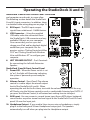
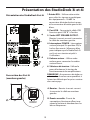
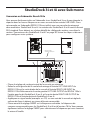
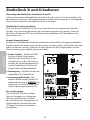
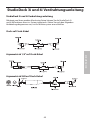
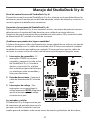
StudioDock 3i and 4i Rear Panel Layout
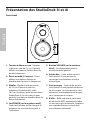
StudioDock 3i and 4i Layout
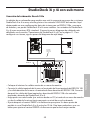
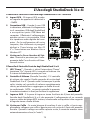
1.RCA INPUT – Used to connect signals
from unbalanced, –10dBV devices.
The Red connector is the for Right
input and the White is for the Left
input.
2. USB connector – Connect the
supplied USB cable to this rear panel
USB "B" connector.
3. L
EFT SPEAKER OUTPUT – Push
Terminals for connecting the Leftside Extension Speaker.
4. P
OWER SWITCH – Main power
switch. When set to the ON position,
the front panel blue LED illuminates
indicating the StudioDock 3i and 4i is
powered up and ready for operation.
5. AC
INLET - Connect the supplied IEC
power cable here.
6. VOLTAGE SELECTION SWITCH - This
switch is used to select the amplifiers
operating voltage.
NOTE: If you are changing the position
of this switch, be sure it is set to the
correct voltage for your country.
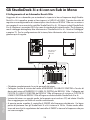
3i and 4i Rear Panel Layout (left
speaker)
A
B
A.TERMINAL CUP – Push Terminals for
connecting the Left-side Extension
Speaker to the Active (Right-side)
speaker.
B.TUNED PORT - Quiet port design
offering linear extended low
frequency response.
B