1
Speaker Amplifier
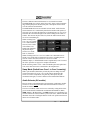
The "SPR" in the push-button section stands for speaker. This switch will
place all selected audio on the cockpit speaker when this switch is activated. The speaker amplifier will present the audio sources selected by the
pilot, in “Split Mode." Unswitched audio, (autopilot disconnect, altimeter
warning, etc.) will come through the speaker regardless of the speaker button position.
Public Address Function
To access PA function, an external switch must be installed, and activated.
This places the pilot microphone on the speaker output when the PTT is
pushed. The copilot can continue to use the selected com radio.
We recommend that the switch transfer the audio from the cockpit speaker
to a cabin speaker for public address. This will prevent feedback.
Split Mode
The split mode can be activated at any time by pressing the desired combination of XMT buttons. For instance, to activate a Com 1/Com 2 split,
press and hold the com 1 button, and then press the Com 2 button while
holding the Com 1 button. This places the pilot on Com 1 and the Copilot
on Com 2.
Split mode for Com 3, in normal (not TEL/Duplex) is possible with pilot on
Com 1, copilot on Com 2 or 3. Pilot on Com 2 or Com 3 and Copilot on
Com 1 is not possible.
Note:
Due to the nature of VHF communications signals, and the size
constraints in general aviation aircraft, it is probable that there
will be some bleed-over in the Split mode, particularly on
adjacent frequencies. PS Engineering makes no warranty about
the suitability of Split Mode in all aircraft conditions.
Note: Split Mode does not turn off other (Nav, ADF, etc.) selected
audio to pilot. However, the copilot will only hear the selected
communications receiver.
Split Mode ICS
In split mode, the pilot and copilot are usually isolated from each other on
the intercom while simultaneously using their respective radios. Depressing
the ICS button in Split Mode will activate VOX intercom between the pilot
and copilot positions. This permits intercommunication when desired between the crew. Pressing the ICS button again disables this crew intercom
function.
202-780-0001
R6
4
PMA7000B Pilot Guide