1
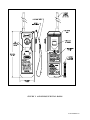
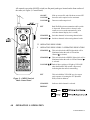
All controls (except the ON/OFF switch) are flat panel push types located on the front surface of
the radio (see Figure 2, Control Panel).
ON/OFF
Slide up to turn ON, and slide down to turn OFF.
VOLUME s
Increases audio output level to maximum.
VOLUME t
Decreases audio output level.
PTT
Push To Talk activates transmitter while switch
is depressed. When switch is released, radio
returns to receive mode automatically. (Also
refreshes channel display for 1 second.)
CHANNEL s
Switches channels in increasing channel order.
CHANNEL t
Switches channels in decreasing channel order.
3.2 OPERATING INDICATORS
.2
OPERATING INDICATORS.2 OPERATING INDICATORS
CHANNEL s
This switch includes a RED light which will be
illuminated when the radio is ON and the
Channel s is selected.
CHANNEL t
This switch includes a GREEN light which will be
illuminated when the radio is ON and Channel t
is selected.
VOLUME s t Both of these switches will light up YELLOW
when the Push To Talk switch is depressed,
indicating that the radio is transmitting.
PTT
This switch blinks YELLOW at a slow rate to
assist operator in locating the PTT (Push To
Talk) switch in darkness.
CHANNEL
Indicates which channel is selected.
Figure 2: GMDSS Survival
Radio Control Panel
DISPLAY
4.0
OPERATION .0 OPERATION
Y1-03-0128 Rev. E