1
2
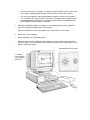
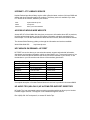
Press [F2] while F2=Setup is displayed at the bottom of the screen. F2=Setup appears
for a short period, during the POST (Power-On-Self-Test).
NOTE
3
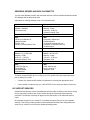
If you fail to press [F2] in time and the start-up
process continues, you will need to restart your PC to
go through the POST again so you can press [F2].
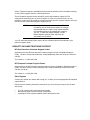
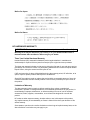
The PC’s Setup program will display.
PhoenixBIOS Setup Copyright 1985-95 Phoenix Technologies Ltd.
Copyright 1995 Hewlett-Packard Rev. GW.O5.xx
Main
Preferences
Configuration
Security
Power
Exit
Item-Specific Help
System Time :
System Date :
[7:24:06]
[05/24/1995]
System Memory :
Extended Memory :
640 Kb
7 Kb
Running Windows 95
[No]
If you are not
running Windows
95, the BIOS setup
program will offer
you some of the
Windows 95 features
and optimize the use
of hardware
resources.
F1
Help
↑
↓
Select Item
F7/F8
Change Value
F9
Setup Defaults
ESC
Exit
←
→
Select Menu
Enter
Select > Sub-Menu
F10
Previous Values
•
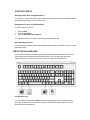
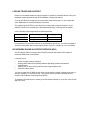
The ↑ or ↓ arrows, [TAB] and [SHIFT] or [TAB] keys can be used to select fields in the
current menu.
•
The [PAGE UP] key moves to the previous page and the [PAGE DOWN] key moves to
the next page in a scrollable menu.
•
The [HOME] key moves to the top item, and the [END] key moves to the bottom item, of
the current menu.
•
Within a field [F7] selects the next lower value and [F8] selects the next higher value.
•
[ENTER] displays a sub-menu for menu items marked with a solid right arrow.